
J-Tech Digital JTECH-MV41AE
J-Tech Digital 4K HDMI MultiviewInstrukcja obsługi przełącznika er (JTECH-MV41AE)
Model: JTECH-MV41AE
Wstęp
This manual provides detailed instructions for the installation, operation, and troubleshooting of your J-Tech Digital 4K HDMI Multiviewer Switch (JTECH-MV41AE). Please read this manual thoroughly before using the product to ensure proper functionality and to maximize your experience.

Image: J-Tech Digital 4K HDMI Multiviewer Switch (JTECH-MV41AE) with remote and a display showing multiple video inputs.
Informacje dotyczące bezpieczeństwa
- Zapewnij odpowiednią wentylację wokół urządzenia.
- Nie wystawiaj urządzenia na działanie wody ani nadmiernej wilgoci.
- Używaj wyłącznie dołączonego zasilacza.
- Unikaj umieszczania ciężkich przedmiotów na urządzeniu.
- Trzymaj urządzenie z dala od źródeł ciepła.
Zawartość opakowania
Sprawdź, czy w przesyłce znajdują się wszystkie elementy:
- 1x J-Tech Digital 4K HDMI Multiviewer Switch (JTECH-MV41AE)
- Pilot zdalnego sterowania 1x IR
- Zasilacz 1x5 V prądu stałego
- 1x Instrukcja obsługi
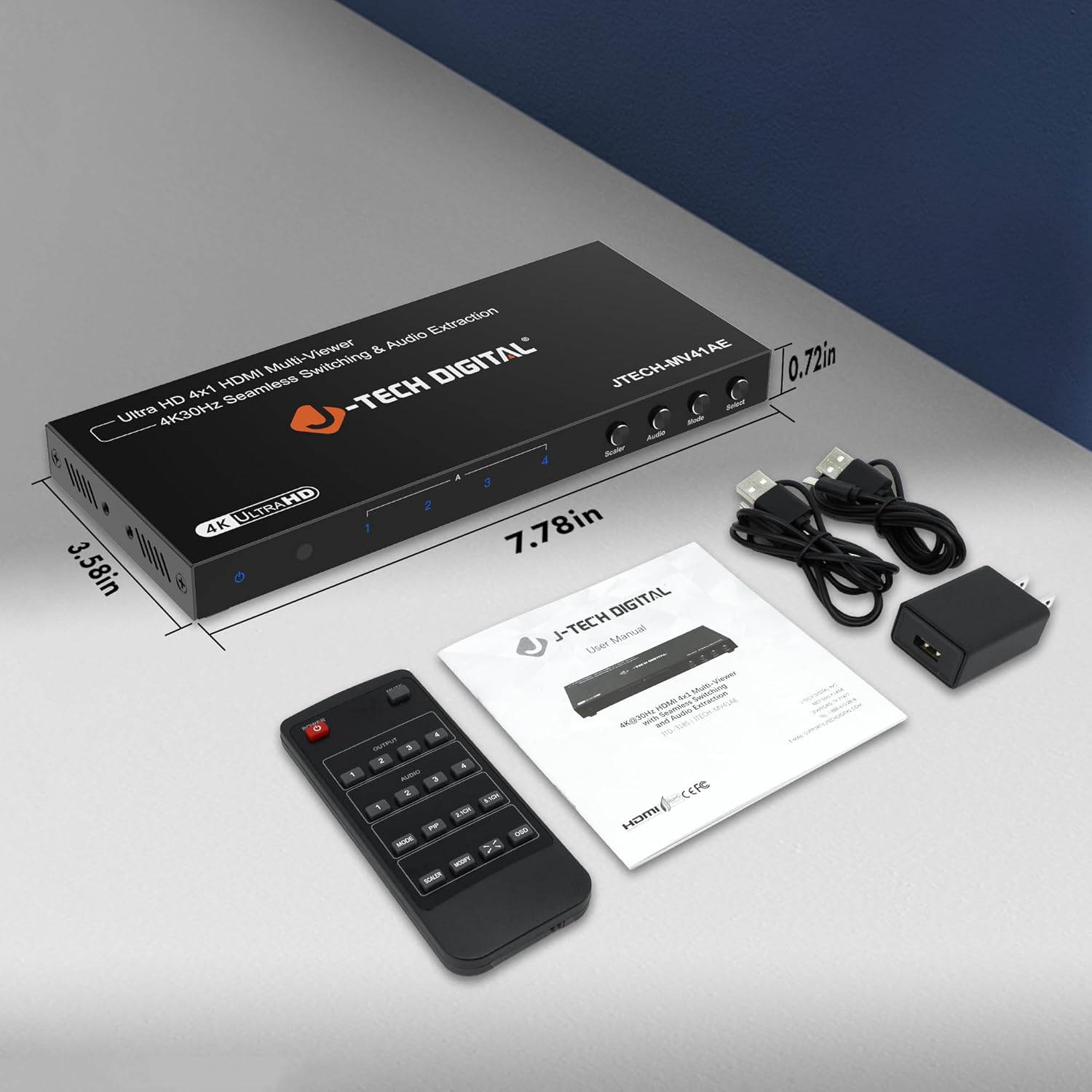
Image: Package contents of the JTECH-MV41AE.
Produkt ponadview
Front and Rear Panel Interface

Image: Detailed diagram of the multiviewer switch's front and rear panels.
Panel przedni:
- Dioda LED zasilania: Wskazuje stan zasilania.
- Odbiornik IR: Do sygnałów zdalnego sterowania.
- HDMI 1-4 Input Indicators: LEDs show active HDMI inputs.
- Input 1-4 Selection Buttons: Select individual HDMI inputs.
- Scaler Button: Adjusts output resolution.
- Przycisk dźwięku: Controls audio output settings.
- Przycisk trybu: Cycles through viewtryby.
- Wybierz przycisk: Confirms selections or activates PiP.
Tylny panel:
- HDMI 1-4 Input: Podłącz urządzenia źródłowe HDMI.
- Wyjście HDMI: Connect to your display (TV, monitor, projector).
- Wyjście audio (stereo): 3.5mm jack for analog audio extraction.
- Audio Output (TOSLINK): Optical port for digital audio extraction.
- Micro USB (RS-232 Control): For advanced control via PC.
- 5V DC: Port wejściowy zasilania.
- Przełącznik włącz / wyłącz: Przełącznik zasilania.
Główne cechy
- Supports up to 4 HDMI sources on a single display.
- Seamless switching between source devices without delay or black screen.
- Supports 4K@30Hz resolution.
- Funkcje 6 różnych viewing modes, including Picture-in-Picture (PiP) with custom location control.
- Audio extraction via Optical (TOSLINK) and 3.5mm stereo outputs.
- Control via remote control, front panel buttons, or RS232.
Konfiguracja i instalacja
Follow these steps to set up your J-Tech Digital 4K HDMI Multiviewer Przełącznik:
- Podłącz źródła HDMI: Connect up to four HDMI source devices (e.g., PC, game console, Blu-ray player, STB) to the HDMI Input 1-4 ports on the rear panel of the multiviewer przełącznik.
- Podłącz wyświetlacz HDMI: Connect an HDMI cable from the HDMI Output port on the multiviewer switch to the HDMI input of your display (TV, monitor, or projector).
- Podłącz wyjście audio (opcjonalnie): If you wish to extract audio to an external sound system, connect an optical cable to the TOSLINK port or a 3.5mm stereo cable to the Stereo port on the rear panel.
- Podłącz zasilanie: Plug the provided 5V DC power adapter into the DC 5V port on the rear panel, then plug the adapter into a power outlet.
- Włączanie: Flip the ON/OFF switch on the rear panel to the 'ON' position. The Power LED on the front panel should illuminate.

Image: Connection diagram for the JTECH-MV41AE.
Działanie
Włączanie/wyłączanie
Use the ON/OFF switch on the rear panel to power the device. The front panel Power LED indicates the power status.
Wybór wejścia
You can select the desired HDMI input using the front panel buttons (Input 1-4) or the corresponding number buttons on the IR remote control.
ViewTryby pracy
Multiviewer switch offers 6 different viewing modes. Press the Tryb button on the front panel or remote to cycle through these modes:
- Single Display Mode
- Dual Side Mode (Side by Side)
- Dual Side Mode (Up and Down)
- 4 Equal Display Mode
- 1 Big, 3 Small Display Mode
- Picture-in-Picture (PiP) Mode (1 Big, 1 Small)

Image: Six display modes supported by the JTECH-MV41AE.
Picture-in-Picture (PiP) Function
In PiP mode, you can customize the location of the small window. Press the Pypeć button on the remote control to adjust its position on the screen.
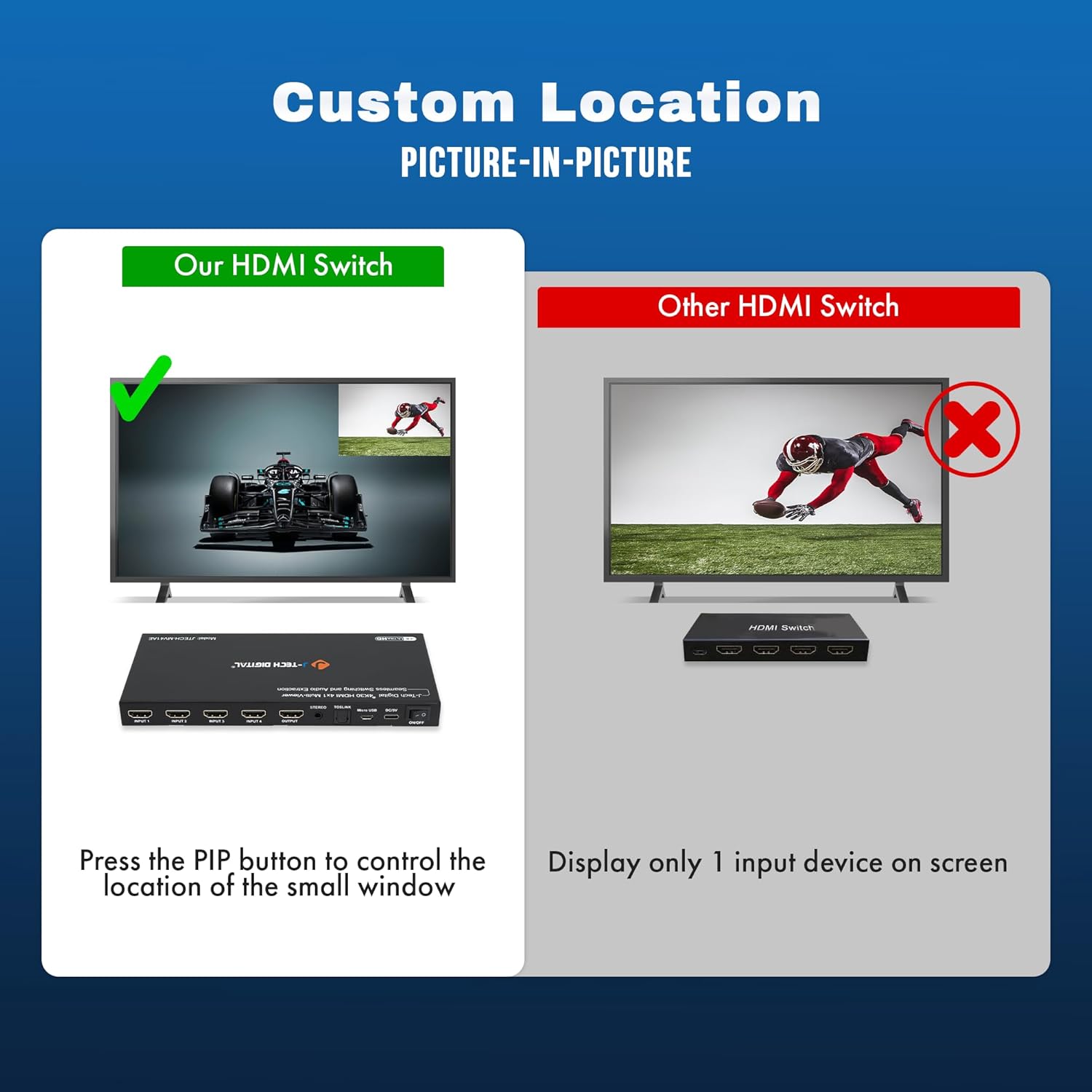
Image: Custom Picture-in-Picture location control feature.
Bezproblemowe przełączanie
The device features seamless switching, meaning there is no black screen or delay when transitioning between different source devices. This ensures a smooth viewzdobywania doświadczenia.

Image: Seamless switching functionality.
Ekstrakcja dźwięku
Audio from any of the incoming HDMI signals can be extracted to an external sound system using the Optical (TOSLINK) or 3.5mm analog audio outputs on the rear panel.
Sterowanie RS232
For advanced control and integration into professional setups, the device can be controlled via RS232 using the Micro USB port and appropriate software.
Konserwacja
To ensure the longevity and optimal performance of your J-Tech Digital 4K HDMI Multiviewer Switch, follow these maintenance guidelines:
- Czyszczenie: Do czyszczenia zewnętrznej części urządzenia należy używać miękkiej, suchej ściereczki. Unikaj stosowania silnych środków chemicznych i ściernych środków czyszczących.
- Wentylacja: Aby zapobiec przegrzaniu, upewnij się, że otwory wentylacyjne nie są zablokowane.
- Składowanie: Jeśli urządzenie nie będzie używane przez dłuższy czas, należy je przechowywać w chłodnym i suchym miejscu, z dala od bezpośredniego światła słonecznego i ekstremalnych temperatur.
- Zarządzanie kablami: Keep cables neatly organized and avoid sharp bends or excessive tension to prevent damage.
Rozwiązywanie problemów
If you encounter issues with your multiviewer switch, refer to the following common problems and solutions:
| Problem | Możliwa przyczyna | Rozwiązanie |
|---|---|---|
| No video output or flickering screen. | Loose cable connections, incompatible resolution, power issue. | Check all HDMI and power cable connections. Ensure they are secure. Try a different HDMI cable. Verify that your display supports the output resolution (4K@30Hz). Cycle power to the device and display. |
| Brak wyjścia audio. | Incorrect audio settings, loose audio cable, incompatible audio format. | Check audio cable connections (Optical/3.5mm). Ensure your external sound system is correctly configured. Press the 'Audio' button on the device or remote to adjust audio settings. |
| Pilot nie działa. | Dead batteries, obstructed IR path. | Replace batteries in the remote. Ensure there are no obstructions between the remote and the device's IR receiver. |
| Device defaults to 2K resolution on startup. | Default setting behavior. | Press the 'Scaler' button multiple times to cycle to the desired 4K resolution. This setting may need to be reapplied after each power cycle. |
| Cannot switch between inputs. | No signal from source, faulty button/remote. | Ensure all source devices are powered on and sending a signal. Try using both the front panel buttons and the remote control. |
Specyfikacje
- Model: JTECH-MV41AE
- Wymiary produktu: 3.58 x 7.78 x 0.72 cala
- Waga przedmiotu: 1.4 funta
- Kolor: Czarny
- Typ złącza: HDMI
- Typ kabla: HDMI
- Porty wejściowe: 4x HDMI
- Porty wyjściowe: 1x HDMI, 1x Optical (TOSLINK), 1x 3.5mm Stereo
- Wsparcie rozdzielczości: Do 4K@30Hz
- Metody kontroli: IR Remote, Front Panel Buttons, RS232
- Zgodne urządzenia: Blu-Ray Player, Gaming Console, Laptop, Projector, Television

Image: Wide compatibility of the JTECH-MV41AE.
Gwarancja i wsparcie
All J-Tech Digital products include a one-year manufacturer replacement warranty. Additionally, J-Tech Digital provides free lifetime technical support from their customer support team located in Stafford, TX.
Godziny pracy pomocy technicznej: Monday – Friday, 9 AM – 6 PM CST.
Contact information is available on the J-Tech Digital seller page or official webstrona.
Powiązane dokumenty - JTECH-MV41AE
 |
Instrukcja obsługi przełącznika J-Tech Digital 8K HDMI 2x1 (JTD-1226, JTECH-EKSW21AE) Instrukcja obsługi przełącznika HDMI J-Tech Digital ULTRA HD 2x1 obsługującego rozdzielczość 8K/60Hz, HDR10+, Dynamic HDR, z ekstrakcją dźwięku i kontrolą EDID. Zawiera specyfikację, instrukcję podłączenia i wskazówki dotyczące rozwiązywania problemów. |
 |
Instrukcja obsługi przełącznika J-Tech Digital 4x4 Seamless Switch 4K HDMI Matrix i kontrolera ściany wideo Kompleksowa instrukcja obsługi przełącznika J-Tech Digital 4x4 Seamless Switch, matrycy 4K HDMI i kontrolera ściany wideo (model: JTECH-VWM04). Dowiedz się więcej o jego funkcjach, specyfikacji, obsłudze, połączeniu i sterowaniu IP. |
 |
J-Tech Digital JTECH-4K88-EX 8x8 HDBaseT HDMI Matrix Switcher User Manual Comprehensive user manual for the J-Tech Digital JTECH-4K88-EX 8x8 HDBaseT HDMI Matrix Switcher, covering features, panel descriptions, system connection, control methods (IR, RS232, TCP/IP), troubleshooting, and specifications. |
 |
Instrukcja obsługi procesora ściany wideo J-TECH DIGITAL ULTRA HD HDMI 3x3 Kompleksowa instrukcja obsługi procesora ściany wideo J-TECH DIGITAL ULTRA HD HDMI 3x3 (JTD-3260, JTECH-VW0109-AE) z wejściem 4K30, wyjściem 1080 i ekstrakcją dźwięku. Funkcje, specyfikacje, konfiguracja, rozwiązywanie problemów i informacje o gwarancji. |
 |
Instrukcja obsługi przełącznika J-TECH DIGITAL 8K HDMI 2x1 | JTD-2936 Instrukcja obsługi przełącznika 8K HDMI 2x1 J-TECH DIGITAL JTD-2936 (JTECH-8KSW21P). Dowiedz się więcej o jego funkcjach, specyfikacji i rozwiązywaniu problemów, aby płynnie przełączać wideo 8K@60Hz i 4K@120Hz. |
 |
Instrukcja obsługi przedłużacza HDMI J-TECH DIGITAL JTECH-4K60-UNT/UNR ProAV Instrukcja obsługi przedłużacza HDMI J-TECH DIGITAL JTECH-4K60-UNT/UNR ProAV Many-to-Many 4K@60Hz z IR. Obejmuje funkcje, specyfikacje, instalację i rozwiązywanie problemów. |
Ask a question about this manual
Ask about setup, troubleshooting, compatibility, parts, safety, or missing instructions. Manuals+ will review the question and use this page’s manual context to help answer it.