
1. Wprowadzenie
Welcome to the UMIDIGI G100A user manual. This guide provides comprehensive instructions on how to set up, operate, and maintain your new smartphone. The UMIDIGI G100A is designed to offer a smooth and efficient user experience with its Android 14 operating system, powerful UNISOC T615 processor, and a large 6.9-inch 120Hz HD+ display. Please read this manual carefully to ensure proper use and to maximize the device's potential.

Rysunek 1.1: Przód i tył view of the UMIDIGI G100A smartphone.
2. Co znajduje się w pudełku
Upon unboxing your UMIDIGI G100A, please verify that all the following items are included:
- 1x UMIDIGI G100A Smartphone
- 1x Pre-applied Screen Protector Film
- 1x Etui na telefon
- 1x Wyrzutnik tacki SIM
- 1x Type-C to Type-C USB Cable
- 1x Zasilacz
- Przewodnik szybkiego startu 1x

Figure 2.1: All items included in the UMIDIGI G100A product package.
3. Konfiguracja
3.1. Instalacja karty SIM i karty TF
The UMIDIGI G100A supports dual SIM cards and a TF (microSD) card for expandable storage. To install:
- Znajdź tackę na kartę SIM znajdującą się z boku telefonu.
- Włóż narzędzie do wyjmowania tacki karty SIM w mały otwór obok tacki i delikatnie naciśnij, aż tacka wyskoczy.
- Place your Nano-SIM cards and/or TF card into the designated slots on the tray, ensuring the gold contacts face downwards.
- Carefully reinsert the tray into the phone until it is flush with the device's side.
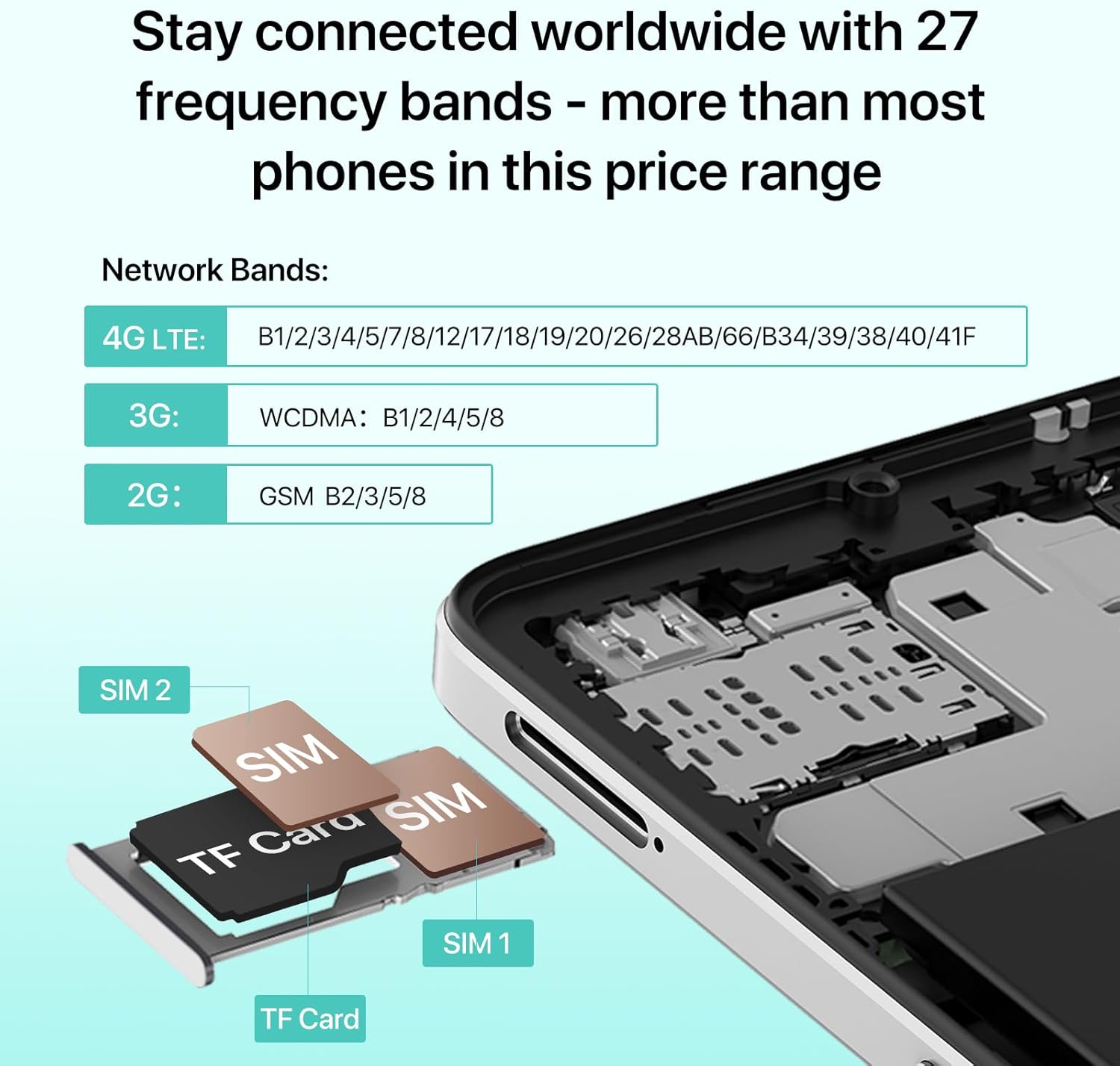
Figure 3.1: Proper placement of SIM cards and TF card in the tray.
3.2. Pierwsze włączenie i ładowanie
Before first use, it is recommended to fully charge your UMIDIGI G100A. Connect the provided USB cable to the phone's Type-C port and the power adapter, then plug it into a wall outlet. The phone supports 20W fast charging. Press and hold the power button (usually on the side) until the UMIDIGI logo appears to power on the device.

Figure 3.2: The UMIDIGI G100A features a 6000mAh battery and supports OTG for charging other devices.
3.3. Expanding RAM (Virtual Memory)
The UMIDIGI G100A allows you to expand its RAM virtually, utilizing a portion of the internal storage. This can enhance multitasking performance.
- Go to the phone's Ustawienia.
- Znajdź i stuknij w Rozszerzenie pamięci.
- Trzask Set RAM extend Size.
- Select the desired RAM option to expand (e.g., 4GB + 4GB).
- Confirm the selection and reboot your phone for the changes to take effect.

Figure 3.3: Instructions for setting up virtual RAM expansion.
4. Instrukcja obsługi
4.1. Funkcje wyświetlacza
The UMIDIGI G100A boasts a 6.9-inch HD+ display with a 120Hz refresh rate, providing a smooth visual experience, especially during scrolling and gaming. The resolution is 1640x720 pixels, offering clear and vibrant visuals for everyday use.

Figure 4.1: The 6.9-inch HD+ display offers immersive visuals.
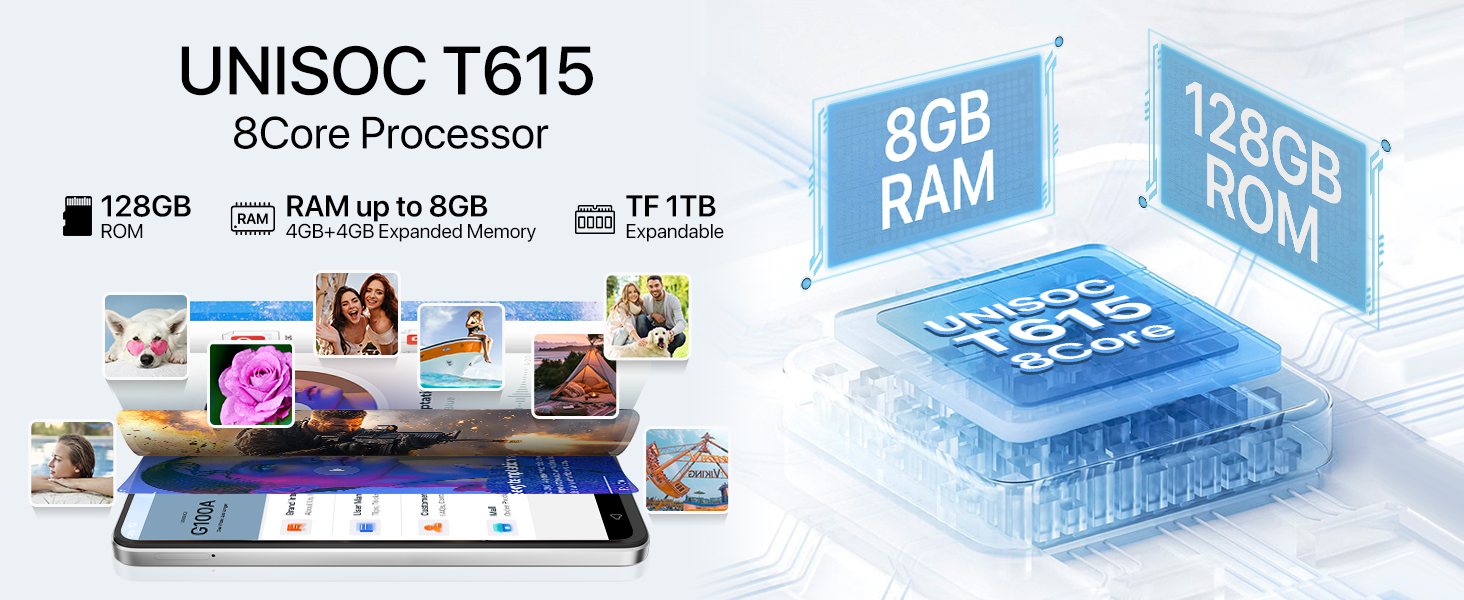
Figure 4.2: The 120Hz refresh rate significantly reduces motion blur for a smoother experience.
4.2. Processor Performance
Equipped with the UNISOC T615 8-core processor, the UMIDIGI G100A delivers efficient performance for daily tasks, gaming, and multimedia. This 12nm process chip ensures low power consumption and extended battery life.

Figure 4.3: The UNISOC T615 processor powers the UMIDIGI G100A.
4.3. Korzystanie z aparatu
The UMIDIGI G100A features a versatile camera system to capture your moments:
- 13 MP tylny aparat: For clear and detailed photos.
- Aparat głębi 2 MP: Enhances portrait mode for professional-looking bokeh effects.
- Przedni aparat 8 MP: Do wysokiej jakości selfie i połączeń wideo.
Explore various modes:
- Tryb profesjonalny: Manual settings for advanced photography, especially in low-light conditions.
- Tryb przechwytywania: Intelligent motion tracking to keep subjects in focus.
- Tryb portretowy: Perfect for travel selfies and group shots with artistic blur.
- Tryb nocny: Optimized for clearer shots in dark environments.

Figure 4.4: Camera specifications and available shooting modes.
4.4. Łączność
The UMIDIGI G100A offers robust connectivity options:
- 4G Dual SIM: Supports a wide range of 4G LTE bands (B1/2/3/4/5/7/8/17/18/19/20/26/28AB/66/38/40/41) for global compatibility.
- Bluetooth 5.2: Improved efficiency over Bluetooth 5.0 with LE Audio and lower latency for seamless wireless connections.
- Wi-Fi: Obsługuje łączność Wi-Fi w celu uzyskania dostępu do Internetu.
- Radio FM: Stay informed and entertained even offline with the built-in FM radio.
- Gniazdo audio 3.5 mm: For traditional wired headphones, ensuring stable and uninterrupted audio.

Figure 4.5: Bluetooth 5.2 enables efficient data transfer.

Figure 4.6: The phone includes FM Radio and a 3.5mm audio jack.
4.5. Funkcje Androida 14
The UMIDIGI G100A runs on Android 14, offering enhanced privacy, performance, and accessibility features. Enjoy improved photo quality, AI-generated wallpapers, new themes, and robust data privacy controls.

Figure 4.7: Android 14 provides a more personal, secure, and accessible experience.
4.6. Accessibility Features (Auto-generated Subtitles)
The UMIDIGI G100A supports auto-generated subtitles for various spoken content, enhancing accessibility. To enable this feature:
- Kliknij Ustawienia aplikacja.
- Przejdź do Dostępność.
- Trzask Preferencje napisów.
- Otwarte Show captions Aby aktywować.

Figure 4.8: Enabling auto-generated subtitles for improved accessibility.
4.7. Kontrola rodzicielska
Manage your child's account, set time limits, content filters, and app permissions for a safe online experience using Parental Controls. To set up:
- Otwórz swój telefon Ustawienia.
- Kliknij na Cyfrowe dobre samopoczucie i kontrola rodzicielska.
- Wprowadź Skonfiguruj kontrolę rodzicielską sekcja.
- Pobierz Łącze rodzinne Google app and select the account to manage.

Figure 4.9: Setting up parental controls for a safer user experience.
5. Konserwacja
To ensure the longevity and optimal performance of your UMIDIGI G100A, follow these maintenance guidelines:
- Czyszczenie: Do czyszczenia ekranu i obudowy telefonu używaj miękkiej, niepozostawiającej włókien ściereczki. Unikaj stosowania silnych środków chemicznych i materiałów ściernych.
- Temperatura: Nie wystawiaj telefonu na działanie ekstremalnych temperatur (wysokiej lub niskiej) ani bezpośredniego światła słonecznego przez dłuższy czas.
- Narażenie na działanie wody: The UMIDIGI G100A is not waterproof. Avoid contact with water or other liquids.
- Składowanie: Jeśli telefon nie będzie używany przez dłuższy czas, należy przechowywać go w chłodnym i suchym miejscu.
- Aktualizacje oprogramowania: Regularnie sprawdzaj dostępność aktualizacji systemu i instaluj je, aby mieć pewność, że w telefonie znajdują się najnowsze funkcje i poprawki zabezpieczeń.
6. Rozwiązywanie Problemów
Oto rozwiązania typowych problemów, z którymi możesz się spotkać:
- Telefon się nie włącza: Upewnij się, że bateria jest naładowana. Podłącz telefon do ładowarki i odczekaj kilka minut przed ponownym włączeniem.
- Słaby sygnał sieciowy lub brak usługi: Check if your SIM card is properly inserted. Verify that your carrier's network bands are compatible with the UMIDIGI G100A's supported bands (2G: B2/3/5/8, 3G: B1/2/4/5/8, 4G: B1/2/3/4/5/7/8/17/18/19/20/26/28AB/66/38/40/41). Try restarting the phone or toggling airplane mode on and off.
- Aplikacje ulegają awarii lub zawieszają się: Close background apps. Clear the cache of the problematic app in Settings > Apps. If the issue persists, try reinstalling the app.
- Bateria szybko się rozładowuje: Reduce screen brightness, disable unnecessary features like Bluetooth or Wi-Fi when not in use, and close power-intensive background apps.
- Niska wydajność: Zwolnij miejsce w pamięci, usuwając niepotrzebne pliki files or apps. Consider expanding virtual RAM as described in Section 3.3.
7. Specyfikacje
Key technical specifications for the UMIDIGI G100A:
| Funkcja | Specyfikacja |
|---|---|
| Nazwa modelu | G100A |
| System operacyjny | Android 14 |
| Model procesora | UNISOC T615 (8-core) |
| Prędkość procesora | 1.6 GHz (up to 1.8 GHz) |
| Rozmiar wyświetlacza | 6.9 cali |
| Rezolucja | 720x1640 HD+ |
| Częstotliwość odświeżania | 120 Hz |
| Pamięć RAM | 4 GB (możliwość rozszerzenia do 8 GB za pomocą pamięci wirtualnej) |
| Pamięć wewnętrzna | 128 GB (z możliwością rozszerzenia do 1 TB za pomocą karty TF) |
| Kamera tylna | 13MP + 2MP Depth |
| Przednia kamera | 8MP |
| Pojemność baterii | 6000 mAh |
| Ładowanie | Obsługa szybkiego ładowania 20 W |
| Łączność | 4G Dual SIM, Wi-Fi, Bluetooth 5.2, GPS |
| Gniazdo audio | 3.5 mm |
| Wymiary | 6.73 x 3.03 x 0.31 cala |
| Waga | 7 uncji |
8. Gwarancja i wsparcie
UMIDIGI is committed to providing excellent customer service. Your UMIDIGI G100A comes with:
- 30-dniowa gwarancja zwrotu pieniędzy i bezpłatny zwrot: Dla Twojego spokoju ducha.
- 1-letnia ograniczona gwarancja: Obejmuje wady produkcyjne przez okres jednego roku od daty zakupu.
- Wsparcie online 24/7: Access dedicated one-on-one technical support.
For assistance, you can use the UMIDIGI Customer Center App:
- Znajdź Centrum usług APLIKACJA w telefonie.
- Wprowadź Obsługa klienta sekcja.
- Trzask Pytania.
- Fill in the content according to the prompts and confirm.

Figure 8.1: Using the UMIDIGI Customer Center App for quick problem resolution.
For more information, visit the official UMIDIGI webodwiedź witrynę lub skontaktuj się bezpośrednio z działem obsługi klienta.