
1. Wprowadzenie
Welcome to the user manual for your new XIAOMI Poco X7 Pro 5G smartphone. This guide provides essential information on setting up, operating, maintaining, and troubleshooting your device. Please read this manual thoroughly to ensure optimal performance and longevity of your smartphone.
The Poco X7 Pro is a high-performance 5G smartphone featuring the MediaTek Dimensity 8400-Ultra chipset, built with a 4nm process technology and ARM Cortex-A725 CPU architecture. It is designed for speed and efficiency.
2. Zawartość opakowania
Upon unboxing your Poco X7 Pro, please verify that the following items are included:
- Smartfon XIAOMI Poco X7 Pro 5G
- Protective film (pre-applied or in box)
Note: Other accessories such as a power adapter, charging cable, or SIM ejector tool may be sold separately and are not always included in the standard package. Please check the product packaging for a complete list of included items.
3. Urządzenie ponadview
Familiarize yourself with the physical components of your Poco X7 Pro 5G.

Rycina 3.1: Przód view of the Poco X7 Pro 5G smartphone, highlighting its storage capacity.
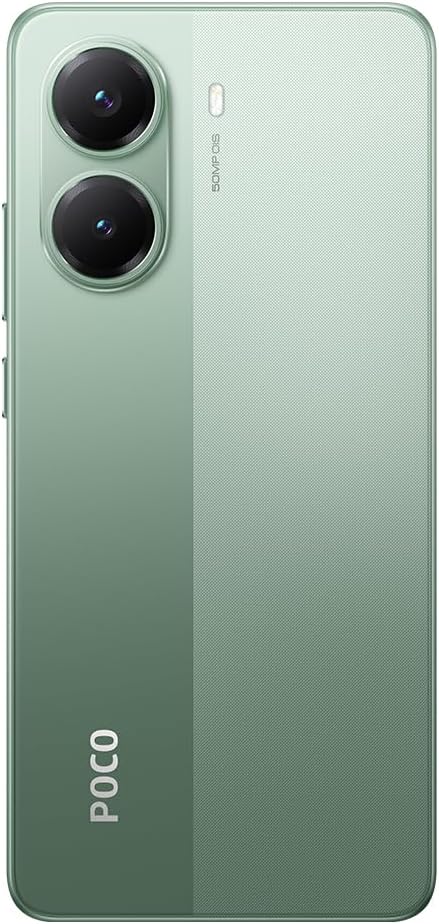
Rysunek 3.2: Tył view of the Poco X7 Pro 5G, showcasing the camera setup and design.
3.1. Komponenty fizyczne
- Wyświetlacz: 6.67-inch AMOLED screen with 2712x1220 resolution and 120Hz refresh rate. Protected by Gorilla Glass 7i.
- Kamera tylna: 50 MP main camera with OIS (Optical Image Stabilization) and f/1.5 aperture, utilizing a Sony IMX882 sensor. Supports 4K video recording at 60fps with dual OIS and EIS stabilization.
- Przednia kamera: (Specific MP not detailed in features, but typically located at the top center of the display).
- Pikolak: Power button and volume rockers typically located on the side.
- Porty: Port USB-C do ładowania i przesyłania danych.
- Tacka na kartę SIM: Slot for inserting SIM cards.
4. Konfiguracja początkowa
4.1. Wkładanie karty SIM
- Znajdź tackę na kartę SIM znajdującą się z boku urządzenia.
- Insert the SIM ejector tool (if available, otherwise a thin pin) into the small hole next to the tray to open it.
- Umieść kartę(y) Nano-SIM w tacce, złotymi stykami skierowanymi w dół.
- Ostrożnie wsuń tackę z powrotem do gniazda, aż będzie równo z urządzeniem.
4.2. Włączanie urządzenia
- Press and hold the Power button (usually on the right side) until the XIAOMI logo appears on the screen.
- Postępuj zgodnie z instrukcjami wyświetlanymi na ekranie, aby dokończyć konfigurację początkową, w tym wybrać język, połączyć się z siecią Wi-Fi i zalogować się na koncie Google.
4.3. Ładowanie akumulatora
Your device comes with a 6,000 mAh battery. For optimal performance, fully charge the device before first use.

Figure 4.1: Illustration of the 6000 mAh battery and 90W HyperCharge capability, allowing a full charge in approximately 42 minutes.
- Connect a compatible USB-C charging cable to the device's charging port.
- Connect the other end of the cable to a compatible power adapter (sold separately) and plug it into a power outlet.
- The device supports 90W fast wired charging, capable of charging from 0% to 100% in approximately 42 minutes.
5. Podstawowa obsługa
5.1. Gesty na ekranie dotykowym
- Uzyskiwać: Wybierz element lub aktywuj funkcję.
- Dotknij i przytrzymaj: Uzyskaj dostęp do menu kontekstowych lub przenieś elementy.
- Trzepnąć: Nawiguj po ekranach i listach.
- Szczypta: Powiększaj lub pomniejszaj obrazy i web stron.
5.2. Funkcje aparatu
Your Poco X7 Pro features an advanced camera system.

Figure 5.1: Detail of the 50 MP main camera with OIS and the 20 MP front camera.
- Kamera tylna: The 50 MP main camera with OIS (Optical Image Stabilization) and f/1.5 aperture uses Sony's IMX882 sensor. It supports 4K video recording at 60fps with dual OIS and EIS stabilization for clear and steady footage.
- Przednia kamera: Capture high-quality selfies and video calls.
- Tryby aparatu: Explore various modes such as Portrait, Night, Pro, and Panorama for diverse photographic experiences.
5.3. Funkcje wyświetlacza
The device's display offers exceptional visual quality.

Figure 5.2: Key display specifications including brightness, refresh rate, and resolution.
- Jasność: Advertised to reach up to 3,200 nits of peak brightness for excellent visibility even in bright conditions.
- Częstotliwość odświeżania: Features a 120Hz refresh rate for smooth scrolling and fluid animations.
- Dotknij Sampstawka lingwistyczna: Offers a 2,560 Hz touch sampling rate for highly responsive touch input.
- Rezolucja: 2712 x 1220 pixels, providing sharp and detailed visuals.
6. Konserwacja
6.1. Czyszczenie urządzenia
- Do delikatnego przecierania ekranu i obudowy telefonu należy używać miękkiej, niepozostawiającej włókien ściereczki.
- Unikaj stosowania silnych środków chemicznych, ściernych środków czyszczących i sprężonego powietrza.
- The Poco X7 Pro has an IP68 dust and water resistance rating, meaning it can withstand immersion in up to 1.5 meters of fresh water for up to 30 minutes. However, it is not recommended for use in water and water damage is not covered under warranty.
6.2. Aktualizacje oprogramowania
Regularly check for and install software updates to ensure your device has the latest features, security patches, and performance improvements. Your device runs on Android 15.
- Idź do Ustawienia > O telefonie > MIUI version (or similar) to check for updates.
- Przed rozpoczęciem aktualizacji upewnij się, że urządzenie jest podłączone do sieci Wi-Fi i ma wystarczająco naładowaną baterię.
7. Rozwiązywanie Problemów
Jeśli masz problemy z urządzeniem, wypróbuj poniższe typowe rozwiązania:
- Urządzenie nie włącza się: Upewnij się, że bateria jest naładowana. Podłącz urządzenie do ładowarki na co najmniej 15 minut, a następnie spróbuj je ponownie włączyć.
- Aplikacje ulegają awarii lub zawieszają się: Close the problematic app and reopen it. If the issue persists, restart your phone. You can also clear the app's cache or reinstall it.
- Słaba łączność sieciowa: Sprawdź, czy karta SIM jest prawidłowo włożona. Spróbuj włączyć i wyłączyć tryb samolotowy. Jeśli problem nadal występuje, skontaktuj się z operatorem sieci.
- Bateria szybko się rozładowuje: Reduce screen brightness, disable unnecessary background apps, and turn off features like Bluetooth or GPS when not in use. Check battery usage in settings to identify power-hungry apps.
- Ekran dotykowy nie reaguje: Restart your device. If the screen remains unresponsive, a factory reset might be necessary (back up your data first).
For more complex issues, refer to the official XIAOMI support webodwiedź witrynę lub skontaktuj się z obsługą klienta.
8. Specyfikacje techniczne
Detailed specifications for the XIAOMI Poco X7 Pro 5G:
| Funkcja | Specyfikacja |
|---|---|
| Marka | XIAOMI |
| Nazwa modelu | POCO X7 PRO |
| System operacyjny | Android 15 |
| Typ procesora | Snapdragon (MediaTek Dimensity 8400-Ultra) |
| Prędkość procesora | 3.25 GHz |
| Rozmiar pamięci RAM | 8 GB |
| Pojemność magazynowa | 256 GB |
| Rozmiar ekranu | 6.67 cali |
| Typ wyświetlacza | AMOLED |
| Rezolucja | 2712x1220 |
| Częstotliwość odświeżania | 120 Hz |
| Pojemność baterii | 6000 mAh (litowo-jonowy) |
| Ładowanie | 90W Fast Wired Charging |
| Kamera tylna | 50 MP with OIS, f/1.5 aperture, Sony IMX882 sensor |
| Rozdzielczość wideo | 4K at 60fps (with dual OIS and EIS stabilization) |
| Łączność | 5G, Bluetooth, NFC, USB, Wi-Fi |
| Odporność na wodę/kurz | IP68 |
| Waga | 400 gramów |
| Rok Model | 2025 |
9. Informacje dotyczące bezpieczeństwa
Aby zapobiec obrażeniom ciała lub uszkodzeniu urządzenia, należy przestrzegać następujących środków ostrożności:
- Nie wystawiaj urządzenia na działanie ekstremalnych temperatur, bezpośredniego światła słonecznego ani otwartego ognia.
- Unikaj upuszczania urządzenia i narażania go na silne uderzenia.
- Używaj wyłącznie zatwierdzonych ładowarek i akcesoriów.
- Nie próbuj samodzielnie demontować ani naprawiać urządzenia. Skontaktuj się z autoryzowanym serwisem.
- Trzymaj urządzenie z dala od urządzeń medycznych, gdyż może to zakłócać ich działanie.
- Urządzenie i baterię należy utylizować zgodnie z lokalnymi przepisami.
10. Gwarancja i wsparcie
Your XIAOMI Poco X7 Pro 5G is covered by a limited warranty. For specific warranty terms and conditions, please refer to the warranty card included with your product or visit the official XIAOMI webstrona.
For technical support, service, or further assistance, please contact XIAOMI customer service or visit their official support channels. You can find contact information on the XIAOMI webstrona.