
Wstęp
This manual provides instructions for setting up and using your ECONTROLLY BN59-01385B Voice Remote Control. This replacement remote is designed to be compatible with various Samsung Smart TV models, offering voice control functionality and direct access buttons for popular streaming services.

Przód view of the ECONTROLLY BN59-01385B Voice Remote Control.
Przewodnik po konfiguracji
1. Instalowanie baterii
Do pilota potrzebne są dwie baterie alkaliczne AAA (nie dołączone).
- Otwórz pokrywę komory baterii z tyłu pilota.
- Włóż dwie baterie AAA, upewniając się, że bieguny dodatni (+) i ujemny (-) są prawidłowo ustawione względem wskaźników wewnątrz komory.
- Dokładnie zamknij pokrywę komory baterii.
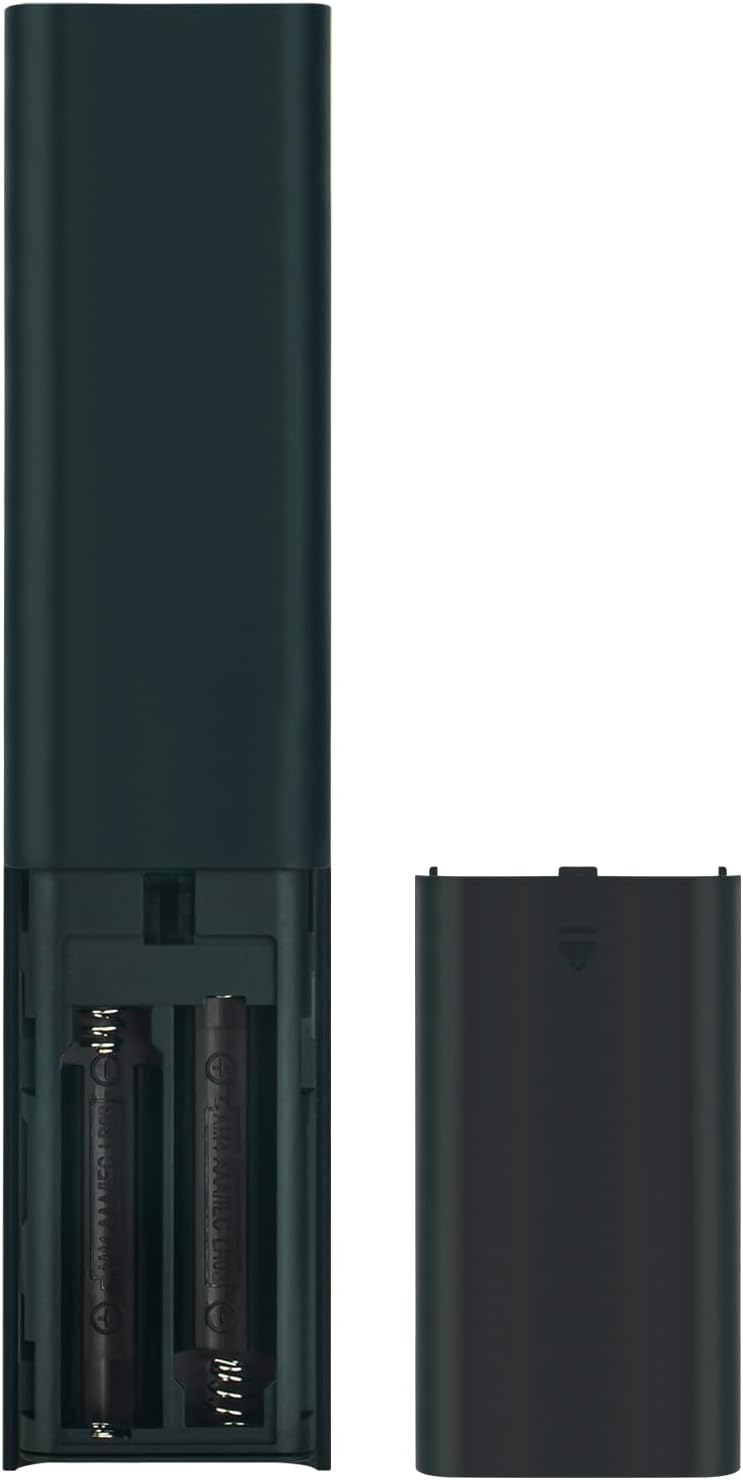
Image showing the battery compartment for AAA batteries.
2. Pairing the Remote Control with Your TV
This remote control uses Bluetooth connectivity and requires pairing with your Samsung TV before use. Follow these steps to pair:
- Sprawdź, czy telewizor Samsung jest włączony.
- Point the remote control towards your TV.
- Jednocześnie naciśnij i przytrzymaj Powrót przycisk (zakrzywiona strzałka) i Odtwórz/Pauza przez 3 sekundy lub dłużej.
- A pairing message should appear on your TV screen, indicating successful pairing.
If pairing is unsuccessful, ensure the batteries are correctly installed and try again. Move closer to the TV if necessary.
Instrukcja obsługi
The ECONTROLLY BN59-01385B remote control provides intuitive navigation and voice command capabilities.
Główne funkcje:
- Przycisk zasilania: Located at the top right, typically marked with a circle and a vertical line. Turns the TV on or off.
- Przycisk sterowania głosowego (
 ): Located near the top, marked with a microphone icon. Press and hold to activate voice commands for searching content, changing settings, or controlling smart home devices.
 - Navigation Pad (Directional Buttons & Enter): The large circular pad in the center. Use to navigate menus and select items.
- Przycisk powrotu: Located below the navigation pad, marked with a curved arrow. Returns to the previous screen or menu.
- Przycisk Home: Located below the navigation pad, marked with a house icon. Accesses the Smart Hub or home screen.
- Przycisk Odtwórz/Pauza: Located below the navigation pad, marked with a play/pause icon. Controls media playback.
- Przyciski zwiększania/zmniejszania głośności (+/-): Adjusts the TV volume.
- Przyciski zmiany kanału w górę/w dół (up/down arrows): Changes TV channels.
- Przyciski szybkiego dostępu: Dedicated buttons for Netflix, Samsung TV Plus, Prime Video, and Disney+ for direct app launch.
The microphone button activates voice control for your Samsung TV.
Konserwacja i pielęgnacja
- Keep the remote control dry. Moisture can damage the internal circuits.
- Avoid exposing the remote to extreme temperatures.
- Czyść pilota miękką, suchą ściereczką. Nie używaj środków czyszczących ani rozpuszczalników o działaniu ściernym.
- Jeżeli pilot nie będzie używany przez dłuższy czas, należy wyjąć baterie, aby zapobiec ich wyciekowi.
- Handle the remote with care to prevent drops or impacts.
Rozwiązywanie problemów
| Problem | Rozwiązanie |
|---|---|
| Pilot nie odpowiada. |
|
| Sterowanie głosowe nie działa. |
|
| Przyciski są lepkie lub nie reagują. |
|
Specyfikacje
- Numer modelu: PT-BN59-01385B
- Marka: KONTROLNIE
- Łączność: Bluetooth
- Rodzaj kontrolera: Sterowanie głosowe
- Cechy szczególne: Voice Search, Quick Access Buttons
- Zgodne urządzenia: Samsung Televisions
- Źródło zasilania: 2 baterie alkaliczne AAA (brak w zestawie)
- Maksymalny zasięg: 10 metrów (33 stóp)
- Tworzywo: ABS
- Kolor: Czarny
- Wymiary (dł. x szer.): Approximately 16.1 cm (6.33 in) x 3.5 cm (1.37 in)
- Waga: Około 2 uncji (56.7 grama)

Wymiary fizyczne pilota.
Kompatybilne modele telewizorów
This remote control is compatible with various Samsung Smart TV models, including but not limited to:
- Seria QN85B: QA55QN85BA, QA65QN85BA, QA75QN85BA, QA85QN85BA, QA65QN85BAW, QA75QN85BAW, QA85QN85BAW, QA55QN85BAWXXY, QA65QN85BAWXXY, QA75QN85BAWXXY
- Q60B Series: QA55Q60BA, QA65Q60BA, QA75Q60BA, QA85Q60BA, QA55Q60BAW, QA65Q60BAW, QA75Q60BAW, QA85Q60BAW, QA55Q60BAWXXY, QA65Q60BAWXXY, QA75Q60BAWXXY, QA85Q60BAWXXY
- Q70B Series: QA55Q70BA, QA65Q70BA, QA75Q70BA, QA85Q70BA, QA55Q70BAW, QA65Q70BAW, QA75Q70BAW, QA85Q70BAW, QA55Q70BAWXXY, QA65Q70BAWXXY, QA75Q70BAWXXY, QA85Q70BAWXXY
- Q80B Series: QA55Q80BA, QA65Q80BA, QA75Q80BA, QA85Q80BA, QA55Q80BAW, QA65Q80BAW, QA75Q80BAW, QA85Q80BAW, QA55Q80BAWXXY, QA65Q80BAWXXY, QA75Q80BAWXXY, QA85Q80BAWXXY
- Seria QN90B: QA43QN90BA, QA50QN90BA, QA55QN90BA, QA65QN90BA, QA75QN90BA, QA85QN90BA, QA43QN90BAW, QA50QN90BAW, QA55QN90BAW, QA65QN90BAW, QA75QN90BAW, QA85QN90BAW, QA43QN90BAWXXY, QA50QN90BAWXXY, QA55QN90BAWXXY
This list is not exhaustive. If your TV model is not listed, please refer to your TV's user manual or contact ECONTROLLY support for compatibility information.

Visual comparison of the replacement remote with an original remote.
Wsparcie i kontakt
For further assistance or inquiries, please refer to the product listing on Amazon or contact ECONTROLLY customer support.