
1. Wprowadzenie
This manual provides essential information for the assembly, operation, maintenance, and troubleshooting of your Hbada E2 Ergonomic Office Chair. Please read these instructions carefully before use to ensure proper function and longevity of your chair.

Figure 1: Hbada E2 Ergonomic Office Chair, side view.
2. Informacje dotyczące bezpieczeństwa
- Zawsze dokładnie postępuj zgodnie z instrukcją montażu.
- Keep the chair away from direct heat sources to prevent material damage.
- Do not exceed the maximum weight capacity of the chair. Refer to specifications for details.
- Przed użyciem należy upewnić się, że wszystkie śruby i połączenia są mocno dokręcone i okresowo sprawdzać, czy nie ma luzów.
- Używaj krzesła na płaskiej i stabilnej powierzchni.
3. Instalacja i montaż
Assembly is required for this product. Detailed step-by-step assembly instructions and all necessary tools are included in the product packaging. Please refer to the separate assembly guide for a complete walkthrough. Ensure all components are present before beginning assembly.

Figure 2: Hbada E2 Ergonomic Office Chair, front view zmontowanego produktu.
4. Instrukcja obsługi (regulacja)
The Hbada E2 chair offers multiple adjustment features to customize your seating experience for optimal comfort and support.
4.1. Regulacja zagłówka
The 3D adjustable headrest can be positioned to support your neck and head effectively.
- Regulacja pionowa: Adjust the headrest up or down by up to 10 cm.
- Forward and Backward Adjustment: Move the headrest forward or backward by up to 3 cm.
- Obrót: Rotate the headrest up to 60 degrees to find your preferred angle.

Figure 3: Headrest adjustment capabilities.
4.2. Regulacja podparcia lędźwiowego
The 6-way adjustable lumbar support provides comprehensive lower back protection.
- Forward and Backward Adjustment: Adjust the lumbar support in 3 levels.
- Regulacja pionowa: Move the lumbar support up or down.
- Left-Right Suspension: The floating structure adapts to your movements.

Figure 4: Lumbar support dynamic adjustment features.
4.3. Regulacja podłokietnika
The 3D armrests can be adjusted to provide optimal elbow support.
- Regulacja wysokości: Adjust armrest height by up to 7.5 cm.
- Forward and Backward Adjustment: Move armrests forward or backward by up to 5 cm.
- Obrót: Rotate armrests 40 degrees left and right.

Figure 5: Armrest adjustment options.
4.4. Recline Function and Locking
The chair features a reclining function with three lockable tilt angles.
- Recline up to 135 degrees.
- Lockable angles for 90° (comfortable office), 115° (leisure and entertainment), and 138° (short nap).

Figure 6: Three-level locking recline positions.
4.5. Wired Control Adjustment
The aluminum alloy wired control allows for easy adjustment without bending down.
- Simply toggle the adjuster for one-touch operation of chair functions.

Figure 7: Wired control for easy adjustments.
5. Konserwacja
Regular maintenance ensures the longevity and optimal performance of your Hbada E2 chair.
- Czyszczenie: For the mesh fabric, gently wipe with a damp cloth and mild soap. Avoid harsh chemicals. For the frame, use a soft, dry cloth.
- Kontrola: Okresowo sprawdzaj dokręcenie wszystkich śrub i nakrętek. W razie potrzeby dokręć je ponownie.
- Kółka: Utrzymuj kółka w czystości, bez włosów i zanieczyszczeń, aby zapewnić płynny ruch.
- Unikaj przeciążania: Do not place excessive weight on the chair or armrests beyond the specified capacity.
6. Rozwiązywanie Problemów
If you encounter any issues with your Hbada E2 chair, please refer to the following common solutions:
- Krzesło skrzypi: Check and tighten all assembly bolts. A small amount of silicone spray on moving parts may help, but avoid contact with mesh or upholstery.
- Chair Not Adjusting: Ensure no obstructions are blocking the adjustment mechanisms. Verify that the wired control is functioning correctly.
- Kółka nie obracają się płynnie: Clean any debris from the caster wheels. Ensure they are properly inserted into the chair base.
- Gas Lift Issues: If the chair does not hold its height, the gas lift may need replacement. Contact customer support for assistance.
For persistent issues or concerns not addressed here, please contact Hbada customer support.
7. Specyfikacje
| Funkcja | Szczegół |
|---|---|
| Marka | hbada |
| Nazwa modelu | E2 |
| Kolor | Biały |
| Wymiary produktu (Gł. x Szer. x Wys.) | 30.51" gł. x 22.24" szer. x 18.11" wys. |
| Tworzywo | Alloy Steel (Frame), Mesh (Back, Seat), Foam (Fill) |
| Styl pleców | Oczko |
| Styl ramienia | Regulowany 3D |
| Liczba pozycji leżących | 3 |
| Zawarte komponenty | Podkładka pod ramię, poduszka |
| Zalecenia dotyczące powierzchni | Twarda podłoga, dywan |
| Producent | hbada |
| Data pierwszej dostępności | 18 grudnia 2024 r. |
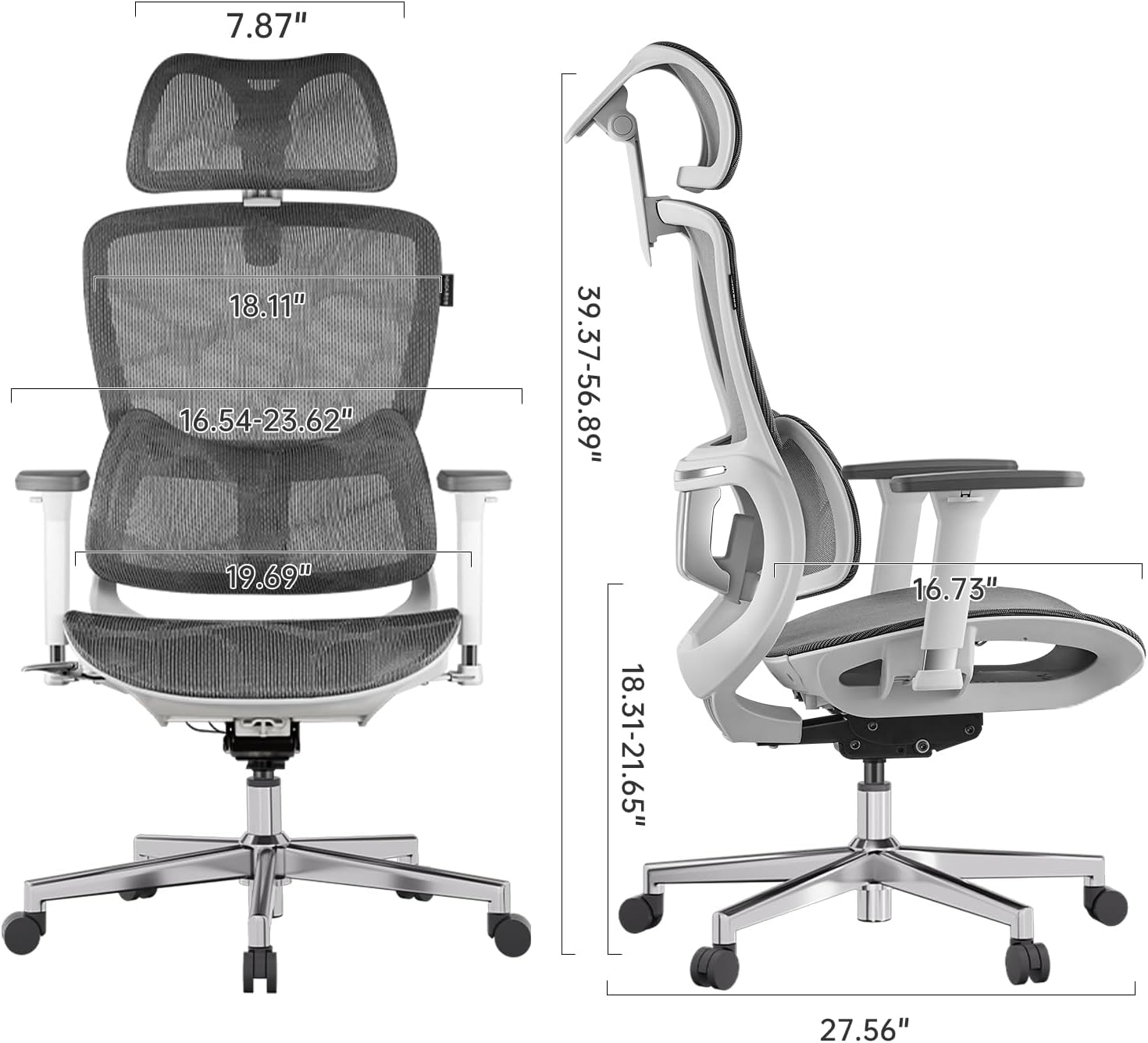
Figure 8: Detailed dimensions of the Hbada E2 Office Chair.
8. Gwarancja i wsparcie
Hbada is committed to providing high-quality products and customer satisfaction.
8.1. Zasady zwrotu
Produkt można zwrócić w ciągu 30 dni od daty zakupu, zgodnie z polityką zwrotów sprzedawcy.
8.2. Plany ochrony
Można dokupić opcjonalne plany ochrony, które rozszerzają zakres ochrony poza standardową gwarancję:
- 2-letni plan ochrony: Jednorazowa płatność w wysokości 44.99 USD.
- 3-letni plan ochrony: Jednorazowa płatność w wysokości 56.99 USD.
- Pełna ochrona: Monthly billing of $16.99, covering eligible past and future purchases.
These plans offer additional coverage and are separate from any manufacturer's warranty.
8.3. Obsługa klienta
For product inquiries, assembly assistance, or warranty claims, please visit the official Hbada store or contact their customer service directly.

Figure 9: Hbada's commitment to customer service.
Odwiedź Sklep Hbada Aby uzyskać więcej informacji.