
HETP HX160Q2
HETP Wireless Power Bank User Manual
Model: HX160Q2
Wstęp
Thank you for choosing the HETP Wireless Power Bank. This 40800mAh portable charger is designed to provide versatile and efficient power for your electronic devices. Featuring 7-in-1 charging capabilities, including built-in cables, multiple output ports, and wireless charging, it ensures your devices remain powered on the go. Please read this manual carefully before use to ensure proper operation and maintenance.

Obraz: Przód view of the HETP Wireless Power Bank, displaying its LCD screen with 100% charge and the wireless charging pad. The side shows the built-in cables.
Cechy produktu
- Duża pojemność: 40800mAh premium Li-polymer battery for multiple device charges.
- Ładowanie 7 w 1: Simultaneously charge up to 7 devices.
- Wbudowane kable: Includes iOS, USB-C, and Micro USB cables for convenience.
- Wiele portów wyjściowych: Two USB-A ports and one USB-C port.
- Ładowanie bezprzewodowe: 15W wireless charging compatible with all wireless-enabled devices.
- Szybkie ładowanie: 25W PD 3.0 and QC 4.0 fast charging technology.
- Wyświetlacz LCD: Clear digital display showing battery percentage.
- Funkcje bezpieczeństwa: Multi-security protection for safe charging.

Image: Diagram illustrating the wide compatibility of the power bank with various electronic devices, including smartphones, tablets, smartwatches, and earbuds.
Zawartość opakowania
- 1 x HETP Wireless Portable Charger Power Bank (40800mAh)
- 1 x Product Instruction Manual (this document)
Środki ostrożności
- Nie wystawiaj powerbanku na działanie ekstremalnych temperatur (wysokiej lub niskiej), bezpośredniego światła słonecznego ani ognia.
- Nie rozbieraj, nie modyfikuj ani nie naprawiaj urządzenia samodzielnie.
- Przechowywać z dala od wody i innych płynów.
- Unikaj upuszczania i narażania power banku na silne uderzenia.
- Przechowywać w chłodnym i suchym miejscu, gdy nie jest używany.
- Przechowywać w miejscu niedostępnym dla dzieci.
Konfiguracja i początkowe użycie
Ładowanie Power Banku
Before first use, fully charge the power bank. The LCD display will show the charging progress and battery percentage.
- Korzystanie z wbudowanego kabla USB-C: Connect the built-in USB-C cable from the power bank to a USB wall adapter (not included).
- Korzystanie z portu wejściowego USB-C: Connect a USB-C cable (not included) from a USB wall adapter to the USB-C input port on the power bank.
The LCD screen will illuminate and display the charging percentage. Once it reaches 100%, the power bank is fully charged.

Image: Illustration demonstrating two methods to recharge the power bank: via its integrated USB-C cable or by connecting an external USB-C cable to the dedicated input port.
Instrukcja obsługi
Urządzenia ładujące
The HETP Wireless Power Bank offers multiple ways to charge your devices simultaneously.
1. Wired Charging (Using Built-in Cables)
- Pull out the appropriate built-in cable (iOS, USB-C, or Micro USB) from its slot.
- Connect the cable to your device's charging port.
- The power bank will automatically begin charging your device. The LCD display will show "OUT" indicating output.
2. Wired Charging (Using Output Ports)
- Use your device's original charging cable or a compatible cable.
- Connect one end of the cable to one of the power bank's output ports (USB-A1, USB-A2, or USB-C).
- Podłącz drugi koniec do urządzenia.
- Ładowanie rozpocznie się automatycznie.
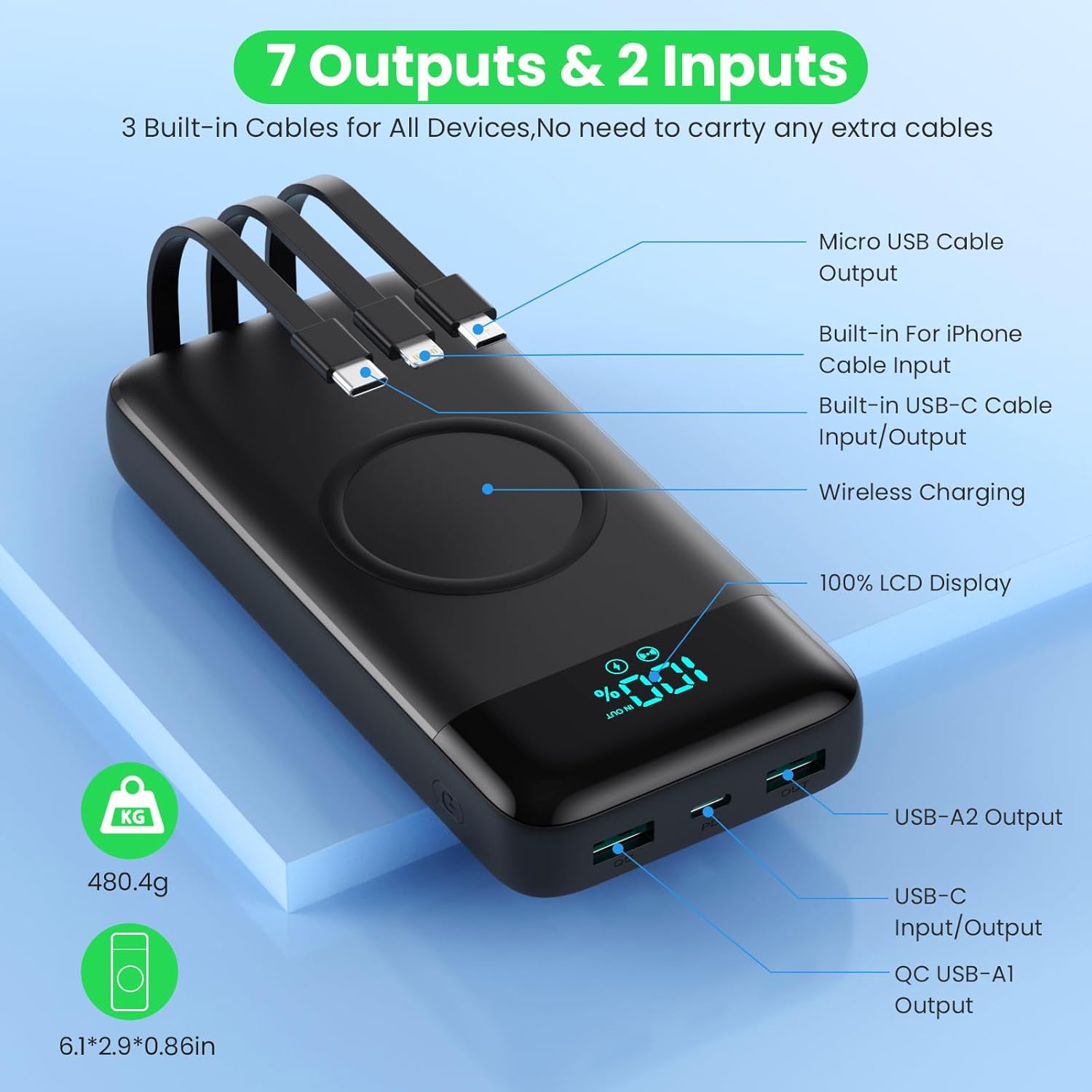
Image: Detailed diagram highlighting all 7 output options (3 built-in cables, 3 USB ports, 1 wireless) and 2 input options (built-in USB-C cable, USB-C port) on the power bank, along with the LCD display.
3. Ładowanie bezprzewodowe
- Upewnij się, że Twoje urządzenie obsługuje ładowanie bezprzewodowe.
- Place your wireless-enabled device directly onto the wireless charging pad located on the top surface of the power bank.
- Align the device centrally on the pad for optimal charging.
- The power bank will automatically detect and begin wireless charging.

Image: A smartphone being wirelessly charged on the power bank, illustrating the fast wireless charging feature and supported wattagt.j.
Jednoczesne ładowanie
The HETP Wireless Power Bank is designed to charge multiple devices concurrently using a combination of its built-in cables, output ports, and wireless charging pad.

Obraz: widok z góry view showing the power bank simultaneously charging a tablet, multiple smartphones, and a smartwatch using its various charging methods.
Konserwacja
- Czyszczenie: Use a soft, dry cloth to clean the surface of the power bank. Do not use abrasive cleaners or solvents.
- Składowanie: If storing for an extended period, charge the power bank to approximately 50-70% capacity. Recharge every 3-6 months to maintain battery health.
- Pielęgnacja kabli: When retracting built-in cables, do so gently to avoid damage.
Rozwiązywanie problemów
| Problem | Możliwa przyczyna | Rozwiązanie |
|---|---|---|
| Powerbank nie ładuje się | Charging cable or adapter faulty; power bank fully discharged; input port issue. | Try a different charging cable and wall adapter. Ensure the power bank is connected correctly. Allow a few minutes for the LCD to activate if fully discharged. |
| Urządzenie nie ładuje się z powerbanku | Power bank low on charge; device cable faulty; device not compatible; incorrect port used; wireless charging misalignment. | Check power bank's charge level. Try a different cable. Ensure device is compatible. For wireless charging, reposition device on the pad. |
| Powolne ładowanie | Kabel nie obsługuje szybkiego ładowania; urządzenie nie obsługuje szybkiego ładowania; wiele urządzeń ładuje się jednocześnie. | Użyj kabla kompatybilnego z szybkim ładowaniem. Upewnij się, że Twoje urządzenie obsługuje szybkie ładowanie. Ładowanie wielu urządzeń może zmniejszyć prędkość ładowania poszczególnych urządzeń. |
| Wyświetlacz LCD nie działa | Power bank wyłączony; problem wewnętrzny. | Press the power button to activate the display. If problem persists, contact customer support. |
Specyfikacje
| Funkcja | Szczegół |
|---|---|
| Numer modelu | HX160Q2 |
| Pojemność baterii | 40800mAh |
| Typ baterii | Litowo-polimerowy |
| Wymiary produktu | Wymiary 10.58 x 6.78 x 1.31 cm |
| Waga przedmiotu | 100 gramów |
| Wejście (USB-C) | Szybkie ładowanie PD 25 W |
| Wyjście (USB-C) | Szybkie ładowanie PD 25 W |
| Wyjście (USB-A) | QC 4.0 Fast Charging |
| Wyjście bezprzewodowe | 15W (5W, 7.5W, 10W, 15W compatible) |
| Wbudowane kable | iOS, USB-C, Micro USB |
| Wyświetlacz | Wyświetlacz cyfrowy LCD |
| Kolor | Czarny |
Gwarancja i wsparcie
Each HETP product is safety certified. If you encounter any problems or have questions regarding your Wireless Power Bank, please do not hesitate to contact our customer support team. We are committed to providing professional after-sales service and satisfactory solutions within 12 hours.
Szczegółowe warunki gwarancji i dane kontaktowe znajdziesz w dokumentacji zakupu.
Ask a question about this manual
Ask about setup, troubleshooting, compatibility, parts, safety, or missing instructions. Manuals+ will review the question and use this page’s manual context to help answer it.