
Lenovo Yoga 7i
Instrukcja obsługi laptopa Lenovo Yoga 7i 2 w 1
Model: Yoga 7i
Wstęp
This manual provides essential information for setting up, operating, maintaining, and troubleshooting your Lenovo Yoga 7i 2-in-1 laptop. The Lenovo Yoga 7i is a versatile and powerful device designed for productivity and entertainment, featuring a 360° foldable touchscreen and advanced Intel Core Ultra processing capabilities.

Image: The Lenovo Yoga 7i 2-in-1 laptop shown with its included accessories, highlighting its touchscreen, backlit keyboard, fingerprint reader, and Thunderbolt 4 USB-C port.
Organizować coś
Co jest w pudełku
- Lenovo Yoga 7i Laptop
- Zasilacz sieciowy
- Bateria (zintegrowana)
- Dokumentacja (niniejszy podręcznik i inne przewodniki)
- USB Hub with Ethernet Port
- 512GB Portable SSD

Image: A visual representation of the included accessories: a Timetec Portable SSD, a YGYTE USB Hub, and a cleaning cloth, alongside the YGYTE accessory suite packaging.
Pierwsze włączenie i konfiguracja
- Naładuj baterię: Connect the AC adapter to the laptop's USB-C port (Thunderbolt 4) and plug it into a power outlet. Allow the battery to charge fully before first use.
- Włączanie: Press the power button, typically located on the side or keyboard deck.
- Instalacja systemu Windows: Follow the on-screen prompts to complete the Windows 11 Pro setup. This includes selecting your region, keyboard layout, connecting to a Wi-Fi network, and creating a user account.
- Microsoft Office Activation: The laptop includes a lifetime license for Microsoft Office. Follow the instructions provided during Windows setup or in the pre-installed Office applications to activate your license.
Korzystanie z laptopa
Understanding the 2-in-1 Design
The Lenovo Yoga 7i features a 360° hinge, allowing it to transform into four distinct modes:
- Tryb laptopa: Tradycyjna konfiguracja laptopa do pisania i pracy biurowej.
- Tryb namiotu: Idealne do oglądania filmów lub prezentacji w ograniczonych przestrzeniach.
- Tryb stojący: Perfect for touch-based interactions, media consumption, or presentations.
- Tryb tabletu: Folded completely back for use as a tablet, leveraging the touchscreen.

Image: The Lenovo Yoga 7i laptop displayed in its four versatile modes: Laptop, Tablet, Tent, and Stand, demonstrating its 360° flip-and-fold design.
Główne cechy i łączność
Your Yoga 7i is equipped with a range of features to enhance your experience:
- Wyświetlacz dotykowy: The 16-inch WUXGA (1920x1200) FHD+ IPS touch display offers crisp visuals and intuitive interaction.
- Podświetlana klawiatura: For comfortable typing in low-light conditions.
- Czytnik linii papilarnych: For secure and quick login.
- Porty:
- 2x Thunderbolt 4 USB-C (Power Delivery, DisplayPort, Charge)
- 2x SuperSpeed 5Gbps USB-A
- HDMI 2.1 (up to 4K/60Hz)
- Czytnik kart SD
- Gniazdo słuchawkowe/mikrofonowe
- Połączenie bezprzewodowe: Killer Wi-Fi 6E for fast internet and Bluetooth 5.3 for connecting peripherals.
- Camera and Audio: FHD 1080p IR camera with Privacy Shutter and Stereo speakers with Dolby Audio.
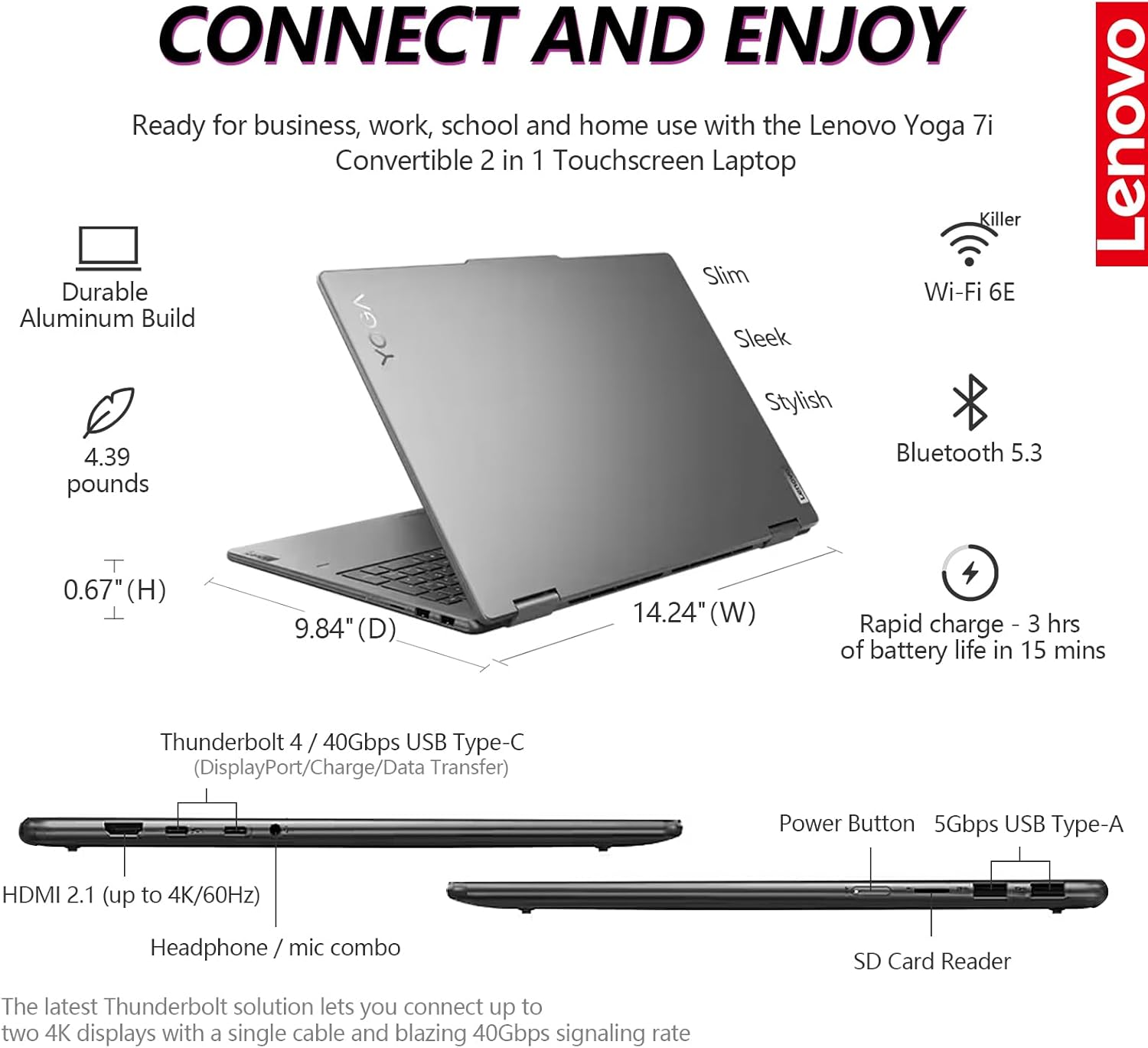
Obraz: szczegółowy view of the Lenovo Yoga 7i's connectivity ports, including Thunderbolt 4 USB-C, USB-A, HDMI 2.1, SD Card Reader, and headphone/mic combo, along with indicators for Wi-Fi 6E and Bluetooth 5.3.

Image: Visuals highlighting the 1080p FHD IR camera with privacy shutter, Dolby Audio stereo speakers, fingerprint reader, backlit keyboard, and buttonless Mylar surface multi-touch touchpad.
Konserwacja
Czyszczenie laptopa
- Ekran: Użyj miękkiej, niepozostawiającej włókien ściereczki przeznaczonej specjalnie do urządzeń elektronicznych. DampDelikatnie przetrzyj wodą lub płynem do czyszczenia ekranów. Unikaj silnych środków chemicznych.
- Klawiatura i obudowa: Użyj miękkiej, suchej ściereczki. W przypadku uporczywych zabrudzeń, delikatnie przetrzyj.ampened cloth with mild soap solution can be used, ensuring no liquid enters openings.
- Porty: Delikatnie usuń kurz z portów za pomocą sprężonego powietrza.
Pielęgnacja baterii
- Unikaj ekstremalnych temperatur.
- For optimal battery longevity, avoid constantly discharging the battery to 0% or keeping it at 100% for extended periods.
- The laptop supports Rapid Charge, providing up to 3 hours of battery life in 15 minutes of charging.
Aktualizacje oprogramowania
Regularnie sprawdzaj dostępność aktualizacji systemu Windows i sterowników Lenovo oraz instaluj je, aby zapewnić sobie optymalną wydajność, bezpieczeństwo i zgodność.
Rozwiązywanie problemów
Typowe problemy i rozwiązania
| Wydanie | Możliwe rozwiązanie |
|---|---|
| Laptop się nie włącza. | Ensure the AC adapter is securely connected and the power outlet is functional. Try a different outlet. If battery is completely drained, allow it to charge for at least 30 minutes before attempting to power on. |
| Problemy z połączeniem Wi-Fi. | Check if Wi-Fi is enabled in Windows settings. Restart your router and modem. Update Wi-Fi drivers from the Lenovo support webstrona. |
| Ekran dotykowy nie reaguje. | Restart the laptop. Check for updated display or touchscreen drivers. Ensure the screen is clean and free of debris. |
| Niska wydajność. | Close unnecessary applications. Check Task Manager for high CPU/RAM usage. Ensure sufficient free space on the SSD. Run a virus scan. Install all pending Windows updates. |
| Akumulator się nie ładuje. | Verify the AC adapter is correctly connected. Check the charging port for damage. Update power management drivers. |
Aby uzyskać bardziej szczegółowe informacje na temat rozwiązywania problemów, zapoznaj się z pomocą techniczną Lenovo webodwiedź witrynę lub skontaktuj się z obsługą klienta.
Specyfikacje
Below are the key technical specifications for the Lenovo Yoga 7i 2-in-1 Laptop:
| Funkcja | Szczegół |
|---|---|
| Nazwa modelu | Joga 7i |
| Edytor | Intel Core Ultra 5 125U (12 cores, 14 threads, up to 4.3GHz) with Intel AI Boost NPU |
| BARAN | 16 GB pamięci LPDDR5x |
| Składowanie | 1 TB PCIe NVMe M.2 SSD + 512GB Portable SSD (Total 1.5 TB) |
| Wyświetlacz | 16 inch WUXGA (1920x1200) FHD+ IPS Touchscreen, micro-edge, TÜV low blue light |
| Grafika | Karta graficzna Intel Iris Xe (zintegrowana) |
| System operacyjny | Windows 11 Pro 64-bit |
| Łączność bezprzewodowa | Killer Wi-Fi 6E, Bluetooth 5.3 |
| Porty | 2x Thunderbolt 4 USB-C, 2x SuperSpeed 5Gbps USB-A, HDMI 2.1, SD Card Reader, Headphone/mic combo |
| Kamera | FHD 1080p IR camera with Privacy Shutter |
| Audio | Stereo speakers with Dolby Audio |
| Żywotność baterii | Do 13 godzin (średnio) |
| Wymiary (dł. x szer. x wys.) | 14.24 x 9.84 x 0.67 cala |
| Waga | 4.39 funta |
| Kolor | Szary sztormowy |

Image: A diagram illustrating the Intel Core Ultra 5 125U processor with its 12 cores, 14 threads, 12MB cache, and 4.30GHz maximum turbo frequency, highlighting its AI capabilities and integration with Copilot.

Obraz: Ponadview of the Lenovo Yoga 7i's speedy productivity, featuring Windows 11 Pro, Intel Core Ultra 5 processor, and Intel Iris Xe Graphics, designed for demanding tasks.

Image: Details of the 16-inch FHD+ IPS display with 1920x1200 WUXGA resolution, micro-edge design, IPS technology, TÜV low blue light certification, and touch functionality.

Image: Information on the Lenovo Yoga 7i's memory and storage, including 16GB LPDDR5x RAM, 1.5TB total SSD storage (1TB PCIe NVMe M.2 SSD + 512GB Portable SSD), and the inclusion of Lifetime Microsoft Office.
Gwarancja i wsparcie
Your Lenovo Yoga 7i laptop comes with a standard manufacturer's warranty. For specific warranty terms and conditions, please refer to the warranty card included in your product packaging or visit the official Lenovo support webstrona.
Kontakt z pomocą techniczną
For technical assistance, driver downloads, or service requests, please visit the Lenovo Support webstrona: support.lenovo.com.
Kontaktując się z pomocą techniczną, prosimy o przygotowanie numeru seryjnego laptopa. Numer seryjny zazwyczaj znajduje się na naklejce na spodzie laptopa lub można go znaleźć w informacjach o systemie Windows.