
Ollny NYD050A
Ollny 110FT Solar String Lights (Model NYD050A) Instruction Manual
Kompleksowy przewodnik dotyczący konfiguracji, obsługi i konserwacji.
1. Wprowadzenie
Thank you for choosing the Ollny 110FT Solar String Lights. This manual provides detailed instructions for the safe and efficient use of your new lighting system. Please read this manual thoroughly before installation and operation.
Zawartość opakowania:
- 1x 110FT Solar String Lights with 50 G40 LED Bulbs
- 2x Spare Shatterproof G40 LED Bulbs
- 1x Solar Panel with Ground Stake
- 1x Pilot zdalnego sterowania (w zestawie 2 baterie AAA)
- Mounting Hardware (clips, screws, wall anchors)
- Kabel ładowania USB 1x
- 1x Instrukcja obsługi (ten dokument)
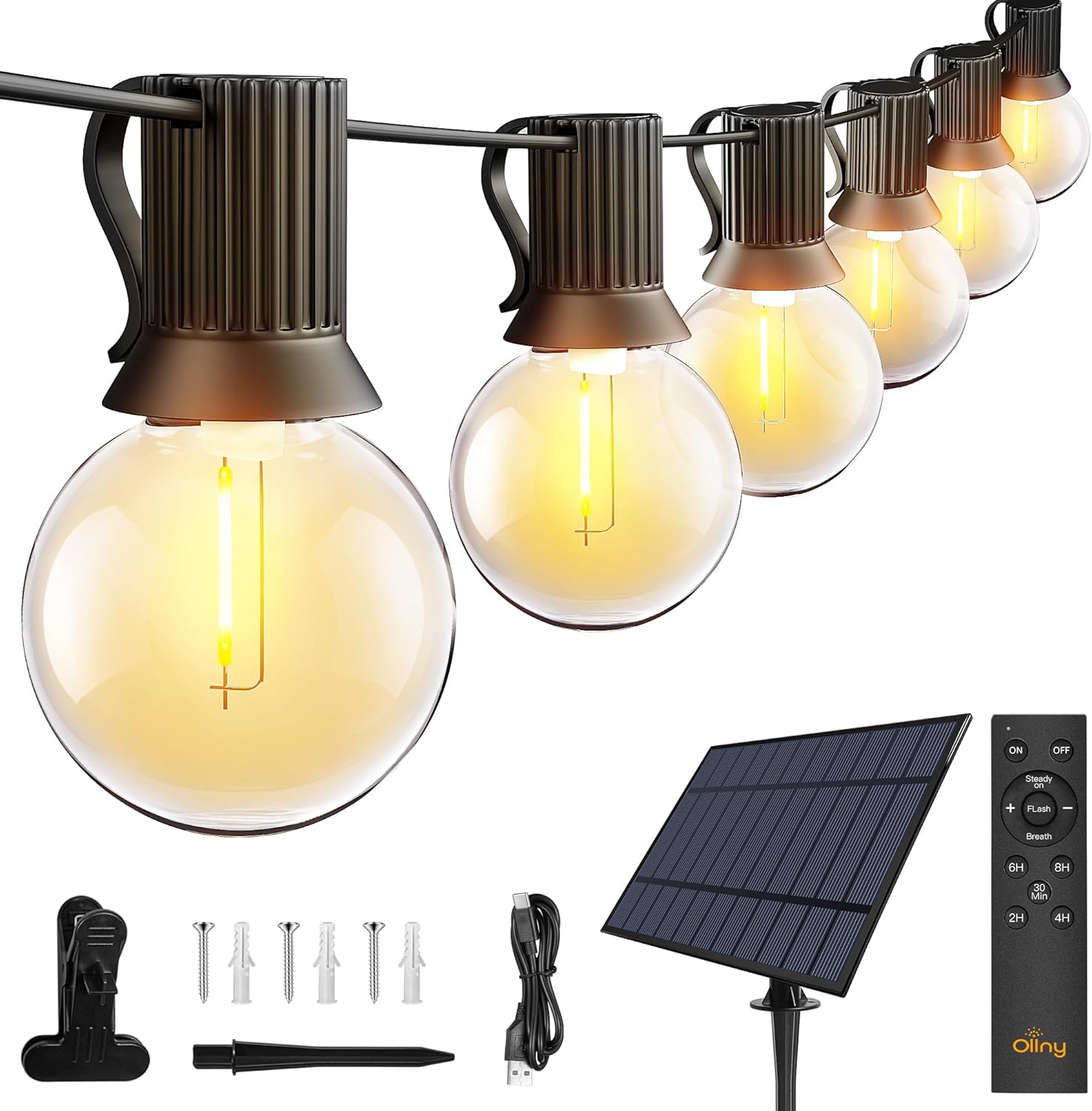
Obraz: Ponadview of the Ollny 110FT Solar String Lights package contents, showing the string lights, solar panel, remote control, and various installation accessories.
2. Informacje dotyczące bezpieczeństwa
- Przed użyciem upewnij się, że wszystkie elementy są bezpiecznie połączone.
- Nie próbuj modyfikować ani naprawiać produktu. Skontaktuj się z obsługą klienta, aby uzyskać pomoc.
- Aby zapewnić optymalną wydajność ładowania, utrzymuj panel słoneczny w czystości.
- Avoid submerging the string lights or solar panel in water, despite their water-resistant rating (IP65 for solar panel, IP45 for bulbs).
- Shatterproof bulbs are designed for durability, but handle with care.
3. Konfiguracja i instalacja
3.1 Umiejscowienie paneli słonecznych
The solar panel is crucial for charging the lights. Choose a location that receives at least 6-8 hours of direct sunlight daily. Avoid shaded areas.

Image: Close-up of the solar panel, highlighting the USB charging port and the 'MODE' and 'ON/OFF' buttons. It also shows the 4000mAh battery capacity and 10 hours of light duration.
3.2 Metody instalacji
The solar panel offers multiple installation options:
- Stawka naziemna: Attach the stake to the solar panel and insert it firmly into the ground.
- Mocowanie ścienne: Use the provided screws and anchors to secure the panel to a wall or fence.
- Mocowanie klipsowe: Attach the clip to the panel and secure it to a suitable edge or railing.

Image: Depicts three ways to install the solar panel: inserting it into the ground with a stake, nailing it to a wall, or clamping it to a board.
3.3 String Light Placement
Uncoil the string lights carefully. Hang them using the integrated clips on each bulb socket or other suitable fasteners. Ensure the solar panel is connected to the string lights.

Image: A diagram illustrating the total length of the 110FT solar outdoor string lights, the 2-foot spacing between bulbs, and the 11.5-foot lead cable from the solar panel to the first bulb. It also notes that the lights are not connectable.
3.4 Aktywacja początkowa
Before first use, press the ON button located behind the solar panel. Allow the solar panel to charge in direct sunlight for 4-6 hours, or use the USB cable for faster charging (approximately 4 hours).

Image: Illustrates two charging methods for the solar panel: solar power (6 hours charging) and USB charging (4 hours charging).
4. Instrukcja obsługi
4.1 Automatic ON/OFF Function
The solar panel has a built-in light sensor. The lights will automatically turn on at dusk and turn off at dawn, provided the ON button on the solar panel is activated.
Notatka: If you wish to use the lights during daylight hours, ensure the solar panel is covered to simulate darkness.

Image: Demonstrates the light sensor function of the solar panel, with lights automatically turning on at night and off during the day. A note advises covering the solar panel for daytime use.
4.2 Funkcje zdalnego sterowania
The included remote control allows for convenient adjustment of light settings from up to 33 feet away.

Obraz: szczegółowy view of the remote control, illustrating buttons for power (ON/OFF), brightness adjustment (+/-), three lighting modes (Steady ON, Flash, Breath), and timer settings (30 minutes, 2 hours, 4 hours, 6 hours, 8 hours).
- WŁ./WYŁ.: Włącz lub wyłącz światła.
- Ściemnianie: Użyj + I - buttons to adjust brightness from 25% to 100% in Steady ON mode.
- Tryby: Select from three lighting modes:
- Stałe WŁ.: Ciągłe oświetlenie.
- Błysk: Efekt migania.
- Oddech: Gradual dimming and brightening effect.
- Timery: Set the lights to turn off automatically after a specified duration: 30 minutes, 2 hours, 4 hours, 6 hours, or 8 hours.
Video: An official product video demonstrating the Ollny G40 solar outdoor lights in various settings, showcasing their aesthetic appeal and functionality. This video is provided by the seller, Ollny Decor Lights.
5. Konserwacja
- Czyszczenie: Okresowo przecieraj panel słoneczny miękką,amp ściereczką do usuwania kurzu i zanieczyszczeń, zapewniając maksymalną wydajność ładowania.
- Wymiana żarówki: The string lights include 2 spare bulbs. To replace a bulb, gently unscrew the old bulb and screw in a new one. Ensure the power is off before replacing bulbs.
- Składowanie: If storing the lights for an extended period, ensure the solar panel is fully charged. Store in a cool, dry place.

Obraz: szczegółowy view of one of the G40 LED bulbs, showing its clear shatterproof casing and the E12 screw base.
6. Rozwiązywanie Problemów
| Problem | Możliwa przyczyna | Rozwiązanie |
|---|---|---|
| Światła nie włączają się w nocy. |
|
|
| Światła są słabe lub migoczą. |
|
|
| Pilot nie działa. |
|
|
7. Specyfikacje produktu
| Funkcja | Szczegół |
|---|---|
| Numer modelu | NYD050A |
| Długość całkowita | 110 stóp |
| Liczba żarówek | 50 LED + 2 Spare |
| Typ żarówki | G40 Shatterproof LED |
| Podstawa żarówki | E12 |
| Kolor światła | Ciepła biel (2700 kelwinów) |
| Źródło zasilania | Solar Powered (with USB charging option) |
| Bateria panelu słonecznego | 4000mAh |
| Czas ładowania panelu słonecznego | 4-6 godzin (bezpośrednie światło słoneczne) |
| Czas ładowania USB | Około 4 godzin |
| Czas działania | Do 10 godzin (w pełni naładowany) |
| Stopień wodoodporności | Solar Panel: IP65, Bulbs: IP45 |
| Metoda kontroli | Remote Control (RF, 33ft range) |
| Baterie do pilota zdalnego sterowania | 2 AAA (w zestawie) |
| Cechy specjalne | Dimmable (25%-100%), 3 Lighting Modes (Steady, Flash, Breath), Timers (30min/2H/4H/6H/8H), Auto ON/OFF Light Sensor |
| Tworzywo | Plastikowy |
| Waga przedmiotu | 3.85 funta (1.75 kilograma) |
8. Gwarancja i wsparcie
Ollny products are designed for quality and durability. For any questions, concerns, or technical support, please contact Ollny customer service via Amazon. Our support team is available to assist you within 24 hours.
Szczegóły gwarancji znajdziesz w dokumentacji zakupu.
Ask a question about this manual
Ask about setup, troubleshooting, compatibility, parts, safety, or missing instructions. Manuals+ will review the question and use this page’s manual context to help answer it.