
DEVAISE ASJZ032
DEVAISE 48x24 Inch Electric Standing Desk with Drawers (Model ASJZ032) User Manual
Szczegółowe instrukcje dotyczące montażu, obsługi i konserwacji.
Ważne informacje dotyczące bezpieczeństwa
Przed montażem i użyciem należy uważnie przeczytać wszystkie instrukcje. Zachowaj tę instrukcję do wykorzystania w przyszłości.
- Always ensure that the total weight on the desk does not exceed 180 lbs (81.6 kg).
- Be cautious of obstructions when adjusting the desk height to avoid potential damage or injury.
- Utilize the anti-collision feature to prevent collisions with objects or people during height adjustments.
- Podczas pracy urządzenia należy trzymać dzieci i zwierzęta z dala od biurka.
- Przed użyciem upewnij się, że wszystkie śruby i nakrętki są mocno dokręcone. Regularnie sprawdzaj, czy połączenia nie są luźne.
- Nie siadaj i nie stawaj na biurku.
- Odłącz zasilanie przed czyszczeniem lub konserwacją.
Zawartość opakowania
Verify that all components are present before beginning assembly. Refer to the assembly video for visual identification of parts.
Video: "Fast Assembly for DEVAISE Standing Desk with Drawers" - This video provides a visual guide to all included parts and the assembly process.
Pakiet powinien zawierać:
- Desktop (1 piece)
- Nogi (2 sztuki)
- Elementy poprzeczki/ramy
- Motor and control box
- Panel sterowania
- Zasilacz i kable
- Szuflady (2 sztuki)
- Półka do przechowywania
- Headphone hooks (2 pieces)
- Sprzęt montażowy (śruby, śruby, klucz imbusowy)
- Instrukcja obsługi
Instrukcja montażu
Follow these steps carefully for proper assembly. All parts are clearly labeled, and pre-drilled holes are provided for convenience. An Allen wrench is included for assembly.
- Step 1: Attach the Drive Rod to the Motor.
Insert the drive rod (part 4 in video) into the motor (part 5 in video). Ensure it is securely seated.

Obraz: Wybuchowy view of desk components, illustrating the quick installation process with labeled parts.
- Krok 2: Zamontuj nogi biurka.
Attach the foot supports to the bottom of each leg (parts 3 and 10 in video) using the provided screws (A) and Allen wrench (E).
- Step 3: Connect Legs with Crossbar.
Position the legs upright and connect them using the main crossbar (part 1 in video). Secure with screws (B) and Allen wrench (E).
- Step 4: Install Side Brackets.
Attach the side brackets (part 2 in video) to the top of the leg assembly, securing them with screws (B) and Allen wrench (E).
- Step 5: Prepare the Desktop.
Place the desktop (parts 7 and 18 in video) face down on a soft, clean surface. Attach the connecting plates (N) and wooden dowels (H) to join the desktop sections if applicable.
- Step 6: Attach Leg Assembly to Desktop.
Carefully align the assembled leg frame with the pre-drilled holes on the underside of the desktop. Secure the frame to the desktop using screws (C) and Allen wrench (E).
- Step 7: Connect Control Box and Cables.
Mount the control box (G) and connect all motor and control panel cables (F) as shown in the diagram. Ensure all connections are firm.
- Step 8: Assemble the Storage Shelf.
Assemble the storage shelf components (parts 11, 12, 13, 14, 15 in video) using screws (I), wooden dowels (H), and the provided tools (E, K, L).
- Step 9: Attach Storage Shelf to Desktop.
Carefully place the assembled storage shelf onto the desktop, aligning it with the designated holes. Secure it with screws (I) and wooden dowels (H).
- Step 10: Install Drawers and Hooks.
Insert the fabric drawers (part 16 in video) into their compartments. Attach the headphone hooks (part 8 in video) to the sides of the desk.

Image: Fully assembled DEVAISE Electric Standing Desk with two monitors, a laptop, and various office accessories, highlighting its functional design.
Instrukcja obsługi
This section details how to use the electric height adjustment and integrated features of your DEVAISE standing desk.
Elektryczna regulacja wysokości
The desk features a smooth electric height adjustment system, allowing you to switch between sitting and standing positions effortlessly. The height range is from 28.35 inches to 46.45 inches.
- Użyj W górę (▲) I W dół (▼) arrows on the control panel to manually adjust the desk height.
- Na wyświetlaczu LED pojawi się aktualny wzrost w calach.
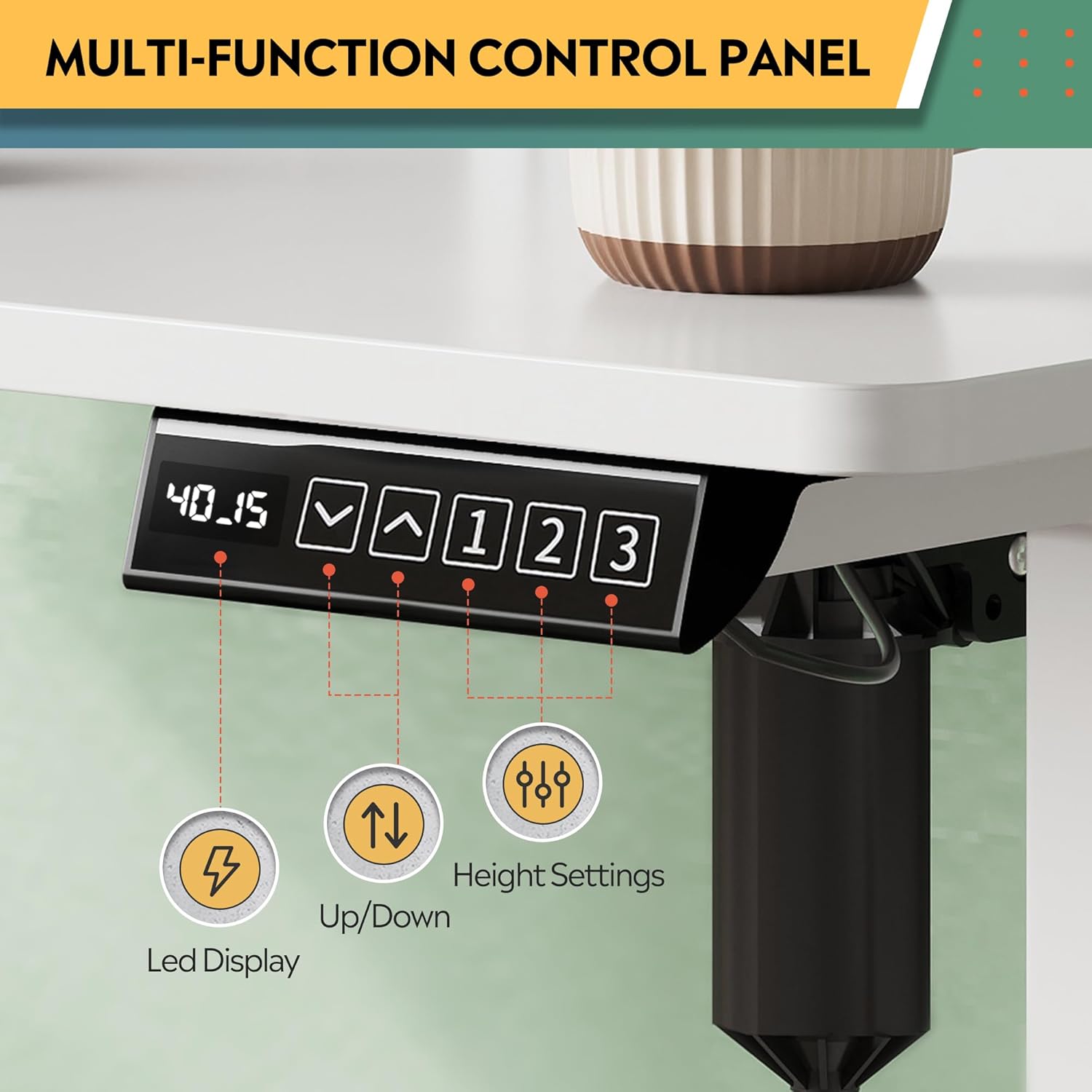
Image: Multi-function control panel showing LED display, up/down arrows, and memory preset buttons.
Ustawienia pamięci
The desk includes three programmable height settings for quick, one-touch adjustments to your preferred sitting or standing heights.
- Dostosuj wysokość biurka do swoich potrzeb, korzystając ze strzałek w górę/w dół.
- Naciśnij "M" button (or similar memory set button, if present) followed by one of the numbered preset buttons (1, 2 lub 3) to save the current height.
- Aby przywołać zapisaną wysokość, wystarczy nacisnąć odpowiadający jej numerowany przycisk ustawienia wstępnego (1, 2 lub 3).
Zintegrowane gniazda zasilania i porty USB
The desk is equipped with 2 AC outlets and 2 USB ports (12A, 110~125V) for convenient power access for your devices.
- Plug your monitors, laptops, and other devices directly into the AC outlets.
- Use the USB ports to charge smartphones, tablets, and other USB-powered accessories.
Video: "DEVAISE Standing Desk with S" - Demonstrates the integrated power outlets, USB ports, and headphone hooks.
Funkcja antykolizyjna
The smart anti-collision feature automatically stops and reverses the desk's movement if an obstruction is detected, protecting both the desk and your belongings.
Video: "DEVAISE Electric Standing Desk for Home Office" - Illustrates the sit-to-stand functionality and the anti-collision system.
Konserwacja
Regular maintenance ensures the longevity and optimal performance of your standing desk.
- Czyszczenie: Przetrzyj powierzchnię biurka miękką,amp szmatką. Unikaj silnych środków chemicznych i ściernych środków czyszczących, które mogą uszkodzić wykończenie.
- Inspekcje: Okresowo sprawdzaj wszystkie śruby i połączenia, aby upewnić się, że są dobrze dokręcone. W razie potrzeby dokręć je ponownie.
- Zarządzanie kablami: Ensure cables are neatly organized and not interfering with the desk's movement. Use the provided cable management features.
- Pielęgnacja silnika: The motor system is designed for maintenance-free operation. Do not attempt to open or service the motor or control box.
Rozwiązywanie problemów
If you encounter any issues with your DEVAISE standing desk, refer to the following common problems and solutions.
| Problem | Możliwa przyczyna | Rozwiązanie |
|---|---|---|
| Biurko się nie porusza. | Power cable disconnected, motor cable loose, control box error. | Check all power and motor connections. Unplug the desk for 10 seconds, then plug it back in to reset. |
| Biurko porusza się nierównomiernie lub wydaje nietypowe dźwięki. | Uneven load, loose screws, obstruction. | Ensure weight is evenly distributed. Check and tighten all assembly screws. Clear any obstructions. |
| Funkcja zapobiegająca kolizjom włącza się zbyt często. | Sensitivity setting too high, minor obstruction. | Check the area for any subtle obstructions. Refer to the control panel manual for adjusting anti-collision sensitivity (if available). |
| Ustawienia pamięci nie działają. | Ustawienia predefiniowane nie zostały zapisane prawidłowo. | Re-program the memory presets following the "Memory Presets" instructions in this manual. |
Jeśli problem będzie się powtarzał, skontaktuj się z obsługą klienta.
Specyfikacje
| Funkcja | Szczegół |
|---|---|
| Marka | ZDEMASKOWAĆ |
| Numer modelu | ASJZ032 |
| Projekt biurka | Biurko stojące |
| Wymiary produktu (Gł. x Szer. x Wys.) | 70.1 cm gł. x 120 cm szer. x 72 cm wys. (27.6" gł. x 47.24" szer. x 28.35" wys.) |
| Kolor | Biały |
| Minimalna wysokość | 28.35 cala (72 cm) |
| Maksymalna wysokość | 46.45 cala (118 cm) |
| Maksymalna nośność | 180 funtów (81.6 kg) |
| Materiał bazowy | Iron, Alloy Steel Frame |
| Najlepszy rodzaj materiału | Drewno inżynieryjne |
| Liczba szuflad | 2 |
| Gniazdka elektryczne | 2 AC Outlets, 2 USB Ports (12A, 110~125V) |
| Cechy specjalne | Adjustable Height, Electric, Headphone Hooks, Storage Shelf |
| Wymagany montaż | Tak |
Gwarancja i wsparcie
Your DEVAISE Electric Standing Desk comes with a limited warranty. For specific details regarding the warranty period and coverage, please refer to the warranty card included in your package or contact DEVAISE customer support.
Obsługa klienta: Should you require assistance with assembly, product operation, or any other inquiries, our U.S.-based customer support team is available to help. Please refer to the contact information provided in your product packaging or on the official DEVAISE webstrona.
Optional protection plans are available for purchase, offering extended coverage for 2-year or 3-year durations, or a monthly complete protect plan. Details can be found where the product was purchased.
Powiązane dokumentyASJZ032

Ask a question about this manual
Ask about setup, troubleshooting, compatibility, parts, safety, or missing instructions. Manuals+ will review the question and use this page’s manual context to help answer it.