
1. Wprowadzenie
Welcome to the user manual for your Nothing Phone (3a). This guide provides detailed instructions on setting up, operating, maintaining, and troubleshooting your device to ensure optimal performance and user experience.

Figure 1.1: The Nothing Phone (3a) showcasing its unique transparent back design and Glyph Interface.
2. Konfiguracja
2.1. Rozpakowanie i wstępna inspekcja
Upon receiving your Nothing Phone (3a), carefully open the packaging and inspect the contents. Ensure all items listed in the "What's in the Box" section are present and undamaged.
- Nothing Phone (3a) device
- Kabel USB-C
- Wysuwacz tacy na kartę SIM
- Wstępnie nałożona folia ochronna na ekran
2.2. Wkładanie karty SIM
- Znajdź tackę na kartę SIM znajdującą się z boku telefonu.
- Włóż narzędzie do wyjmowania tacki karty SIM w mały otwór obok tacki i mocno naciśnij, aż tacka wyskoczy.
- Umieść kartę(y) Nano-SIM w tacce, złotymi stykami skierowanymi w dół.
- Ostrożnie włóż tackę karty SIM z powrotem do telefonu, aż zatrzaśnie się na swoim miejscu.
2.3. Pierwsze włączenie i kreator konfiguracji
Press and hold the power button on the right side of the phone until the Nothing logo appears. Follow the on-screen instructions to complete the initial setup, including language selection, Wi-Fi connection, Google account sign-in, and data transfer.
3. Operating Your Nothing Phone (3a)
3.1. Nothing OS 3.1 Overview
The Nothing Phone (3a) runs on Nothing OS 3.1, an intuitive and customizable Android-based operating system. It features functional adaptations for an optimized user experience.

Figure 3.1: Visual representation of Nothing OS 3.1's customizable interface.
3.2. System kamer
The Nothing Phone (3a) is equipped with an advanced camera system designed to capture high-quality photos and videos.
- Główna kamera: 50-MP OIS (Optical Image Stabilization) main camera for detailed and stable shots.
- Aparat z teleobiektywem: 50-MP telephoto lens with up to 30x Ultra Zoom for capturing distant subjects.
- Aparat ultraszerokokątny: 8-MP ultra-wide-angle lens for expansive landscape and group shots.
- Przednia kamera: 32-MP front camera for sharp selfies and video calls.

Figure 3.2: Detailed breakdown of the Phone (3a)'s Elite Camera System components.

Figure 3.3: Illustration of the telephoto zoom lens technology and its capability to capture distant scenes.
3.3. Essential Key and Essential Space
The Essential Key is a new physical button on the side of your device. A short press captures screen content, while a long press allows you to record voice notes, ideas, and inspirations. The Essential Space organizes your captures and provides personalized suggestions.

Figure 3.4: The Essential Key and its integration with the Essential Space for content organization.
3.4. Interfejs glifów
The Glyph Interface on the back of the phone provides unique LED light and sound notifications for calls, messages, and other alerts, offering a distinct visual and auditory experience.

Figure 3.5: The Glyph Interface on the rear of the Nothing Phone (3a), demonstrating its illuminated patterns.
4. Konserwacja
4.1. Zarządzanie baterią
The Nothing Phone (3a) features a 5,000 mAh battery with 50W fast charging. To maximize battery lifespan:
- Unikaj ekstremalnych temperatur.
- Do ładowania użyj dołączonego kabla USB-C.
- Unikaj częstego całkowitego rozładowywania akumulatora.

Figure 4.1: Visual representation of the 5,000 mAh battery capacity.
4.2. Czyszczenie urządzenia
Use a soft, lint-free cloth to clean the screen and back of your phone. For stubborn smudges, slightly dampPrzetrzyj szmatkę wodą. Unikaj stosowania silnych środków chemicznych i materiałów ściernych.
4.3. Aktualizacje oprogramowania
Regularnie sprawdzaj dostępność aktualizacji oprogramowania i instaluj je, aby mieć pewność, że Twoje urządzenie ma najnowsze funkcje, poprawki zabezpieczeń i ulepszenia wydajności. Przejdź do Ustawienia > System > Aktualizacja oprogramowania aby sprawdzić dostępność aktualizacji.
5. Rozwiązywanie Problemów
5.1. Typowe problemy i rozwiązania
| Wydanie | Możliwa przyczyna | Rozwiązanie |
|---|---|---|
| Telefon się nie włącza | Niski poziom baterii, awaria oprogramowania | Charge the phone for at least 30 minutes. Perform a forced restart by holding the power button for 10-15 seconds. |
| Aplikacje ulegają awarii lub zawieszają się | App bug, insufficient RAM, outdated software | Clear app cache/data. Close background apps. Update the app or phone software. |
| Słaba żywotność baterii | High screen brightness, background apps, network issues | Adjust screen brightness. Close unused apps. Disable unnecessary features like GPS/Bluetooth. |
5.2. Przywracanie ustawień fabrycznych
If issues persist, a factory reset may be necessary. This will erase all data on your phone, so ensure you have backed up important information. Navigate to Ustawienia > System > Opcje resetowania > Usuń wszystkie dane (reset fabryczny).
6. Specyfikacje
Key technical specifications for the Nothing Phone (3a) (Model: A059).
| Funkcja | Szczegół |
|---|---|
| Nazwa modelu | Nic Telefon (3a) |
| Numer modelu | A059 |
| System operacyjny | Android 15, Nothing OS 3.1 |
| Wyświetlacz | 6.77-inch Flexible FHD+ AMOLED, 120 Hz, 1.07 billion colors |
| Edytor | Snapdragon 7s Gen 3 (2.5 GHz, 8-core) |
| BARAN | 12 GB (up to 20GB RAM Boost) |
| Składowanie | 256 GB |
| Główna kamera | 50-MP OIS |
| Aparat teleobiektywowy | 50-MP (30x Ultra Zoom) |
| Aparat ultraszerokokątny | 8-MP |
| Przednia kamera | 32-MP |
| Bateria | 5,000 mAh (50W Fast Charging) |
| Wymiary | Wymiary 7.75 x 0.83 x 16.35 cm |
| Waga | 201 gramów |
| Odporność na wodę/kurz | IP64 |
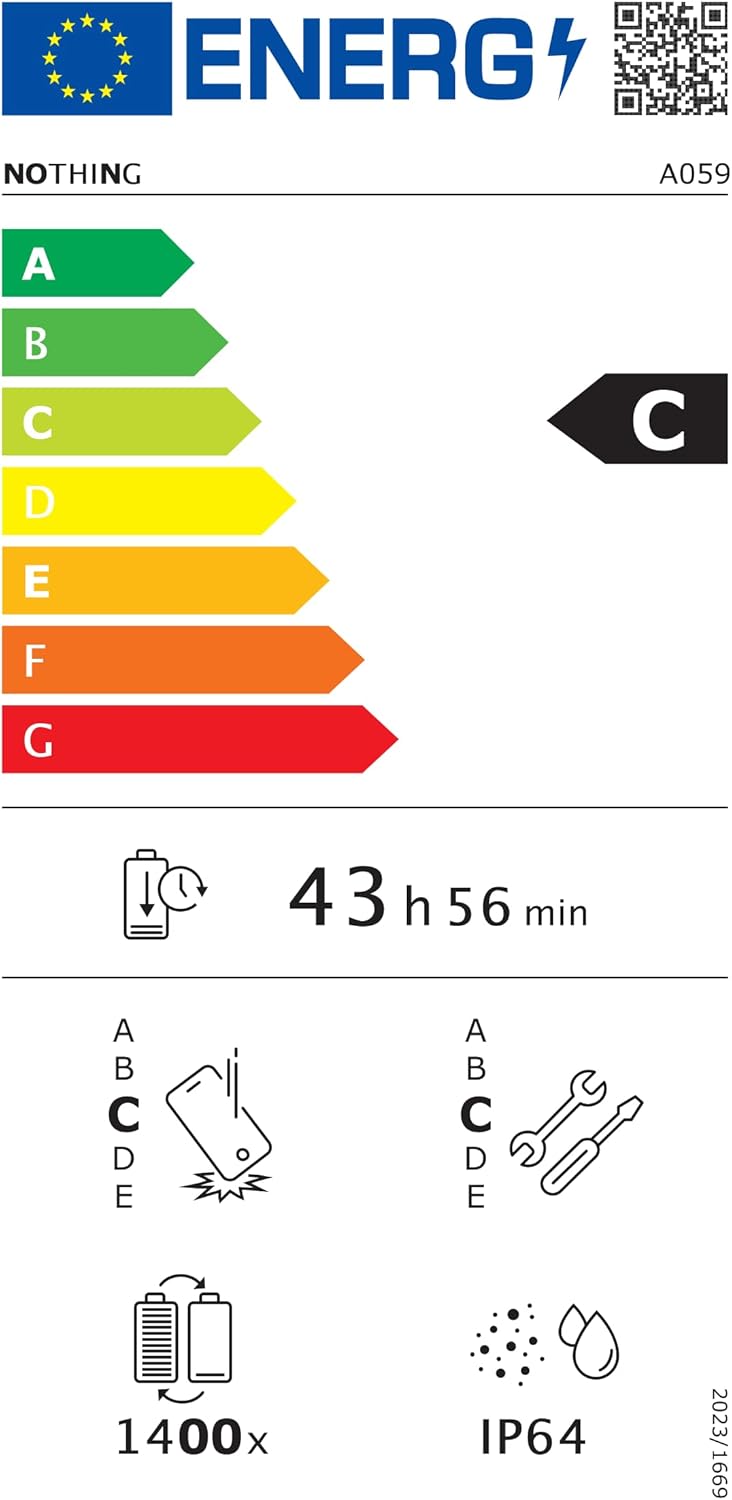
Figure 6.1: EU Energy Label for Nothing Phone (3a), indicating energy efficiency and IP64 rating. More details available at eprel.ec.europa.eu/qr/2179652.
7. Gwarancja i wsparcie
Your Nothing Phone (3a) comes with a manufacturer's warranty. Please refer to the warranty card included in your product packaging for specific terms and conditions.
For further assistance, technical support, or warranty claims, please visit the official Nothing support webna stronie lub skontaktuj się z obsługą klienta. Więcej informacji znajdziesz na stronie Nothing Store on Amazon.