
1. Wprowadzenie
The BTMETER BT-5000Y is a high-precision portable digital hot wire anemometer designed for accurate measurement of wind speed, air temperature, and airflow (CMM/CFM). Its retractable sensor allows for convenient measurements in confined spaces, making it suitable for a wide range of applications including environmental monitoring, air conditioning system maintenance, and outdoor activities.

Figure 1.1: BTMETER BT-5000Y Anemometer with its main unit and flexible probe.

Figure 1.2: Common applications for the BT-5000Y anemometer, such as drone flight, marine activities, HVAC system checks, and outdoor sports.
2. Główne cechy
- Simultaneous Wind Speed and Temperature Measurement: Equipped with a thermometer for high-precision readings of both wind speed and air temperature.
- Accurate Airflow Detection: Utilizes an advanced hot-wire sensor for reliable measurements.
- Wiele jednostek miary: Supports 5 wind speed units (m/s, ft/min, Knots, km/h, Mph) and air volume units (CMM/CFM).
- Wysuwany czujnik: Designed for easy and convenient measurements, especially in narrow or hard-to-reach areas.
- Duży kolorowy wyświetlacz LCD: Simultaneously displays current, maximum, and minimum wind speed, air temperature, and airflow data for clear readability.
- Inteligentne funkcje: Includes unit conversion, data hold, MAX/MIN/AVG functions, low battery indicator, and configurable automatic shutdown to extend battery life.
- Wytrzymały akumulator: Built-in 600mAh lithium battery with USB Type-C charging for extended operation.
- Trwała konstrukcja: Features a waterproof and dustproof construction suitable for various environments.
3. Konfiguracja
3.1 Rozpakowanie i wstępna inspekcja
Upon receiving your BTMETER BT-5000Y, carefully unpack all components. Verify that the package contains the main anemometer unit, the retractable hot-wire probe, a USB Type-C charging cable, and this user manual. Inspect the device for any visible damage.
3.2 Ładowanie akumulatora
Before first use, fully charge the internal 600mAh lithium battery. Connect the provided USB Type-C cable to the device's charging port and plug the other end into a standard USB power adapter (not included) or a computer USB port. The charging indicator on the display will show the charging status. A full charge typically takes a few hours.
3.3 Podłączanie sondy
Gently connect the retractable hot-wire probe to the main unit's sensor port. Ensure a secure connection to prevent inaccurate readings. The probe can be extended or retracted as needed for different measurement scenarios.

Figure 3.1: Device diagram illustrating key components and controls.
4. Instrukcja obsługi
4.1 Włączanie/wyłączanie zasilania
- Naciśnij Moc przycisk (①) aby włączyć urządzenie.
- Naciśnij i przytrzymaj Moc przycisk (①) na kilka sekund, aby wyłączyć urządzenie.
- The device features a configurable automatic shutdown function to save power. Refer to the settings menu for adjustment.
4.2 Pomiar podstawowy
Once powered on, the device will immediately begin measuring wind speed and temperature. Ensure the probe is positioned correctly in the airflow you wish to measure.
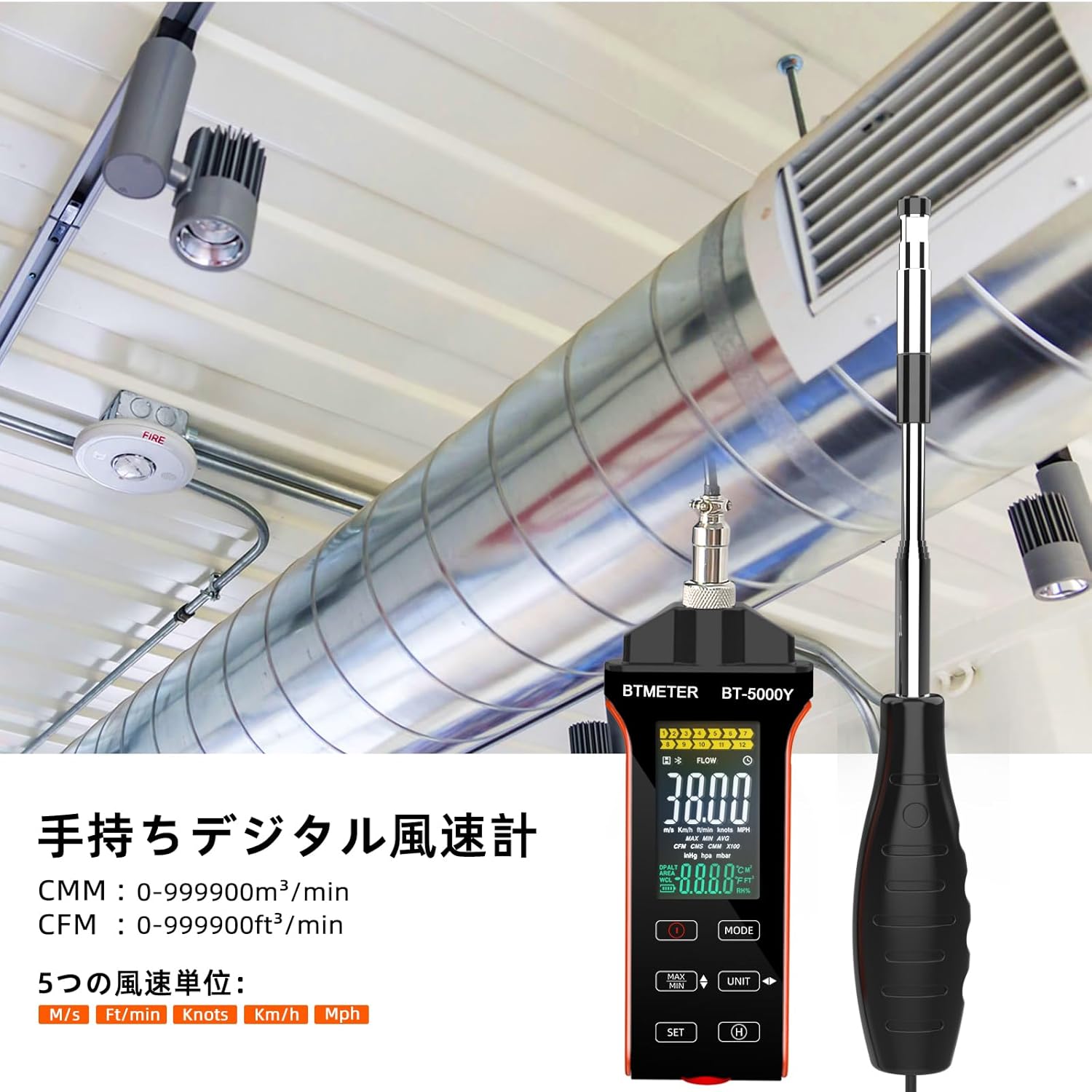
Figure 4.1: The BT-5000Y anemometer being used to measure airflow in a duct.
4.3 Konwersja jednostek
The BT-5000Y supports multiple units for wind speed and airflow. Use the JEDNOSTKA button to cycle through available units.
- Wind Speed Units: m/s (meters/second), ft/min (feet/minute), Knots, km/h (kilometers/hour), Mph (miles/hour).
- Air Volume Units: CMM (cubic meters/minute), CFM (cubic feet/minute).
- Jednostki temperatury: °C (Celsius), °F (Fahrenheit).

Figure 4.2: The display showing the five available wind speed units.
4.4 MAX/MIN/AVG Function
Naciśnij MAKS./MIN. przycisk do view the maximum, minimum, and average readings during a measurement session. Pressing it repeatedly will cycle through these values.
4.5 Funkcja zatrzymania danych
Aby zamrozić aktualny odczyt na wyświetlaczu, naciśnij przycisk H (Hold) button. Press it again to release the hold and resume live measurement.
4.6 Wyświetlacz LCD powyżejview
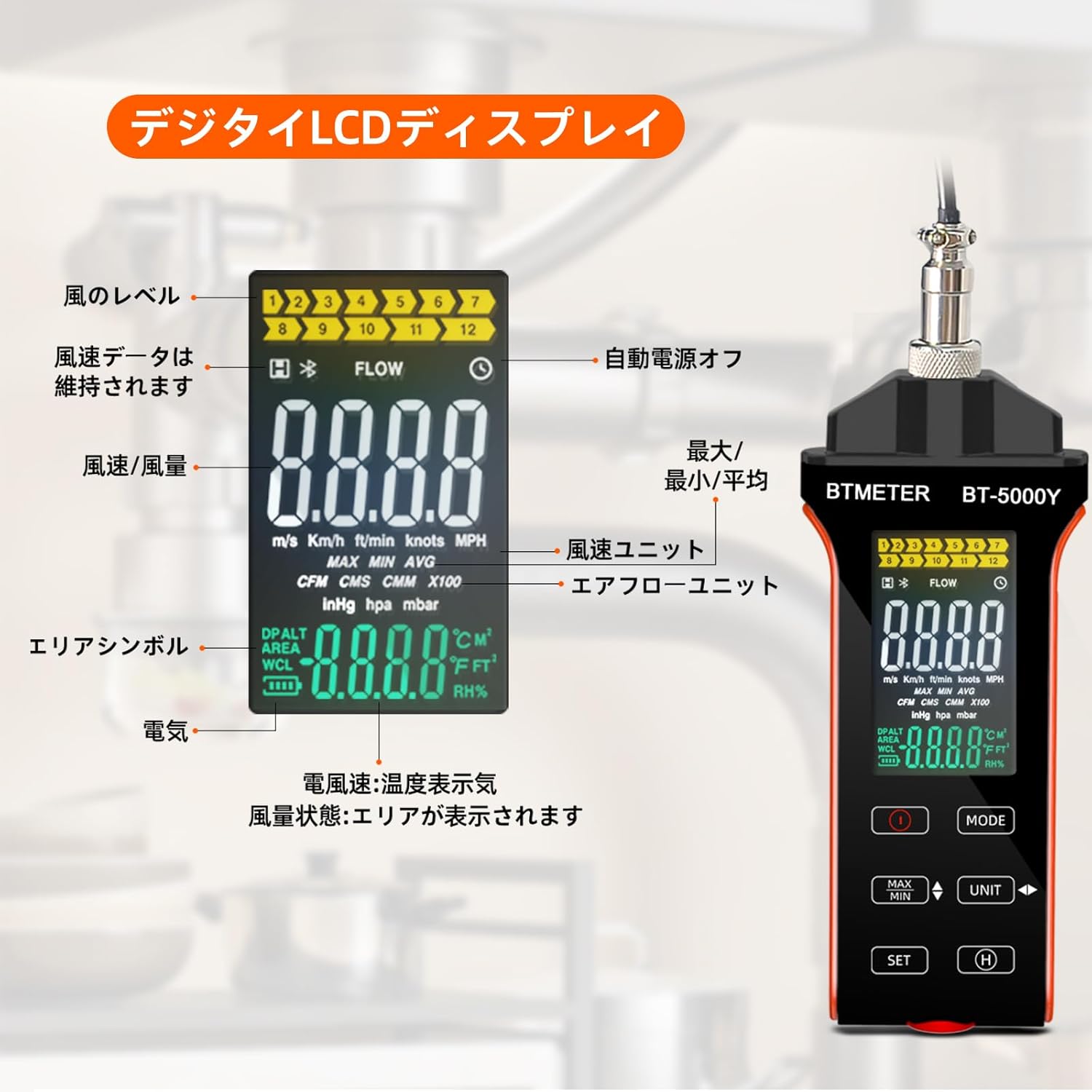
Rysunek 4.3: Szczegółowy opisview of the digital LCD display and its indicators.
The large color LCD display provides comprehensive information:
- Wind Level Indicator: Visual representation of wind strength.
- Data Hold Symbol: Indicates when the display is frozen.
- Auto Power Off Indicator: Shows if auto-shutdown is active.
- MAX/MIN/AVG Indicators: Displays the selected measurement mode.
- Wind Speed Units: Current unit (m/s, km/h, ft/min, knots, Mph).
- Airflow Units: Current unit (CMM, CFM).
- Area Symbol: Used for airflow calculations.
- Wskaźnik baterii: Pokazuje pozostały czas pracy baterii.
- Wyświetlacz temperatury: Shows air temperature in °C or °F.
5. Konserwacja
5.1 Czyszczenie
Wipe the device and probe with a soft, dry cloth. Do not use abrasive cleaners or solvents. Ensure the hot-wire sensor is clean and free of dust or debris for accurate readings.
5.2 Przechowywanie
When not in use, retract the sensor probe and store the anemometer in a cool, dry place, away from direct sunlight and extreme temperatures. Use the provided carrying case (if applicable) to protect the device.
5.3 Pielęgnacja baterii
To prolong battery life, avoid fully discharging the battery frequently. Recharge the device when the low battery indicator appears. If storing for an extended period, charge the battery to approximately 50% every few months.
6. Rozwiązywanie Problemów
If you encounter issues with your BTMETER BT-5000Y, please refer to the following common problems and solutions:
- Urządzenie się nie włącza:
- Upewnij się, że bateria jest wystarczająco naładowana. Podłącz urządzenie do źródła zasilania za pomocą kabla USB typu C i ładuj je przez co najmniej 30 minut przed ponownym włączeniem.
- Sprawdź, czy przycisk zasilania jest naciśnięty i przytrzymany przez wymagany czas.
- Niedokładne lub nieregularne odczyty:
- Check if the hot-wire sensor is clean and free from dust, lint, or other obstructions. Gently clean it if necessary.
- Ensure the probe is fully extended and properly positioned in the airflow.
- Verify that the probe is securely connected to the main unit.
- Ensure the device is operating within its specified temperature and humidity ranges.
- Digital display is erratic or 'crazy':
- This could indicate a software glitch or a hardware issue. Try turning the device off and on again.
- Jeśli problem będzie się powtarzał, skontaktuj się z obsługą klienta w celu uzyskania dalszej pomocy.
- Issues with CFM/CMM calculation or unit conversion (e.g., automatically switching units, incorrect conversions):
- Dokładnie ponownieview the manual's section on unit conversion and area input. Some devices may have specific input methods or default behaviors for area calculations.
- Ensure you are following the correct sequence for entering area values and selecting units.
- If the issue persists and appears to be a fundamental flaw in unit handling, contact customer support.
- Low battery indicator constantly on:
- Recharge the battery fully. If the issue persists after a full charge, the battery may need replacement.
For issues not covered here, please contact BTMETER customer support.
7. Specyfikacje
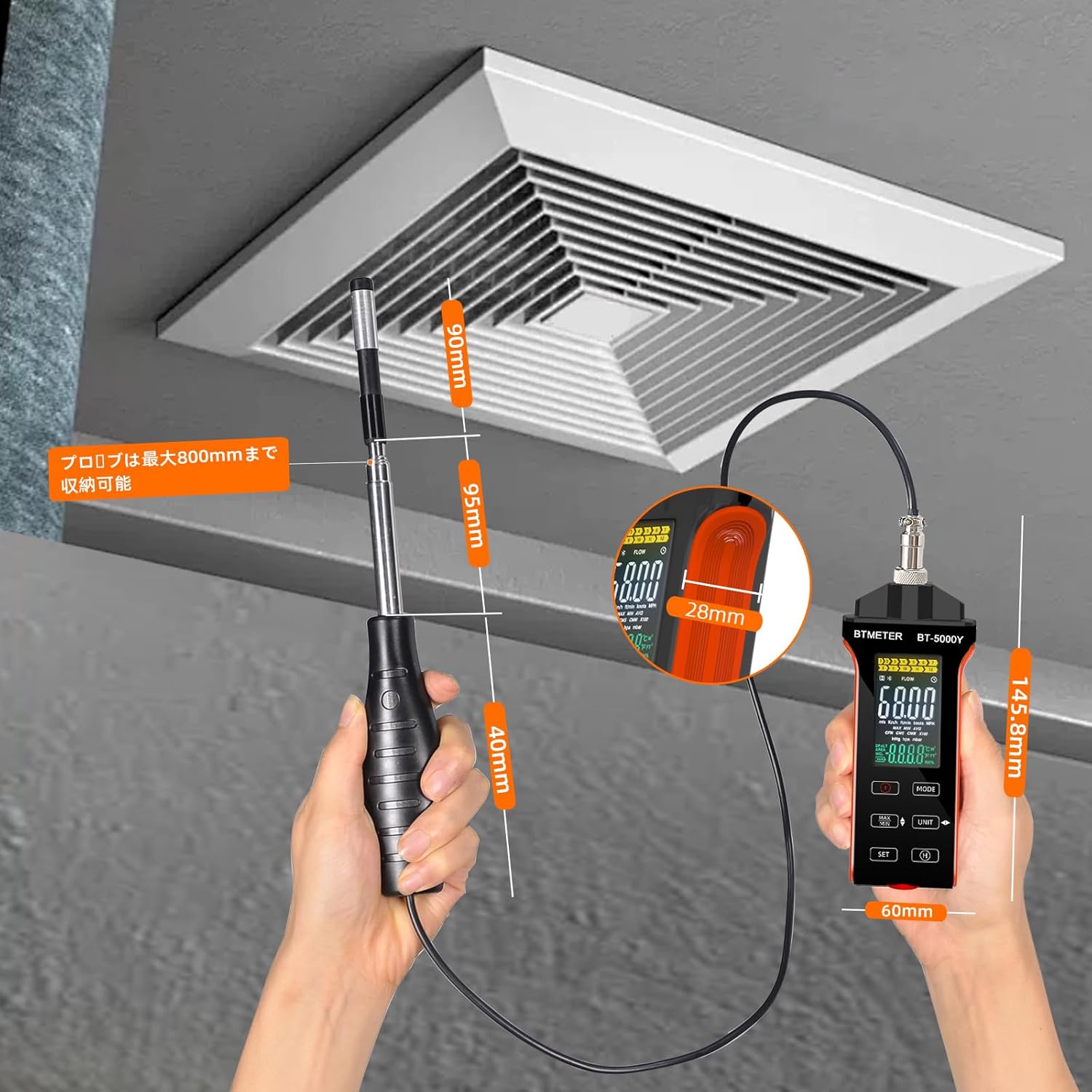
Figure 7.1: Dimensions of the BTMETER BT-5000Y anemometer.
| Parametr | Wartość |
|---|---|
| Model | BT-5000Y |
| Zakres pomiaru prędkości wiatru | 0 - 30 m/s |
| Dokładność prędkości wiatru | ±5% ±0.1 dgt |
| Rozdzielczość prędkości wiatru | 0.1% |
| Air Temperature Measurement Range | 0.0 - 45.0 °C (32.0 - 113.0 °F) |
| Dokładność temperatury powietrza | ±1.0°C (±1.8°F) |
| Air Temperature Resolution | 0.1 |
| Air Volume Range (CMM) | 0 - 999900 m³/min |
| Air Volume Range (CFM) | 0 - 999900 ft³/min |
| Air Volume Resolution | 0.001-100 |
| Bateria | Wbudowana bateria litowa 600mAh |
| Interfejs ładowania | USB typu C |
| Waga przedmiotu | 250 gramów |
| Wymiary opakowania | Wymiary 14.5 x 6 x 3 cm |
| Zawarte komponenty | 1 * BTMETER BT-5000Y Anemometer |
8. Gwarancja i wsparcie
BTMETER products are designed for reliability and performance. This product comes with a standard manufacturer's warranty. For specific warranty terms and conditions, please refer to the warranty card included with your product or visit the official BTMETER webstrona.
If you require technical assistance, troubleshooting, or have questions about your BT-5000Y anemometer, please contact BTMETER customer support through their official channels. When contacting support, please have your product model (BT-5000Y) and purchase information ready.