
1. Ważne informacje dotyczące bezpieczeństwa
Please read this entire manual before installation and assembly. If you have any questions regarding any of the instructions or warnings, please contact your local distributor for assistance.
- We accept no responsibility for incorrect or faulty installation.
- Follow the enclosed installation instructions carefully.
- Check the condition and completeness of all items before beginning.
- The fastening materials supplied for wall mounting are intended exclusively for fastening to solid masonry or concrete. For other wall types, such as hollow bricks, plasterboard, or lightweight construction, please contact a specialist retailer for information on suitable fastening elements.
- Under no circumstances should you exceed the limit values specified for the product.
2. Zawartość opakowania
Verify that all components are present and undamaged before installation. If any parts are missing or damaged, do not attempt to install. Contact customer support for replacement parts.

Figure 2.1: XTRARM TiTon Double TV Wall Mount and included hardware components, including various screws, anchors, washers, and a drilling template.
Pakiet zazwyczaj zawiera:
- XTRARM TiTon Double TV Wall Mount assembly
- Standard mounting hardware for TV and wall (various screws, anchors, washers)
- Szablon wiertniczy
- Small spirit level
- Multiple hook-and-loop straps for cable management
3. Specyfikacje
| Funkcja | Specyfikacja |
|---|---|
| Typ montażu | Montaż ścienny |
| Typ ruchu | Articulated, Swivel, Tilt, Rotate |
| Tworzywo | Metal |
| Kolor | Czarny |
| Odległość od ściany | 12.9 cm (retracted) to 120 cm (extended) |
| Obrót | Up to 90° (portrait/landscape) |
| Obracać | Do 180° (90° w lewo/w prawo) |
| Nachylenie | -5° do +12° |
| Zalecany rozmiar telewizora | Approximately 52 – 110 inches |
| Nośność | Maksymalnie 80 kg |
| Zgodność ze standardem VESA | 100x100mm, 100x200mm, 200x100mm, 200x200mm, 200x300mm, 300x200mm, 300x300mm, 400x200mm, 400x300mm, 400x400mm, 500x300mm, 600x200mm, 600x400mm |

Figure 3.1: VESA compatibility and maximum weight capacity.

Figure 3.2: Key dimensions and movement capabilities of the mount.
Figure 3.3: Comprehensive technical drawing with detailed dimensions and adjustment ranges.
4. Konfiguracja i instalacja
Proper installation is crucial for the safety and stability of your TV. Ensure you have the necessary tools and assistance before proceeding.
4.1 Wymagane narzędzia (nie dołączone)
- Wiertarka
- Stud finder (if mounting to wood studs)
- Ołówek
- Taśma miernicza
- Klucz nasadowy lub klucz nastawny
- Śrubokręt krzyżakowy
4.2 Wybór miejsca montażu
Select a wall location that can safely support the weight of the mount and your TV. For solid concrete or masonry walls, use the provided anchors. For wood stud walls, ensure the mount is centered on a stud. Avoid mounting to drywall alone.
4.3 Attaching the Wall Plate
- Position the drilling template at the desired height on the wall and mark the drill holes with a pencil. Use the included spirit level to ensure it is perfectly horizontal.
- Drill pilot holes at the marked locations. The drill bit size will depend on your wall type and the chosen anchors/screws.
- Włóż kotwy ścienne (jeśli są wymagane dla danego typu ściany) w otwory pilotażowe.
- Align the wall plate with the drilled holes and secure it to the wall using the appropriate screws and washers. Ensure it is firmly attached.
4.4 Mocowanie uchwytów TV do telewizora
- Ostrożnie połóż telewizor ekranem do dołu na miękkiej i czystej powierzchni, aby zapobiec uszkodzeniu ekranu.
- Znajdź otwory montażowe VESA z tyłu telewizora.
- Select the correct size screws and spacers (if needed) from the provided hardware that fit your TV's VESA pattern.
- Przymocuj dwa pionowe uchwyty do telewizora z tyłu, upewniając się, że są wypoziomowane i solidnie zamocowane. Nie dokręcaj ich zbyt mocno.
4.5 Montaż telewizora na płycie ściennej
- Korzystając z czyjejś pomocy, ostrożnie podnieś telewizor i zawieś dołączone uchwyty na płycie ściennej.
- Upewnij się, że telewizor jest pewnie zamocowany na płycie ściennej.
- Włącz wszelkie zabezpieczające mechanizmy blokujące na wspornikach, aby zapobiec przypadkowemu wysunięciu.

Rysunek 4.1: Example of the XTRARM TiTon Double TV Wall Mount installed with a television.
5. Instrukcja obsługi
The XTRARM TiTon Double mount offers full motion capabilities for optimal viewkąty.
5.1 Adjusting Wall Distance
Gently pull or push the TV to extend or retract the mount. The mount allows for a wall distance ranging from 12.9 cm to 120 cm.

Figure 5.1: Adjustable wall distance of the mount.
5.2 Regulacja obrotu
The mount can swivel up to 180 degrees (90 degrees left or right) to direct the screen towards different viewobszarów.

Figure 5.2: Swivel capability of the mount.
5.3 Regulacja nachylenia
Adjust the vertical tilt of your TV from -5 degrees to +12 degrees to reduce glare and optimize viewing comfort. Loosen the tilt adjustment knobs, set the desired angle, and then retighten the knobs.
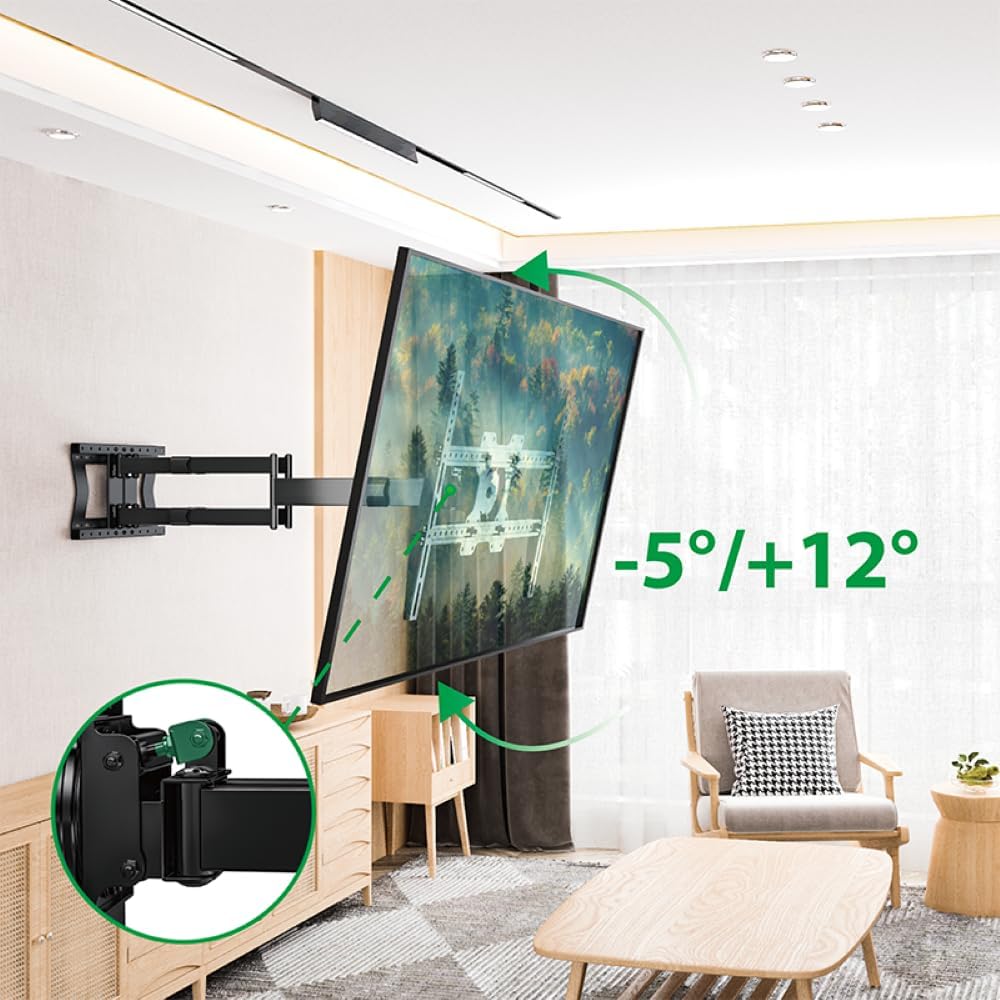
Figure 5.3: Tilt adjustment range and mechanism.
5.4 Regulacja obrotu
The mount allows for a 90-degree rotation, enabling you to switch between landscape and portrait orientation for your TV.

Figure 5.4: 90-degree rotation capability.
5.5 Zarządzanie kablami
Use the provided hook-and-loop straps to bundle and organize cables along the mount arms for a tidy appearance and to prevent snagging during adjustments.
6. Konserwacja
Regularna konserwacja zapewnia długowieczność i bezpieczne działanie uchwytu ściennego do telewizora.
- Czyszczenie: Przetrzyj uchwyt miękką, suchą ściereczką. Unikaj środków czyszczących o właściwościach ściernych i rozpuszczalników, które mogłyby uszkodzić wykończenie.
- Sprawdź połączenia: Okresowo sprawdzaj wszystkie śruby i nakrętki, aby upewnić się, że są dobrze dokręcone. W razie potrzeby dokręć je, ale nie przekręcaj.
- Sprawdź zużycie: Regularnie sprawdzaj uchwyt pod kątem oznak zużycia, uszkodzeń lub korozji. W przypadku stwierdzenia jakichkolwiek problemów, zaprzestań użytkowania i skontaktuj się z obsługą klienta.
7. Rozwiązywanie Problemów
If you encounter any issues with your XTRARM TiTon Double TV Wall Mount, refer to the following common problems and solutions:
| Problem | Możliwa przyczyna | Rozwiązanie |
|---|---|---|
| Telewizor nie jest wypoziomowany | Wall plate or TV brackets not level during installation. | Carefully remove the TV, adjust the wall plate or TV brackets using a spirit level, and re-mount. |
| Difficulty moving the mount | Joints may be too tight or require lubrication. | Check for any overtightened bolts. Apply a small amount of silicone-based lubricant to moving joints if necessary. |
| Góra wydaje się niestabilna | Loose wall plate, incorrect anchors, or exceeding weight capacity. | Immediately remove the TV. Re-check all wall plate fasteners. Ensure correct anchors were used for your wall type. Verify TV weight does not exceed 80 kg. If issues persist, consult a professional installer. |
8. Gwarancja i wsparcie
For information regarding warranty coverage, technical support, or replacement parts, please refer to the documentation provided at the time of purchase or visit the official XTRARM webZachowaj paragon jako dowód zakupu.