
1. Wprowadzenie
Thank you for choosing the DEVAISE ASJZ026 L-Shaped Electric Standing Desk. This manual provides essential information for the safe assembly, operation, and maintenance of your new adjustable height desk. This desk is designed to offer a versatile workspace, allowing seamless transitions between sitting and standing positions to promote a healthier work environment.
Przed montażem i użyciem należy dokładnie przeczytać tę instrukcję i zachować ją do wykorzystania w przyszłości.
2. Instrukcje bezpieczeństwa
- Przed montażem upewnij się, że wszystkie elementy są kompletne i nieuszkodzone. Nie używaj, jeśli brakuje którejkolwiek części lub jest ona uszkodzona.
- Keep children and pets away from the desk during operation to prevent injury from moving parts.
- Do not place hands or other body parts near the lifting columns or crossbars during height adjustment to avoid pinching.
- Ensure the power cord is properly connected and not damaged. Do not operate the desk with a damaged cord or plug.
- The maximum weight capacity for this desk is 220 lbs (100 kg). Do not exceed this limit.
- Unikaj stawiania płynów bezpośrednio na panelu sterowania lub w pobliżu podzespołów elektrycznych.
- Przed przystąpieniem do czyszczenia lub wykonywania prac konserwacyjnych należy odłączyć zasilanie.
- This desk is intended for indoor use only.
3. Zawartość opakowania
Sprawdź, czy w opakowaniu znajdują się wszystkie poniższe elementy. Jeśli brakuje którejkolwiek części lub jest ona uszkodzona, skontaktuj się z obsługą klienta.
- Desktop Panels (L-shaped, typically 2-3 sections)
- Lifting Columns (Legs with motors)
- Foot Pads/Adjustable Feet
- Crossbars/Frame Components
- Skrzynka sterownicza
- Panel sterowania
- Zasilacz i kabel
- Headphone Hooks (x2)
- Zaciski kablowe
- Assembly Hardware (screws, Allen wrenches, etc.)
4. Instalacja i montaż
Assembly typically requires two people. Follow the included graphical instructions for detailed steps. Ensure you have adequate space for assembly.
4.1 Rozpakowanie i przygotowanie
- Ostrożnie rozpakuj wszystkie elementy i rozłóż je na miękkiej, czystej powierzchni, aby zapobiec zarysowaniom.
- Zidentyfikuj wszystkie części na liście zawartości opakowania.
4.2 Montaż ramy
- Attach the lifting columns to the crossbars and frame components using the provided hardware. Ensure all connections are secure.
- Install the adjustable feet onto the bottom of the lifting columns. These can be adjusted later to level the desk.
4.3 Instalacja na pulpicie
- Carefully place the desktop panels onto the assembled frame. The L-shaped design allows for flexible left or right orientation during installation to suit your workspace.
- Secure the desktop panels to the frame using the designated screws.
4.4 Połączenia elektryczne
- Connect the motor cables from the lifting columns to the control box.
- Connect the control panel cable to the control box.
- Connect the power adapter to the control box, then plug the power cable into a wall outlet.
4.5 Instalacja akcesoriów
- Attach the headphone hooks to the underside of the desk as desired.
- Use the provided cable clips to manage and organize power and peripheral cables, ensuring a tidy and safe workspace.
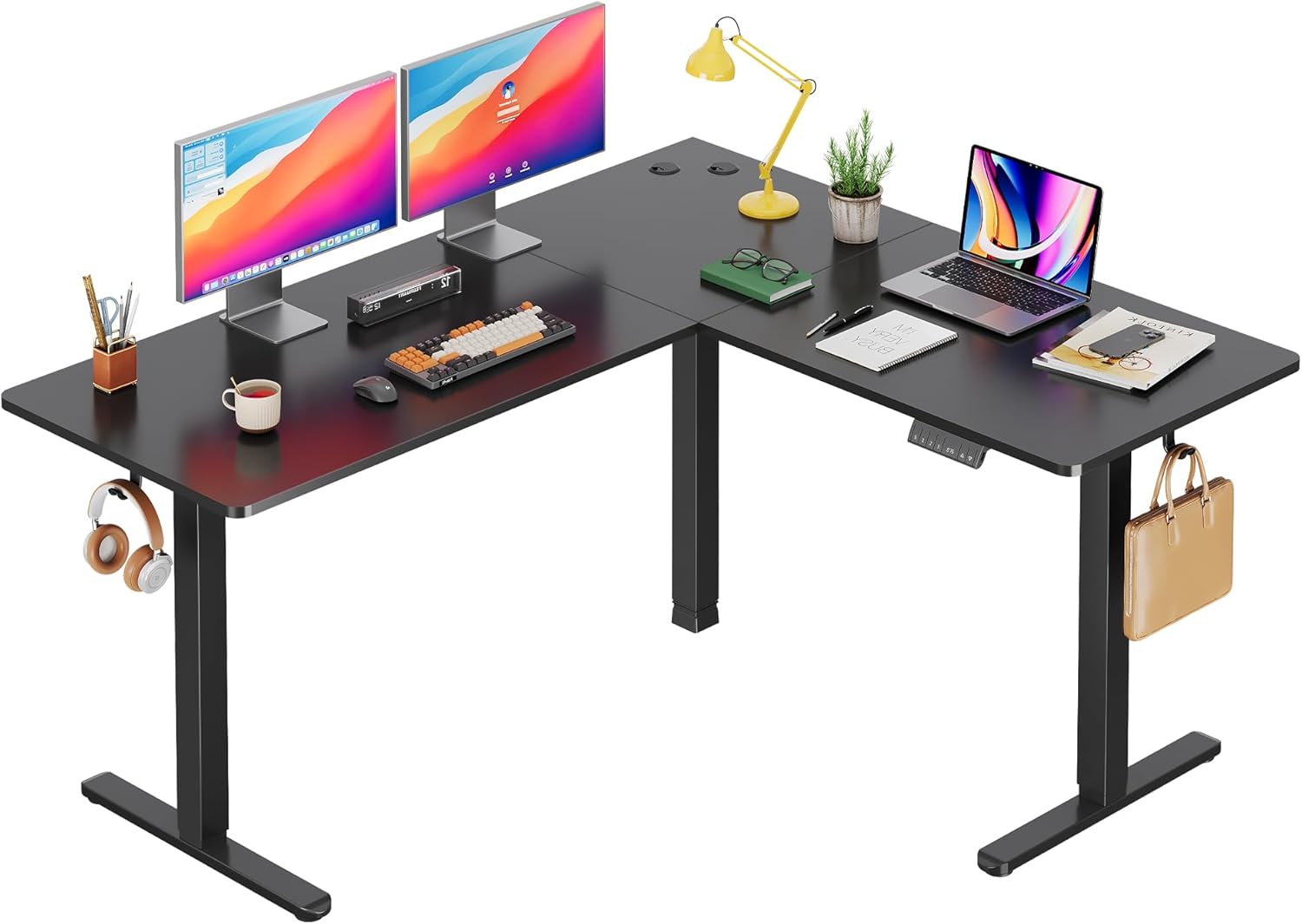
Image: The DEVAISE ASJZ026 L-Shaped Electric Standing Desk fully assembled in a modern home office environment, showcasinze względu na przestronność i funkcjonalność.

Image: A detailed diagram illustrating the desk dimensions (63x55 inches) and its load capacity of up to 180 lbs, highlighting the robust construction.

Image: Visual representation of the desk's adjustable height feature, showing the range from a minimum of 28.35 inches to a maximum of 46.45 inches, suitable for various user preferences.
5. Instrukcja obsługi
5.1 Panel sterowania ponadview
The desk is operated via a multi-function control panel, typically located on the front edge of the desk. It features an LED display, up/down buttons, and memory preset buttons.

Obraz: szczegółowy view of the desk's control panel, highlighting the 'S' button for saving presets, three memory height buttons (1, 2, 3), the LED display showing current height, and the up/down adjustment buttons.
5.2 Regulacja wysokości
- Przyciski w górę/w dół: Naciśnij i przytrzymaj W górę (▲) or W dół (▼) button to raise or lower the desk to your desired height. Release the button to stop movement. The LED display will show the current height.
5.3 Ustawienia pamięci
Biurko umożliwia zapisanie do trzech preferowanych ustawień wysokości, co pozwala na szybką regulację.
- Aby zapisać ustawienie wstępne: Dostosuj wysokość biurka do swoich potrzeb za pomocą przycisków góra/dół. Naciśnij S przycisk, a następnie natychmiast naciśnij jeden z przycisków pamięci (1, 2, Lub 3). The LED display will confirm the setting is saved.
- Aby użyć ustawienia wstępnego: Naciśnij odpowiedni przycisk pamięci (1, 2, Lub 3). Biurko automatycznie przesunie się na zapisaną wysokość.
5.4 Funkcja antykolizyjna
Biurko jest wyposażone w system antykolizyjny. Jeśli biurko napotka przeszkodę podczas regulacji wysokości, automatycznie się zatrzyma i lekko cofnie, aby zapobiec uszkodzeniom lub obrażeniom.
5.5 porty USB do ładowania
Some models may include a USB charging port on the control panel for convenient charging of small electronic devices.

Obraz: Wnętrze view diagram highlighting the dual motor system, which provides stable and efficient power for the desk's height adjustment mechanism.
Obraz: Szczegółowy views of additional features: two desk hooks for headphones or bags, adjustable feet for leveling on uneven surfaces, and cable clips for organized cable management.
6. Konserwacja
- Czyszczenie: Przetrzyj powierzchnię biurka i ramę miękką szmatką.amp cloth. Avoid harsh chemicals or abrasive cleaners. Ensure the desk is unplugged before cleaning.
- Inspekcje: Okresowo sprawdzaj wszystkie śruby i połączenia, aby upewnić się, że są dobrze dokręcone. W razie potrzeby dokręć.
- Zarządzanie kablami: Regularly check power and motor cables for any signs of wear or damage. Ensure cables are not pinched or tangled.
7. Rozwiązywanie Problemów
If you encounter issues with your DEVAISE ASJZ026 desk, refer to the following common problems and solutions:
| Problem | Możliwa przyczyna | Rozwiązanie |
|---|---|---|
| Biurko się nie porusza. | Power cable disconnected; motor cables loose; control box malfunction. | Check all power and motor connections. Ensure the power outlet is functional. Reset the desk by unplugging for 30 seconds and plugging back in. |
| Biurko porusza się nierównomiernie lub wydaje nietypowe dźwięki. | Nierównomierne obciążenie, luźne połączenia, przeszkoda. | Ensure weight is evenly distributed. Check all frame connections for tightness. Clear any obstructions. Perform a reset. |
| LED display shows an error code (e.g., E01, E02). | Overload; motor fault; sensor issue. | Refer to the specific error code in the detailed manual (if provided) or perform a reset. Reduce desk load if an overload is suspected. |
| Funkcja zapobiegająca kolizjom jest zbyt czuła lub nie działa. | Sensor calibration issue; obstruction. | Ensure no constant pressure is applied to the desk. Perform a reset. If adjustable, refer to the full manual for sensitivity settings. |
If these solutions do not resolve the issue, please contact DEVAISE customer support.
8. Specyfikacje
- Marka: ZDEMASKOWAĆ
- Numer modelu: ASJZ026
- Wymiary produktu: 23.62" gł. x 62.99" szer. x 25.84" wys.
- Regulowany zakres wysokości: 28.5" to 47.2" (Minimum Height: 28.5 Inches, Maximum Height: 47 Inches)
- Najlepszy rodzaj materiału: Drewno inżynieryjne
- Materiał bazowy: Żelazo
- Nośność: 220 lbs (Maximum Weight Recommendation: 2.2E+2 Pounds)
- Typ silnika: Dual Motor Electric
- Cechy szczególne: Adjustable Height, Electric, L-shaped, Anti-collision Technology, Cable Management, Headphone Hook
- Waga przedmiotu: 80.74 funtów
- Kolor: Czarny
- Wymagany montaż: Tak
9. Gwarancja i pomoc techniczna
The DEVAISE ASJZ026 L-Shaped Electric Standing Desk comes with a Lifetime Warranty, as specified by the manufacturer. This warranty covers defects in materials and workmanship under normal use.
For warranty claims, technical assistance, or any questions regarding your product, please contact DEVAISE customer support through their official channels. Please have your model number (ASJZ026) and proof of purchase available when contacting support.
