
1. Wprowadzenie
Thank you for choosing the DEVAISE 63 x 28 Inch Electric Standing Desk. This manual provides essential information for the safe assembly, operation, and maintenance of your new adjustable height desk. Please read these instructions thoroughly before use and retain them for future reference.
This electric standing desk is designed to provide a versatile workspace, allowing seamless transitions between sitting and standing positions to promote a healthier work environment. It features a robust frame, a spacious desktop, and an intuitive control panel with memory presets.
2. Informacje dotyczące bezpieczeństwa
Ważne instrukcje bezpieczeństwa:
- Always keep children and pets away from the desk when in motion.
- Use the child lock feature to prevent unintended height adjustments.
- Be aware of the anti-collision feature and do not force the desk to move if it encounters an obstacle.
- Ensure all cables are properly managed to avoid entanglement during height adjustments.
- Nie przeciążaj biurka ponad jego maksymalną nośność 180 funtów.
- Używaj biurka tylko na równej powierzchni.
3. Zawartość opakowania
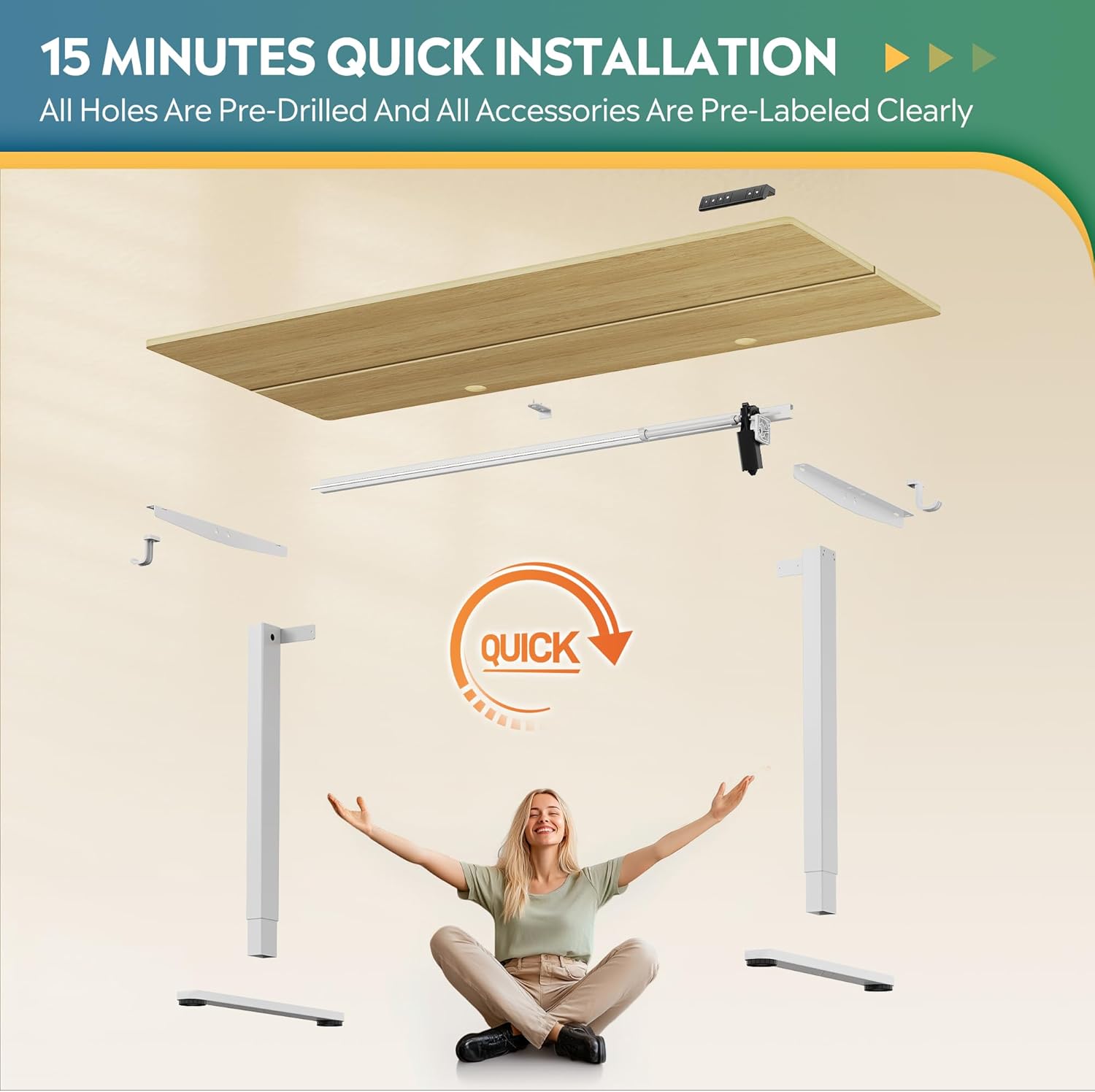
Before assembly, please verify that all components are present and undamaged. Refer to the assembly diagram below for a visual representation of the parts.
- Desktop (63 x 28 inches, Maple)
- Nogi biurka (2)
- Foot Pads (2)
- Control Panel with LED Touchscreen
- Układ silnika
- Crossbars and Support Brackets
- Zaczep na słuchawki
- Sprzęt montażowy (śruby, narzędzia itp.)
- Instrukcja obsługi
4. Instalacja i montaż
The DEVAISE Electric Standing Desk is designed for straightforward assembly. All holes are pre-drilled, and accessories are pre-labeled for ease of installation. It is recommended to have a Phillips head screwdriver available.
4.1 Etapy montażu
- Rozpakuj wszystkie komponenty i sprawdź je na liście zawartości opakowania.
- Attach the desk legs to the crossbars using the provided hardware. Ensure proper orientation as indicated in the detailed instructions.
- Secure the foot pads to the bottom of the desk legs.
- Mount the motor system and control panel to the designated areas on the desk frame.
- Carefully place the desktop onto the assembled frame, aligning it with the pre-drilled holes. Secure the desktop with the provided screws.
- Connect all necessary cables for the motor and control panel.
- Attach the headphone hook to your preferred side of the desk.
- Perform an initial power-on and calibration as per the detailed instructions provided in the box.

5. Instrukcja obsługi
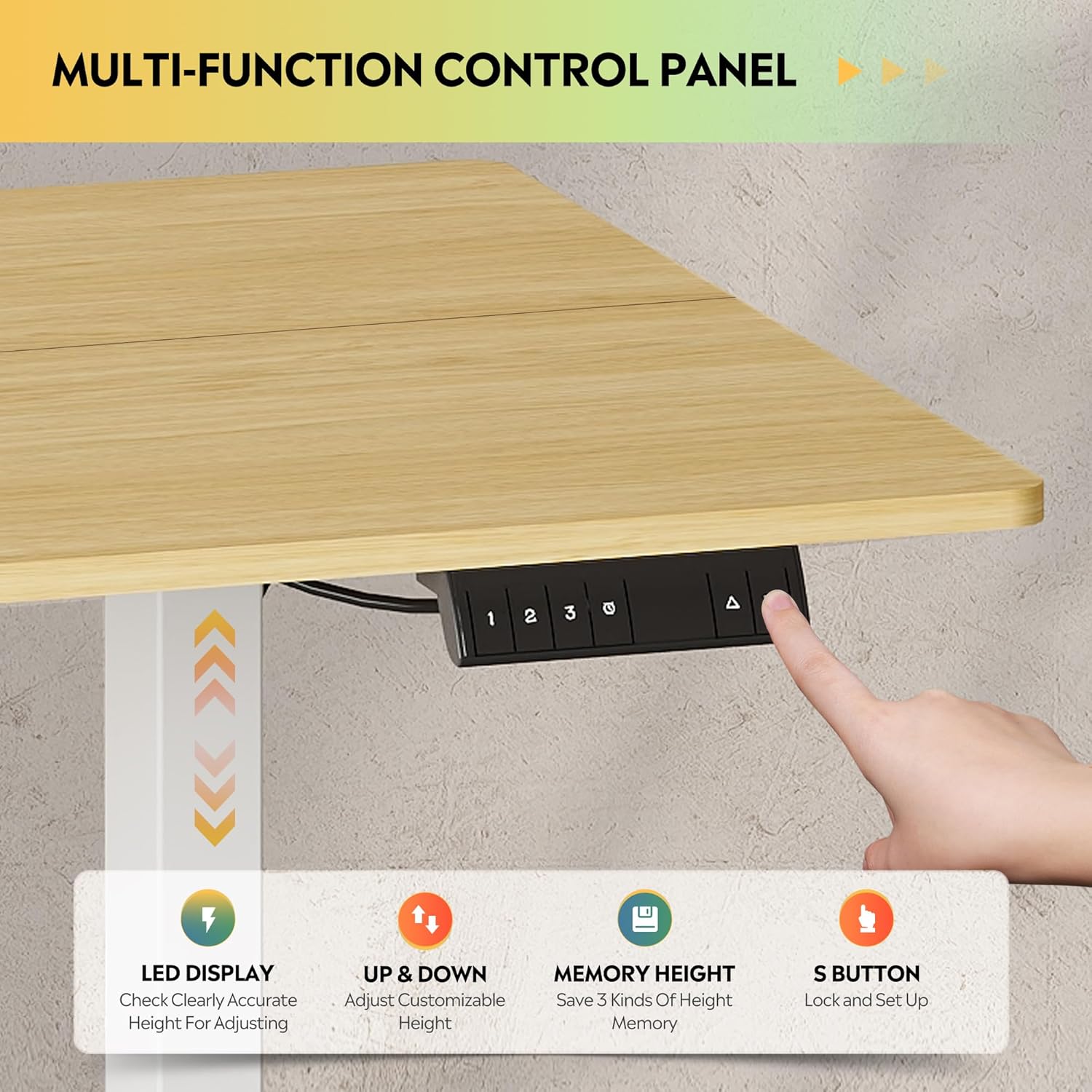
Your DEVAISE Electric Standing Desk features an intuitive LED touchscreen control panel for easy height adjustments and memory presets.
5.1 Regulacja wysokości
The desk's height can be adjusted smoothly and quietly from 28.35 inches (sitting height) to 46.45 inches (standing height).
- Przyciski w górę/w dół: Use the up (▲) and down (▼) arrows on the control panel to manually adjust the desk to your desired height. The LED display will show the current height.
- The tri-motor system ensures quiet operation, typically below 50dB, minimizing disturbance in your workspace.


5.2 Ustawienia pamięci
The control panel allows you to save up to three preferred height settings for quick recall.
- Zapisywanie ustawienia wstępnego: Adjust the desk to your desired height. Press the 'S' button, then press one of the numbered memory buttons (1, 2, or 3) until you hear a beep or see a confirmation on the LED display.
- Przywoływanie ustawienia wstępnego: Simply press the corresponding numbered memory button (1, 2, or 3) to automatically move the desk to the saved height.
6. Konserwacja
Regular maintenance ensures the longevity and optimal performance of your DEVAISE Electric Standing Desk.
- Czyszczenie: Przetrzyj blat i ramę miękką szmatką.amp szmatką. Unikaj środków czyszczących o działaniu ściernym i silnych środków chemicznych, które mogłyby uszkodzić wykończenie.
- Zarządzanie kablami: Periodically check and organize cables to prevent snagging or damage during height adjustments.
- Kontrola elementów złącznych: Occasionally inspect all screws and fasteners to ensure they are tight. Retighten if necessary.
- Kontrola silnika: Listen for any unusual noises during operation. If you notice any issues, refer to the troubleshooting section or contact customer support.
7. Rozwiązywanie Problemów
If you encounter any issues with your DEVAISE Electric Standing Desk, please refer to the following common solutions:
| Problem | Możliwa przyczyna | Rozwiązanie |
|---|---|---|
| Biurko się nie rusza | Power cable disconnected; Child lock engaged; Overload | Check power connection; Deactivate child lock; Reduce weight on desk |
| Uneven movement or tilting | Unbalanced load; Loose fasteners | Distribute weight evenly; Check and tighten all assembly screws |
| Kod błędu na wyświetlaczu LED | Konkretna usterka systemu | Refer to the detailed manual for specific error codes or contact customer support. |
| Anti-collision feature activated frequently | Przeszkoda na drodze | Ensure clear path for desk movement; Adjust sensitivity if possible (refer to detailed manual) |
If the problem persists after attempting these solutions, please contact DEVAISE customer support for assistance.
8. Specyfikacje
Key technical specifications for the DEVAISE Electric Standing Desk (Model ASJZ024):
| Funkcja | Szczegół |
|---|---|
| Marka | ZDEMASKOWAĆ |
| Numer modelu | ASJZ024 |
| Wymiary produktu (Gł. x Szer. x Wys.) | 27.63" gł. x 62.99" szer. x 28.42" wys. |
| Kolor | Maple (Desktop), White (Base) |
| Minimalna wysokość | 28.35 cali |
| Maksymalna wysokość | 46.45 cali |
| Grubość blatu | 0.6 cali |
| Maksymalna nośność | 180 funtów |
| Materiał bazowy | Żelazo |
| Najlepszy rodzaj materiału | Drewno inżynieryjne |
| Cechy specjalne | 3-Button Memory Presets, Adjustable Height, Electric, Ergonomic, LED Touchscreen |
| Zawarte komponenty | Zaczep na słuchawki |
| Wymagany montaż | Tak |

9. Gwarancja i wsparcie
DEVAISE is committed to providing quality products and customer satisfaction. For any questions regarding desk assembly, product selection, or technical support, please do not hesitate to contact our U.S.-based product support team.
Please refer to the warranty information included in your product packaging for details on coverage and terms. Keep your purchase receipt as proof of purchase.
For further assistance, visit the official DEVAISE store: DEVAISE Store on Amazon
