
Wstęp
This manual provides detailed instructions for the installation, operation, and maintenance of your LeeKooLuu 7-Inch Wireless Backup Camera System. Designed for trucks, pickups, trailers, and cars, this system offers HD 1080P clarity, night vision, and IP69K waterproofing to enhance your parking safety and towing assistance. Please read this manual thoroughly before use to ensure proper functionality and longevity of your device.

Image: The LeeKooLuu 7-Inch Wireless Backup Camera System, showing the monitor and the license plate camera unit.
Co jest w pudełku
Przed rozpoczęciem instalacji sprawdź, czy wszystkie komponenty są obecne:
- Monitor 1x7 Cal
- 1 x Wireless Backup Camera (License Plate Camera)
- 1 x Suction Cup Bracket (for monitor mounting)
- 1 x Cigarette Lighter Adapter (for monitor power)
Konfiguracja i instalacja
The LeeKooLuu Wireless Backup Camera System is designed for effortless plug-and-play setup, typically completed within 20-30 minutes. The system is pre-paired from the factory, eliminating the need for manual pairing.
1. Instalacja monitora
The 7-inch monitor can be installed on your vehicle's dashboard or windshield using the included suction cup bracket. Ensure the mounting surface is clean and dry for optimal adhesion.
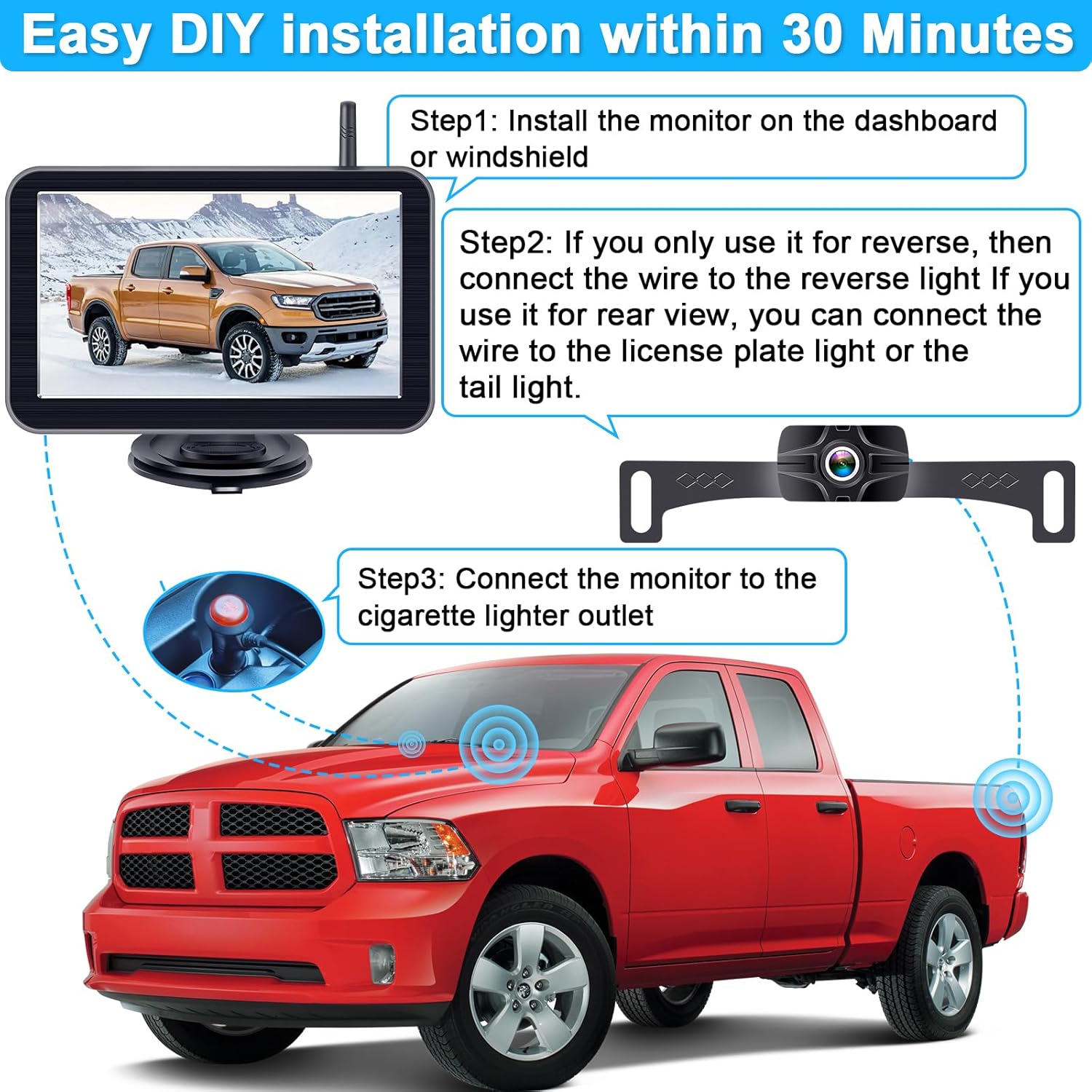
Image: Step-by-step diagram illustrating the installation of the monitor on the dashboard and the connection of the camera to the vehicle's reverse light or license plate light.

Image: Visual representation of two common monitor installation methods: mounting on the vehicle dashboard and mounting on the windshield.
2. Camera Installation and Wiring
The wireless backup camera is typically mounted near the license plate. For power, connect the camera to your vehicle's reverse light for activation when reversing. Alternatively, for continuous rear view, connect it to the license plate light or tail light. Ensure secure connections to prevent signal loss.

Image: Important note on incompatible vehicle types, specifically where the license plate camera might obstruct the rear door if the license plate aligns with the door edge.
3. Podłączenie zasilania
Connect the monitor to your vehicle's cigarette lighter outlet using the provided adapter. Press the on/off button on the adapter to power the monitor.
Instrukcja obsługi
Display and Clarity
The 7-inch monitor provides crystal-clear HD 1080P video, ensuring sharp visuals for reversing, parking, and towing. The built-in night vision feature enhances visibility in low light or nighttime conditions.
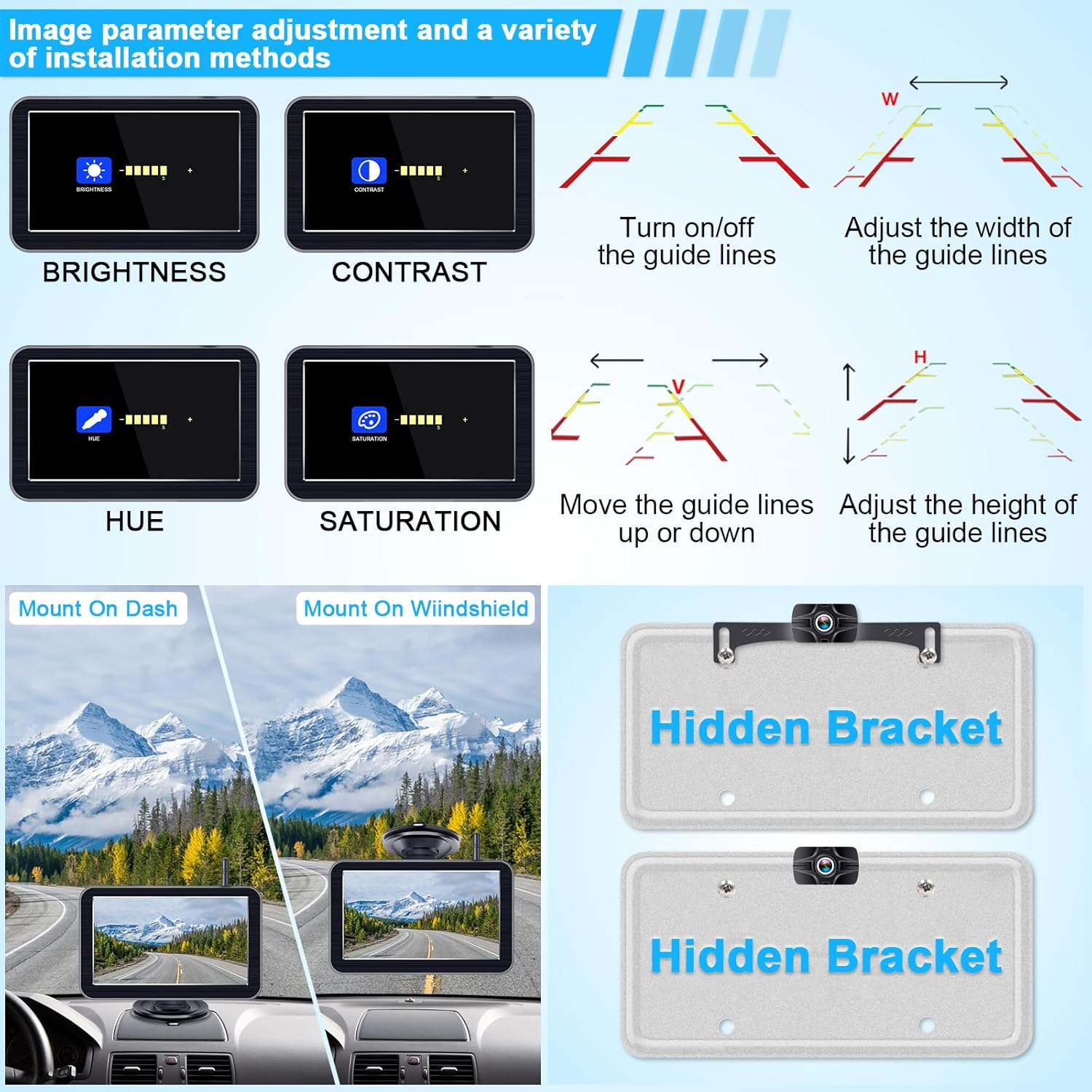
Image: Visual comparison demonstrating the superior HD 1080P image quality and clear night vision capabilities of the system, alongside options for mirror and original image views.
Wielokanałowy Viewing and Split Screen
The system supports up to 2 cameras, allowing for comprehensive coverage. Use the 'CH' button on the monitor to switch between different camera views. A continued press will toggle to split-screen mode, enabling simultaneous viewużywanie wielu kamer.

Image: Illustration of the system's ability to support two cameras, displaying individual camera views (CAM1, CAM2) and a combined split-screen view.
Adjustable Parking Lines (DIY Grid Lines)
The system features adjustable parking lines to assist with guiding your vehicle in tight spaces. You can customize the lines by turning them on/off, adjusting their width, moving them up/down, and adjusting their height to suit your specific needs and vehicle dimensions.

Image: Detailed visual guide on how to adjust various parameters of the parking guide lines, including brightness, contrast, hue, saturation, and the position/size of the guide lines.
Image Parameter Adjustment
You can adjust various image parameters on the monitor, including brightness, contrast, hue, and saturation, to optimize the display for different lighting conditions and personal preferences.
Konserwacja
Proper maintenance ensures the longevity and optimal performance of your LeeKooLuu Wireless Backup Camera System.
Waterproof and Temperature Resistance
The camera boasts an IP69K waterproof rating, designed to withstand heavy rain, snow, and extreme temperatures ranging from -22°F to 176°F. This ensures reliable performance in diverse weather conditions.

Image: Icons illustrating the IP69K waterproof and dustproof ratings, along with the wide temperature operating range from -22°F to 176°F.

Image: A visual demonstrating the camera's IP69 waterproof and strong hydrophobic capabilities, ensuring a clear rear view even on rainy days.
Czyszczenie i pielęgnacja
Regularnie czyść obiektyw aparatu i ekran monitora miękką, miękką szmatką.amp cloth to ensure clear visibility. Avoid using abrasive cleaners or solvents that could damage the surfaces. Ensure all connections remain secure.
Rozwiązywanie problemów
If you encounter issues with your LeeKooLuu Wireless Backup Camera System, refer to the following common problems and solutions:
| Problem | Możliwa przyczyna | Rozwiązanie |
|---|---|---|
| No signal on monitor | Loose power connection, camera not powered, interference, camera/monitor out of range. | Check all power connections. Ensure camera is receiving power (e.g., reverse gear engaged). Reduce distance between camera and monitor. Check for strong electromagnetic interference. |
| Rozmazany lub zniekształcony obraz | Dirty camera lens, poor signal, monitor settings. | Clean camera lens. Check signal strength. Adjust brightness, contrast, hue, and saturation settings on the monitor. |
| Parking lines not visible or incorrect | Parking lines feature disabled or misconfigured. | Access monitor settings to enable and adjust the DIY grid lines (width, height, position). |
| Monitor się nie włącza | Cigarette lighter adapter not fully inserted, vehicle power issue, adapter fault. | Ensure cigarette lighter adapter is fully inserted and receiving power. Check vehicle's fuse for the cigarette lighter. Try a different power source if available. |
Specyfikacje
- Rozmiar ekranu: 7 cali
- Technologia wyświetlania: PROWADZONY
- Rozdzielczość przechwytywania wideo: 1080p
- Technologia czujnika optycznego: CMOS
- Typ soczewki: Wide Angle (150° viewkąt)
- Stopień wodoodporności: IP69K
- Temperatura pracy: -22°F do 176°F (-30°C do 80°C)
- Tomtage: 12 wolty
- Typ instalacji: Montaż powierzchniowy, montaż na desce rozdzielczej
- Wymiary produktu: 9.25 x 5.99 x 4.21 cala
- Waga przedmiotu: 1.76 funta
Gwarancja i wsparcie
LeeKooLuu products are manufactured to high-quality standards and are backed by a manufacturer's warranty. For specific warranty details, technical support, or assistance with any issues not covered in this manual, please contact LeeKooLuu customer service directly. Contact information can typically be found on the product packaging or the official LeeKooLuu webstrona.
We are committed to providing excellent customer support to ensure your satisfaction with our products.


