
DOOGEE S119
Instrukcja obsługi telefonu DOOGEE S119 (2025) Rugged
Model: S119 | Brand: DOOGEE
1. Wprowadzenie
Welcome to the user manual for your new DOOGEE S119 (2025) Rugged Phone. This guide provides essential information to help you set up, operate, maintain, and troubleshoot your device. The DOOGEE S119 is designed for durability and performance, featuring a robust build, a large battery, and advanced camera capabilities, making it ideal for demanding environments and active lifestyles.
2. Zawartość opakowania
Sprawdź zawartość paczki, aby upewnić się, że znajdują się w niej wszystkie elementy:
- 1 x DOOGEE S119 Rugged Smartphone
- 1 x ładowarka (33 W)
- 1 x kabel USB typu C
- 1 x Anti-explosion film (Screen Protector)
- 1 x Instrukcja obsługi
3. Koniec produktuview
The DOOGEE S119 is engineered for resilience and functionality. Key features include:
- 1.32" Multifunctional Rear Display: Provides quick access to notifications, call alerts, media controls, and more.
- Bateria 10200mAh: Offers extended usage time with 33W fast charging and OTG reverse charging capabilities.
- 24 GB pamięci RAM + 512 GB pamięci ROM: Amppamięć i miejsce do przechowywania danych, z możliwością rozszerzenia do 2TB za pomocą karty TF.
- 6.72" FHD+ IPS Waterdrop Screen: Vibrant display with 1080x2400 resolution.
- Główny aparat AI 100 MP: High-resolution main camera for detailed photos.
- Kamera noktowizyjna 20 MP: Robi wyraźne zdjęcia w warunkach słabego oświetlenia.
- Mediatek MT8788 Octa-core Processor: Ensures smooth performance and efficient power consumption.
- System Android 14: Latest Android OS for a seamless user experience.
- Certyfikaty Rugged: IP68/IP69K/MIL-STD-810H certified for water, dust, and drop resistance.
- Łączność: NFC, Dual SIM, GPS (Glonass, Galileo, Beidou), Bluetooth, Wi-Fi, USB.
- Bezpieczeństwo: Fingerprint ID and Face Unlock.

Rysunek 3.1: Przód i tył view of the DOOGEE S119 (2025) Rugged Phone, highlighting its robust design and rear display.

Rysunek 3.2: Szczegółowy view of the 1.32" multifunctional rear display, showing various functions like call answering, camera, calendar, message view, music, and alarm clock.

Figure 3.3: Illustration of the 10200mAh mega battery with 33W fast charging and OTG reverse charging capabilities.

Figure 3.4: Visual representation of the 24GB RAM (8GB Basic + 16GB Extended) and 512GB ROM, expandable to 2TB.

Figure 3.5: Close-up of the 6.72" FHD+ IPS Waterdrop Screen, highlighting its aspect ratio, color depth, and brightness.
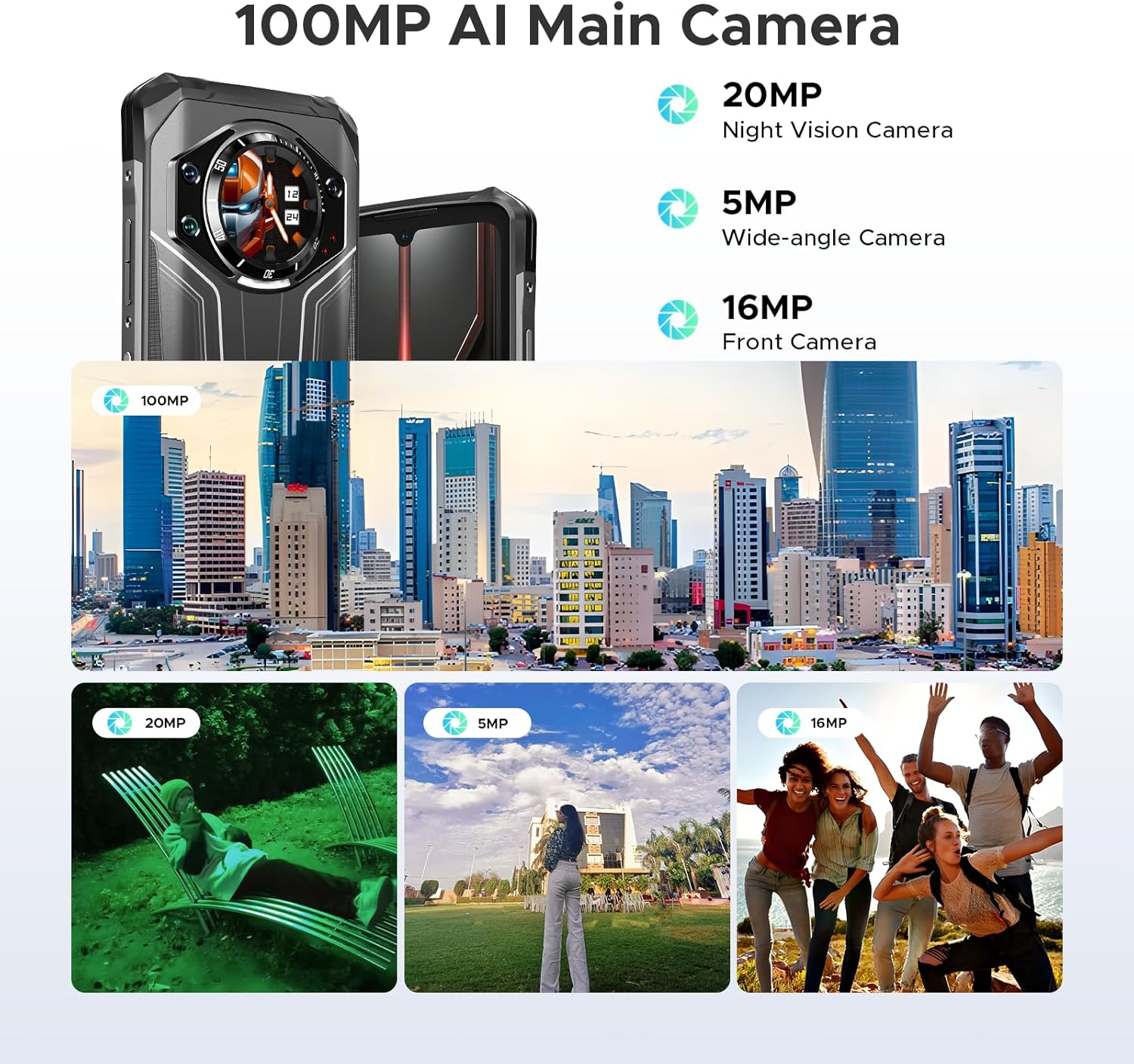
Rysunek 3.6: Koniecview of the camera system, including the 100MP AI Main Camera, 20MP Night Vision Camera, 5MP Wide-angle Camera, and 16MP Front Camera, with exampzdjęcia.

Figure 3.7: Diagram illustrating the MediaTek MT8788 Octa-core Processor, its LPDDR4 Flash Memory, 12nm Production Process, and 2.0GHz Operating Frequency.

Figure 3.8: Depiction of the latest Android 14 System with various app icons, emphasizing a security-enhanced Linux base.
4. Konfiguracja
4.1 Wkładanie kart SIM i karty TF
The DOOGEE S119 supports a triple card slot (2 SIM cards + 1 TF card).
- Znajdź tackę na kartę SIM znajdującą się z boku telefonu.
- Otwórz tackę za pomocą dołączonego narzędzia do wyjmowania karty SIM.
- Ostrożnie włóż karty Nano-SIM i/lub kartę TF do wyznaczonych gniazd. Upewnij się, że są prawidłowo ułożone.
- Delikatnie wsuń tackę z powrotem do telefonu, aż zatrzaśnie się na swoim miejscu.
4.2 Pierwsze włączenie i podstawowa konfiguracja
- Naciśnij i przytrzymaj przycisk zasilania (znajdujący się z boku urządzenia), aż na ekranie pojawi się logo DOOGEE.
- Postępuj zgodnie z instrukcjami wyświetlanymi na ekranie, aby wybrać swój język, połączyć się z siecią Wi-Fi i skonfigurować konto Google.
- Configure security features such as Fingerprint ID and Face Unlock for convenient and secure access.
5. Instrukcja obsługi
5.1 Korzystanie z tylnego wyświetlacza o przekątnej 1.32 cala
The rear display offers quick access to various functions without needing to fully activate the main screen:
- Powiadomienia: View połączenia przychodzące, wiadomości i alerty aplikacji.
- Odbieranie połączeń: Answer or reject calls directly from the rear screen.
- Sterowanie muzyką: Odtwarzaj, wstrzymuj, pomijaj utwory i reguluj głośność podczas odtwarzania multimediów.
- Kamera: Użyj jako viewfinder for rear camera selfies or quick shots.
- Clock/Calendar: Display time, date, and set alarms.
- Sprawdzenie baterii: Szybko view procent bateriitage.
- Kompas: Access a digital compass for navigation.
Video 5.1: Demonstration of the DOOGEE S119 (2025) Rugged Phone's 1.32" multifunctional rear display features, including call answering, music control, and quick access to information.
5.2 Obsługa kamery
The S119 features a versatile camera system:
- Główny aparat AI 100 MP: For high-resolution photos. Open the Camera app and select "Photo" mode.
- Kamera noktowizyjna 20 MP: Ideal for low-light environments. Switch to "Night Vision" mode in the camera app.
- Aparat szerokokątny 5 MP: For capturing broader scenes. Select the wide-angle option in the camera interface.
- Przedni aparat 16 MP: For selfies and video calls. Switch to the front camera in the app.
- Tryby: Explore various modes like HDR, Panorama, and Pro Mode for enhanced photography.
5.3 Zarządzanie baterią
Bateria o pojemności 10200 mAh zapewnia dłuższe użytkowanie. Aby zoptymalizować czas pracy baterii:
- Use the included 33W fast charger for quick power-ups.
- Włącz tryb oszczędzania baterii, gdy poziom naładowania baterii jest niski.
- Zamknij nieużywane aplikacje działające w tle.
- Utilize OTG reverse charging to power other devices (cable not included).
5.4 General Phone Use
- Nawigacja: Use GPS, Glonass, Galileo, and Beidou for accurate location services.
- NFC: Enable NFC in settings for contactless payments and data transfer.
- Dual Unlock: Use side fingerprint sensor or face unlock for quick and secure access.
- Android 14: Customize settings, manage apps, and utilize Google services.
6. Konserwacja
To ensure the longevity and optimal performance of your DOOGEE S119:
- Czyszczenie: Przetrzyj telefon miękką szmatką.amp szmatką. Unikaj silnych środków chemicznych i materiałów ściernych.
- Wodoodporność: While IP68/IP69K certified, ensure all ports and covers are securely closed before exposing to water. Do not intentionally submerge the device beyond specified limits.
- Temperatura: Unikaj wystawiania telefonu na działanie ekstremalnych temperatur (bardzo wysokich lub bardzo niskich) przez dłuższy czas.
- Ochrona ekranu: Apply the provided anti-explosion film to protect the main screen from scratches.
- Aktualizacje oprogramowania: Regularnie sprawdzaj dostępność aktualizacji systemu i instaluj je, aby zapewnić optymalną wydajność i bezpieczeństwo.
7. Rozwiązywanie Problemów
| Problem | Możliwe rozwiązanie |
|---|---|
| Telefon się nie włącza. | Upewnij się, że bateria jest naładowana. Podłącz ją do ładowarki na co najmniej 10 minut przed próbą włączenia. |
| Słaby sygnał sieciowy lub brak usługi. | Check SIM card insertion. Verify network compatibility with your carrier (FDD, TDD, WCDMA, GSM bands). Move to an area with better coverage. |
| Aplikacje działają wolno lub ulegają awarii. | Zamknij aplikacje działające w tle. Wyczyść pamięć podręczną aplikacji. Uruchom ponownie telefon. Upewnij się, że masz wystarczająco dużo miejsca w pamięci. |
| Bateria szybko się rozładowuje. | Reduce screen brightness. Disable unused features like Wi-Fi, Bluetooth, GPS. Limit background app activity. |
| Rear display not responding. | Restart the phone. Check for system updates. |
| Nie można połączyć się z siecią Wi-Fi. | Restart your router and phone. Re-enter Wi-Fi password. Ensure you are within range. |
8. Specyfikacje
| Funkcja | Szczegół |
|---|---|
| Model | DOOGEE S119 |
| System operacyjny | Android 14 |
| Edytor | Mediatek MT8788 Octa-core (2 GHz CPU Speed) |
| BARAN | 24 GB (8 GB pamięci fizycznej + 16 GB pamięci wirtualnej) |
| Pamięć wewnętrzna | 512 GB pamięci ROM (możliwość rozszerzenia do 2 TB za pomocą karty TF) |
| Główny wyświetlacz | 6.72 inches FHD+ IPS Waterdrop Screen (1080 x 2400 resolution) |
| Wyświetlacz tylny | 1.32 inches Multifunctional Round Display (386 PPI) |
| Główna kamera | 100-megapikselowy aparat główny AI |
| Kamera Night Vision | 20MP |
| Kamera szerokokątna | 5MP |
| Przednia kamera | 16MP |
| Pojemność baterii | 10200 mAh (81 Hours Phone Talk Time) |
| Ładowanie | Szybkie ładowanie 33 W, ładowanie zwrotne OTG |
| Trwałość | IP68, IP69K, MIL-STD-810H certified (Waterproof, Dustproof, Drop-proof) |
| Łączność | Bluetooth, Wi-Fi, USB Type-C, NFC, GPS (Glonass, Galileo, Beidou) |
| Gniazdo karty SIM | Potrójny slot na kartę (2 karty SIM + 1 karta TF) |
| Funkcje bezpieczeństwa | Identyfikacja odcisku palca z boku, odblokowywanie twarzą |
| Wymiary | 7.02 x 3.27 x 7.04 cala |
| Waga przedmiotu | 1.32 funta |
9. Gwarancja i pomoc techniczna
DOOGEE provides comprehensive support for its products:
- Gwarancja: Produkt objęty jest 2-letnią ograniczoną gwarancją.
- Zwroty: Enjoy a 30-Day Money Back Guarantee and Free Return policy.
- Obsługa klienta: For any inquiries or technical assistance, please contact DOOGEE customer support. Refer to the official DOOGEE website or the contact information provided in your package for details.

Rysunek 9.1: Koniecview of DOOGEE's customer service, including 30-day money-back guarantee, 2-year limited warranty, and 24/7 online support.
Ask a question about this manual
Ask about setup, troubleshooting, compatibility, parts, safety, or missing instructions. Manuals+ will review the question and use this page’s manual context to help answer it.