
1. Koniec produktuview
The Daylight Slimline 4 LED Table Lamp is designed to provide high-quality, adjustable illumination for various tasks. It features ultra-bright 6,000K LEDs, 4 brightness levels, a flexible design, an anti-glare diffuser, and a convenient USB-C charging port.

Image 1: The Slimline 4 LED Table Lamp, featuring a flexible arm and a clamp do bezpiecznego montażu.
2. Konfiguracja i instalacja
The Slimline 4 Table Lamp comes with a 2-in-1 Table Clamp and Screwable Tabletop Mount for versatile installation.
2.1 Podłączanie Clamp Uchwyt
- Rozpakuj wszystkie elementy z pudełka.
- Zidentyfikuj lamp unit and the clamp montaż.
- Poluzuj śrubę na clamp until the opening is wide enough to fit over your desired table or desk edge.
- Przesuń klamp onto the table edge and tighten the screw securely until the clamp jest stabilny i stabilny.
- Włóż podstawę lamp into the designated slot on the clamp. Ensure it is fully seated and stable.

Image 2: The secure clamp mount for attaching the lamp to a desk or table edge.
2.2 Using the Screwable Tabletop Mount (Optional)
For a more permanent installation, the clamp can be converted into a screwable tabletop mount. Consult the separate instructions provided with the mount for detailed steps on drilling and securing it to a surface.
2.3 Połączenie zasilania
- Connect the provided power adapter to the lampPort wejściowy zasilania.
- Podłącz zasilacz do odpowiedniego gniazdka elektrycznego.
3. Instrukcja obsługi
The Slimline 4 LED Table Lamp is designed for ease of use with intuitive controls.
3.1 Powering On/Off and Adjusting Brightness
- Locate the tactile micro-switch button on the lamp's stem.
- Naciśnij przycisk raz, aby włączyć lamp on to its lowest brightness setting.
- Subsequent presses will cycle through the 4 available brightness levels.
- After the highest brightness level, pressing the button again will turn the lamp wyłączony.

Image 3: Illustration of the 4 brightness levels, demonstrating the range from soft to ultra-bright illumination.
3.2 Positioning the Lamp
Lamp features a flexible arm and dual flexible joints, allowing you to adjust the light precisely where needed. Gently bend the arm to direct the light beam. The anti-glare diffuser ensures even light distribution and reduces eye strain.

Image 4: The flexible arm allows for precise positioning of the light.
3.3 Korzystanie z portu ładowania USB-C
A high-power 5V/2A USB-C port is integrated into the lamp for convenient charging of mobile devices.
- Upewnij się, że lamp jest podłączony do źródła zasilania.
- Plug your USB-C compatible device's charging cable into the USB-C port on the lamp's stem.
- Twoje urządzenie rozpocznie ładowanie.
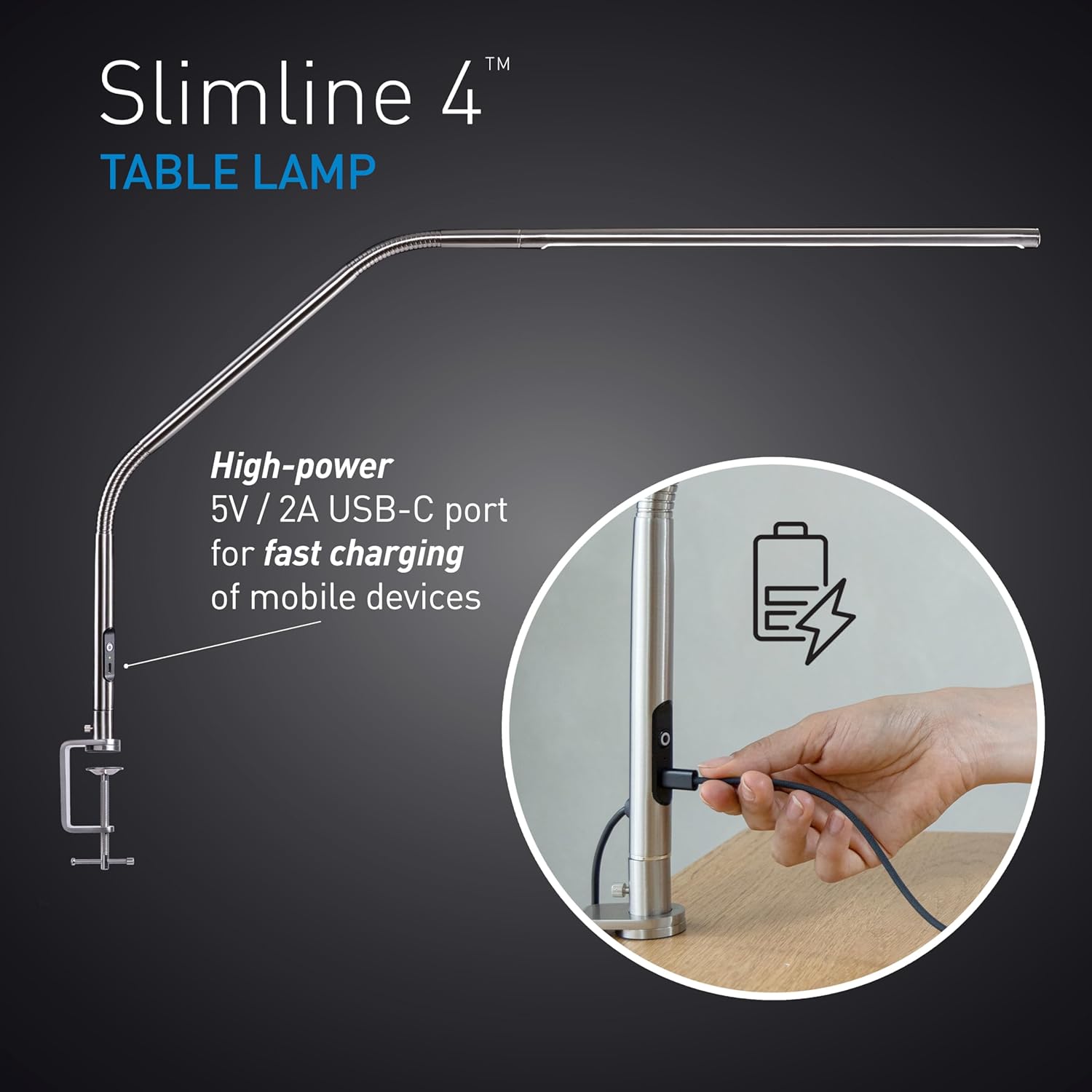
Image 5: The USB-C port located on the lamp's stem for charging devices.
4. Konserwacja
Proper care will ensure the longevity and optimal performance of your Slimline 4 LED Table Lamp.
- Czyszczenie: Odłącz lamp Przed czyszczeniem odłącz urządzenie od źródła zasilania. Przetrzyj je miękką, suchą ściereczką.amp's surfaces. Avoid abrasive cleaners or solvents, as these can damage the finish.
- Obsługiwanie: Podczas gdy lamp has a flexible arm, avoid excessive force or sharp bends that could damage internal wiring.
- Składowanie: Jeśli przechowujesz lamp przez dłuższy czas, upewnij się, że jest czyste, suche i przechowywane w bezpiecznym miejscu, aby zapobiec uszkodzeniom.
5. Rozwiązywanie Problemów
Jeśli masz problemy z lamp, zapoznaj się z poniższymi typowymi rozwiązaniami:
| Problem | Możliwa przyczyna | Rozwiązanie |
|---|---|---|
| Lamp nie włącza się. | Brak zasilania, luźne połączenie, uszkodzone gniazdko. | Sprawdź, czy zasilacz jest prawidłowo podłączony do obu gniazdek.amp i gniazdka ściennego. Sprawdź gniazdko za pomocą innego urządzenia. |
| USB-C port not charging device. | Lamp not powered; faulty cable; device incompatibility. | Upewnij się, że lamp is powered on. Try a different USB-C cable. Verify your device is compatible with 5V/2A charging. |
| Światło migocze lub jest nierównomierne. | Unstable power supply; internal issue. | Ensure the power connection is stable. If the problem persists, contact customer support. |
If these solutions do not resolve the issue, please refer to the warranty and support section for further assistance.
6. Specyfikacje
| Funkcja | Szczegół |
|---|---|
| Nazwa modelu | Slimline 4 Table - Brushed Steel |
| Numer modelu | U35109 |
| Źródło światła | PROWADZONY |
| Temperatura barwowa | 6,000K (światło dzienne) |
| Jasność | 3,200 Lux at 30cm (12") |
| Wskaźnik oddawania barw (CRI) | 95+ |
| Poziomy jasności | 4 (regulowany) |
| Pobór mocy | 13.6 watów |
| Wyjście USB-C | 5V/2A |
| Wymiary produktu | 22" gł. x 10" szer. x 16.5" wys. |
| Tworzywo | Metal |
| Rodzaj wykończenia | Polished Brushed Steel |
| Typ montażu | Tabletop (Clamp & Screwable Mount) |
| Metoda kontroli | Dotyk (Naciśnij przycisk) |
| UPC | 809802351095 |
7. Gwarancja i wsparcie
7.1 Gwarancja producenta
This Daylight Slimline 4 LED Table Lamp jest objęty 2-letnia gwarancja producenta od daty zakupu. Niniejsza gwarancja obejmuje wady materiałowe i wykonawcze powstałe w wyniku normalnego użytkowania. Nie obejmuje ona uszkodzeń spowodowanych niewłaściwym użytkowaniem, wypadkami, nieautoryzowanymi modyfikacjami ani normalnym zużyciem.
7.2 Obsługa klienta
For warranty claims, technical assistance, or any questions regarding your product, please contact Daylight customer support. Refer to the product packaging or the official Daylight webna tej stronie znajdziesz najbardziej aktualne dane kontaktowe.
When contacting support, please have your model number (U35109) and proof of purchase readily available.