
1. Wprowadzenie
This manual provides detailed instructions for setting up and operating your AIfasterfly MC200 Wireless Mobile Gaming Controller. Designed for both iPhone and Android devices, this controller enhances your mobile gaming experience with advanced features and ergonomic design. Please read this manual thoroughly before use to ensure optimal performance and longevity of your device.
2. Koniec produktuview
2.1 Zawartość opakowania
- AIfasterfly MC200 Wireless Mobile Gaming Controller
- Kabel ładujący USB
- Instrukcja obsługi
2.2 Główne cechy
- Bezprzewodowa łączność Bluetooth: Seamless connection with zero latency for iPhone and Android.
- Szeroka kompatybilność: Supports Xbox Cloud, Steam Link, GeForce Now, and MFi Apple Arcade.
- Konstrukcja chowana: Fits phones from 4" to 7.3" (10cm-18.5cm) securely.
- Joysticki i wyzwalacze z efektem Halla: Eliminates drift, dead zones, and physical wear for precise control.
- Funkcja turbo: Customizable rapid-fire with 3 speeds (5/12/20 shots/sec).
- Programowalne przyciski Wstecz: Map up to 21 commands per button (ML/MR) for macro programming.
- Regulowane oświetlenie: 6 trybów oświetlenia z regulowaną jasnością.
- Długa żywotność baterii: 800mAh battery provides 6+ hours of playtime with dynamic lights.
- Podwójna wibracja: Immersive, non-adjustable vibration feedback.
- Ergonomiczna konstrukcja: Textured grips reduce fatigue for extended gaming sessions.
- Keylinker App Optimization: Fine-tune settings via the Keylinker App (search "MC200").

Image: The AIfasterfly MC200 Wireless Mobile Gaming Controller, showcasinze względu na ergonomiczną konstrukcję i układ przycisków.
3. Konfiguracja
3.1 Instalacja telefonu
- Gently pull the left and right sides of the controller outwards to extend the retractable phone holder.
- Carefully place your smartphone into the holder. The controller is designed to fit phones ranging from 4 inches to 7.3 inches (10cm-18.5cm).
- Ensure your phone is securely seated within the rubber padding and anti-slip textured grips to prevent accidental drops.

Image: A smartphone being securely placed into the retractable holder of the AIfasterfly MC200 controller.

Image: The AIfasterfly MC200 controller extended, illustrating the minimum and maximum phone sizes it can accommodate (100mm-185mm).
3.2 parowanie Bluetooth
- Naciśnij i przytrzymaj DOM button on the controller for 3 seconds until the indicator light begins to flash. This indicates the controller is in pairing mode.
- On your smartphone (iPhone or Android), navigate to the Bluetooth settings.
- Locate and select "Xbox Wireless Controller" from the list of available devices.
- Po podłączeniu kontrolka na kontrolerze zacznie świecić światłem ciągłym.
- To reconnect after initial pairing, simply press the DOM button. The controller will automatically connect to the last paired device.
- The controller will auto-shutdown if Bluetooth is disabled or if the DOM button is held for 5 seconds.
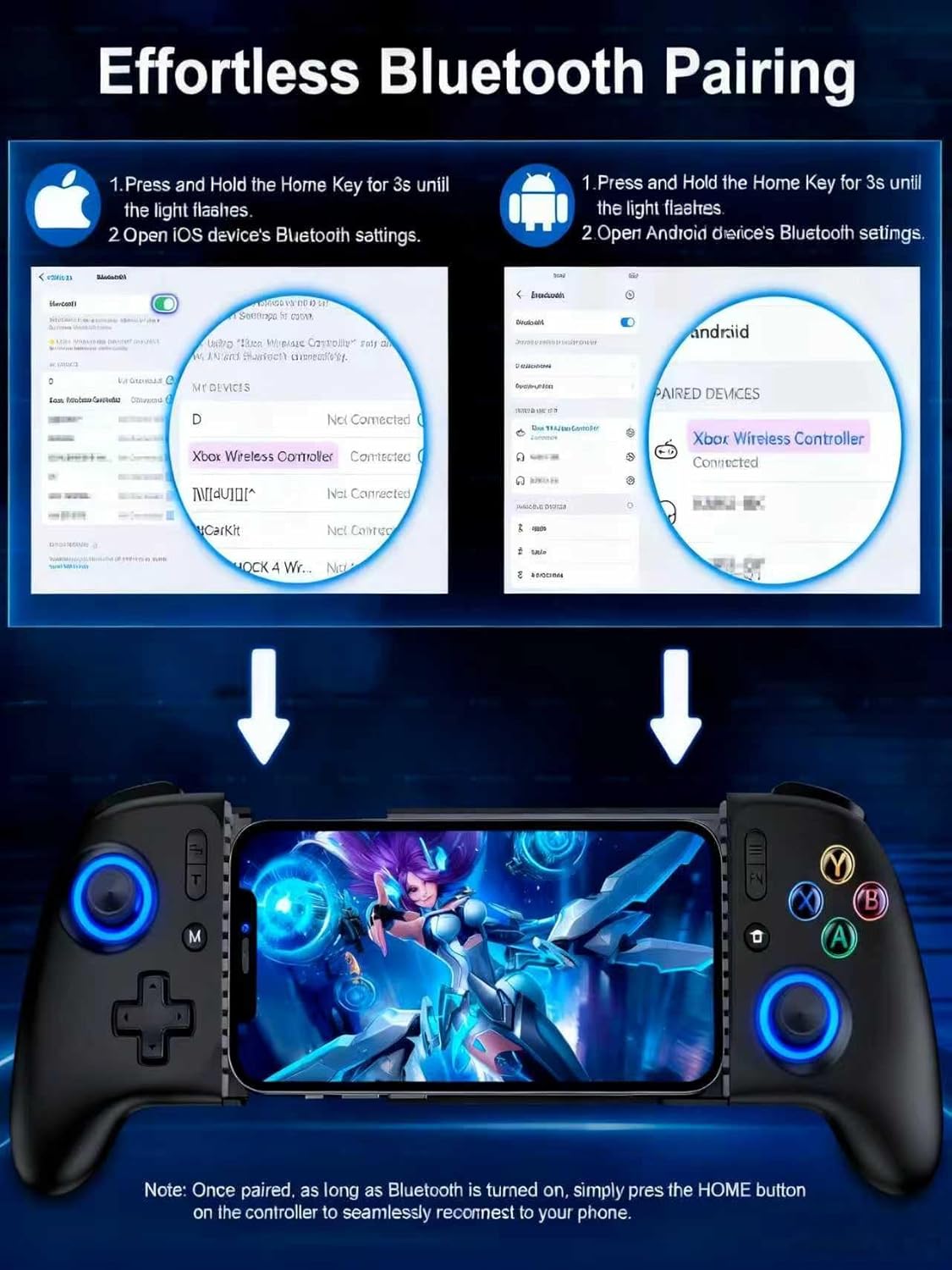
Image: Visual guide demonstrating the Bluetooth pairing process for both iOS and Android devices with the AIfasterfly MC200 controller.
4. Instrukcja obsługi
4.1 Joysticki i wyzwalacze z efektem Halla
The MC200 controller features Hall Effect joysticks and triggers, which utilize magnetic induction principles. This technology prevents common issues such as stick drift, dead zones, and wear-and-tear, providing precise and responsive control for an extended lifespan. You can toggle zero-deadzone mode via M+L3/R3.

Image: Diagram illustrating the Hall Effect joystick technology, highlighting its precision and lack of dead zones.
4.2 Funkcja Turbo
Activate the Turbo function for rapid-fire actions in games. The controller offers 3 adjustable Turbo speeds:
- 5 shots/second
- 12 shots/second
- 20 shots/second
Refer to the quick start guide for specific button combinations to activate and adjust Turbo speeds.

Image: The AIfasterfly MC200 controller with an overlay indicating the Turbo button and its three adjustable speeds.
4.3 Programmable Back Buttons (ML/MR)
The MC200 features two programmable back buttons (ML and MR) that allow for macro programming. You can map up to 21 commands per button, including A/B/X/Y, triggers, and D-pad inputs, to create custom game-winning combos. To enter programming mode, hold M + ML/MR.

Image: A diagram highlighting the ML and MR programmable back buttons on the AIfasterfly MC200 controller and the programming function.
4.4 Light Customization
Personalize your gaming experience with 6 lighting modes and adjustable brightness. Cycle through different lighting modes by pressing the FN button. Adjust brightness by pressing FN + L3 (wzrost) lub FN + R3 (zmniejszenie).

Image: The AIfasterfly MC200 controller showcasing its adjustable LED lighting with various modes and brightness levels.
4.5 Żywotność baterii i ładowanie
The controller is equipped with an 800mAh battery, providing over 6 hours of continuous playtime even with dynamic lights activated. Use the provided USB charging cable to recharge the controller. The charging indicator light will show the charging status.

Image: A user enjoying an extended gaming session with the AIfasterfly MC200 controller, highlighting its long battery life.
4.6 Podwójna wibracja
Dual motors provide immersive vibration feedback for a more realistic gaming experience in compatible games. Please note that the vibration intensity is non-adjustable.
4.7 Keylinker App Optimization
For advanced customization, download the Keylinker App (search "MC200") on your smartphone. The app allows you to fine-tune button layouts, adjust sensitivity, and manage macros for a personalized gaming setup.
5. Zgodność
The AIfasterfly MC200 Wireless Mobile Gaming Controller is compatible with a wide range of iPhone and Android devices. It supports iOS System Version 13.0 and above.
5.1 Supported Devices (Examplas)
- iPhone'a: iPhone 6 to iPhone 15 Pro Max (and newer models with iOS 13.0+)
- Galaktyka Samsunga: S24, S23, S22, S21, S20, S10, S9, S8 Series, Note 20 Ultra 5G/10, Z Flip 4/3
- OnePlus: 9 Pro, 10 Pro
- Redmi: K90 Pro
- Realme: X2 Pro, 7 Pro
- Bardzo słaby: G7 ThinQ
- Nothing: 1
- Przeciwnik: Znajdź X5 Pro
- vivo: Pro+, iQOO 3
- Xiaomi: 12 Pro, MIX4, POCO X3 Pro
- Smartisan: Za 3
- Black Shark: 2
- Motocykl: S50
6. Specyfikacje
| Model | MC200 |
| Łączność | Bluetooth |
| Pojemność baterii | 800mAh |
| Pauza w szkole | 6+ hours (with dynamic lights) |
| Kompatybilność z rozmiarem telefonu | 100 mm - 185 mm (4" - 7.3") |
| Joysticki/spusty | Efekt Halla |
| Programowalne przyciski | ML/MR (up to 21 commands) |
| Oświetlenie | 6 modes, adjustable brightness |
| Wibracja | Dual motors (non-adjustable) |
| Wymiary | 9.65 x 4.57 x 2.4 cala (opakowanie) |
| Waga przedmiotu | 13.4 uncji |
7. Rozwiązywanie Problemów
7.1 Kontroler nie łączy się
- Sprawdź, czy kontroler jest odpowiednio naładowany.
- Sprawdź, czy Bluetooth jest włączony w Twoim smartfonie.
- Make sure the controller is in pairing mode (indicator light flashing after holding DOM przez 3 sekundy).
- Try restarting both your smartphone and the controller.
- If previously paired, ensure the controller is not connected to another device.
7.2 Opóźnienie wejściowe lub brak reakcji sterowania
- Upewnij się, że system operacyjny Twojego telefonu jest aktualny.
- Zamknij wszystkie niepotrzebne aplikacje działające w tle telefonu, aby zwolnić zasoby.
- Move closer to your phone to ensure a strong Bluetooth connection.
- Check if the game you are playing fully supports external controllers.
7.3 Stick Drift or Dead Zones
- The MC200 features Hall Effect joysticks designed to prevent drift. If you experience issues, ensure the controller firmware is up to date via the Keylinker App.
- Try toggling the zero-deadzone mode (M+L3/R3) as described in section 4.1.
7.4 Telefon nie mieści się w uchwycie
- Verify your phone's dimensions are within the supported range of 4" to 7.3" (10cm-18.5cm).
- Zdejmij wszelkie niewygodne etui na telefon, które mogą utrudniać jego prawidłowe dopasowanie.
8. Gwarancja i wsparcie
The AIfasterfly MC200 Wireless Mobile Gaming Controller comes with a manufacturer's warranty. Please refer to the warranty card included in your package for specific terms, conditions, and duration. For technical support, troubleshooting assistance, or warranty claims, please contact AIfasterfly customer service through the contact information provided on the warranty card or the official AIfasterfly webstrona.
Prosimy zachować dowód zakupu w celach gwarancyjnych.