
1. Wprowadzenie
Thank you for choosing the TECPHILE K936 Wireless Keyboard and Mouse Combo. This product is designed to provide versatile and efficient input for multiple devices, featuring both Bluetooth 5.0 and 2.4GHz USB connectivity. This manual will guide you through the setup, operation, and maintenance of your new keyboard and mouse.
2. Zawartość opakowania
- TECPHILE K936 Wireless Keyboard
- TECPHILE Wireless Mouse
- Odbiornik USB (przechowywany w komorze baterii myszy)
- Kabel ładujący USB-C
- Keyboard Protective Cover
- Instrukcja obsługi
3. Koniec produktuview
Familiarize yourself with the components of your TECPHILE K936 Wireless Keyboard and Mouse Combo.

Obraz 3.1: The TECPHILE K936 Wireless Keyboard and Mouse Combo in Grey. The keyboard features a full layout with a numeric keypad, and the mouse is a compact, ergonomic design.

Obraz 3.2: Diagram showing the dimensions of the keyboard (368mm x 121mm) and mouse (110mm x 63mm x 30mm).
Funkcje klawiatury:
- Multi-device connectivity: 3 x Bluetooth 5.0, 1 x 2.4GHz USB
- Dedicated function keys (F1-F12) with multimedia controls
- Akumulator litowo-jonowy 300mAh
- Port ładowania typu C
- Automatic sleep mode for power saving
- Scissor-leg key structure for comfortable typing
- Transparent protective cover included
Funkcje myszy:
- Dual-mode connectivity: 1 x Bluetooth, 1 x 2.4GHz USB
- Optical movement detection technology
- Projekt oburęczny
- Quiet click buttons
4. Konfiguracja
4.1 Pierwsze ładowanie
Before first use, fully charge both the keyboard and mouse. Connect the provided USB-C charging cable to the charging port on the keyboard and mouse, and the other end to a 5V/1A power adapter (not included) or a computer USB port. The charging indicator light will show charging status and turn off when fully charged.
Note: Only use a 5V/1 Amp power adapter for charging to ensure optimal battery life.

Obraz 4.1: Illustration of the keyboard's battery specifications: 2-4 hours charging time, 300mAh battery capacity, and up to 180 days standby time.
4.2 Podłączanie klawiatury
The keyboard supports up to three Bluetooth connections and one 2.4GHz USB connection.

Obraz 4.2: Diagram illustrating the keyboard's ability to connect to multiple devices via Bluetooth (3 channels) and 2.4GHz USB.
2.4GHz USB Connection:
- Locate the USB receiver inside the mouse's battery compartment.
- Podłącz odbiornik USB do wolnego portu USB w komputerze lub urządzeniu.
- Włącz klawiaturę. Klawiatura powinna połączyć się automatycznie.
Połączenie Bluetooth (BT1, BT2, BT3):
- Włącz klawiaturę.
- Naciśnij i przytrzymaj Fn klucz i jeden z kluczy Bluetooth (BT1, BT2, Lub BT3) for 3-5 seconds until the corresponding indicator light flashes rapidly. This indicates pairing mode.
- Na swoim urządzeniu (komputerze, tablecie, smartfonie) przejdź do ustawień Bluetooth i wyszukaj nowe urządzenia.
- Select "TECPHILE Keyboard" from the list of available devices to pair.
- Po sparowaniu kontrolka przestanie migać i będzie świecić światłem ciągłym przez kilka sekund, po czym wyłączy się.
- Repeat for other Bluetooth channels to connect to additional devices.
4.3 Podłączanie myszy
The mouse supports one Bluetooth connection and one 2.4GHz USB connection.
2.4GHz USB Connection:
- Sprawdź, czy odbiornik USB jest podłączony do urządzenia.
- Switch the mouse to 2.4GHz mode using the switch on the bottom of the mouse.
- Mysz powinna połączyć się automatycznie.
Połączenie Bluetooth:
- Switch the mouse to Bluetooth mode using the switch on the bottom of the mouse.
- Press and hold the Bluetooth pairing button on the bottom of the mouse for 3-5 seconds until the indicator light flashes.
- Na swoim urządzeniu przejdź do ustawień Bluetooth i wyszukaj nowe urządzenia.
- Select "TECPHILE Mouse" from the list to pair.
5. Instrukcja obsługi
5.1 Switching Between Devices (Keyboard)
To switch between connected devices on the keyboard, simply press the Fn key along with the corresponding connection key (BT1, BT2, BT3, Lub 2.4G for USB). The keyboard will switch to the selected device instantly.
5.2 Switching Between Devices (Mouse)
To switch between 2.4GHz USB and Bluetooth modes on the mouse, use the toggle switch located on the bottom of the mouse.
5.3 Function Keys (Keyboard)
The keyboard features dedicated function keys (F1-F12) that can be used in conjunction with the Fn key for various multimedia and system controls.
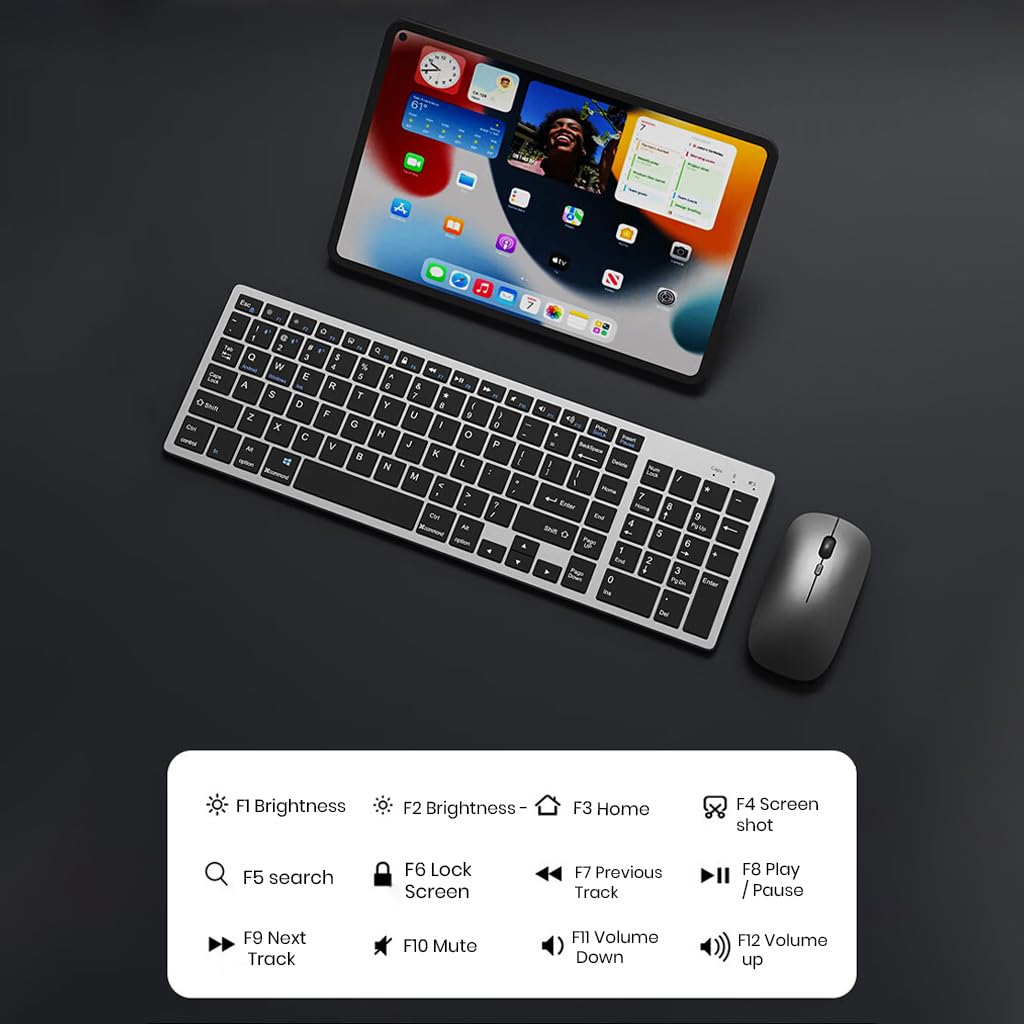
Obraz 5.1: The keyboard displaying its function keys and their associated actions, such as brightness control, home, screen shot, search, lock screen, media playback, and volume control.
- Fn+F1: Zmniejszona jasność
- Fn+F2: Zwiększenie jasności
- Fn+F3: Dom
- Fn+F4: Zrzut ekranu
- Fn+F5: Szukaj
- Fn+F6: Ekran blokady
- Fn+F7: Poprzedni utwór
- Fn+F8: Odtwórz/Pauza
- Fn+F9: Następny utwór
- Fn+F10: Niemy
- Fn+F11: Zmniejsz głośność
- Fn+F12: Zwiększ głośność
5.4 Tryb oszczędzania energii
The keyboard and mouse are equipped with an automatic sleep mode to conserve battery life. If inactive for 10 minutes, the devices will enter sleep mode. To wake them up, simply press any key on the keyboard or move/click the mouse.

Obraz 5.2: Diagram illustrating the auto-sleep mode and how to reactivate the keyboard and mouse by pressing any key.
6. Konserwacja
- Czyszczenie: Do czyszczenia klawiatury i myszy używaj miękkiej, suchej ściereczki. W przypadku uporczywych zabrudzeń, delikatnie przetrzyjamp Można użyć ściereczki, upewniając się, że do urządzenia nie dostanie się żadna ciecz.
- Pokrowiec ochronny: Utilize the included transparent protective cover for the keyboard to guard against dust and accidental spills.
- Składowanie: Przechowuj urządzenia w chłodnym, suchym miejscu, z dala od bezpośredniego światła słonecznego i ekstremalnych temperatur.
- Ładowanie: Always use a 5V/1A power adapter for charging to prevent damage and ensure battery longevity.

Obraz 6.1: The keyboard shown with its transparent protective keyskin, designed to prevent dust and spills.
7. Rozwiązywanie Problemów
| Problem | Możliwa przyczyna | Rozwiązanie |
|---|---|---|
| Keyboard/Mouse not connecting via 2.4GHz USB. | USB receiver not properly inserted, low battery, incorrect mode selected. |
|
| Klawiatura/mysz nie łączy się przez Bluetooth. | Not in pairing mode, device's Bluetooth is off, already connected to max devices, low battery. |
|
| Opóźnienia lub przerywane połączenie. | Zakłócenia, odległość od odbiornika/urządzenia, niski poziom naładowania baterii. |
|
| Klawisze klawiatury nie reagują. | Low battery, device in sleep mode, connection issue. |
|
8. Specyfikacje
| Funkcja | Szczegół |
|---|---|
| Marka | TECPIL |
| Model | K936 |
| Technologia łączności | Keyboard: 3 x Bluetooth 5.0, 1 x 2.4GHz USB; Mouse: 1 x Bluetooth, 1 x 2.4GHz USB |
| Kompatybilne urządzenia | Laptop, komputer osobisty, smartfon, tablet |
| System operacyjny | Android, iOS, Windows, macOS |
| Bateria klawiatury | 300mAh litowo-jonowy (ładowalny) |
| Port ładowania | USB typu C |
| Czas ładowania | 2-4 godzin (w przybliżeniu) |
| Czas czuwania | Do 180 dni |
| Wymiary klawiatury (dł. x szer. x wys.) | Wymiary 36 x 13 x 1.5 cm |
| Wymiary myszy (dł. x szer. x wys.) | 11 x 6.3 x 3 cm (w przybliżeniu) |
| Waga przedmiotu | 661 g (combo) |
| Technologia wykrywania ruchu | Optyczny |
| Orientacja dłoni | Oburęczny |
9. Gwarancja i wsparcie
TECPHILE products come with a standard warranty. For warranty claims, technical support, or any product-related inquiries, please contact TECPHILE customer service through the retailer where the product was purchased or visit the official TECPHILE webwitryna do informacji kontaktowych.
Prosimy zachować dowód zakupu w celach gwarancyjnych.
Manufacturer/Importer: TECPHILE, 2nd Floor, A36, Block B, Naraina Industrial Area Phase 2, Naraina, New Delhi, Delhi, 110028