
1. Ważne informacje dotyczące bezpieczeństwa
Przed montażem i użyciem należy uważnie przeczytać wszystkie instrukcje. Nieprzestrzeganie tych instrukcji może spowodować obrażenia ciała lub uszkodzenie produktu.
- Always keep children and pets away from the desk when in motion.
- Use the child lock feature (if available) to prevent unintended height adjustments.
- Be aware of the anti-collision feature; do not force the desk to move if it encounters an obstacle.
- Ensure all cables are properly managed to avoid entanglement during height adjustments.
- Do not overload the desk. The maximum weight capacity is 180 lbs.
- Używaj biurka tylko na równej powierzchni.
2. Zawartość opakowania
Przed rozpoczęciem montażu sprawdź, czy wszystkie elementy są obecne. Jeśli brakuje którejkolwiek części lub jest ona uszkodzona, skontaktuj się z obsługą klienta.
- Desktop (0.6" thick, Rustic Brown)
- Nogi biurka (2)
- Foot Pads (2)
- Crossbar/Frame Assembly
- Control Panel with LED Touchscreen
- Zasilacz i kabel
- Zaczep na słuchawki
- Assembly Hardware (screws, L-shaped installation tools)
- Instrukcja obsługi
3. Instrukcja montażu
The DEVAISE ASJZ021 desk is designed for quick and simple assembly, typically within 15 minutes. All holes are pre-drilled, and accessories are clearly labeled.
Wymagane narzędzia:
- Śrubokręt krzyżakowy (brak w zestawie)
- L-shaped installation tools (included)
Montaż krok po kroku:
- Rozpakuj komponenty: Ostrożnie wyjmij wszystkie części z opakowania i połóż je na czystej, miękkiej powierzchni, aby zapobiec zarysowaniom.
- Zamontuj podkładki pod stopy: Secure the foot pads to the bottom of each desk leg using the provided screws.
- Złóż ramę: Connect the desk legs to the crossbar/frame assembly. Ensure all connections are tight and secure.
- Dołącz pulpit: Carefully place the desktop onto the assembled frame. Align the pre-drilled holes on the desktop with the frame. Secure the desktop to the frame using the provided screws.
- Zainstaluj Panel sterowania: Mount the LED touchscreen control panel to the underside of the desktop in the designated location. Connect the control panel cable to the motor.
- Podłącz zasilanie: Plug the power adapter into the desk's motor and then into a wall outlet.
- Zamontuj haczyk na słuchawki: Install the headphone hook to the side of the desk as desired.

Obraz: Wybuchowy view of desk components illustrating the 15-minute quick installation process.
4. Instrukcja obsługi
The DEVAISE ASJZ021 Electric Standing Desk features a tri-motor system for smooth and quiet height adjustments and a smart LED touchscreen controller.
Panel sterowania nadview:

Obraz: Szczegółowy view of the multi-function control panel with LED display, up/down arrows, memory presets (1, 2, 3), and 'S' button.
- Wyświetlacz LED: Shows the current desk height in real-time.
- Strzałki w górę/w dół (▲ / ▼): Press and hold to adjust the desk height manually. Release to stop at the desired height.
- Ustawienia pamięci (1, 2, 3): Store and recall up to three personalized height settings.
- 'S' Button: Used for saving memory presets and activating the child lock function.
Regulacja wysokości:
The desk can be adjusted between 28.35 inches (sitting height) and 46.45 inches (standing height).

Image: Comparison of the desk at its minimum height of 28.35 inches and maximum height of 46.45 inches.
- Regulacja ręczna: Press and hold the ▲ (Up) or ▼ (Down) button until the desk reaches your desired height.
- Ustawianie ustawień pamięci:
- Dostosuj wysokość biurka do swoich preferencji za pomocą przycisków Góra/Dół.
- Press the 'S' button. The LED display will show 'S-'.
- Immediately press one of the memory buttons (1, 2, or 3). The display will show 'S-1', 'S-2', or 'S-3' to confirm the height is saved.
- Przywoływanie ustawień pamięci: Simply press the corresponding memory button (1, 2, or 3) once. The desk will automatically move to the saved height.
Cicha praca:
The tri-motor system operates quietly, typically below 50dB, ensuring minimal disruption in your workspace.

Image: Graphic illustrating the quiet operation of the desk, comparing its sound level (below 50dB) to soft breaths (10dB), whisper (25dB), and car horns (80dB).
5. Specyfikacje
Detailed technical specifications for the DEVAISE ASJZ021 Electric Standing Desk.
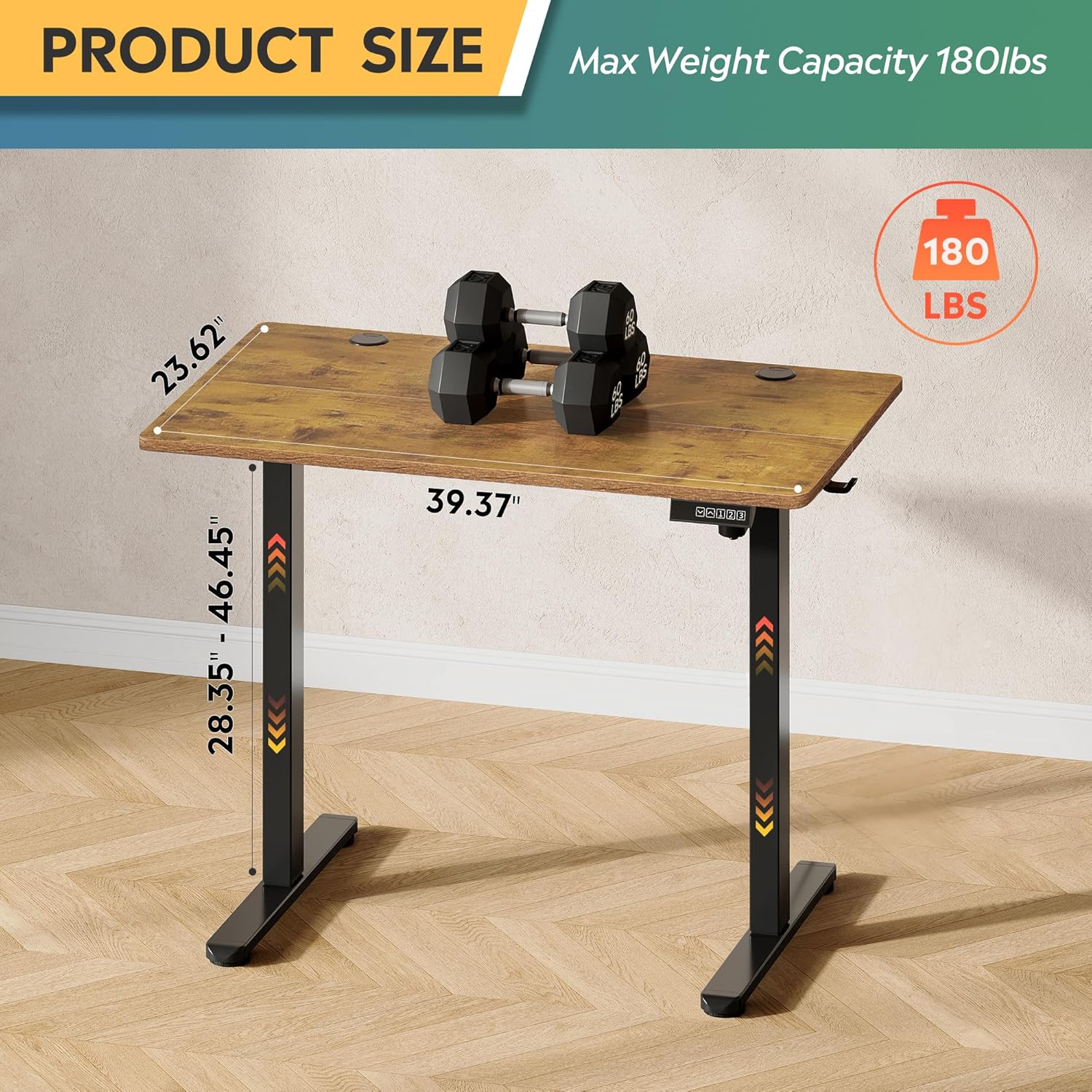
Image: Product dimensions (39.37"W x 23.62"D) and height range (28.35"-46.45"), highlighting the 180 lbs maximum weight capacity.
| Funkcja | Specyfikacja |
|---|---|
| Numer modelu | ASJZ021 |
| Wymiary produktu (Gł. x Szer. x Wys.) | 23.62" gł. x 39.37" szer. x 28.34" wys. |
| Minimalna wysokość | 28.35 cali |
| Maksymalna wysokość | 46.45 cali |
| Grubość blatu | 0.6 cali |
| Maksymalna zalecana waga | 180 funtów |
| Waga przedmiotu | 37 funtów |
| Mechanizm podnoszący | Electric (Tri-motor system) |
| Liczba pozycji wysokości | 3 Ustawienia pamięci |
| Poziom hałasu | <50dB |
| Najlepszy rodzaj materiału | Drewno inżynieryjne |
| Materiał bazowy | Żelazo |
| Kolor | Rustic Brown (Desktop), Black (Base) |
| Cechy specjalne | Adjustable Height, Compact, Electric, LED Touchscreen |
6. Konserwacja
Regular maintenance helps ensure the longevity and optimal performance of your standing desk.
- Czyszczenie: Przetrzyj blat i ramę miękką szmatką.amp szmatką. Unikaj silnych środków chemicznych i ściernych środków czyszczących, które mogłyby uszkodzić wykończenie.
- Zarządzanie kablami: Periodically check and organize cables to prevent them from snagging or getting pinched during height adjustments.
- Dokręcenie śrub: Od czasu do czasu sprawdzaj, czy wszystkie śruby i nakrętki są dobrze dokręcone. W razie potrzeby dokręć je.
- Kontrola silnika: Listen for any unusual noises during operation. If you notice any issues, refer to the troubleshooting section or contact support.
7. Rozwiązywanie Problemów
If you encounter any issues with your DEVAISE ASJZ021 Electric Standing Desk, please refer to the following common problems and solutions.
| Problem | Możliwa przyczyna | Rozwiązanie |
|---|---|---|
| Biurko się nie rusza | Odłączony kabel zasilający; Przeciążenie; Błąd silnika | Check power connections. Reduce weight on desk. Unplug for 10 seconds, then plug back in. |
| Nierówna regulacja wysokości | Przeszkoda; Problem z czujnikiem | Clear any obstructions. Perform a reset (refer to control panel instructions or contact support). |
| Na wyświetlaczu pojawia się kod błędu | Specific system error | Note the error code and consult the DEVAISE support webodwiedź witrynę lub skontaktuj się z obsługą klienta, aby uzyskać szczegółowe wskazówki. |
| Desk stops moving unexpectedly | Anti-collision activated; Overheating protection | Check for obstructions. Allow the motor to cool down for 20 minutes before attempting to operate again. |
If the problem persists after attempting these solutions, please contact DEVAISE customer support.
8. Gwarancja i wsparcie
DEVAISE is committed to providing quality products and customer satisfaction. Your purchase is backed by our support services.
- Obsługa klienta: For any questions, concerns, or assistance with assembly or operation, please contact our 24/7 US-based support team. Refer to your purchase documentation for contact details.
- Informacje o gwarancji: Specific warranty terms and conditions may vary. Please refer to the warranty card included with your product or visit the official DEVAISE webWięcej informacji znajdziesz na naszej stronie.
