
DEVAISE ABGY012
DEVAISE Ergonomic Mesh Desk Chair User Manual
Model: ABGY012
1. Koniec produktuview
The DEVAISE Ergonomic Mesh Desk Chair (Model ABGY012) is designed for comfort and support during extended periods of sitting. It features a breathable mesh design, adjustable lumbar support, a 3D adjustable headrest, and space-saving flip-up armrests. The chair is built with a durable metal frame and silent wheels, supporting a maximum weight of 300 pounds.

Rycina 1: Przód view of the DEVAISE Ergonomic Mesh Desk Chair.
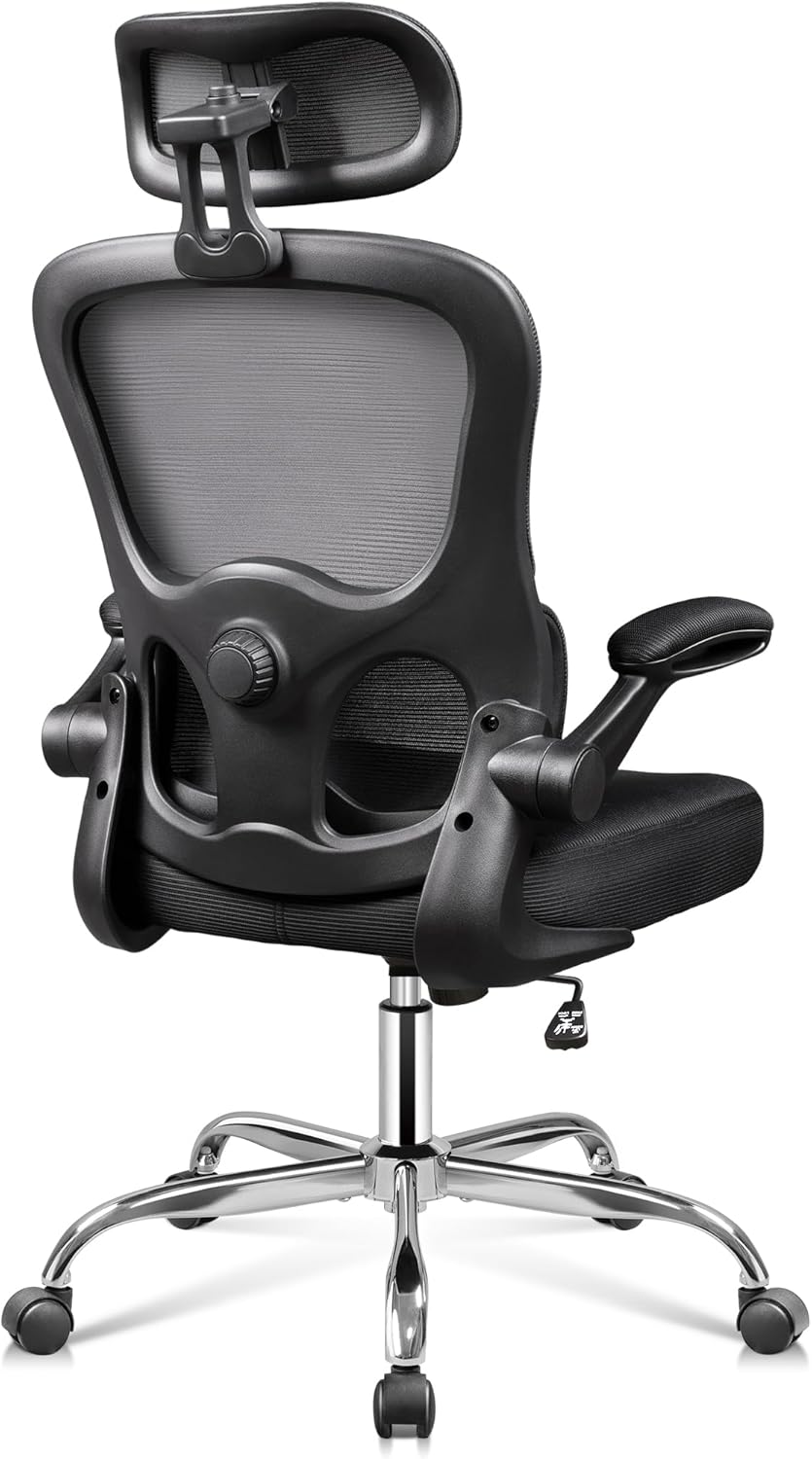
Rysunek 2: Tył view of the DEVAISE Ergonomic Mesh Desk Chair, highlighting the mesh backrest and lumbar support mechanism.
2. Ważne informacje dotyczące bezpieczeństwa
This product has a maximum weight capacity of 300 lbs. Always ensure that the chair is used within this limit. Be cautious when adjusting the headrest, lumbar support, and armrests to prevent any potential injuries. Always follow the assembly instructions carefully to ensure the stability and safety of the chair.
3. Instalacja i montaż
The DEVAISE Ergonomic Mesh Desk Chair is designed for easy assembly, typically taking around 20 minutes. While assembly can be done by one person, having a second person may assist with certain steps, such as attaching the arms to the backrest and seat cushion.
Etapy montażu (wskazówki ogólne):
- Rozpakuj komponenty: Carefully remove all parts from the packaging and lay them out on a clean, flat surface. Verify all components are present against the included parts list.
- Zamontuj kółka do podstawy: Włóż pięć kółek w otwory na końcu każdej nogi podstawy krzesła. Dociśnij mocno, aż zatrzasną się na swoim miejscu.
- Włóż podnośnik gazowy: Umieść cylinder podnośnika gazowego w środkowym otworze złożonej podstawy krzesła.
- Zamocuj mechanizm do siedzenia: Secure the seat plate mechanism to the underside of the seat cushion using the provided screws. Ensure the front of the mechanism faces the front of the seat.
- Podłącz fotel do podnośnika gazowego: Place the assembled seat onto the gas lift cylinder, ensuring it is securely seated.
- Dołącz podłokietniki: Secure the armrests to the seat cushion and backrest using the designated screws.
- Zamocuj oparcie: Connect the backrest to the seat mechanism and armrests.
- Montaż zagłówka: Slide the headrest into the top of the backrest and adjust to your preferred height.
Refer to the detailed assembly instructions included in your product packaging for specific diagrams and screw placements.
4. Instrukcja obsługi
The DEVAISE Ergonomic Mesh Desk Chair offers multiple adjustment features to customize your seating experience for optimal comfort and support.
4.1. Regulacja wysokości siedziska
Aby wyregulować wysokość siedziska, znajdź dźwignię po prawej stronie pod siedziskiem. Pociągnij dźwignię do góry, jednocześnie odrywając się od siedziska, aby je podnieść. Aby obniżyć siedzisko, pociągnij dźwignię do góry, pozostając w pozycji siedzącej.

Figure 3: Location of the seat height adjustment lever.
4.2. Regulacja podparcia lędźwiowego
The chair features separated-adjustable lumbar support. Use the knob located on the side of the backrest to adjust the depth of the lumbar support, allowing you to customize it to fit your waist and provide precise support for your lower back.
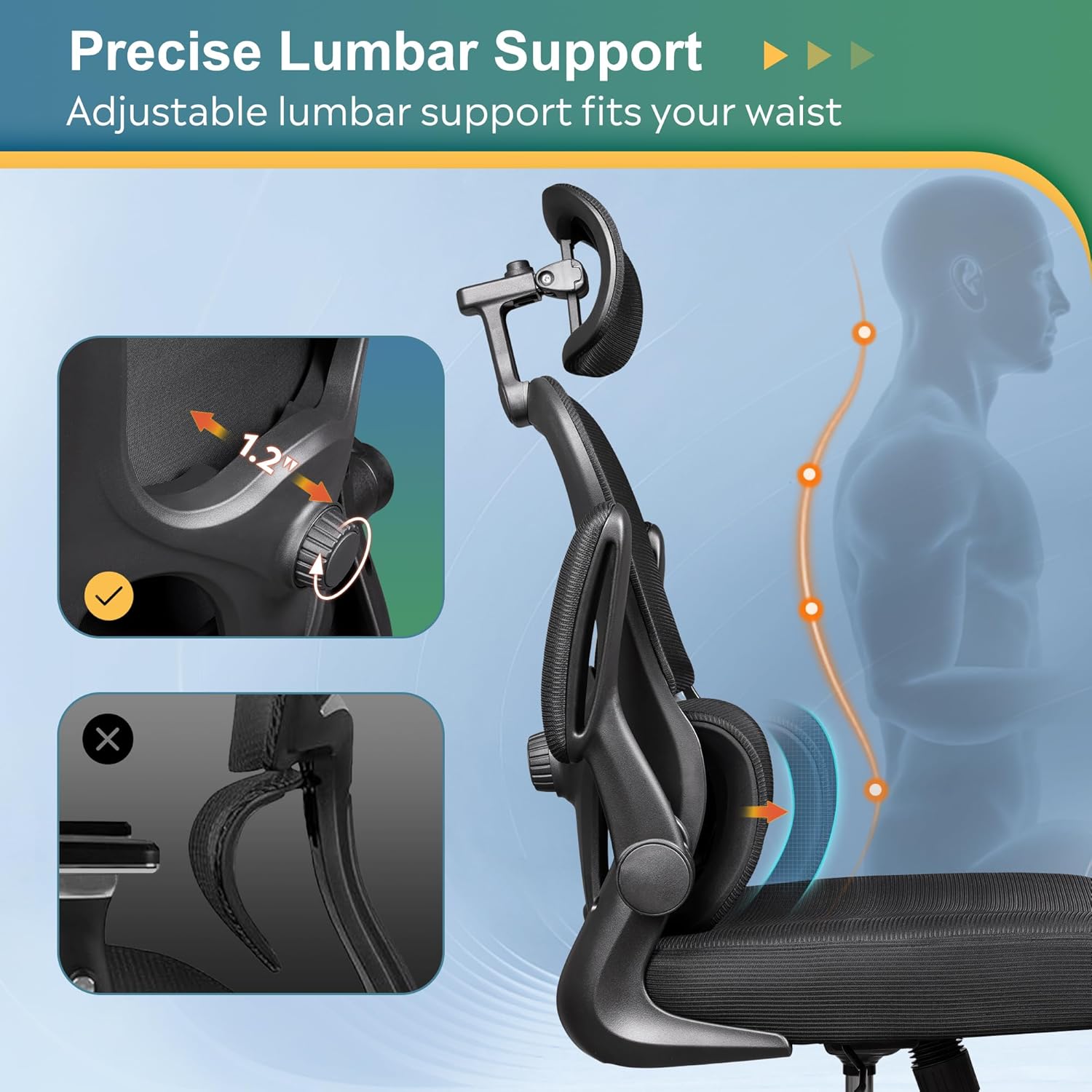
Figure 4: Adjusting the precise lumbar support with the side knob.

Figure 5: Close-up of the lumbar adjustment dial.
4.3. Regulacja zagłówka 3D
The 3D headrest can be adjusted in multiple ways for optimal neck and head support:
- Regulacja wysokości: Slide the headrest up or down to find the ideal height.
- Regulacja nachylenia: Tilt the headrest forward or backward to support your head's natural curve.
- Obrót: Rotate the headrest up to 55 degrees for personalized comfort.
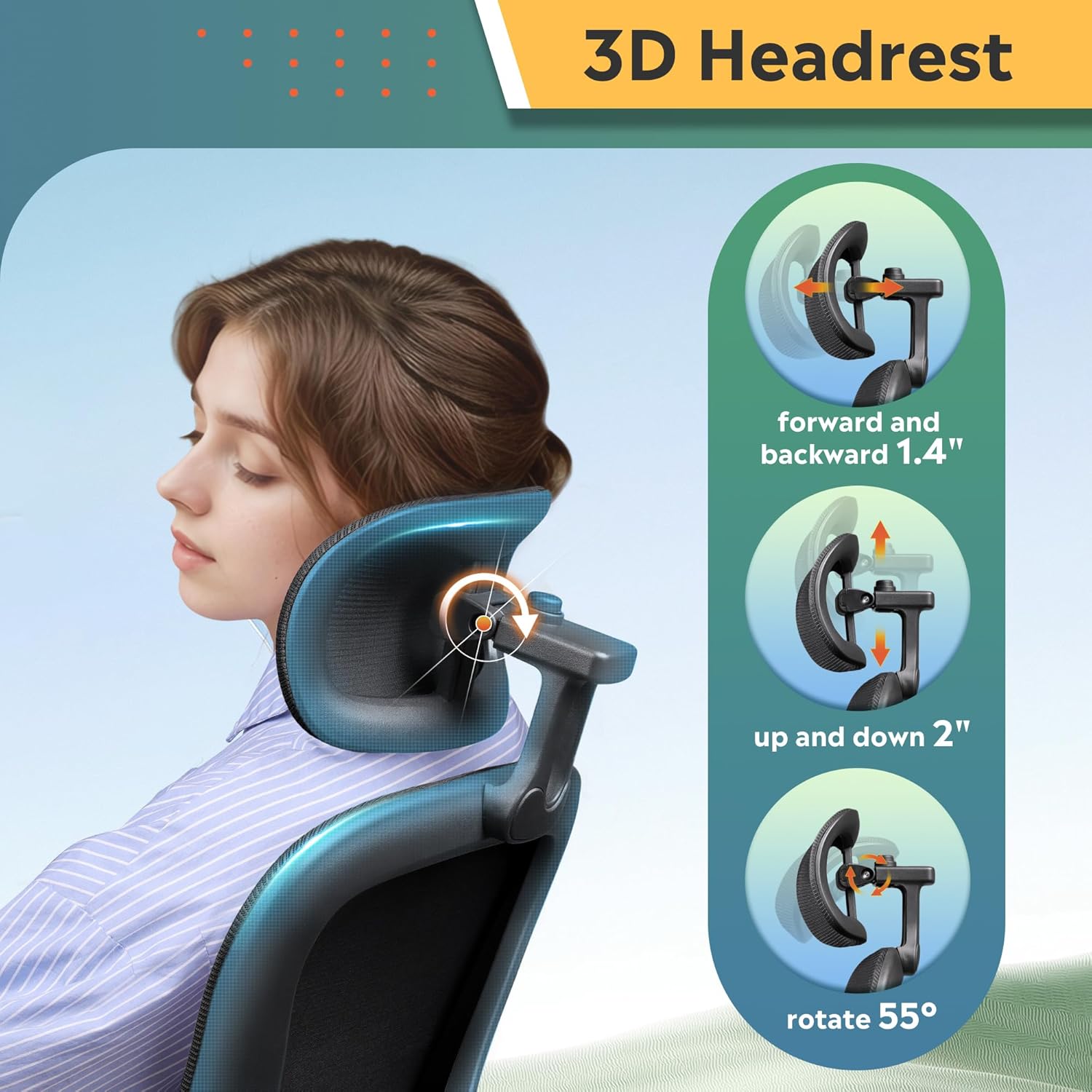
Figure 6: Illustrations of the 3D headrest's height, tilt, and rotation adjustments.

Figure 7: Close-up of the headrest adjustment mechanism.
4.4. Podnoszone podłokietniki
The armrests can be flipped up by 90 degrees. This feature allows you to push the chair closer to your desk, saving space in smaller work areas, or to easily move the chair out of the way when not in use.

Figure 8: The chair demonstrating its 90-degree flip-up armrests for space-saving.

Figure 9: A user demonstrating the flip-up armrest feature.
4.5. Rocking and Tilt Function
The chair offers a 90-125° rocking tilt function. To activate the rocking motion, pull out the lever located on the left side beneath the seat. Push the lever in to lock the chair in an upright position. The tension of the rocking motion can be adjusted using the round knob located at the front underside of the seat.

Figure 10: The tilt tension adjustment knob located under the seat.
4.6. Funkcja obrotu
The chair features BIFMA 5.1-Certified 360° swivel castors, allowing for smooth and silent movement across various floor types without causing damage.

Figure 11: The chair's durable base with 360° swivel casters.
5. Konserwacja
To maintain the longevity and appearance of your DEVAISE Ergonomic Mesh Desk Chair, follow these simple care instructions:
- Czyszczenie: Wyczyść za pomocą reklamyamp cloth. Avoid harsh chemicals or abrasive cleaners that may damage the mesh or frame.
- Regularna kontrola: Okresowo sprawdzaj wszystkie śruby i nakrętki, aby upewnić się, że są dobrze dokręcone. W razie potrzeby dokręć je, aby zachować stabilność i bezpieczeństwo.
- Pielęgnacja kół: Utrzymuj kółka wolne od włosów i zanieczyszczeń, aby zapewnić płynne obracanie się kółek.
6. Rozwiązywanie Problemów
If you encounter any issues with your DEVAISE Ergonomic Mesh Desk Chair, please refer to the following common solutions or contact customer support.
- Krzesło skrzypi lub się chwieje: Check all assembly screws and bolts. Tighten any loose fasteners. Ensure the chair is on a flat, even surface.
- Trudności w regulacji wysokości: Ensure the height adjustment lever is fully engaged. If the gas lift is unresponsive, it may require replacement.
- Kółka nie obracają się płynnie: Inspect casters for trapped debris (hair, lint, etc.) and clean them thoroughly.
- Brak regulacji podparcia lędźwiowego: Verify the adjustment knob is turning freely and not obstructed.
For further assistance, please contact DEVAISE Customer Support.
7. Specyfikacje
| Funkcja | Szczegół |
|---|---|
| Marka | ZDEMASKOWAĆ |
| Nazwa modelu | ABGY012 Home Office Desk Chair |
| Kolor | Czarny |
| Wymiary produktu | 24.8" gł. x 26.57" szer. x 47.05" wys. |
| Maksymalna zalecana waga | 300 funtów |
| Tworzywo | Foam (Seat), Foam & Mesh (Back) |
| Styl pleców | Rozdzielony tył |
| Styl ramienia | Rounded, Flip-up (90°) |
| Liczba pozycji leżących | 1 (90-125° rocking tilt) |
| Kółka | BIFMA 5.1-Certified 360° Swivel Castors |
| Waga przedmiotu | 26.6 funta |
| Montaż | Wymagaj montażu |
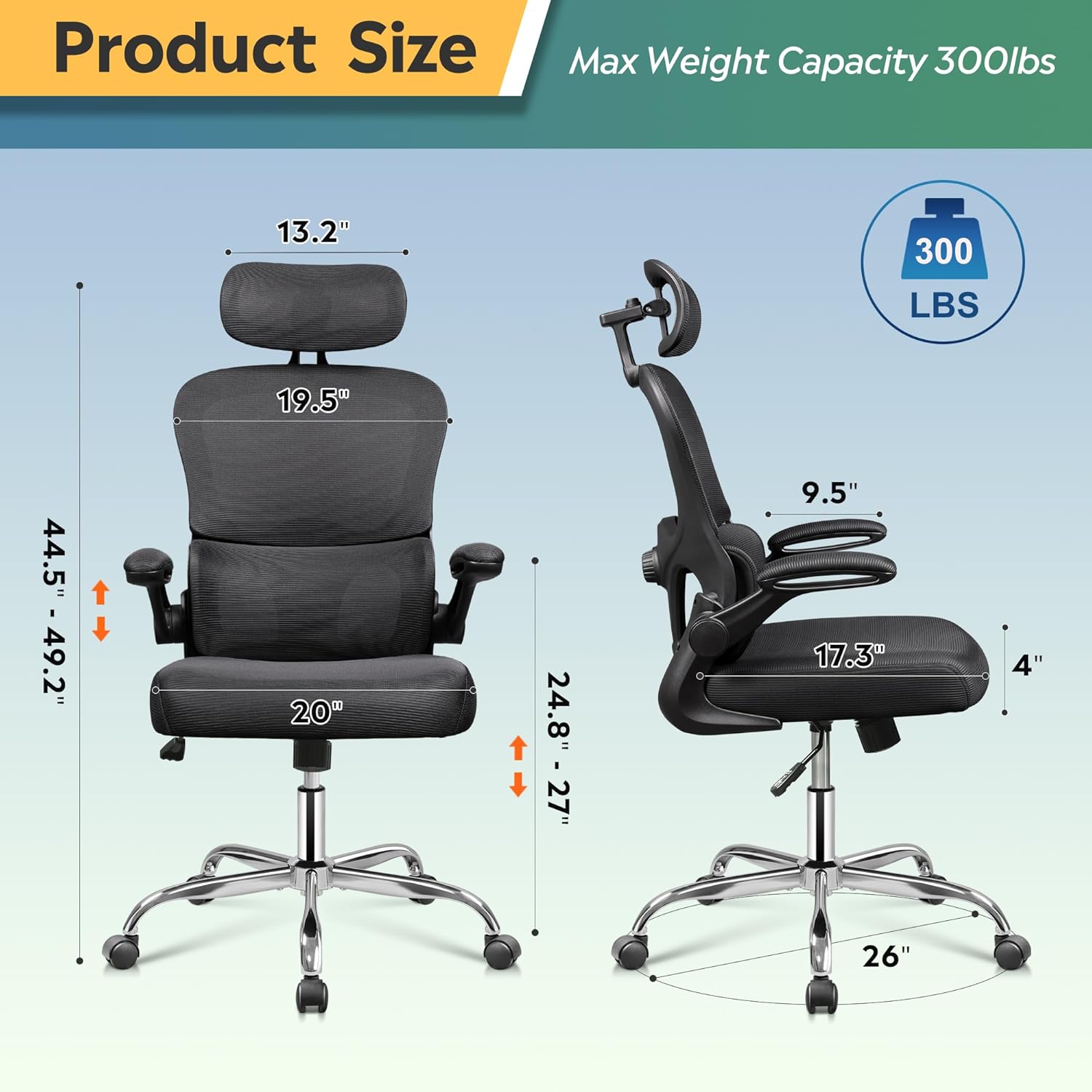
Rysunek 12: Szczegółowe wymiary produktu i maksymalny udźwig.
8. Oficjalny film o produkcie
Watch the official product video from DEVAISE for a visual guide on the chair's features and functionality.
Video 1: DEVAISE office chair 012 - A demonstration of the chair's features and adjustments.
9. Gwarancja
The DEVAISE Ergonomic Mesh Desk Chair comes with a 2-year warranty, providing peace of mind for lasting quality and support.
10. Obsługa klienta
For any questions, concerns, or assistance with your DEVAISE Ergonomic Mesh Desk Chair, please contact our customer support team:
- Webstrona: Visit the official DEVAISE webStrona z odpowiedziami na często zadawane pytania i zasobami pomocy.
- E-mail: Zapoznaj się z opakowaniem produktu lub oficjalnym webwitryna poczty e-mail służącej do obsługi klienta.
- Telefon: Zapoznaj się z opakowaniem produktu lub oficjalnym webstrona z numerem telefonu obsługi klienta.
Powiązane dokumentyABGY012

Ask a question about this manual
Ask about setup, troubleshooting, compatibility, parts, safety, or missing instructions. Manuals+ will review the question and use this page’s manual context to help answer it.