
1. Wprowadzenie
Thank you for choosing the TELESIN Neck Mount SE 2.0. This manual provides detailed instructions for the proper use, setup, and maintenance of your new neck mount. Designed for hands-free POV vlogging, this mount offers enhanced stability and comfort for various action cameras.
Przed użyciem produktu należy dokładnie przeczytać instrukcję, aby zapewnić optymalną wydajność i bezpieczeństwo.
2. Funkcje produktu
- SE 2.0 All-New Upgrade Air Cushion Protection & Stable Chest Strap: Equipped with air cushion protection underneath the neck-hanging base to reduce friction and discomfort. Includes an adjustable chest strap for improved stability during dynamic activities, preventing camera shake.
- Superior Stability POV: The upgraded neck mount base features two additional buckles, allowing transformation into a chest strap for enhanced stability during intense sports like mountain biking, skiing, and motocross.
- Bendable Skin-Friendly Material Enhanced Comfort & One-Key Switch: Made from bendable, tough, skin-friendly silicone with pleated anti-slip properties. Increased width reduces neck pressure for long-term wear. Features a relocated one-click release button for intuitive installation and removal.
- Built-In Rotation Function, Horizontal And Vertical Switching: Supports 90-degree horizontal rotation with four adjustable angles for versatile shooting modes (landscape, portrait, upside-down).
- Szeroka kompatybilność: Compatible with GoPro Hero series (13, 12, 11, 10, 9, 8, 7, 6, 5 Black, 4, 3+ Fusion Session), DJI Osmo Action, Osmo Pocket 2/3, DJI Action 5 Pro/3/4, Insta360 (X5, One R, RS, X2, X3, X4, Go 2, Go 3, Ace Pro), AKASO, and other wearable cameras.
3. Zawartość opakowania
Sprawdź, czy w przesyłce znajdują się wszystkie elementy:
- Neck Mount SE 2.0 × 1
- 1/4 Adapter Head × 1
- Fixing Screw × 1
- Adjustable Chest Strap × 1
- Instrukcja obsługi × 1
Note: Magnetic Phone Holder is not included with this model. It is available in separate combination kits.

Image: Components included in the TELESIN Neck Mount SE 2.0 package.
4. Konfiguracja i instalacja
4.1 Podłączanie kamery
- Prepare the Neck Mount: Ensure the neck mount is clean and free of debris.
- Podłącz kamerę: Align your action camera's mounting prongs with the slot on the neck mount's base. Insert the fixing screw through the prongs and tighten it securely. For cameras with a 1/4 inch thread, use the provided 1/4 adapter head.
- Zabezpiecz kamerę: Ensure the camera is firmly attached and does not wobble.

Obraz: Ponadview of the neck mount and camera attachment points.
4.2 Wearing the Neck Mount
- Miejsce wokół szyi: Gently place the neck holder around your neck, ensuring the camera faces forward.
- Dostosuj dla komfortu: The neck mount is made of bendable material. Adjust the flexible tubing to fit your body shape comfortably. The air cushion padding should rest against your chest/neck area for optimal comfort.
- Optional Chest Strap Attachment: For enhanced stability, attach the adjustable chest strap to the two upgraded buckles on the neck mount base. Thread the strap around your chest and secure it. Adjust the strap length for a snug fit without restricting breathing.

Image: Demonstrating the neck mount with chest strap for enhanced stability.

Image: Detail of the air cushion and flexible material for comfort.

Image: Demonstrating the flexibility and portability of the neck mount.
5. Instrukcja obsługi
5.1 Adjusting Camera Angle and Orientation
- Obrót poziomy: The neck mount features a built-in swivel function allowing 90-degree horizontal rotation. This enables quick switching between landscape and portrait modes without detaching the camera.
- Regulacja kąta: The mount supports four adjustable angles for precise framing.
- One-Click Release: The one-click release button, located on top of the base, simplifies the process of installing and removing your camera.
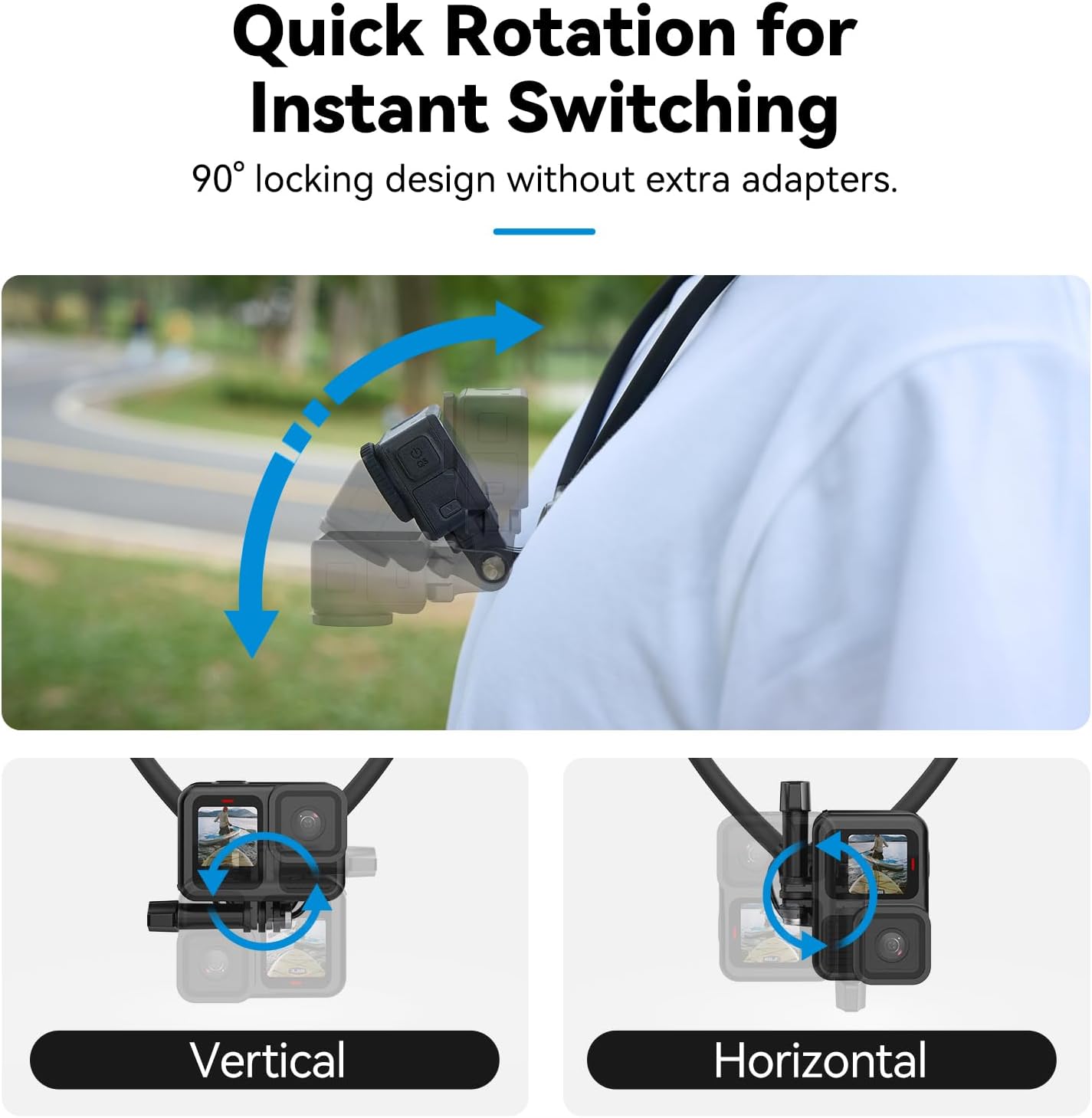
Image: Quick rotation for instant switching between vertical and horizontal views.

Image: Detail of the durable aluminum alloy lock and one-click installation.
6. Konserwacja i pielęgnacja
- Czyszczenie: Wipe the neck mount with a soft, damp cloth after each use, especially if exposed to sweat, dirt, or saltwater. Do not use harsh chemicals or abrasive cleaners.
- Składowanie: Store the neck mount in a cool, dry place away from direct sunlight and extreme temperatures. Its bendable design allows for compact storage.
- Kontrola: Regularly inspect the mount for any signs of wear, damage, or loose components. Ensure the fixing screw and adapter head are always secure before use.
- Unikaj nadmiernego zginania: While flexible, avoid excessively sharp bends or twisting the neck mount to prevent damage to the internal stainless steel tube.
7. Rozwiązywanie Problemów
7.1 Camera Shakes During Recording
- Check Camera Attachment: Ensure your action camera is securely fastened to the mount with the fixing screw tightened.
- Utilize Chest Strap: For high-impact activities, always use the adjustable chest strap to provide additional stability and minimize camera movement.
- Verify Camera Weight: Ensure your camera's weight is within the recommended limit (typically under 300g for optimal stability).
7.2 Discomfort When Wearing
- Dopasuj dopasowanie: Bend the neck mount to conform more closely to your neck and shoulder contours.
- Position Air Cushion: Ensure the air cushion padding is properly positioned against your body to maximize comfort and reduce friction.
- Rób przerwy: For prolonged use, take short breaks to readjust or remove the mount.
8. Specyfikacje
| Model: | TXSM-AU-S2-HNB-09 |
| Zgodność: | Compatible with all action cameras with a two-prong mount, and 1/4 interface cameras (GoPro, DJI, Insta360, AKASO, etc.) |
| Przybory: | Silicone, aluminum alloy, ABS+PC |
| Masa netto: | 155 gramów |
| Neck Strap Length: | 60 cm (20.4 cala) |
| Cechy szczególne: | Quick Release Button, One-Hand Operation, Ergonomic, Hands-Free, Adjustable, Air Cushion Protection, 90-degree Rotation |

Image: Product dimensions and specifications overview.
9. Gwarancja i wsparcie
TELESIN products are manufactured with high-quality materials and undergo strict quality control. For warranty information and technical support, please refer to the official TELESIN webodwiedź witrynę lub skontaktuj się z lokalnym dystrybutorem.
W celu uzyskania informacji o obsłudze klienta prosimy odwiedzić stronę TELESIN Store on Amazon lub skontaktuj się bezpośrednio ze sprzedawcą.


