
Wstęp
This manual provides detailed instructions for the safe and efficient operation of your Phomemo M836-B Portable Thermal Printer. The M836-B is an inkless, wireless thermal printer designed for portability and convenience, supporting various paper sizes including US Letter and A4. Please read this manual thoroughly before using the printer to ensure optimal performance and longevity.
Produkt ponadview
Główne cechy
- Druk termiczny bez użycia atramentu: Utilizes thermal technology, eliminating the need for ink cartridges or ribbons.
- Połączenie bezprzewodowe: Supports Bluetooth for seamless connection with iOS and Android devices.
- Łączność USB: Compatible with Windows, macOS, ChromeOS, and Linux via USB Type-C.
- Wysoka rozdzielczość: Offers a print resolution of 300 DPI for clear text and graphics.
- Przenośna konstrukcja: Compact and lightweight, ideal for travel and on-the-go printing.
- Multi-Size Paper Support: Accommodates various thermal paper sizes, including US Letter (8.5'' x 11'') and A4.
- Wyjście monochromatyczne: Prints in black and white.

Image: The Phomemo M836-B printer demonstrating its inkless thermal printing capability, highlighting no mess from ink.

Obraz: Ponadview of the Phomemo M836-B's key features, including wireless connectivity, inkless operation, 2600mAh battery capacity, and 300 DPI resolution.
Zawartość opakowania
Sprawdź, czy w opakowaniu znajdują się wszystkie elementy:
- Phomemo M836-B Portable Thermal Printer
- Thermal Paper (as specified in the box)
- Kabel USB typu C.
- Instrukcja obsługi (ten dokument)
Przewodnik po konfiguracji
1. Ładowanie drukarki
- Podłącz dołączony kabel USB typu C do portu ładowania drukarki.
- Podłącz drugi koniec kabla USB do kompatybilnego zasilacza USB (nie ma go w zestawie) lub do portu USB komputera.
- The indicator light will show charging status. Charge the printer fully before first use.
2. Ładowanie papieru
The Phomemo M836-B supports both thermal paper rolls and sheet-fed thermal paper.
- Otwórz pokrywę komory papieru.
- For roll paper: Insert the thermal paper roll into the designated slot, ensuring the printing side faces upwards. Gently pull a small length of paper out.
- For sheet-fed paper: Insert the thermal paper sheet into the input slot, ensuring it is straight and aligned.
- Zamknij dokładnie pokrywę komory papieru.

Image: Illustration of how to load different types of thermal paper (roll and sheet) into the Phomemo M836-B printer, showing the paper selection mechanism.
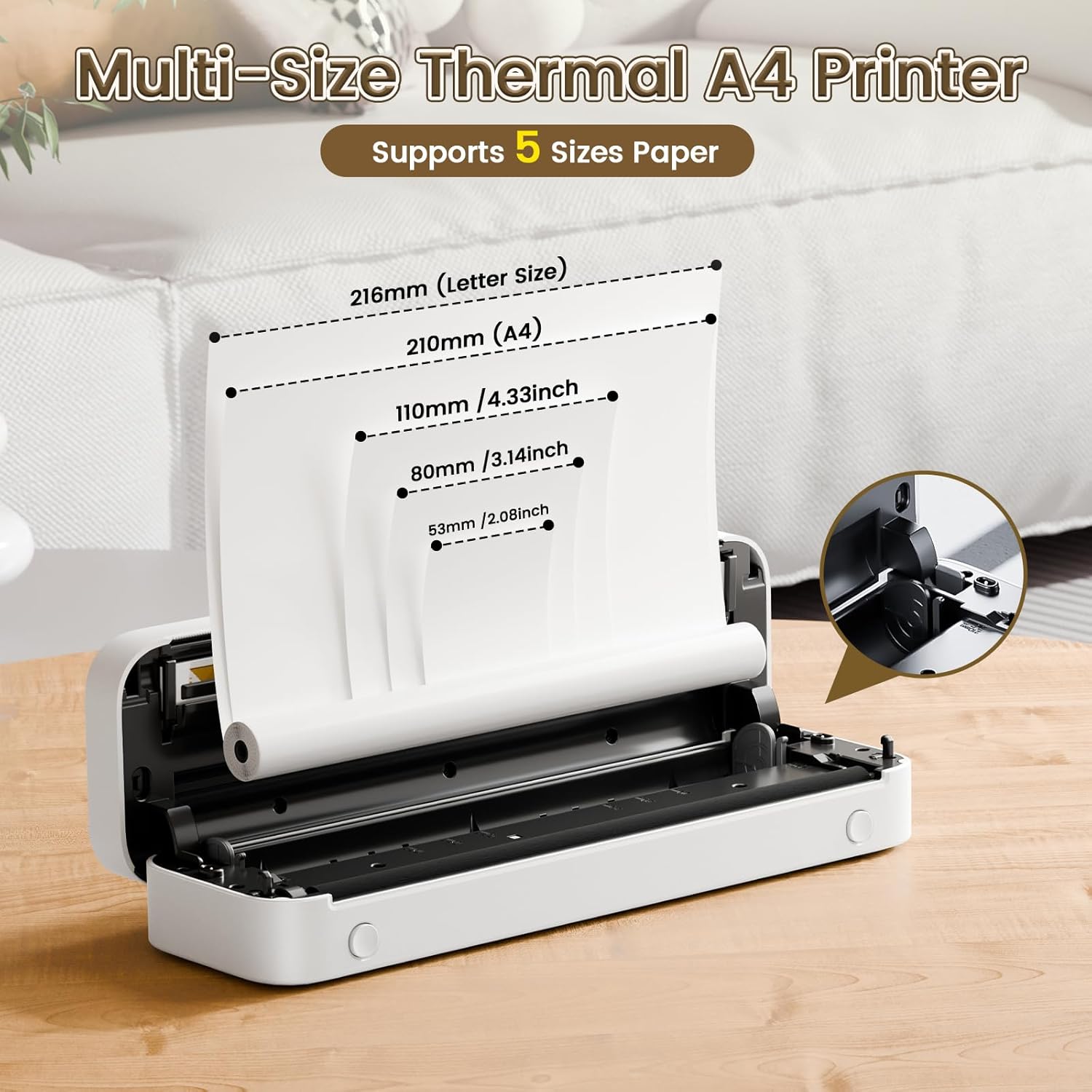
Image: The Phomemo M836-B printer demonstrating support for multiple paper sizes, including US Letter (216mm) and A4 (210mm).
3. Łączenie się z urządzeniami
Drukarka obsługuje połączenia Bluetooth i USB.
Bluetooth Connection (for iOS/Android)
- Pobierz oficjalną aplikację Phomemo ze sklepu z aplikacjami na swoim urządzeniu.
- Turn on the printer by pressing and holding the power button.
- Włącz Bluetooth w swoim urządzeniu mobilnym.
- Open the Phomemo app, search for the printer (M836-B), and pair with it.
- Postępuj zgodnie ze wskazówkami wyświetlanymi na ekranie, aby dokończyć proces parowania.
USB Connection (for Windows/macOS/ChromeOS/Linux)
- Upewnij się, że drukarka jest włączona.
- Podłącz drukarkę do komputera za pomocą dołączonego kabla USB typu C.
- Odwiedź oficjalną stronę Phomemo webStrona (www.phomemo.com) to download and install the appropriate drivers for your operating system.
- Po zainstalowaniu sterowników drukarka powinna zostać rozpoznana przez komputer.

Image: Diagram illustrating the two types of connections supported by the Phomemo M836-B: Bluetooth for Android, iOS, and iPad, and USB for Windows, macOS, ChromeOS, and Linux.
Instrukcja obsługi
Printing from Mobile Devices
- Ensure your printer is charged, loaded with paper, and connected via Bluetooth to your mobile device.
- Otwórz aplikację Phomemo.
- Select the document or image you wish to print from within the app.
- Adjust print settings (e.g., paper size, density) as needed.
- Aby rozpocząć drukowanie, naciśnij przycisk drukowania.
Printing from Computers
- Ensure your printer is charged, loaded with paper, and connected via USB to your computer with drivers installed.
- Otwórz dokument lub file chcesz wydrukować na swoim komputerze.
- Przejdź do "File" > "Drukuj" (lub użyj skrótu Ctrl+P/Cmd+P).
- Select the Phomemo M836-B from the list of available printers.
- W razie potrzeby dostosuj preferencje drukowania (np. rozmiar papieru, orientację).
- Kliknij „Drukuj”.
Paper Handling Tips
- Always use high-quality thermal paper for best results.
- Ensure the paper is loaded correctly with the printable side facing the print head.
- Avoid exposing thermal paper to direct sunlight or high temperatures, as this can degrade print quality over time.
- Manually tear off printed documents carefully after printing, as the printer does not have an automatic cutter.
Konserwacja
Czyszczenie drukarki
- Wyłącz drukarkę i odłącz ją od źródła zasilania.
- Użyj miękkiej, niestrzępiącej się ściereczki, lekko wyczyśćampDelikatnie przetrzyj głowicę drukującą alkoholem izopropylowym. Pozostaw do całkowitego wyschnięcia przed użyciem.
- Clean the exterior of the printer with a soft, dry cloth. Do not use abrasive cleaners or solvents.
Składowanie
- Przechowuj drukarkę w chłodnym, suchym miejscu, z dala od bezpośredniego światła słonecznego i ekstremalnych temperatur.
- If storing for an extended period, ensure the printer is fully charged to maintain battery health.
- Keep thermal paper in its original packaging in a dark, cool place to prevent premature fading.
Rozwiązywanie problemów
If you encounter issues with your Phomemo M836-B printer, refer to the following common problems and solutions:
Drukarka się nie włącza
- Sprawdź baterię: Ensure the printer is sufficiently charged. Connect it to a power source and try again.
- Przycisk zasilania: Press and hold the power button for a few seconds to ensure it's properly activated.
Connectivity Issues (Bluetooth/USB)
- Bluetooth:
- Ensure Bluetooth is enabled on your device and the printer is within range.
- Unpair and re-pair the printer in your device's Bluetooth settings.
- Uruchom ponownie drukarkę i urządzenie mobilne.
- USB:
- Sprawdź, czy kabel USB jest prawidłowo podłączony do drukarki i komputera.
- Ensure the correct printer drivers are installed on your computer. Reinstall if necessary.
- Spróbuj użyć innego portu USB lub kabla.
Poor Print Quality (Blurry, Faded, Streaks)
- Czyszczenie głowicy drukującej: Follow the cleaning instructions in the Maintenance section.
- Paper Quality/Type: Ensure you are using high-quality thermal paper and that it is loaded correctly.
- Gęstość druku: Adjust print density settings in the Phomemo app or printer driver.
- Przechowywanie papieru: Thermal paper exposed to heat or light can degrade. Try a fresh roll of paper.
Zacięcia papieru
- Wyłącz drukarkę: Immediately turn off the printer.
- Usuń papier: Gently pull out any jammed paper. Do not force it, as this can damage the printer.
- Przeładować: Ensure paper is loaded correctly and not wrinkled or bent before restarting.
Dane techniczne
| Funkcja | Specyfikacja |
|---|---|
| Marka | Fomemo |
| Nazwa modelu | M836-B |
| Technologia łączności | Bluetooth, USB typu C |
| Technologia druku | Termiczny |
| Wyjście drukarki | Monochromia |
| Maksymalna rozdzielczość druku | 300 DPI |
| Maksymalna prędkość drukowania (monochromatyczna) | 1.5 stron na minutę |
| Kompatybilne urządzenia | Android Devices, Mac, Windows, iPhone, iPad |
| Maksymalny rozmiar nośnika | 8.5 x 11 cali (format amerykański Letter) |
| Obsługa rozmiaru papieru | US Letter, A4 |
| Printing Media Type | Papier termiczny |
| Waga przedmiotu | 1.53 funta (ok. 694 g) |
| Wymiary produktu (Gł. x Szer. x Wys.) | 7.8D x 26.4W x 4.5H centymetrów |
| Metoda kontroli | Aplikacja |
| Kraj pochodzenia | Chiny |
Gwarancja i wsparcie
Specific warranty details for the Phomemo M836-B Portable Thermal Printer are not provided within this document. For information regarding warranty coverage, technical support, or service, please refer to the warranty card included with your product or contact Phomemo customer service directly through their official webstronę internetową lub dane kontaktowe znajdujące się na opakowaniu produktu.
Official Phomemo Webstrona: www.phomemo.com