
Wstęp
Thank you for choosing the Irfora Multifunction Bamboo 12-Digit Calculator. This eco-friendly calculator combines classic design with modern functionality, featuring a durable bamboo casing and dual power source. This manual provides essential information for setting up, operating, and maintaining your calculator to ensure optimal performance.

Rycina 1: Przód view of the Irfora Bamboo Calculator, showcasing its natural bamboo finish and large LCD display.
1. Konfiguracja
1.1 Rozpakowanie
Carefully remove the calculator from its packaging. Inspect the device for any signs of damage. Retain the packaging for future storage or transport.
1.2 Włączanie
The calculator features a dual power system: solar and button battery. It automatically switches between power sources for efficient operation.
- Energia słoneczna: Place the calculator in a well-lit area. The solar panel will convert light into energy, powering the device.
- Moc baterii: In low-light conditions, the calculator will automatically switch to button battery power.
- Aby włączyć kalkulator, naciśnij przycisk ON/C/CE or AC klawisz.

Rysunek 2: Kątowy view of the Irfora Bamboo Calculator, showing the solar panel and LCD display.
2. Instrukcja obsługi
The calculator features 29 large, comfortable keys with carved numbers that are designed not to fade over time.
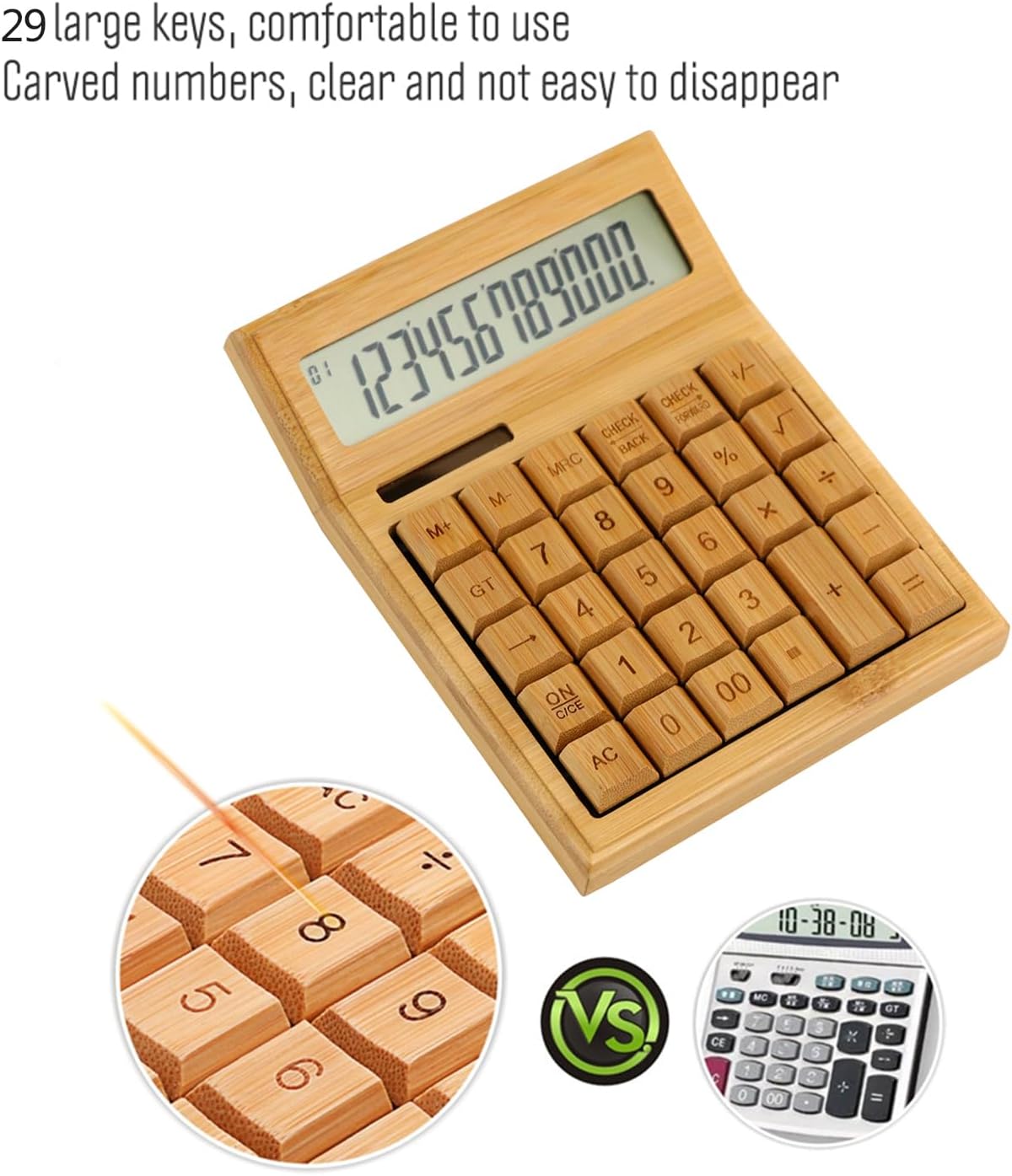
Rysunek 3: Zbliżenie view highlighting the large, carved bamboo keys for comfortable and durable use.
2.1 Podstawowe operacje arytmetyczne
Perform standard calculations using the following keys:
- + (Dodatek)
- - (Odejmowanie)
- × (Mnożenie)
- ÷ (Dział)
- = (Równy)
2.2 Funkcje pamięci
The calculator includes memory functions for complex calculations:
- M+: Dodaje wyświetloną wartość do pamięci.
- M-: Odejmuje wyświetloną wartość od pamięci.
- MRC: Recalls the memory value. Pressing twice clears the memory.
2.3 Funkcje specjalne
- % (procentytage): Calculates percentagt.j.
- √ (Square Root): Calculates the square root of the displayed number.
- +/- (Sign Change): Changes the sign of the displayed number (positive to negative, or vice versa).
- AC (All Clear): Clears all entries and memory.
- ON/C/CE (On/Clear Entry): Turns on the calculator. When on, clears the last entry. Pressing twice clears all entries.

Figure 4: A hand demonstrating the use of the calculator for daily tasks.
2.4 Automatyczne wyłączanie zasilania
To conserve energy, the calculator will automatically power off after approximately 12 minutes of inactivity. Press ON/C/CE or AC aby z powrotem włączyć.
3. Konserwacja
3.1 Czyszczenie
To clean the calculator, gently wipe the surface with a soft, dry cloth. For stubborn dirt, a slightly damp Można użyć ściereczki, ale należy uważać, aby wilgoć nie dostała się do urządzenia. Unikaj stosowania silnych środków chemicznych i ściernych środków czyszczących.
3.2 Przechowywanie
Store the calculator in a cool, dry place away from direct sunlight and extreme temperatures. Prolonged exposure to direct sunlight can affect the bamboo finish.
3.3 Wymiana baterii
The calculator uses a button battery (type not specified, typically AG10 or LR1130). If the display becomes dim or unresponsive in low light, the battery may need replacement. Consult a qualified technician or refer to the product packaging for specific battery type and replacement instructions. Improper battery replacement can damage the device.
4. Rozwiązywanie Problemów
| Problem | Możliwa przyczyna | Rozwiązanie |
|---|---|---|
| Wyświetlacz jest pusty lub przyciemniony. | Niewystarczające oświetlenie do zasilania energią słoneczną lub niski poziom naładowania akumulatora. | Move the calculator to a brighter area. If the problem persists, the button battery may need replacement. |
| Kalkulator nie włącza się. | No power, or device is in auto-off mode. | Ensure adequate light for solar power. Press ON/C/CE or AC. If still unresponsive, replace the button battery. |
| Nieprawidłowe wyniki obliczeń. | Incorrect key input, or temporary internal error. | Naciskać AC to clear all entries and restart the calculation. Double-check your input. |
5. Specyfikacje
- Marka: Irfora
- Model: LAKJPOS0867
- Wyświetlacz: 12-cyfrowy duży wyświetlacz LCD
- Źródło zasilania: Dual Power (Solar & Button Battery)
- Klawiatura: 29 Bamboo Keys with Carved Numbers
- Funkcje: Basic Arithmetic, Square Root, Percentage, Memory (M+, M-, MRC), Sign Change
- Automatyczne wyłączanie: Około 12 minut bezczynności
- Wymiary produktu: 19 x 14 x 4 cm (ok. 7.5 x 5.5 x 1.6 cala)
- Waga produktu: 295 g (ok. 0.65 funta)
6. Gwarancja i wsparcie
Aby uzyskać informacje o gwarancji i obsłudze klienta, zapoznaj się z dokumentacją dołączoną do zakupu lub skontaktuj się ze sprzedawcą. Zachowaj dowód zakupu na wypadek roszczeń gwarancyjnych.
Aby uzyskać dalszą pomoc, odwiedź stronę Irfora brand page on Amazon.co.jp.