
1. Wprowadzenie
This manual provides essential information for the safe and effective use of the Generic JBD 8S-24S, 100A Smart Battery Management System (BMS). This BMS is designed for LiFePO4 and LFP prismatic battery packs, supporting configurations from 8S to 24S (24V to 72V) with a continuous discharge current of up to 100 Amperes and a charge current of up to 50 Amperes. It features an active balancer and Bluetooth connectivity for monitoring and control.
The Smart BMS protects your battery pack from overcharge, over-discharge, overcurrent, and over-temperature conditions, ensuring optimal performance and extending battery life.
2. Informacje dotyczące bezpieczeństwa
WARNING: Improper installation or use can lead to serious injury, fire, or damage to the battery pack and BMS. Always follow safety guidelines.
- Wysoka głośnośćtage i prąd: Battery packs operate at high voltages and currents. Exercise extreme caution to avoid short circuits.
- Profesjonalna instalacja: Montaż powinien zostać przeprowadzony przez wykwalifikowany personel mający doświadczenie w zakresie systemów akumulatorowych.
- Izolacja: Ensure all connections are properly insulated to prevent accidental contact.
- Wentylacja: Install the BMS in a well-ventilated area.
- Woda i wilgoć: Keep the BMS dry and away from water or high humidity.
- Prawidłowa polaryzacja: Always connect wires with correct polarity. Reversing polarity can cause irreversible damage.
- Sprzęt ochronny: Należy nosić odpowiedni sprzęt ochrony osobistej (PPE), w tym rękawice termoizolacyjne i okulary ochronne.
3. Zawartość opakowania
Sprawdź, czy w opakowaniu znajdują się wszystkie elementy:
- JBD Smart BMS Unit
- Balance Connector Wires (P- and B- leads)
- NTC Temperature Sensors
- Bluetooth Module (or communication module)
- Przełącznik zewnętrzny

Figure 3.1: JBD Smart BMS unit with included balance wires, NTC sensors, and switch.
4. Konfiguracja i instalacja
Follow these steps carefully for proper installation of the BMS. Refer to the wiring diagrams provided with your specific unit for exact pinouts.
- Przygotuj akumulator: Ensure your LiFePO4/LFP battery cells are balanced and at a safe voltagpoziom e przed podłączeniem BMS.
- Podłącz przewody równoważące:
- Start by connecting the B- (negative) wire of the balance harness to the negative terminal of the first cell (Cell 1).
- Connect the next wire to the positive terminal of Cell 1 (which is also the negative of Cell 2), and continue this sequence until all cell positive terminals are connected to the corresponding balance wires.
- Ensure the last balance wire connects to the positive terminal of the last cell (Cell N).
- Sprawdź dokładnie objtage of each balance wire against the B- terminal to confirm correct sequencing. The voltage should increase incrementally.
- Connect Balance Harness to BMS: Once all balance wires are connected to the battery cells and verified, plug the balance harness connector into the designated port on the BMS.
- Connect NTC Temperature Sensors: Attach the NTC sensors to appropriate locations on the battery pack to monitor cell temperatures. Plug the sensor wires into the NTC ports on the BMS.
- Podłącz główne przewody zasilające:
- Podłącz główny B- (Battery Negative) wire from the battery pack's overall negative terminal to the B- terminal on the BMS.
- Podłącz główny P- (Load/Charge Negative) wire from the BMS to your load/charger negative terminal. The battery pack's overall positive terminal connects directly to the load/charger positive terminal, bypassing the BMS.
- Connect External Switch: If your BMS includes an external switch, connect it to the designated switch port. This switch can be used to activate/deactivate the BMS.
- Podłącz moduł Bluetooth: Plug the Bluetooth module into its dedicated port on the BMS.

Figure 4.1: JBD Smart BMS with balance wires, NTC sensors, and main power connections.
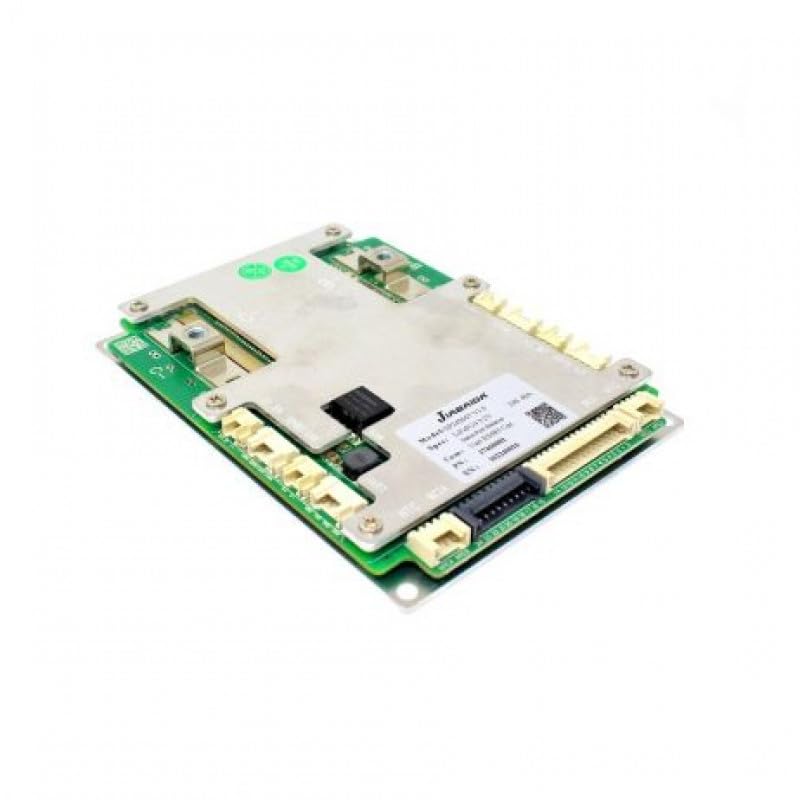
Rysunek 4.2: Zbliżenie view of the JBD Smart BMS board, showing connection points.
5. Instrukcja obsługi
The JBD Smart BMS utilizes Bluetooth connectivity for monitoring and configuration via a dedicated mobile application.
- Pobierz aplikację: Szukaj the official JBD BMS application on your smartphone's app store (e.g., "Xiaoxiang BMS" or similar, as specified by the manufacturer).
- Połącz przez Bluetooth:
- Upewnij się, że Bluetooth jest włączony w Twoim smartfonie.
- Open the JBD BMS app. The app should automatically scan for nearby BMS devices.
- Select your BMS from the list of available devices. You may need to enter a default password (refer to the app's instructions or manufacturer documentation).
- Monitorowanie stanu baterii: Once connected, the app will display real-time data, including:
- Całkowita pojemność akumulatoratage
- Pojedyncza komórka objtages
- Prąd ładowania/rozładowania
- Battery temperature (from NTC sensors)
- Stan naładowania (SOC)
- BMS status (protection triggers, balancing status)
- Aktywne równoważenie: The BMS features an active balancer to equalize cell voltages. This process typically occurs automatically when cell voltage differences exceed a set threshold. You can monitor the balancing status through the app.
- Configuration (Advanced Users): The app may allow configuration of various parameters such as over-voltage, pod objętościątage, overcurrent thresholds, and temperature limits. Exercise extreme caution when modifying these settings, as incorrect values can damage the battery or BMS.
6. Konserwacja
Regular maintenance ensures the longevity and reliable operation of your BMS and battery pack.
- Kontrola wizualna: Okresowo należy sprawdzać system BMS oraz całe okablowanie pod kątem uszkodzeń, korozji lub luźnych połączeń.
- Czystość: Utrzymuj jednostkę BMS w czystości, bez kurzu i zanieczyszczeń. Do czyszczenia używaj suchej, miękkiej ściereczki.
- Warunki środowiskowe: Upewnij się, że system BMS działa w określonych zakresach temperatury i wilgotności. Unikaj ekstremalnych warunków.
- Aktualizacje oprogramowania układowego: Sprawdź producenta website or app for any available firmware updates for the BMS. Follow update instructions carefully.
7. Rozwiązywanie Problemów
If you encounter issues with your JBD Smart BMS, refer to the following common problems and solutions:
- BMS nie włącza się:
- Check all main power connections (B- and P-) for secure contact and correct polarity.
- Sprawdź pojemność akumulatoratage znajduje się w zasięgu działania BMS.
- Ensure the external switch (if present) is in the 'ON' position.
- Brak połączenia Bluetooth:
- Confirm the Bluetooth module is correctly plugged into the BMS.
- Ensure Bluetooth is enabled on your smartphone and the app has necessary permissions.
- Spróbuj ponownie uruchomić aplikację lub telefon.
- Move closer to the BMS unit.
- Nieprawidłowa objętośćtage Odczyty:
- Recheck all balance wire connections to ensure they are in the correct sequence and securely attached to each cell.
- Inspect balance wires for damage or breaks.
- BMS Triggering Protection (e.g., Over-discharge, Overcurrent):
- Identify the specific protection triggered via the app.
- Over-discharge: Naładuj akumulator.
- Nadprądowe: Reduce the load or check for short circuits in the system. Ensure your load does not exceed the BMS's continuous current rating.
- Nadmierna ilośćtage/Podobjtage: Check charger settings and cell balance.
- Powyżej temperatury: Ensure adequate ventilation and check NTC sensor placement.
Jeśli po wypróbowaniu tych rozwiązań problem nadal występuje, skontaktuj się z pomocą techniczną.
8. Specyfikacje

Figure 8.1: JBD Smart BMS board showing model and specification details.
| Funkcja | Specyfikacja |
|---|---|
| Marka | Generic (Manufacturer: JBD -Jaibada) |
| Nazwa modelu | SMART BMS 24-72V -100A |
| Numer modelu | 8S-24S,100A SMART |
| Skład ogniw baterii | Lithium-Phosphate (LiFePO4, LFP) |
| Cell Count Range | 8S-24S |
| Tomtage Zakres | 24V - 72V (Nominal) |
| Maksymalny ciągły prąd rozładowania | 100 Amps |
| Maksymalny prąd ładowania | 50 Amps |
| Balancing Type | Aktywny balanser |
| Łączność | Bluetooth |
| Wymiary (dł. x szer. x wys.) | 15 x 6 x 3 centymetrów |
| Waga przedmiotu | 500 gram |
| Kraj pochodzenia | Chiny |
9. Informacje o gwarancji
This product is sold without an explicit warranty. Please refer to your point of purchase for any return or exchange policies.
10. Wsparcie
For technical assistance or inquiries, please contact:
OLEIO SHOPZ
Telefon: 8137035522