
1. Koniec produktuview
The Rraycom S-W1B-SP is a wireless outdoor security camera system designed for comprehensive surveillance. Featuring 2K QHD resolution, dual-band 5G/2.4G Wi-Fi connectivity, and a solar panel for continuous power, this camera offers advanced features such as human detection, color night vision, two-way audio, and compatibility with Amazon Alexa. Its IP65 waterproof rating ensures reliable performance in various outdoor conditions.

Image 1.1: Rraycom S-W1B-SP 5G Solar Security Camera with attached solar panel.
2. Zawartość opakowania
Sprawdź, czy w pakiecie znajdują się wszystkie komponenty:
- Rraycom S-W1B-SP 5G Solar Security Camera (2 units)
- Panel słoneczny (2 jednostki)
- Uchwyty montażowe i śruby
- Kabel ładujący USB
- Instrukcja obsługi (ten dokument)
3. Przewodnik konfiguracji
3.1 Ładowanie kamery
Before initial use, fully charge the camera's internal battery using the provided USB cable. Connect the cable to the camera's charging port and a standard 5V USB power adapter (not included). The LED indicator will show charging status.
3.2 Instalacja aplikacji i tworzenie konta
- Download the O-KAM app from your smartphone's app store (iOS or Android).
- Otwórz aplikację i utwórz nowe konto lub zaloguj się, jeśli już je posiadasz.

Image 3.1: The O-KAM app interface showing quick connection via Bluetooth.
3.3 Podłączanie kamery do sieci Wi-Fi
The camera supports dual-band 5G/2.4G Wi-Fi for flexible connectivity.
- In the O-KAM app, tap 'Add Device' or the '+' icon.
- Postępuj zgodnie z instrukcjami wyświetlanymi na ekranie, aby wybrać model aparatu.
- Enable Bluetooth on your smartphone for quick pairing.
- Select your 2.4GHz or 5GHz Wi-Fi network and enter the password. Ensure your phone is connected to the same network.
- The app will generate a QR code. Hold your phone's screen approximately 6-8 inches (15-20 cm) in front of the camera lens until you hear a confirmation sound.
- Once connected, the camera's LED indicator will change, and the app will confirm successful pairing.

Image 3.2: The camera supports both 5GHz and 2.4GHz Wi-Fi networks for flexible connectivity.
3.4 Fizyczna instalacja
Choose a location with good Wi-Fi signal and direct sunlight exposure for the solar panel.
- Montaż kamery: Use the provided mounting bracket and screws to securely attach the camera to a wall or other stable surface. Adjust the camera angle for optimal viewzasięg.
- Montaż panelu słonecznego: Position the solar panel in an area that receives maximum direct sunlight throughout the day. Connect the solar panel cable to the camera's charging port. Ensure the connection is secure and waterproof.

Image 3.3: The camera and solar panel are designed with IP65 weatherproofing for outdoor use.
4. Instrukcja obsługi
4.1 Na żywo View i nagrywanie
Access the live feed from your camera through the O-KAM app. You can manually record video or capture screenshots directly from the live view interfejs.

Image 4.1: The O-KAM app provides fast loading of live HD video.
4.2 Detekcja ruchu i alerty
The camera features advanced human detection and PIR motion detection to minimize false alarms. When motion is detected, the camera will record an event and send a notification to your smartphone.
- Regulacja czułości: In the app settings, you can adjust the motion detection sensitivity to suit your environment.
- Niestandardowe strefy aktywności: Zdefiniuj określone obszary w obrębie kamery view where you want to receive motion alerts, ignoring irrelevant areas.

Image 4.2: AI Human Detection reduces false alarms by distinguishing people from other objects.

Image 4.3: Customize activity zones to receive alerts only for important events.
4.3 Kolorowa wizja nocna
The camera provides 2K QHD resolution with full-color night vision, allowing you to see important details clearly even in low-light conditions.
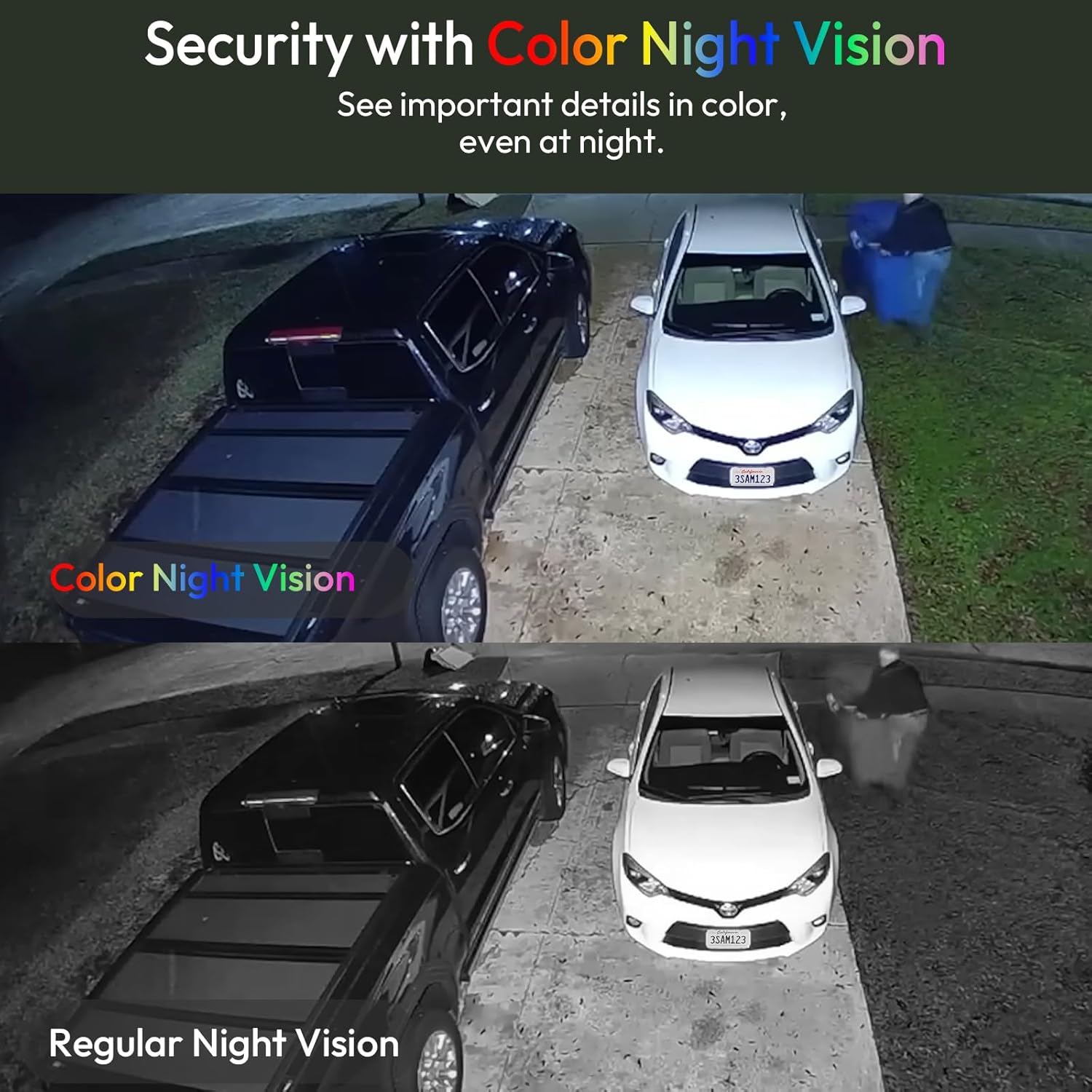
Image 4.4: Color Night Vision provides clear, detailed footage w nocy.
4.4 Two-Way Audio and Siren Alarm
Use the built-in microphone and speaker for two-way communication. You can speak to visitors or deter intruders. The camera also features a siren alarm and spotlights that can be activated manually or automatically upon detection.

Image 4.5: Enhanced two-way talk with a louder speaker and more sensitive microphone.

Image 4.6: The camera can activate a spotlight and siren to deter unwanted visitors.
4.5 Opcje przechowywania
The camera supports both local storage via a Micro SD card (up to 256GB, not included) and cloud storage (subscription may be required for certain features).

Image 4.7: Securely store footage using cloud services or a Micro SD card.
4.6 Integracja z Alexą
The Rraycom camera is compatible with Amazon Alexa. You can use voice commands to view podgląd obrazu z kamery na kompatybilnych urządzeniach obsługujących Alexę.
- Łączenie z Alexą: Follow the instructions in the O-KAM app or Alexa app to link your Rraycom account.
- Polecenia głosowe: Example: "Alexa, show me the backyard camera."

Image 4.8: The camera integrates with Amazon Alexa for convenient voice control and viewing.
4.7 Identyfikacja ptaków za pomocą sztucznej inteligencji
The camera offers an AI bird identification feature that can recognize different bird species. This feature may require a separate subscription within the O-KAM app.
Video 4.9: Demonstration of AI Bird Recognition feature, identifying birds in the camera's view.
5. Pielęgnacja i konserwacja
- Czyszczenie: Regularnie czyść obiektyw aparatu i panel słoneczny miękką, miękką szmatką.amp ściereczką, aby zapewnić wyraźny obraz i wydajne ładowanie słoneczne. Unikaj środków czyszczących o działaniu ściernym.
- Wydajność paneli słonecznych: Ensure the solar panel remains free from obstructions like leaves, dirt, or snow to maintain optimal charging performance.
- Aktualizacje oprogramowania układowego: Check the O-KAM app periodically for firmware updates to ensure your camera has the latest features and security enhancements.
- Zarządzanie kartami SD: W przypadku korzystania z karty SD należy okresowo ją aktualizować.view i wykonaj kopię zapasową ważnych informacjitage. Format the SD card within the app as needed to maintain performance.
6. Rozwiązywanie Problemów
| Problem | Możliwe rozwiązanie |
|---|---|
| Kamera często traci połączenie z siecią. | Check Wi-Fi signal strength at the camera's location. Move the camera closer to the router or consider a Wi-Fi extender. Ensure the camera's battery is charged. |
| Inconsistent motion detection or missed recordings. | Adjust motion detection sensitivity in the app. Verify activity zones are correctly configured. Ensure the camera's view is clear of obstructions. Check battery level, as low power can affect recording. |
| Night vision not working or poor quality. | Ensure the camera lens is clean. Check app settings for night vision mode (auto/color). Verify there are no strong light sources directly facing the camera at night, which can interfere. |
| Solar panel not charging the camera. | Ensure the solar panel is positioned in direct sunlight for several hours daily. Clean the solar panel surface. Check the connection cable between the panel and the camera. |
| Nie można połączyć się z siecią Wi-Fi. | Ensure you are connecting to a 2.4GHz or 5GHz network (both supported). Double-check the Wi-Fi password. Restart your router and the camera. Ensure your phone's Bluetooth is enabled during initial setup. |
| Bateria szybko się rozładowuje. | High motion detection frequency, frequent live view access, or continuous recording can increase battery consumption. Adjust settings to reduce these factors. Ensure the solar panel is effectively charging the camera. |
Wideo 6.1: Ponadview of the camera's wireless connectivity, which can impact performance if not optimized.
7. Specyfikacje produktu
| Funkcja | Szczegół |
|---|---|
| Nazwa modelu | S-W1B-SP |
| Marka | Rraycom |
| Zalecane zastosowanie | Bezpieczeństwo na zewnątrz |
| Technologia łączności | Wireless (5G/2.4G Dual Band Wi-Fi, Bluetooth) |
| Cechy specjalne | 2-Way Audio, Compatible with Alexa, Free Person Detection, Spotlights & Siren Alarm |
| Zastosowanie wewnątrz/na zewnątrz | Plenerowy |
| Kompatybilne urządzenia | Smartphone (via O-KAM app), Amazon Alexa devices |
| Kolor | Czarny |
| Materiał obudowy | Akrylonitryl-butadien-styren (ABS) |
| Źródło zasilania | Zasilany energią słoneczną |
| Wymiary przedmiotu | 4 x 3.7 x 4.7 cala |
| Liczba jednostek | 2 Liczba |
8. Informacje o gwarancji
This Rraycom product is covered by a Roczna gwarancja producenta od daty zakupu. Niniejsza gwarancja obejmuje wady materiałowe i wykonawcze powstałe w wyniku normalnego użytkowania. Nie obejmuje ona uszkodzeń spowodowanych niewłaściwym użytkowaniem, wypadkami, nieautoryzowanymi modyfikacjami ani klęskami żywiołowymi. Prosimy zachować dowód zakupu na potrzeby roszczeń gwarancyjnych.
9. Obsługa klienta
For technical assistance, troubleshooting guidance, or warranty inquiries, please refer to the support section within the O-KAM mobile application or visit the official Rraycom website. Detailed FAQs and contact information may be available there.