
1. Wprowadzenie
This manual provides essential instructions for the proper setup, operation, and maintenance of your Irfora Remote Control. This remote control is designed for wireless navigation and control of compatible GPS fishing bait boats, specifically models D18B, D16B, D18E, and D16E.
The remote control features a strong signal for extended range and an LCD screen to display critical information about your bait boat's status and location.

Image: The Irfora Remote Control shown alongside a compatible GPS fishing bait boat, demonstrating its intended use for wireless operation.
2. Koniec produktuview
Familiarize yourself with the components and controls of your Irfora Remote Control.
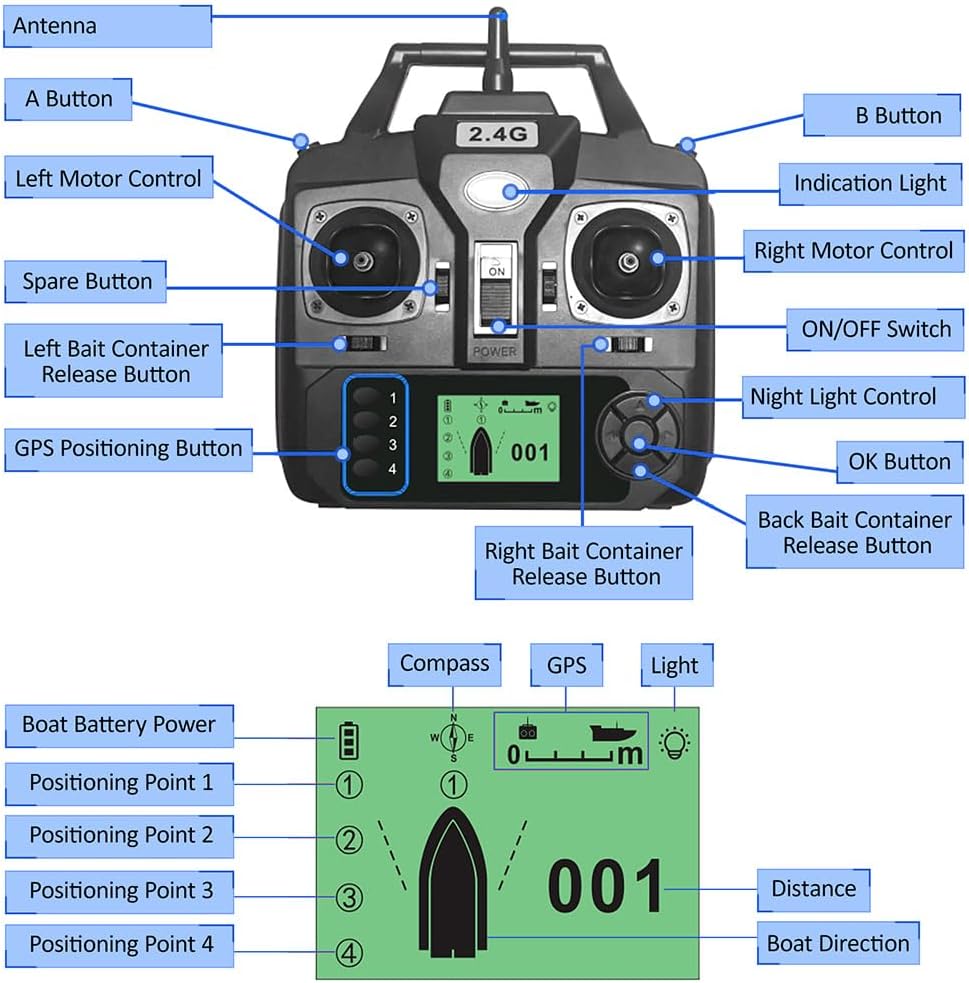
Image: A detailed diagram labeling each part of the remote control, including the antenna, joysticks, ON/OFF switch, bait release buttons, GPS positioning buttons, and LCD screen.
Kluczowe komponenty:
- Antena: Do bezprzewodowej transmisji sygnału.
- Left Motor Control: Joystick for controlling the left motor of the bait boat.
- Right Motor Control: Joystick for controlling the right motor of the bait boat.
- Przełącznik włącz / wyłącz: Włącza i wyłącza pilota.
- Lampka sygnalizacyjna: Zapewnia informację zwrotną o statusie.
- Przycisk A / Przycisk B: Auxiliary control buttons.
- Left Bait Container Release Button: Activates the release mechanism for the left bait container.
- Right Bait Container Release Button: Activates the release mechanism for the right bait container.
- Back Bait Container Release Button: Activates the release mechanism for the rear bait container (if applicable to boat model).
- GPS Positioning Button (1-4): Służy do ustawiania i przywoływania punktów pozycjonowania GPS.
- Sterowanie oświetleniem nocnym: Activates or deactivates the boat's night lights.
- Przycisk OK: Potwierdza wybór na ekranie LCD.
- Ekran LCD: Displays boat distance, direction, positioning points, battery life, and light status.

Obraz: Przód view of the remote control, illustrating its physical dimensions for reference.
3. Konfiguracja
3.1 Instalacja baterii
- Znajdź komorę baterii z tyłu pilota.
- Otwórz pokrywę komory baterii.
- Włóż 4 baterie AA (nie ma ich w zestawie) do komory, zwracając uwagę na prawidłową biegunowość (+/-).
- Dokładnie zamknij pokrywę komory baterii.

Obraz: Tył view of the remote control, highlighting the battery compartment for battery installation.
3.2 Włączanie/wyłączanie
- To power on, slide the ON/OFF switch to the "ON" position. The LCD screen will illuminate.
- To power off, slide the ON/OFF switch to the "OFF" position. The LCD screen will turn off.
3.3 Pairing with Bait Boat
The remote control is typically pre-paired with compatible Irfora GPS fishing bait boats. If pairing is required or connection is lost:
- Ensure both the remote control and the bait boat are powered off.
- Power on the bait boat first.
- Within 5 seconds, power on the remote control.
- The remote control should automatically connect to the bait boat. The LCD screen will display connection status. Refer to your bait boat's specific manual for detailed pairing instructions if issues persist.
4. Instrukcja obsługi
This section details the functions of the remote control for navigating and operating your GPS fishing bait boat.

Image: The remote control in use, demonstrating its function in guiding a bait boat across the water.
4.1 Boat Navigation
- Użyj Left Motor Control joystick to adjust the speed and direction of the left motor.
- Użyj Right Motor Control joystick to adjust the speed and direction of the right motor.
- Combine both joysticks for forward, backward, turning, and precise maneuvering.
4.2 Wypuszczanie przynęty
- Naciśnij Left Bait Container Release Button to open the left bait compartment and release bait.
- Naciśnij Right Bait Container Release Button to open the right bait compartment and release bait.
- Naciśnij Back Bait Container Release Button to open the rear bait compartment (if available on your boat model).
4.3 Pozycjonowanie GPS
The remote control allows you to set and recall up to 4 GPS positioning points.
- Setting a Point: Navigate the boat to the desired location. Press and hold one of the GPS Positioning Buttons (1-4) until the remote confirms the point is saved.
- Recalling a Point: Naciśnij żądany GPS Positioning Button (1-4) briefly. The boat will automatically navigate to the saved location.
4.4 Informacje o ekranie LCD
The LCD screen provides real-time data:
- Moc akumulatora łodzi: Indicates the remaining battery life of the bait boat.
- Kompas: Pokazuje aktualny kurs łodzi.
- Stan GPS: Indicates GPS signal strength and lock.
- Stan światła: Shows if the boat's lights are on or off.
- Dystans: Displays the distance of the boat from the remote control or a set point.
- Kierunek łodzi: Wizualne przedstawienie orientacji łodzi.
- Positioning Points (1-4): Indicates which GPS points are set or active.
4.5 Sterowanie oświetleniem nocnym
- Naciśnij Sterowanie oświetleniem nocnym button to toggle the bait boat's night lights on or off for visibility in low-light conditions.
5. Konserwacja
- Czyszczenie: Przetrzyj pilota miękką, suchą ściereczką. Nie używaj silnych środków chemicznych ani ściernych środków czyszczących.
- Składowanie: Store the remote control in a cool, dry place away from direct sunlight and extreme temperatures. Remove batteries if storing for extended periods to prevent leakage.
- Narażenie na działanie wody: The remote control is not waterproof. Avoid exposing it to water or high humidity.
6. Rozwiązywanie Problemów
| Problem | Możliwa przyczyna | Rozwiązanie |
|---|---|---|
| Pilot zdalnego sterowania nie włącza się. | Baterie są rozładowane lub nieprawidłowo zainstalowane. | Wymień baterie AA na nowe, pamiętając o zachowaniu prawidłowej biegunowości. |
| No connection to bait boat. | Boat is not powered on; remote is out of range; pairing issue. | Ensure boat is on. Move closer to the boat. Re-attempt pairing procedure (Section 3.3). |
| Boat does not respond to controls. | Weak signal; boat battery low; remote battery low. | Check remote and boat battery levels. Move closer to the boat. |
| Ekran LCD jest przyciemniony lub pusty. | Niski poziom baterii pilota. | Wymień baterie pilota. |
7. Specyfikacje
- Marka: Irfora
- Tworzywo: Plastikowy
- Kolor: Czarny
- Wymiary produktu: Approximately 15.5 cm (W) x 16.5 cm (H) / 6.1 in (W) x 6.5 in (H)
- Wymiary opakowania: Approximately 17 cm x 17 cm x 7 cm / 6.7 in x 6.7 in x 2.8 in
- Waga paczki: Około 250 g / 8.8 uncji
- Źródło zasilania: 4 baterie AA (brak w zestawie)
- Częstotliwość bezprzewodowa: 2.4G
- Zdalny zasięg: 400-500 metrów
- Zgodność: Irfora GPS Fishing Bait Boats D18B, D16B, D18E, D16E