
We Technology RL14
Smart WiFi Door Lock with 3D Face Recognition, Fingerprint, Video Doorbell & Intercom
Model: RL14 | Brand: We Technology
1. Koniec produktuview
The We Technology Smart WiFi Door Lock is an advanced security solution for your home, integrating multiple unlocking methods with smart home connectivity. This comprehensive manual provides detailed instructions for installation, operation, maintenance, and troubleshooting to ensure optimal performance and security.
2. Główne cechy
- Advanced 3D Face Recognition Technology: Unlock your door instantly with ultra-secure, touchless 3D facial recognition.
- All-in-One Smart Access (7 Unlocking Methods): Offers versatile entry options including Face ID, Fingerprint, Passcode, IC Card, Mechanical Key, Tuya App (Remote), and Temporary Codes.
- Video Intercom & Real-Time Two-Way Audio: Communicate with visitors directly via the built-in video intercom from anywhere using your smartphone.
- HD Camera & Smart Doorbell Functionality: Features an integrated HD camera and smart doorbell for live viewing and notifications on your smartphone.
- Tuya App Control with 2.4GHz WiFi: Remotely lock/unlock, monitor access logs, create passcodes, and receive alerts via the Tuya app.
- Auto-Locking System for Maximum Safety: Automatically secures your home seconds after entry for peace of mind.
- Inteligentne sterowanie głosem: Kompatybilny z Amazon Alexa i Google Assistant, co umożliwia obsługę bez użycia rąk.
- Long-Lasting 4200mAh Rechargeable Battery: Ensures extended reliability with easy USB recharging.
- Quick DIY Install with Military-Grade Security: Designed for easy self-installation, fitting 45–90mm doors, and built with a premium alloy body and secure 6068 mortise lock.
- Weatherproof & Durable Design: IPX5 rated to withstand rain, dust, and various outdoor conditions.
3. Co znajduje się w pudełku

Image: All components included in the Smart WiFi Door Lock package.
- 1 x double sided door lock (front and rear panels)
- 1 x lock body
- 1 x C-level lock cylinder
- 1 x 4200mAh rechargeable battery
- 2 x mechanical keys
- 2 x IC Cards
- 1 x instrukcja obsługi
- Installation screws and accessories
- 1 x kabel USB (do ładowania)
4. Składniki i wymiary produktu

Image: Labeled diagram of the smart door lock's external and internal components.
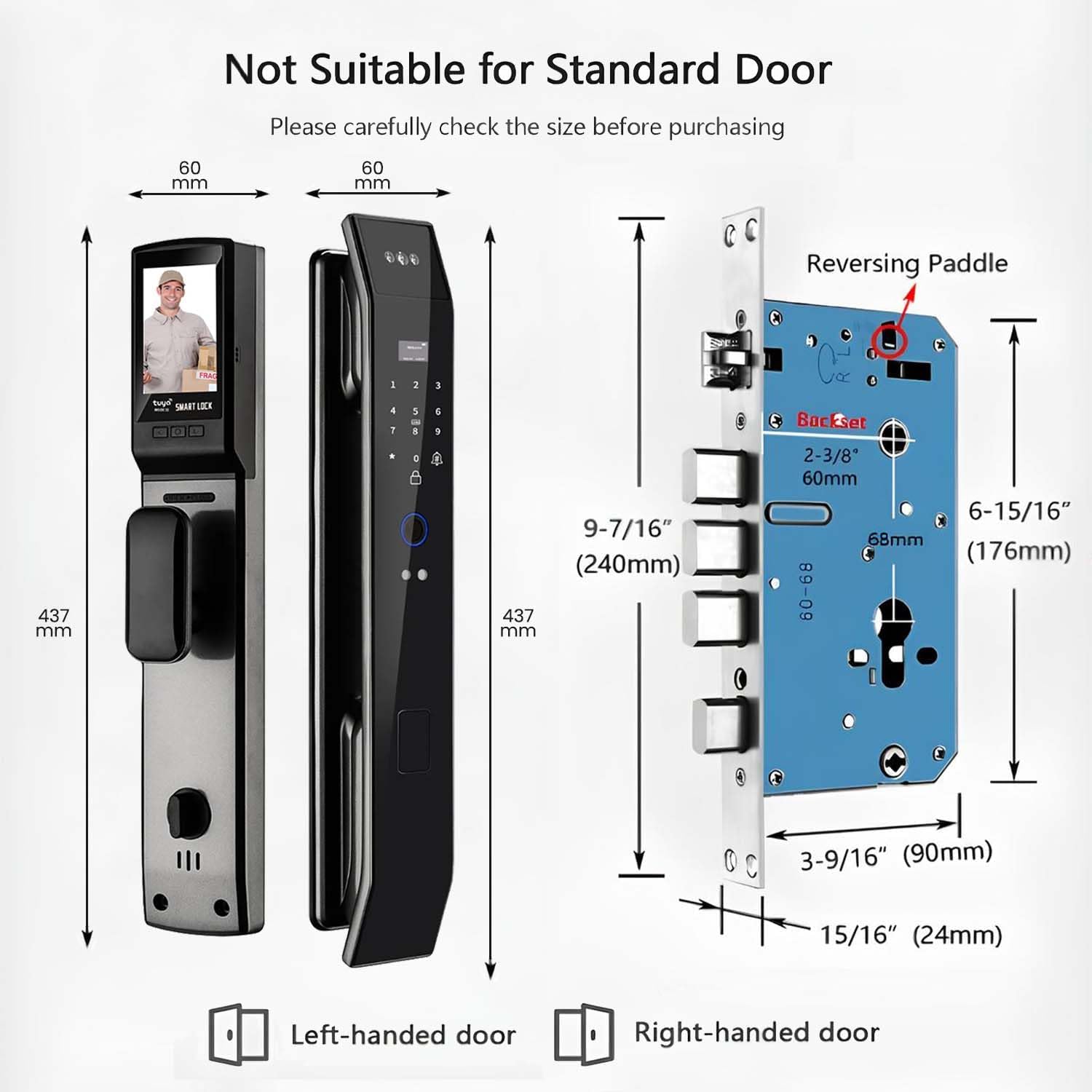
Image: Detailed dimensions of the lock and mortise for installation planning.

Image: The 4200mAh rechargeable lithium battery and its installation.
5. Konfiguracja i instalacja
The Smart WiFi Door Lock is designed for quick DIY installation. Please ensure your door meets the specified dimensions (45-90mm thickness) before beginning. Refer to the included paper manual for step-by-step instructions and template.
5.1. Sprawdzenie zgodności drzwi

Image: Critical measurements for door preparation and lock installation.
Before installation, carefully check the dimensions of your door and existing lock to ensure compatibility. The lock is designed for doors with a thickness between 45mm and 90mm. Use the provided template to mark and drill holes accurately.
5.2. Adjusting Motor Direction
The lock's motor direction may need to be adjusted based on your door's opening direction (left-handed or right-handed). Follow the steps in the video below to configure the motor direction correctly.
Video: Instructions on how to change the motor direction of the RL14 Smart Lock to match your door's orientation.
6. Instrukcja obsługi
6.1. Metody odblokowywania
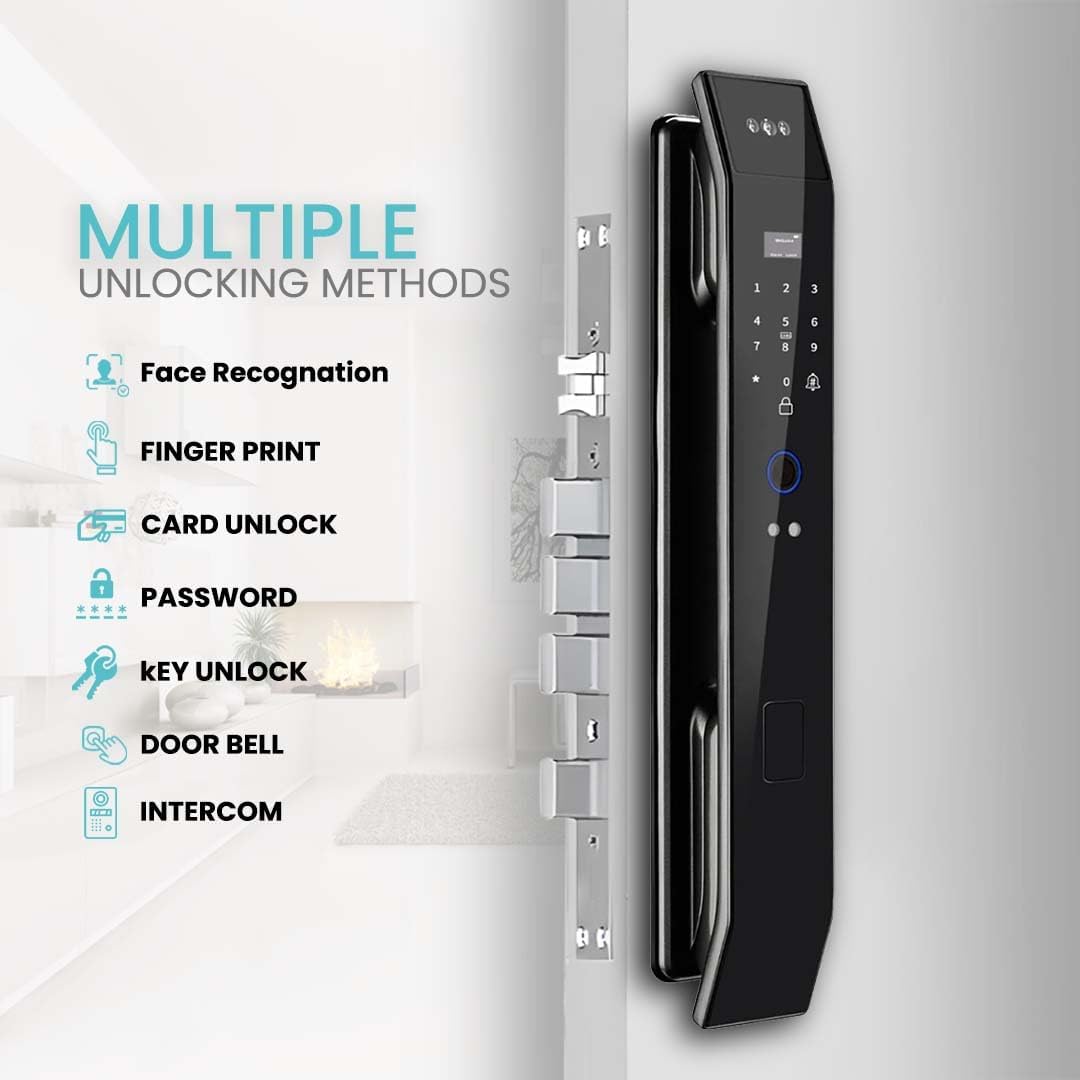
Obraz: Ponadview of the various methods to unlock your smart door lock.
- Rozpoznawanie twarzy 3D: Stand in front of the lock, and it will automatically recognize your face for quick entry.
- Odcisk palca: Połóż zarejestrowany palec na czytniku linii papilarnych.
- Kod dostępu: Enter your registered numerical passcode on the keypad.
- Karta elektroniczna: Tap your registered IC card on the designated card reader area.
- Klucz mechaniczny: Use the physical key as a traditional backup method.
- Tuya App (Remote): Use the Tuya Smart app on your smartphone to remotely unlock the door.
- Kody tymczasowe: Generate and share temporary passcodes for guests or service providers via the app.
6.2. Kontrola aplikacji Tuya

Image: The Tuya Smart app interface for controlling the lock.
Download the Tuya Smart app from your device's app store. Follow the in-app instructions to pair your lock with your 2.4GHz WiFi network. The app allows you to:
- Remotely lock and unlock your door.
- View real-time access logs and notifications.
- Add, modify, or delete user fingerprints, passcodes, and IC cards.
- Generate temporary or recurring passcodes.
- Manage settings and preferences for the lock.
6.3. Video Intercom and Smart Doorbell

Image: Demonstrating the video intercom and two-way audio feature.
When a visitor presses the doorbell button on the lock, you will receive a notification on your smartphone. You can then view the live video feed and engage in two-way audio communication with the visitor, even when you are not home.
6.4. Auto-Locking System
The lock features an auto-locking function that can be enabled or disabled via the Tuya app. When enabled, the door will automatically lock a few seconds after it closes, providing an extra layer of security without manual intervention.
6.5. Integracja sterowania głosowego
Integrate your smart lock with Amazon Alexa or Google Assistant for convenient voice control. Once connected through the Tuya app, you can use voice commands to lock or unlock your door (with a voice passcode for unlocking for security purposes).
7. Konserwacja
- Czyszczenie: Przetrzyj powierzchnię zamka miękką szmatką.amp ściereczką. Unikaj środków czyszczących o działaniu ściernym i rozpuszczalników, które mogą uszkodzić wykończenie lub elementy elektroniczne.
- Zarządzanie baterią: The 4200mAh battery is rechargeable. Monitor the battery level via the Tuya app. Recharge the battery promptly when a low battery alert is received to ensure continuous operation.
- Pielęgnacja czujnika: Keep the fingerprint sensor and camera lens clean and free of dust or smudges for optimal performance.
- Kontrola mechaniczna: Periodically check the mechanical components, such as the handle and deadbolt, for smooth operation. Do not force the handle if it feels stiff.
- Aktualizacje oprogramowania układowego: Check the Tuya app regularly for any available firmware updates to ensure your lock has the latest features and security enhancements.
8. Rozwiązywanie Problemów
| Problem | Możliwa przyczyna | Rozwiązanie |
|---|---|---|
| Lock not responding to input (fingerprint, passcode, card) | Low battery; Incorrect input; Sensor/keypad dirty; System error. | Recharge battery; Re-enter credentials carefully; Clean sensor/keypad; Try resetting the lock (refer to manual for reset procedure). |
| Cannot connect to Wi-Fi or Tuya App | Incorrect Wi-Fi password; Router too far; Only 5GHz Wi-Fi available; App pairing issue. | Ensure correct 2.4GHz Wi-Fi network and password; Move router closer or use a Wi-Fi extender; Re-attempt pairing process in the app. |
| Video doorbell/intercom not working | Poor Wi-Fi signal; App permissions not granted; Camera lens obstructed. | Check Wi-Fi signal strength; Grant necessary camera/microphone permissions to the Tuya app; Clean camera lens. |
| Lock makes unusual noises or is stiff | Improper installation; Mechanical obstruction; Motor issue. | Review installation steps, especially mortise alignment; Check for any physical obstructions in the door frame or lock mechanism; Contact customer support if issue persists. |
| Bateria szybko się rozładowuje | Frequent usage; Poor Wi-Fi signal (lock constantly searching); Extreme temperatures. | This is normal with high usage; Improve Wi-Fi signal strength; Ensure lock is within operating temperature range. |
9. Specyfikacje
| Atrybut | Szczegół |
|---|---|
| Nazwa modelu | 3D Face Recognition Door Lock |
| Numer modelu przedmiotu | RL14 |
| Marka | We Technology |
| Kolor | Szary |
| Tworzywo | Aluminium |
| Wymiary przedmiotu Dł. x Szer. x Wys. | 17.2 x 2.4 x 2.3 cala |
| Waga przedmiotu | 5.5 funtów |
| Źródło zasilania | Zasilany bateryjnie (akumulator 4200mAh) |
| Technologia łączności | Wireless (Bluetooth, Wi-Fi 2.4GHz) |
| Typ kontrolera | Amazon Alexa, Android, Asystent Google, iOS |
| Zastosowanie wewnątrz/na zewnątrz | Outdoor (IPX5 Water Resistant) |
| Typ instalacji | Screw In (Door Mount) |
| Zgodność grubości drzwi | 45–90 mm |
| UPC | 850060105289 |
10. Gwarancja i wsparcie
This We Technology Smart WiFi Door Lock comes with a standard manufacturer's warranty. For specific warranty terms, duration, and claim procedures, please refer to the warranty card included in your product packaging or visit the official We Technology website. For technical support, troubleshooting assistance beyond this manual, or replacement parts, please contact We Technology customer service directly.
Informacje kontaktowe: Please refer to the product packaging or the official We Technology webstrona zawierająca najnowsze dane kontaktowe działu obsługi klienta.
Ask a question about this manual
Ask about setup, troubleshooting, compatibility, parts, safety, or missing instructions. Manuals+ will review the question and use this page’s manual context to help answer it.