
Wstęp
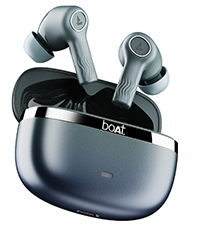
Welcome to the user manual for your boAt Nirvana Ion ANC Pro True Wireless Stereo (TWS) Earbuds. These earbuds are designed to provide a high-quality audio experience with advanced features such as Hi-Res Audio with LDAC, Active Noise Cancellation, and extended battery life. Please read this manual carefully to ensure proper use and optimal performance of your device.

Image: boAt Nirvana Ion ANC Pro TWS Earbuds and charging case.
Co jest w pudełku
- 1 x słuchawki TWS
- 1 x etui ładujące
- 1 x Karta gwarancyjna
- 1 x Instrukcja obsługi
- 1 x kabel ładujący (typ C)
Organizować coś
1. Ładowanie początkowe
Przed pierwszym użyciem należy w pełni naładować słuchawki i etui ładujące. Podłącz dołączony kabel ładujący typu C do portu ładowania w etui i do źródła zasilania. Kontrolka na etui pokaże stan ładowania.
2. Parowanie z urządzeniem
- Otwórz pokrywę etui ładującego. Słuchawki automatycznie przejdą w tryb parowania.
- Na smartfonie lub innym urządzeniu z włączoną funkcją Bluetooth przejdź do ustawień Bluetooth.
- Szukaj "Nirvana Ion ANC Pro" in the list of available devices.
- Wybierz, aby się połączyć. Po połączeniu usłyszysz komunikat dźwiękowy.
The earbuds support Bluetooth v5.3 for stable and efficient wireless connectivity.
3. boAt Hearables App Installation
Enhance your experience by installing the boAt Hearables App. This app allows for customization of EQ settings, firmware updates, and other advanced controls.
Scan this QR code to download the boAt Hearables App. Alternatively, visit l.ead.me/bdAX6k.

Image: boAt Hearables App interface for sound customization and ANC control.
Instrukcja obsługi
1. Sterowanie dotykowe
The earbuds feature intuitive touch controls for various functions. Specific gestures may vary; refer to the app for customization options.
- Odtwórz/Pauza: Pojedyncze dotknięcie dowolnej słuchawki.
- Następny utwór: Kliknij dwukrotnie prawą słuchawkę.
- Poprzedni utwór: Kliknij dwukrotnie lewą słuchawkę.
- Odbieranie/kończenie połączeń: Pojedyncze dotknięcie dowolnej słuchawki.
- Odrzuć połączenie: Naciśnij i przytrzymaj dowolną słuchawkę.
- Aktywuj asystenta głosowego: Naciśnij trzykrotnie dowolną słuchawkę.
- Przełączanie trybów ANC: Long press on either earbud (customizable via app).
2. Tryby aktywnej redukcji szumów (ANC)
The Nirvana Ion ANC Pro offers up to 32dB Active Noise Cancellation to reduce ambient noise. You can switch between different modes:
- Tryb ANC: Redukuje hałas zewnętrzny, zapewniając wciągające wrażenia słuchowe.
- Tryb przezroczystości: Umożliwia słyszenie otoczenia podczas słuchania dźwięku, zwiększając świadomość sytuacyjną.
- Tryb normalny: Standardowe odtwarzanie dźwięku bez redukcji szumów i przezroczystości.

Image: Demonstrating 32dB Active Noise Cancellation.
3. Dual EQ Modes with Crystal Bionic Sound
Experience high-fidelity audio with 10mm drivers and choose between two distinct sound profiles:
- Crystal Bionic Sound: Powered by HiFi, this mode delivers enhanced clarity and detail.
- boAt Signature Sound: Provides a balanced and dynamic audio experience, characteristic of boAt products.

Image: Visual representation of Dual EQ Modes.
4. BEAST™ Mode (Low Latency for Gaming)
Activate BEAST™ Mode for an ultra-low latency experience, ideal for gaming. This mode reduces audio delay to approximately 60ms, ensuring synchronized sound with on-screen action.

Image: BEAST™ Mode for low latency gaming.
5. Łączność wielopunktowa
Connect your earbuds to two devices simultaneously and seamlessly switch between them. For example, you can listen to music on your laptop and instantly answer a call on your phone without re-pairing.

Image: Multipoint Connectivity feature.
6. Crystal Clear Calling with ENx™ Technology
The earbuds are equipped with 4 microphones and ENx™ Technology to ensure your voice is transmitted clearly during calls, even in noisy environments.

Image: Crystal Clear Calling with ENx™ Technology.
7. Ładowanie i żywotność baterii
The earbuds offer an impressive total playback time of up to 120 hours with the charging case. The ASAP™ Charge feature provides 4 hours of playback from just 10 minutes of charging.

Image: 120 Hours Playback and ASAP™ Charge.
Konserwacja
- Czyszczenie: Do czyszczenia słuchawek i etui ładującego używaj miękkiej, suchej ściereczki. Nie używaj silnych środków chemicznych ani materiałów ściernych.
- Składowanie: Przechowuj słuchawki douszne w etui ładującym, gdy nie są używane, aby je chronić i utrzymywać w stanie naładowania.
- Wodoodporność: The earbuds are not water resistant. Avoid exposure to water, sweat, or moisture.
- Port ładowania: Utrzymuj port ładowania typu C w czystości, chroniąc go przed kurzem i zanieczyszczeniami.
Rozwiązywanie problemów
| Problem | Rozwiązanie |
|---|---|
| Słuchawki douszne nie parują się | Upewnij się, że słuchawki są naładowane. Wyłącz i włącz Bluetooth w urządzeniu. Umieść słuchawki z powrotem w etui, zamknij je, a następnie otwórz ponownie, aby ponownie przejść do trybu parowania. |
| Działa tylko jedna wkładka douszna | Place both earbuds back in the case, close the lid, then open again. Check battery levels for both earbuds. Try resetting the earbuds (refer to app or support for specific reset instructions). |
| Niska głośność lub słaba jakość dźwięku | Adjust volume on your device and through touch controls. Ensure earbuds are clean and properly seated in your ears. Check EQ settings in the boAt Hearables App. |
| Problemy z ładowaniem | Ensure the charging cable is securely connected. Try a different charging cable or power adapter. Clean the charging port on the case. |
| ANC nie jest skuteczny | Ensure earbuds are properly sealed in your ear canal. Switch between ANC modes using touch controls or the app. |
Specyfikacje
| Funkcja | Szczegół |
|---|---|
| Nazwa modelu | Nirvana Ion ANC Pro |
| Marka | łódź |
| Umieszczenie ucha | W uchu |
| Wersja Bluetooth | 5.3 |
| Zasięg Bluetooth | 15 metrów |
| Kontrola hałasu | Aktywna redukcja szumów (do 32 dB) |
| Rozmiar sterownika audio | 10 milimetrów |
| Kodek audio | LDAC (Hi-Res Audio) |
| Czas pracy baterii (łącznie) | Do 120 godzin |
| Szybkie ładowanie | ASAP™ Charge (10 mins = 4 Hrs playback) |
| Metoda kontroli | Dotyk, sterowanie głosowe |
| Mikrofony | 4 (with ENx™ Technology) |
| Poziom wodoodporności | Nie jest wodoodporny |
| Kompatybilne urządzenia | Smartfony, tablety, laptopy, komputery stacjonarne |
| Waga | 45 gramów (w przybliżeniu) |
Gwarancja i wsparcie
Your boAt Nirvana Ion ANC Pro TWS Earbuds come with a 1 rok gwarancji od daty zakupu.
For product-related queries, technical support, or warranty claims, please contact boAt customer support:
- Skontaktuj się z pomocą techniczną: +91 (022) 69181920
- E-mail: info@imaginemarketingindia.com
- Producent: Imagine Marketing Ltd.
- Adres producenta: Unit no. 204 & 205, 2nd floor, D-wing & E-wing, Corporate Avenue, Andheri Ghatkopar Link Road, Mumbai, Maharashtra-400093, India.
Proszę zachować paragon zakupu w celu potwierdzenia gwarancji.