
Wstęp
Thank you for choosing the SWOFY D26 MP3 Player. This device combines a high-capacity music player with the versatility of an Android 13.0 system, featuring Bluetooth and Wi-Fi connectivity, a 4.7-inch HD touchscreen, and support for various streaming applications. This manual will guide you through the setup, operation, maintenance, and troubleshooting of your new device to ensure an optimal user experience.
Co jest w pudełku
Prosimy o dokładne sprawdzenie zawartości opakowania. Jeśli brakuje któregokolwiek z elementów lub jest on uszkodzony, prosimy o kontakt z obsługą klienta.
- SWOFY D26 MP3 Player (x1)
- Kabel ładujący USB-C (x1)
- 64GB SD Card (x1)
- Wired Headphones (x1)
- Etui ochronne (x1)
- Instrukcja obsługi (x1)

Image: All components included in the SWOFY D26 MP3 Player package.
Urządzenie ponadview
The SWOFY D26 features a sleek design with a responsive touchscreen and essential physical controls.

Obraz: Przód view of the SWOFY D26 MP3 Player.
Główne cechy:
- 4.7-calowy ekran dotykowy HD: For intuitive navigation and media viewing.
- Przycisk zasilania: Located on the side for turning the device on/off and screen lock.
- Przyciski głośności: Dostosuj wyjście audio.
- Port USB-C: Do ładowania i przesyłania danych.
- Gniazdo słuchawkowe 3.5 mm: Do przewodowego wyjścia audio.
- Gniazdo kart microSD: Do rozszerzenia pamięci.
- Zintegrowany głośnik: Do odtwarzania dźwięku bez słuchawek.
Organizować coś
1. Ładowanie urządzenia
Before first use, fully charge the MP3 player. Connect the provided USB-C cable to the device's USB-C port and the other end to a compatible USB power adapter (not included) or a computer's USB port. The charging indicator will show the charging status.
2. Włączanie/wyłączanie zasilania
- Włączanie: Naciśnij i przytrzymaj przycisk zasilania, aż ekran się zaświeci.
- Aby wyłączyć: Naciśnij i przytrzymaj przycisk zasilania, a następnie wybierz opcję „Wyłącz” z listy opcji na ekranie.
- Aby zablokować/odblokować ekran: Krótko naciśnij przycisk zasilania.
3. Konfiguracja początkowa
Po pierwszym włączeniu zasilania postępuj zgodnie z instrukcjami wyświetlanymi na ekranie, aby:
- Wybierz preferowany język.
- Connect to a Wi-Fi network for internet access and app downloads.
- Ustaw datę i godzinę.
4. Wkładanie karty SD
The device comes with 32GB of internal ROM and includes a 64GB SD card, providing a total of 96GB storage. It supports expansion up to 1TB via a microSD card.
- Znajdź gniazdo karty microSD z boku urządzenia.
- Ostrożnie wsuń kartę microSD do gniazda, złotymi stykami skierowanymi w dół, aż do kliknięcia.
- Aby wyjąć kartę, delikatnie ją dociśnij, aż wyskoczy.
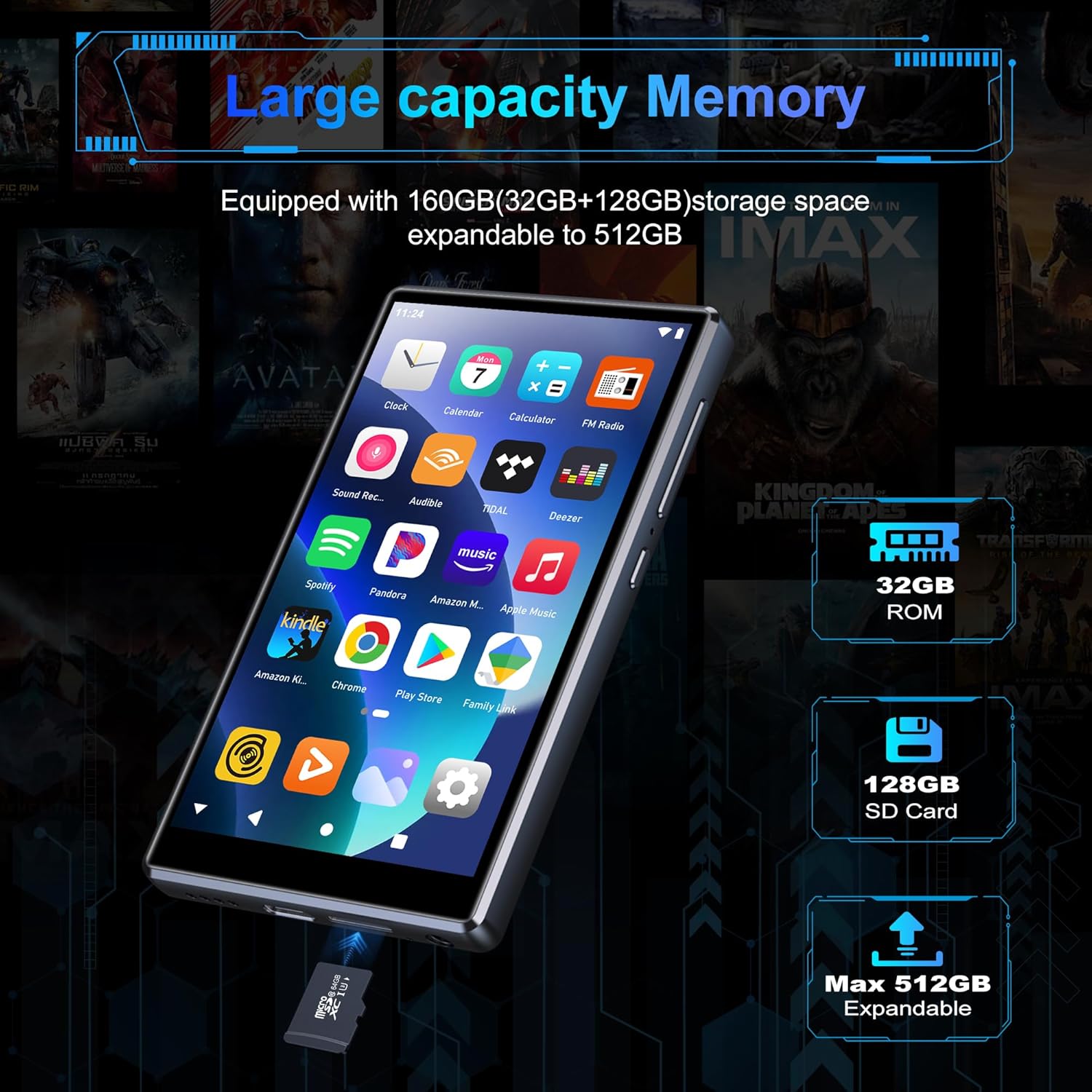
Image: Inserting an SD card for memory expansion.
Instrukcja obsługi
1. Podstawowa nawigacja
The SWOFY D26 operates like a standard Android device. Use touch gestures (tap, swipe, pinch) to navigate menus, open apps, and control media playback.
2. Łączenie z Wi-Fi
- Idź do Ustawienia > Sieć i internet > Wi-Fi.
- Przełącz Wi-Fi On.
- Wybierz żądaną sieć z listy i wpisz hasło, jeśli zostaniesz o to poproszony.
- The device supports dual-band Wi-Fi (2.4GHz and 5GHz) for stable connections.
3. Parowanie Bluetooth
Connect your SWOFY D26 to Bluetooth headphones, speakers, or car stereo systems.
- Idź do Ustawienia > Podłączone urządzenia > Bluetooth.
- Przełącz Bluetooth On.
- Upewnij się, że akcesorium Bluetooth jest w trybie parowania.
- Wybierz akcesorium z listy dostępnych urządzeń, które chcesz sparować.

Image: Bluetooth connectivity for audio playback.
4. Odtwarzanie muzyki
The device supports various audio formats including MP3, OGG, FLAC, AAC, WAV, WMA, and APE. You can play music stored locally or stream from pre-installed apps.
- Lokalny Files: Użyj wstępnie zainstalowanej aplikacji odtwarzacza muzyki, aby przeglądać i odtwarzać pliki audio filezapisane na urządzeniu lub karcie SD.
- Aplikacje do strumieniowania: Access Spotify, Amazon Music, Deezer, Pandora, HIBY, and other streaming services via their respective apps.

Image: Enjoying music with the SWOFY D26 MP3 Player.
5. Odtwarzanie wideo
The 4.7-inch HD screen supports 720p and 1280p video playback. Supported formats include AVI, MKV, RMVB, MP4, MPG, MOV, DAT, and TS.
- Use the pre-installed video player app to watch videos stored on the device or SD card.
- Download video streaming apps from the Play Store for online content.
6. Zarządzanie aplikacjami
The device comes with several popular apps pre-installed. You can download more apps via Wi-Fi from the Google Play Store or uninstall unnecessary ones.

Image: Pre-installed applications on the SWOFY D26.
- Zainstaluj aplikacje: Open the Google Play Store app, search for your desired app, and tap "Install."
- Odinstaluj aplikacje: Idź do Ustawienia > Aplikacje, select the app, and tap "Uninstall."
7. Kontrola rodzicielska
Utilize the parental control features to manage app access and screen time for children.
- Access parental control settings through the device's Ustawienia menu.
- You can restrict app installations, remove pre-installed apps, set a reset lock, and control internet and music player usage duration.
8.Radio FM
The device includes a built-in FM radio. Connect wired headphones (acting as an antenna) to use this feature.
- Podłącz przewodowe słuchawki.
- Otwórz aplikację Radia FM.
- Wyszukaj dostępne stacje.
Konserwacja
1. Czyszczenie
To clean the device, use a soft, dry, lint-free cloth. Avoid using harsh chemicals, cleaning solvents, or abrasive materials, as these can damage the screen or finish.
2. Pielęgnacja baterii
The SWOFY D26 is equipped with a 2500mAh lithium battery. To maximize battery life:
- Unikaj częstego całkowitego rozładowywania akumulatora.
- Nie wystawiaj urządzenia na działanie ekstremalnych temperatur (wysokich lub niskich).
- Unplug the charger once the device is fully charged.
- Expected battery life: Up to 60 hours music playback, 10 hours video playback, 240 hours standby.

Image: Battery capacity and estimated usage times.
3. Aktualizacje oprogramowania
Periodically check for software updates to ensure optimal performance and access to new features. Connect to Wi-Fi and go to Ustawienia > System > Aktualizacja systemu.
Rozwiązywanie problemów
Jeśli masz problemy z odtwarzaczem MP3 SWOFY D26, zapoznaj się z poniższymi typowymi rozwiązaniami:
| Problem | Rozwiązanie |
|---|---|
| Urządzenie nie włącza się. | Ensure the device is charged. Connect to a charger for at least 30 minutes. If unresponsive, perform a hard reset by holding the power button for 10-15 seconds. |
| Problemy z połączeniem Wi-Fi. | Check if Wi-Fi is enabled in settings. Ensure the password is correct. Restart the device and your Wi-Fi router. Try connecting to a different Wi-Fi network. |
| Nieudane parowanie Bluetooth. | Ensure Bluetooth is enabled on both devices and the accessory is in pairing mode. Move devices closer. Restart both devices. |
| Aplikacje ulegają awarii lub zawieszają się. | Wyczyść pamięć podręczną i dane aplikacji w Ustawienia > Aplikacje. Uninstall and reinstall the app. Ensure sufficient storage space is available. |
| Niska jakość dźwięku. | Check headphone connection or Bluetooth connection. Test with different headphones or speakers. Ensure audio filePliki nie są uszkodzone. Dostosuj ustawienia korektora, jeśli są dostępne. |
Specyfikacje
| Funkcja | Szczegół |
|---|---|
| Nazwa modelu | D26 |
| System operacyjny | Android 13.0 |
| Edytor | Procesor 8-rdzeniowy |
| BARAN | 4 GB |
| Pamięć wewnętrzna (ROM) | 32 GB |
| Dołączona karta SD | 64 GB |
| Max. Expandable Storage | Do 1 TB (za pomocą karty microSD) |
| Rozmiar ekranu | 4.7 cali |
| Rozdzielczość ekranu | 720 * 1280 (HD Touchscreen) |
| Łączność | Dual-band Wi-Fi (2.4GHz & 5GHz), Bluetooth |
| Pojemność baterii | 2500 mAh |
| Czas pracy baterii (muzyka) | Do 60 godzin |
| Czas pracy baterii (wideo) | Do 10 godzin |
| Obsługiwane formaty audio | Obsługiwane formaty: MP3, OGG, FLAC, AAC, WAV, WMA, APE |
| Obsługiwane formaty wideo | AVI, MKV, RMVB, MP4, MPG, MOV, DAT, TS |
| Cechy specjalne | Built-in Speaker, FM Radio, Parental Controls |
| Kolor | Czarny |
| Wymiary (dł. x szer. x wys.) | Wymiary 11.9 x 6.7 x 1 cm |
| Waga | 150 gram |

Image: Internal processor and RAM details.
Gwarancja i wsparcie
The SWOFY D26 MP3 Player comes with a standard manufacturer's warranty. For specific warranty terms and conditions, please refer to the warranty card included in your package or contact SWOFY customer support.
For technical support, troubleshooting assistance, or any product-related inquiries, please visit the official SWOFY website or contact their customer service department. Contact information can typically be found on the product packaging or the SWOFY brand store page.
SWOFY Brand Store: Visit SWOFY Store on Amazon