
1. Wprowadzenie
Thank you for choosing the Ftoghe 7-inch HD Touchscreen Car Stereo Radio. This manual provides essential information for the proper installation, operation, and maintenance of your new car stereo system. Please read it thoroughly before use to ensure optimal performance and safety.
This advanced car stereo features a 7-inch IPS touchscreen, Android 13 operating system, 2GB RAM + 32GB ROM, Wireless CarPlay, Android Auto, GPS navigation, Bluetooth, FM radio, DSP sound processing, WiFi connectivity, and supports a backup camera. It is designed to enhance your driving experience with modern technology and convenience.
2. Obowiązujące modele
This car stereo radio is specifically designed for the following Ford truck models:
- Ford F150: 2004-2014
- Ford F250: 2004-2014
- Ford F350: 2004-2014
Notatka: This unit is not compatible with original cars equipped with factory navigation systems. Please verify the dimensions and shape of your vehicle's center console and existing connectors before purchasing i instalowanie.

Image: Applicable Ford F-Series models and required stereo panel size (188*120mm) with compatible connector types.
3. Co znajduje się w pudełku
Twoja paczka powinna zawierać następujące elementy:
- Ftoghe 7-inch HD Touchscreen Car Stereo Unit
- Wiązka kabli zasilających
- Kable wejściowe/wyjściowe RCA
- 2 kable USB
- Kabel wejściowy kamery
- Kabel adaptera USB
- Antena GPS
- Instrukcja obsługi
- Protocol Box (CANBUS)
- Adapter radiowy
- Universal Loose Wire
- Mikrofon zewnętrzny
- Kamera cofania HD

Obraz: Ponadview of the car stereo unit and all included accessories and cables.
Package Contents Video Overview
Video: A detailed look at all items included in the package for the Ford F150 radio, demonstrating each component.
4. Konfiguracja i instalacja
Proper installation is crucial for the functionality and longevity of your car stereo. It is recommended to have this unit installed by a professional if you are not familiar with car audio wiring.
Schemat okablowania
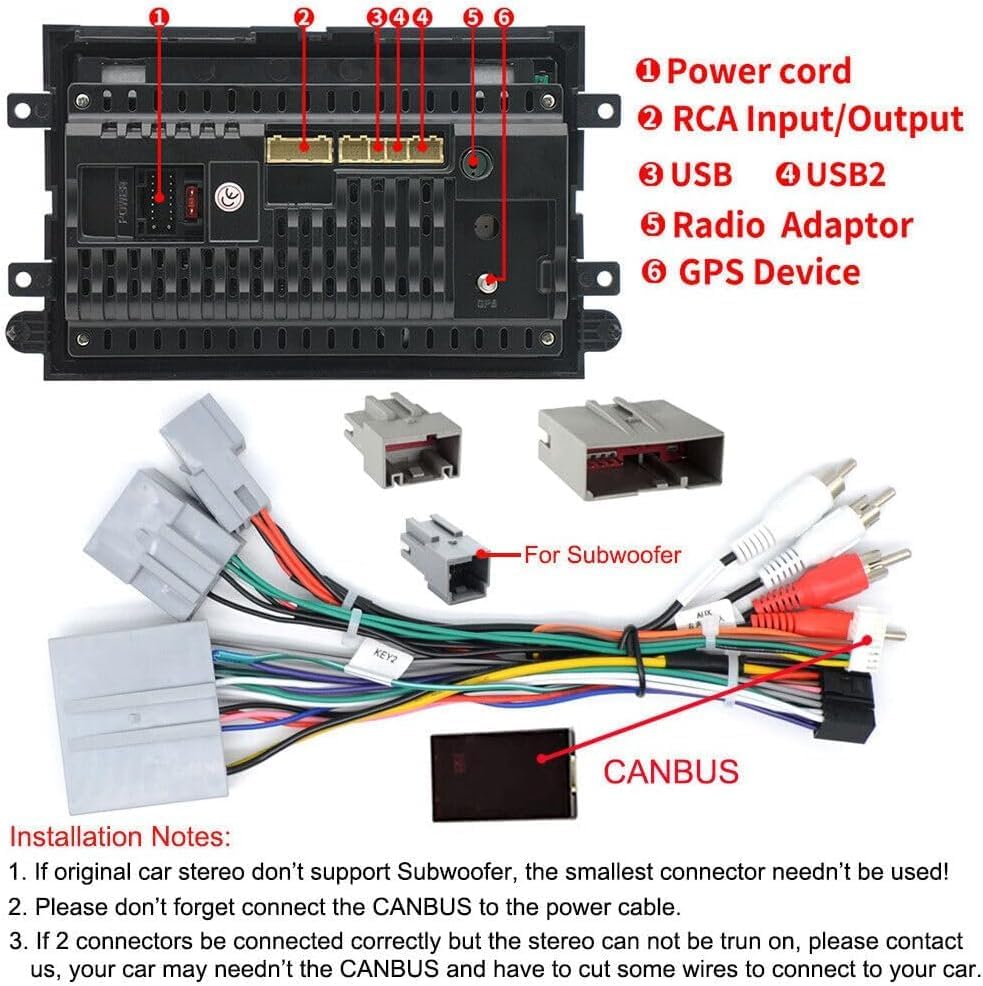
Image: Comprehensive wiring diagram illustrating the connections for power, RCA input/output, USB ports, radio adapter, GPS device, and CANBUS.
Notatki dotyczące instalacji
- If your original car stereo does not support a subwoofer, the smallest connector on the harness is not needed.
- Ensure the CANBUS is correctly connected to the power cable.
- If two connectors are correctly connected but the stereo does not power on, please contact customer support. You may need to bypass the CANBUS and connect some wires directly to your car's system.
- Connect the 4G antenna (if applicable to your configuration) and GPS antenna securely.
- Connect the camera extension cables and the rear camera signal wire as indicated.
Car Radio Installation Guide
Video: Step-by-step guide demonstrating the installation process of a car radio, including connecting various cables and components.
Porównanie przed i po instalacji

Image: Visual comparison showing the original car stereo setup versus the new 7-inch HD touchscreen unit installed in a Ford F-Series dashboard.
5. Instrukcja obsługi
Bezprzewodowy CarPlay i Android Auto
Connect your smartphone wirelessly to access navigation, music, calls, and messages directly from the car stereo's touchscreen. Supports voice control for hands-free operation.

Image: The car stereo screen displaying the user interfaces for both Apple CarPlay and Android Auto, highlighting accessible applications.
Nawigacja GPS
Utilize both online and offline maps for precise navigation. The built-in GPS module and WiFi connectivity allow for easy download of offline maps and real-time traffic updates.

Image: The car stereo screen displaying a GPS navigation map with route details and location markers.
Bluetooth Hands-free
Connect your phone via Bluetooth for hands-free calling and audio streaming. The built-in microphone ensures clear communication.

Image: The car stereo screen showing a hands-free call interface, with a phone connected via Bluetooth for communication and music playback.
Radio FM/RDS
Enjoy your favorite radio stations with 18 preset stations and RDS (Radio Data System) functionality for enhanced information display.

Image: The car stereo screen showing the FM/RDS radio interface, including frequency display and preset station options.
Sterowanie z kierownicy (SWC)
Control essential functions of your car stereo directly from your steering wheel for safer driving. The system supports learning and customizing SWC buttons.

Image: Illustration of steering wheel controls and the corresponding car stereo menu for learning and assigning functions to these buttons.
Customizing Steering Wheel Buttons
Video: This video demonstrates how to customize the single key button shortcut functions on the car stereo, allowing users to program buttons for various purposes like volume control, track skipping, and app access.
Korektor DSP
The built-in DSP (Digital Sound Processor) allows for customized sound settings, optimizing audio playback for different seating positions and preferences.

Image: The car stereo screen displaying the DSP equalizer settings, allowing users to fine-tune audio frequencies and select various sound effects.
6. Kamera cofania
The included HD backup camera automatically displays a clear rearview image on the device screen when reversing, aiding in safe parking and maneuvering.

Image: The car stereo screen displaying a high-definition rearview camera feed with dynamic parking guidelines, enhancing visibility during reverse maneuvers.
7. Rozwiązywanie Problemów
Problemy z zasilaniem
If the unit does not power on, ensure all power connections are secure and correctly wired according to the diagram in the 'Setup & Installation' section. Check the vehicle's fuse box for any blown fuses related to the stereo system.
Connectivity Issues (CarPlay/Android Auto/Bluetooth/WiFi)
If you experience issues connecting your smartphone or accessing network features:
- Ensure Bluetooth and WiFi are enabled on both your phone and the car stereo.
- Verify that the correct Bluetooth device ('CarBT') is selected and paired.
- For CarPlay/Android Auto, ensure the respective app is enabled in your phone's settings and on the car stereo.
- Try restarting both your phone and the car stereo.
How to Connect Bluetooth, CarPlay, and WiFi
Video: This video provides instructions on how to connect Bluetooth, CarPlay, and WiFi to the car stereo, guiding users through the pairing and connection processes.
Kalibracja ekranu
If the touchscreen is unresponsive or inaccurate, it may require calibration. Access the calibration settings through the system menu.
Calibrate Car Radio Screen
Video: This video demonstrates the process of calibrating the car radio screen, ensuring accurate touch response and display alignment.
8. Specyfikacje
| Funkcja | Szczegół |
|---|---|
| Marka | Ftoghe |
| Nazwa modelu | Radio samochodowe z systemem Android 13 |
| Rozmiar ekranu | 7 cali |
| System operacyjny | Android 13 |
| Pamięć RAM + ROM | 2 GB pamięci RAM + 32 GB pamięci ROM |
| Cechy specjalne | Bluetooth, IPS Touchscreen, Steering Wheel Control, Wireless Carplay & Android Auto, Wireless HD Mirror Link, Backup Camera |
| Technologia łączności | Wi-Fi |
| Typ mapy | Na całym świecie (online/offline) |
| Tryb wyjścia audio | Surround Sound (DSP) |
| Typ montażu | Montaż na desce rozdzielczej |
| Waga przedmiotu | 2.7 funta |
| Wymiary opakowania | 11.42 x 7.52 x 4.29 cala |
9. Wsparcie
For technical assistance, warranty claims, or any questions regarding your Ftoghe car stereo, please contact our customer support team.
You can typically find support contact information on the product packaging, the seller's Amazon store page, or by visiting the manufacturer's official webstrona.
Wsparcie online: Odwiedź Lans-us Amazon Store and click 'Ask a question' for direct assistance.