
1. Wprowadzenie
Thank you for choosing the Bmax B8 Pro Mini PC. This compact and powerful desktop computer is designed for a wide range of applications, from office work and streaming to web browsing and home entertainment. Featuring an Intel 12th Generation i7-1255U processor, 24GB LPDDR5 RAM, and a 1TB NVMe SSD, it offers excellent performance and efficiency in a small form factor. This manual provides essential information for setting up, operating, maintaining, and troubleshooting your new Mini PC.

Image 1.1: The Bmax B8 Pro Mini PC, showcasinze względu na kompaktową konstrukcję.
2. Co znajduje się w pudełku
Sprawdź zawartość paczki, aby upewnić się, że znajdują się w niej wszystkie elementy:
- 1 x B8 Pro MINI PC
- 1 x zasilacz
- 1 x Instrukcja obsługi
- 1 x kabel HDMI
- 1 x Metal Bracket (for VESA mounting)

Image 2.1: All components included in the Bmax B8 Pro Mini PC package.
3. Koniec produktuview i funkcje
3.1. Kluczowe komponenty i porty
The Bmax B8 Pro Mini PC is designed with essential ports for connectivity and expansion. Familiarize yourself with the layout:
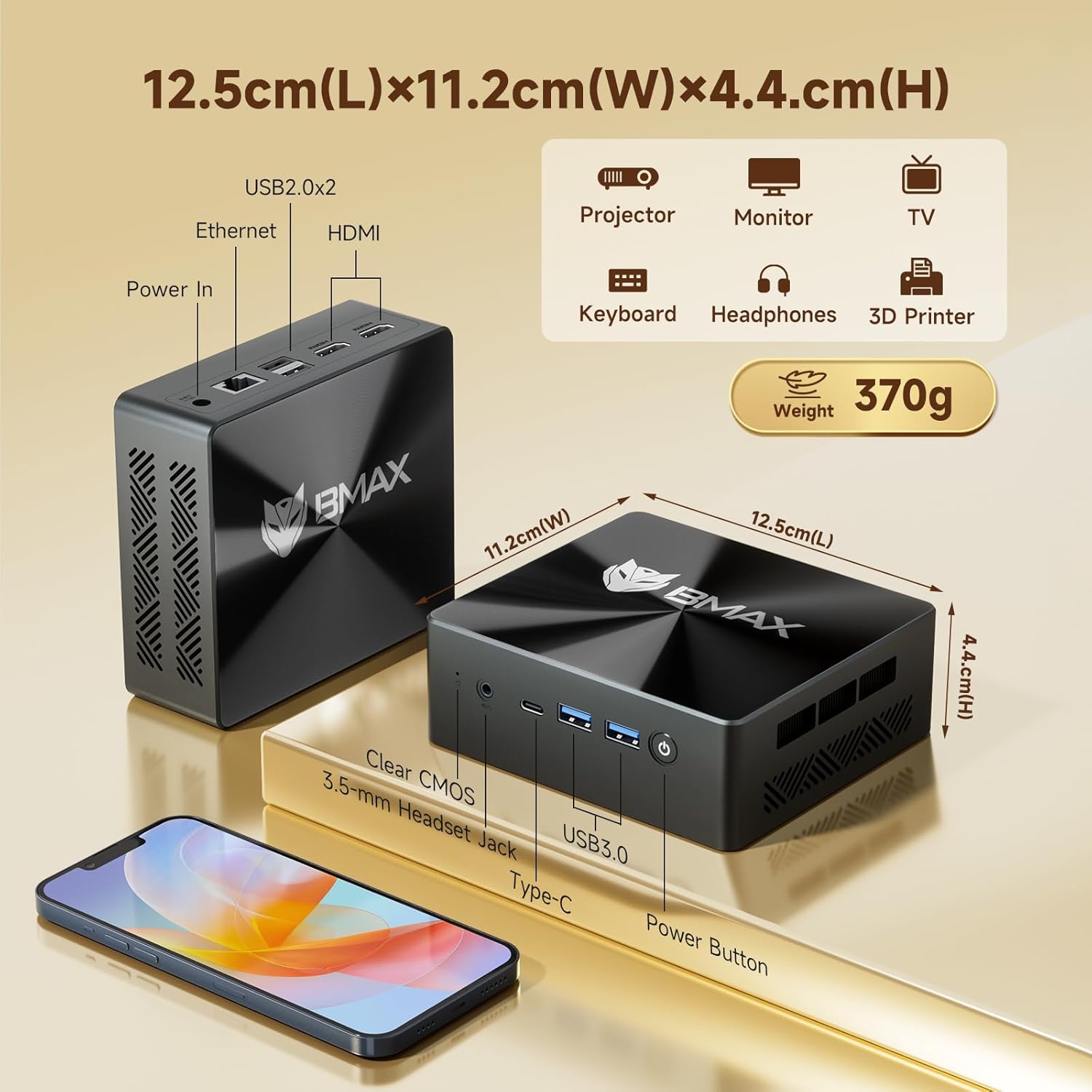
Image 3.1: Dimensions and port configuration of the Bmax B8 Pro Mini PC. Includes USB 2.0, USB 3.0, Ethernet, HDMI, Type-C, 3.5mm Headset Jack, and Power In.
- Panel przedni: Power Button, 3.5mm Headset Jack, USB 3.0 ports (x2), Type-C port.
- Tylny panel: USB 2.0 ports (x2), HDMI ports (x2), Gigabit Ethernet port, Power Input.
3.2. Performance Highlights
The B8 Pro is equipped with advanced hardware for robust performance:
- Edytor: Intel 12th Generation i7-1255U Processor (10 Cores, 12 Threads, up to 4.7 GHz). This CPU provides significant improvements in single-thread, multi-thread, and graphics performance compared to previous generations.
- Pamięć: 24GB LPDDR5 RAM (5200MHz) for high-speed multitasking and efficient application handling.
- Składowanie: 1TB NVMe SSD (M.2_NVMe 2280 x1) ensuring fast boot times and rapid application loading.
- Łączność: Integrated WiFi 6 for faster wireless transmission speeds and Bluetooth 5.2 for lower latency and more stable connections with peripherals.
- Obsługa wyświetlania: Supports 4K/60Hz triple-display output via Type-C and HDMI ports, ideal for multi-monitor setups.
- Układ chłodzenia: Features a smart fan and two copper heat pipes for efficient heat dissipation, ensuring stable performance even under load.

Image 3.2: Detailed specifications of the Intel Core i7-1255U processor.
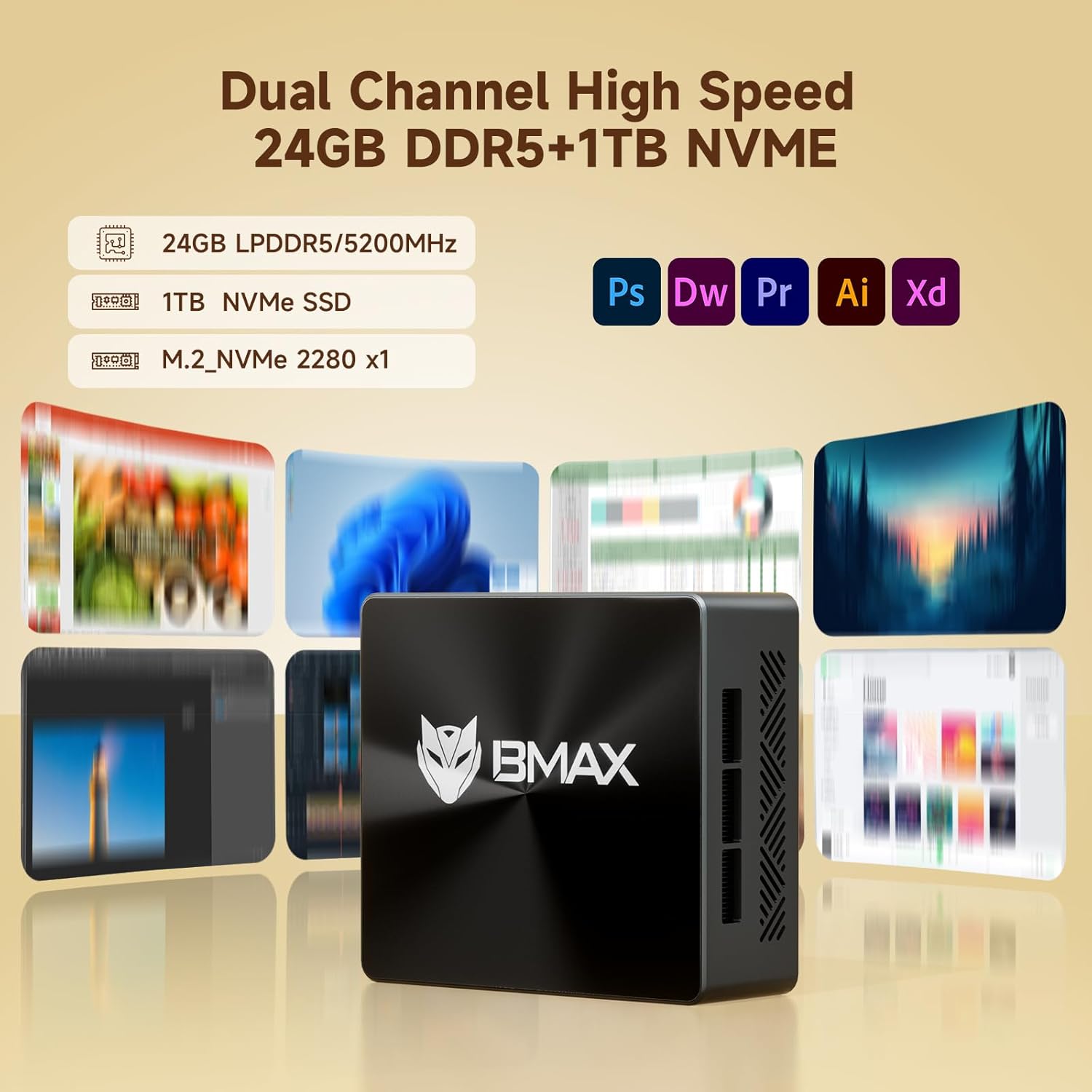
Image 3.3: Illustration of the high-speed memory and storage capabilities.

Image 3.4: Comparison of WiFi 5 and WiFi 6 speeds, highlighting Bluetooth 5.2 benefits.

Image 3.5: Diagram illustrating the smart fan and copper heat pipe cooling solution.
4. Przewodnik konfiguracji
Follow these steps to set up your Bmax B8 Pro Mini PC:
- Połącz z wyświetlaczem: Connect your monitor, TV, or projector to the Mini PC using an HDMI cable. The B8 Pro supports dual HDMI output and one Type-C output for triple display configurations.
- Podłącz urządzenia peryferyjne: Podłącz klawiaturę i mysz do dostępnych portów USB (USB 2.0 lub USB 3.0).
- Podłącz do zasilania: Podłącz zasilacz do portu DC-in w komputerze Mini PC, a następnie podłącz zasilacz do gniazdka elektrycznego.
- Włączanie: Naciśnij przycisk zasilania znajdujący się na przednim panelu minikomputera. Zaświeci się kontrolka zasilania.
- Początkowe ustawienia: Follow the on-screen instructions to complete the Windows 11 Pro initial setup, including language, region, network connection, and user account creation.
- Połączenie internetowe: Connect to your network via Ethernet cable or Wi-Fi. For Wi-Fi, select your network from the available list and enter the password.
5. Instrukcja obsługi
5.1. Podstawowa obsługa
- Włączanie/wyłączanie: Naciśnij przycisk zasilania, aby włączyć komputer. Aby wyłączyć, kliknij przycisk Start w systemie Windows, a następnie wybierz Zasilanie > Wyłącz.
- Uruchom ponownie: W menu Start wybierz Zasilanie > Uruchom ponownie.
- Tryb uśpienia: W menu Start wybierz Zasilanie > Uśpienie.
5.2. Podłączanie do urządzeń zewnętrznych
- Urządzenia USB: Connect USB flash drives, external hard drives, printers, or other USB devices to any available USB port.
- Urządzenia Bluetooth: To connect Bluetooth headphones, speakers, or other devices, go to Windows Settings > Bluetooth & devices, turn on Bluetooth, and pair your device.
- Wyjście audio: Use the 3.5mm headset jack on the front panel for headphones or external speakers. Alternatively, audio can be output through HDMI to your display.
6. Konserwacja
Właściwa konserwacja gwarantuje długowieczność i optymalną wydajność Twojego Mini PC:
- Czyszczenie: Regularly clean the exterior of the Mini PC with a soft, dry cloth. Use compressed air to gently clear dust from the ventilation grilles to prevent overheating. Ensure the device is powered off and unplugged before cleaning.
- Aktualizacje oprogramowania: Keep your Windows operating system and drivers updated. Go to Windows Settings > Windows Update to check for and install updates.
- Zarządzanie pamięcią masową: Periodically check your storage usage. Delete unnecessary files, uninstall unused programs, or use Windows Disk Cleanup to free up space on your 1TB NVMe SSD.
- Wentylacja: Upewnij się, że minikomputer znajduje się w dobrze wentylowanym pomieszczeniu. Nie blokuj otworów wentylacyjnych.
7. Rozwiązywanie Problemów
If you encounter issues with your Bmax B8 Pro Mini PC, refer to the following common problems and solutions:
| Problem | Możliwa przyczyna | Rozwiązanie |
|---|---|---|
| Brak zasilania / komputer się nie włącza | Zasilacz nie jest prawidłowo podłączony; Problem z gniazdkiem elektrycznym; Wadliwy zasilacz. | Ensure power adapter is securely connected to both PC and outlet. Try a different power outlet. Verify power adapter is working. |
| Brak obrazu na monitorze | HDMI/Type-C cable loose or faulty; Incorrect input source on monitor; Monitor off or faulty. | Check display cable connections. Ensure monitor is on and set to the correct input source (HDMI 1, HDMI 2, etc.). Try a different cable or monitor. |
| Brak połączenia internetowego (Wi-Fi) | Wi-Fi disabled; Incorrect Wi-Fi password; Router issue; Driver issue. | Ensure Wi-Fi is enabled in Windows settings. Re-enter Wi-Fi password. Restart your router. Check for updated Wi-Fi drivers. |
| Brak dźwięku | Volume muted; Incorrect audio output device selected; Driver issue. | Check volume levels and ensure it's not muted. In Windows Sound settings, select the correct output device. Update audio drivers. |
| PC runs slowly or freezes | Too many applications running; Low disk space; Overheating; Malware. | Close unnecessary applications. Free up disk space. Ensure proper ventilation. Run a malware scan. |
8. Specyfikacje
Detailed technical specifications for the Bmax B8 Pro Mini PC:
| Funkcja | Specyfikacja |
|---|---|
| Marka | Bmax |
| Nazwa modelu | B8 Pro |
| Edytor | Intel 12th Generation Core i7-1255U (4.7 GHz max) |
| BARAN | 24 GB pamięci LPDDR5 |
| Dysk twardy | Dysk SSD NVMe 1TB |
| Karta graficzna | Zintegrowany |
| System operacyjny | OS (Windows 11 Pro pre-installed) |
| Rozdzielczość ekranu | 3840 × 2160 (4K) |
| Porty USB 2.0 | 2 |
| Porty USB 3.0 | 2 |
| Łączność | WiFi 6, Bluetooth 5.2, Gigabit Ethernet |
| Wymiary (dł. x szer. x wys.) | 12.5 cm x 11.2 cm x 4.4 cm (ok. 4.92 x 4.41 x 1.73 cala) |
| Waga przedmiotu | 1.87 funta (około 848 g) |
9. Gwarancja i wsparcie
Bmax products are designed for reliability and performance. For specific warranty terms and conditions, please refer to the warranty card included with your product or visit the official Bmax website. If you encounter any issues that cannot be resolved using the troubleshooting guide, or require further assistance, please contact Bmax customer support through their official channels. When contacting support, please have your product model number (B8 Pro) and purchase information ready.