
1. Wprowadzenie
This manual provides comprehensive instructions for the installation, operation, and maintenance of your Stinger HEIGH10+ 10.1-inch HD touchscreen infotainment system. Designed specifically for 2014-2018 Chevy Silverado and GMC Sierra trucks, this system enhances your vehicle's capabilities while retaining essential factory features. Please read this manual thoroughly before installation and use to ensure proper functionality and safety.
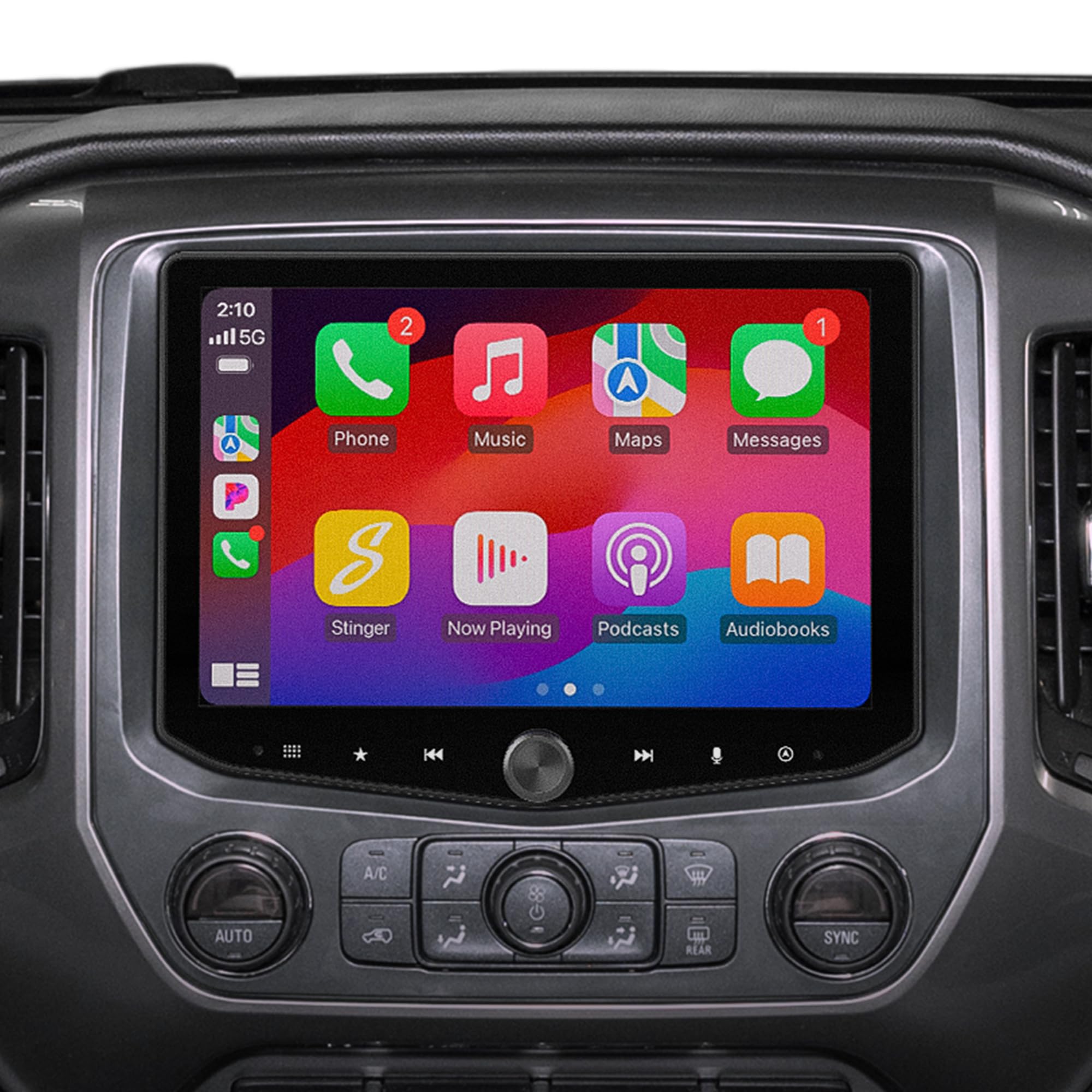
Figure 1: Stinger HEIGH10+ 10.1-inch Infotainment System
2. Koniec produktuview
The Stinger HEIGH10+ infotainment system is engineered in the USA to provide a seamless upgrade for your truck. It features a high-resolution 10.1-inch HD touchscreen with advanced protective films and offers extensive connectivity and vehicle integration capabilities.
Główne cechy:
- 10.1-inch High-Resolution Touchscreen: Features a 1280x800 HD display with anti-glare, anti-reflection, and anti-fingerprint film protection for optimal visibility.
- Łączność bezprzewodowa i przewodowa: Supports MFi-certified Wireless Apple CarPlay, Wireless Android Auto, and Bluetooth for hands-free calling, navigation, messages, and music streaming.
- Multiple USB Inputs: Includes two USB-A inputs and one USB-C input, with the USB-C port offering 3A fast charging for wired smartphone connections.
- Wejście HDMI: Allows connection of external video sources.
- Built-In HD Radio Tuner: Provides access to clear digital AM/FM radio content.
- Zaawansowane sterowanie dźwiękiem: Equipped with 4.5 Vrms & 8-channel RCA outputs, subwoofer control, a 15-band adjustable EQ, 6 user EQ presets, and built-in high-pass (HPF) & low-pass (LPF) crossovers for personalized sound.
- 4 wejścia kamery: Supports both AHD 720p and CVBS 480p cameras for front, rear, and blind spot views, enhancing safety and situational awareness.
- Full OEM Feature Retention: Retains factory features such as vehicle information, real-time gauges, performance data, off-road data, drivetrain information, climate controls, and steering wheel controls.
- Fast Wake-Up & Customization: Offers a responsive user interface with customizable background images and rearrangeable Home screen icons.

Figure 2: Dashboard Before and After HEIGH10+ Installation
3. Co znajduje się w pudełku
Your Stinger HEIGH10+ infotainment system package includes the following components:
- Stinger HEIGH10+ Touchscreen Display Infotainment System
- RadioPro Interface for Chevy Silverado & GMC Sierra (2014-2018)
- Chevy Silverado & GMC Sierra Radio Dash Kit (SR-GM14HX)
- Antenna Adapter for AM/FM Radio
- Zestawy sprzętu
- Stinger USB-A (2) & USB-C Extension Cables
- Instrukcja instalacji
4. Konfiguracja i instalacja
The Stinger HEIGH10+ system is designed for a plug-and-play installation, connecting directly to your vehicle's existing wiring harness without requiring additional modifications or complex wiring procedures. This integration kit is compatible with all trim levels and all audio systems available in 2014-2018 Chevy Silverado and GMC Sierra trucks, including Bose-equipped systems.
For detailed step-by-step installation instructions, please refer to the included Installation Guide. Professional installation is recommended to ensure correct wiring and optimal performance.
Wideo 1: Ponadview of Horizon10/Heigh10+ Radio Features for Silverado & Sierra. This video demonstrates the installation kit and various features of the infotainment system.
5. Instrukcja obsługi
5.1. Wyświetlacz i interfejs użytkownika
The 10.1-inch HD touchscreen offers a responsive and intuitive user experience. It features anti-glare, anti-reflection, and anti-fingerprint properties for clear viewing. You can personalize the background image and rearrange Home screen icons for easier access to your preferred functions.

Figure 3: HEIGH10+ Screen Features
5.2. Łączność
Connect your smartphone and other devices using the following options:
- Bezprzewodowy Apple CarPlay / Android Auto: Wirelessly connect your compatible smartphone to access navigation, messages, music, and hands-free calling directly on the HEIGH10+ display.
- Bluetooth: Pair your device via Bluetooth for audio streaming and hands-free phone calls.
- Wejścia USB: Utilize the two USB-A and one USB-C inputs for wired Apple CarPlay or Android Auto, media playback, and fast 3A charging for your USB-C compatible devices.
- Wejście HDMI: Connect external HDMI-enabled devices for video and audio playback.

Figure 4: Wireless Apple CarPlay and Android Auto
5.3. Sterowanie dźwiękiem
The HEIGH10+ offers advanced audio customization:
- 15-Band Adjustable EQ: Fine-tune your audio output with a detailed 15-band equalizer.
- Ustawienia korektora: Store up to 6 custom EQ presets for quick access to your preferred sound profiles.
- Krzyżowanie: Utilize the built-in High-Pass Filter (HPF) and Low-Pass Filter (LPF) for precise speaker management.
- Wyjścia RCA: Features 4.5 Vrms & 8-channel RCA outputs, including dedicated subwoofer control.

Figure 5: Advanced Audio Equalizer Settings
5.4. Vehicle Integration
The system seamlessly integrates with your truck's data bus to provide enhanced information and control:
- Real-Time Gauges: Monitor critical vehicle parameters such as speed, RPM, oil pressure, transmission temperature, coolant temperature, intake air temperature, engine torque, engine fan speed, oil life remaining, and battery voltage. These gauges can be customized and saved as presets.
- Informacje o pojeździe: View door status (open/closed) and tire pressure readings. The on-screen vehicle graphic can be customized to match your truck's color.
- Off-Road Data: Access specialized off-road screens displaying pitch and roll angles, axle monitoring, and a compass.
- OEM Settings Access: Control various factory vehicle settings including general options, safety features (e.g., collision alert type, chime volume, park assist), lighting (e.g., exit lighting, vehicle locator lights), HVAC (e.g., auto fan max speed, remote start auto cool/heat status), and doors/locks (e.g., auto unlock on exit, delayed door lock, remote door unlock/lock feedback).

Figure 6: Real-Time Gauges Screen

Figure 7: Factory Vehicle Integration
5.5. Wejścia kamery
The system supports up to four camera inputs, allowing for a comprehensive camera system. This includes compatibility with front and rear dashcams, blind spot cameras, and a backup camera. The system supports both AHD 720p and CVBS 480p camera types.

Figure 8: 4 Camera Inputs Interface
6. Specyfikacje
| Funkcja | Specyfikacja |
|---|---|
| Numer modelu | RB10GM14HP |
| Rozmiar wyświetlacza | 10.1 cali |
| Rozdzielczość ekranu | 1280x800 HD |
| System operacyjny | Android |
| Technologia łączności | Bluetooth, HDMI, USB |
| Cechy specjalne | Built-In Bluetooth, HDMI, Touchscreen, USB-A, USB-C, Wireless Apple CarPlay/Android Auto |
| Tryb wyjścia audio | Stereofoniczny |
| Typ montażu | Montaż na desce rozdzielczej |
| Typ mapy | Ameryka Północna |
| Waga przedmiotu | 11.48 funta |
| Wymiary opakowania | 15.2 x 14.5 x 12 cala |
7. Konserwacja
To ensure the longevity and optimal performance of your Stinger HEIGH10+ infotainment system, follow these maintenance guidelines:
- Czyszczenie ekranu: Use a soft, lint-free cloth specifically designed for electronics to clean the touchscreen. Avoid abrasive materials, alcohol, or harsh chemical cleaners, as these can damage the anti-glare and anti-fingerprint coatings.
- Aktualizacje oprogramowania: Periodically check the Stinger Solutions website for available software updates. Keeping your system updated ensures you have the latest features, performance enhancements, and bug fixes.
- Warunki środowiskowe: Unikaj wystawiania urządzenia na działanie ekstremalnych temperatur, długotrwałego bezpośredniego światła słonecznego i nadmiernej wilgoci.
- Połączenia kablowe: Upewnij się, że wszystkie kable są solidnie podłączone. Luźne połączenia mogą powodować przerwy w działaniu.
8. Rozwiązywanie Problemów
If you encounter any issues with your Stinger HEIGH10+ system, refer to the following common troubleshooting steps:
- Brak zasilania: Check all power connections and ensure the vehicle's ignition is on. Verify that the vehicle's battery has sufficient charge.
- Brak dźwięku: Confirm that the volume is not muted or set too low. Check speaker connections and ensure the correct audio source is selected. If using a factory Bose system, ensure the integration kit is correctly installed and configured.
- Brak reakcji ekranu dotykowego: Try restarting the vehicle. If the issue persists, perform a system reset as described in the full installation guide.
- Apple CarPlay/Android Auto Issues: Ensure your smartphone is compatible and its operating system is up to date. For wireless connections, verify Bluetooth and Wi-Fi are enabled on your phone. For wired connections, try a different USB cable and ensure it's connected to the correct USB port.
- Dane pojazdu nie są wyświetlane: Confirm that the RadioPro Interface is correctly installed and communicating with the vehicle's CAN bus. Refer to the installation guide for specific wiring and dip switch settings.
- Kamera nie wyświetla: Check camera connections and ensure the camera is powered. Verify camera settings within the HEIGH10+ interface.
For more detailed troubleshooting or issues not covered here, please consult the complete Installation Guide or contact Stinger customer support.
9. Gwarancja i pomoc techniczna
The Stinger HEIGH10+ Infotainment System comes with a Roczna gwarancja od daty zakupu. Niniejsza gwarancja obejmuje wady materiałowe i wykonawcze przy normalnym użytkowaniu.
For warranty claims, technical support, or additional product information, please visit the official Stinger Solutions webOdwiedź witrynę lub skontaktuj się z działem obsługi klienta. Zachowaj dowód zakupu, aby skorzystać z gwarancji.