
1. Koniec produktuview
The MOBAPAD N1 HD is a versatile wireless controller designed for an enhanced gaming experience across multiple platforms. It features advanced technologies such as Hall Effect Joysticks for precise control, ALPS Dual-Axis Motors for immersive HD vibration, and six-axis motion control. This controller is compatible with Nintendo Switch, PC, iOS, and Android devices, offering seamless connectivity and responsive performance.

Obraz: Przód view of the MOBAPAD N1 HD Wireless Controller, showcasinze względu na ergonomiczną konstrukcję i układ przycisków.
2. Główne cechy
- Zgodność z wieloma platformami: Fully compatible with Nintendo Switch, PC, iOS, and Android devices, ensuring broad usability.
- Joysticki z efektem Halla: Provides smooth, precise, and durable control with minimal wear, ideal for accurate gaming.
- ALPS Dual-Axis Motors with HD Vibration: Delivers realistic and immersive haptic feedback for enhanced gameplay.
- Kontrola ruchu sześcioosiowego: Built-in gyroscope enables enhanced motion control for compatible games.
- NFC for Amiibo Scanning: Supports NFC technology for scanning Amiibo figures on Nintendo Switch.

Image: The controller illustrating its immersive motion control capabilities with swirling lines around it.

Image: The controller positioned in front of a collection of Amiibo figures, highlighting its NFC scanning function.

Image: The controller shown alongside icons for Switch, Android/iOS, and PC, demonstrating its multi-device compatibility.
3. Konfiguracja i połączenie
Follow these steps to connect your MOBAPAD N1 HD controller to your desired device.
3.1. Łączenie z Nintendo Switch
- Z menu HOME wybierz Kontrolery, Następnie Zmień uchwyt/kolejność.
- While the screen is displaying "Press L + R on the controller", press and hold the Przycisk Home on the MOBAPAD N1 HD controller for 3-5 seconds until the player LEDs begin to flash.
- Once connected, the player LED(s) corresponding to the controller number will remain lit.
3.2. Łączenie z komputerem (Windows)
- Connect the controller to your PC using a USB-C cable. The controller will be recognized as a wired controller.
- For wireless connection, ensure your PC has Bluetooth enabled. Go to Bluetooth & other devices settings.
- Wybierz „Dodaj urządzenie Bluetooth lub inne” i wybierz „Bluetooth”.
- Naciśnij i przytrzymaj Przycisk Home on the controller until the LEDs flash rapidly, indicating pairing mode.
- Select "MOBAPAD N1 HD" from the list of available devices.
3.3. Connecting to iOS/Android Devices
- Włącz Bluetooth na urządzeniu z systemem iOS lub Android.
- Przejdź do ustawień Bluetooth i wyszukaj nowe urządzenia.
- Naciśnij i przytrzymaj Przycisk Home on the controller until the LEDs flash rapidly.
- Select "MOBAPAD N1 HD" from the list of available devices to pair.
4. Obsługa kontrolera
Familiarize yourself with the controller's layout and functions for optimal gameplay.
4.1. Układ przycisków
- Lewy drążek analogowy: For movement and camera control. Features Hall Effect technology.
- Prawy drążek analogowy: For camera control and aiming. Features Hall Effect technology.
- Pad kierunkowy: Directional input for menu navigation and specific game actions.
- Przyciski A/B/X/Y: Standardowe przyciski akcji.
- Przyciski L/R: Guziki na ramionach.
- Przyciski ZL/ZR: Przyciski spustowe.
- Przycisk Minus (-): Typically for opening in-game menus or specific functions.
- Przycisk plus (+): Typically for opening in-game menus or specific functions.
- Przycisk Home: Returns to the system's home screen. Also used for pairing and NFC scanning.
- Przycisk przechwytywania: Takes screenshots or video clips (Nintendo Switch).
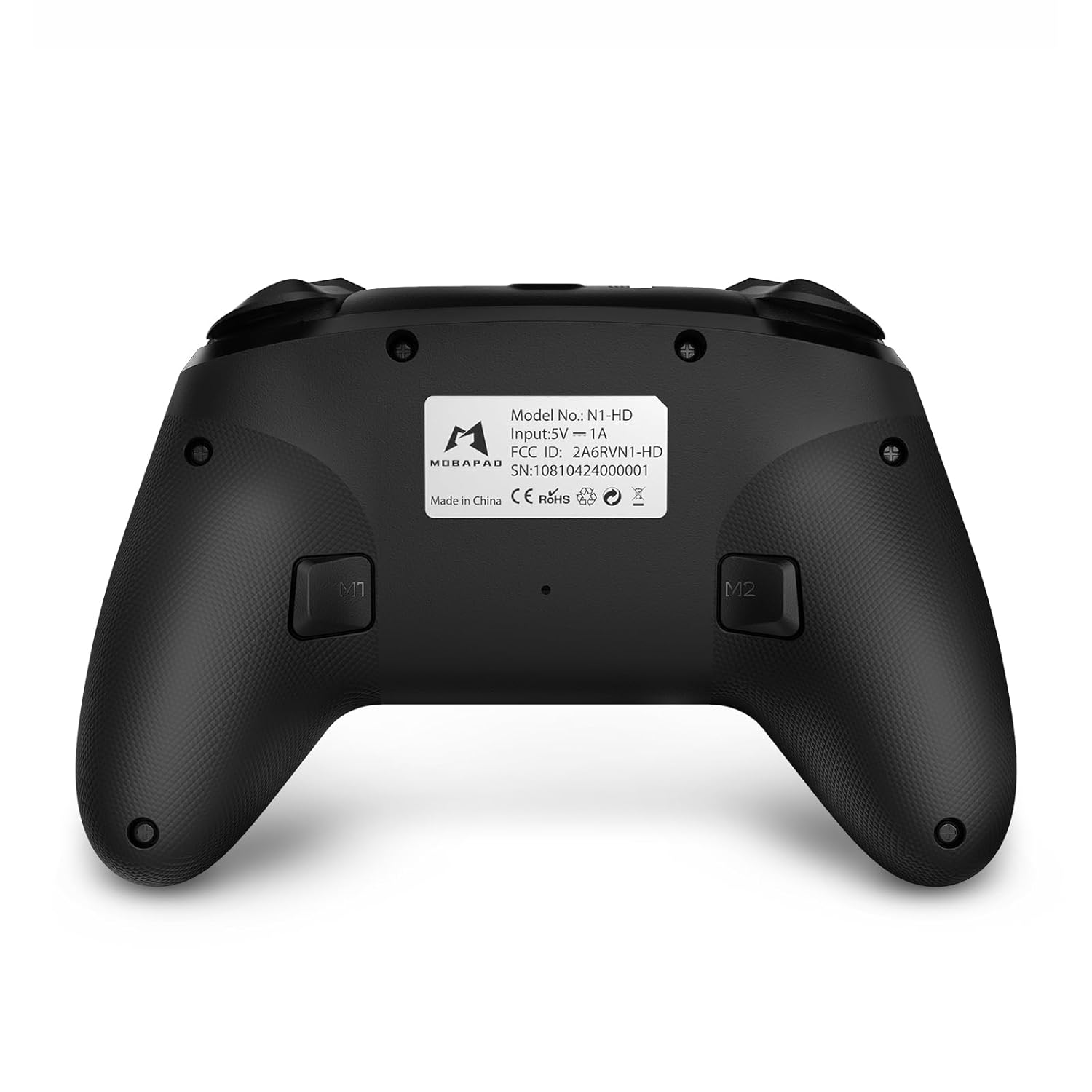
- Przyciski M1/M2: Programmable back buttons for custom macros or remapping.
Zdjęcie: Szczegółowy przód view of the MOBAPAD N1 HD controller, showing all buttons and joysticks.

Obraz: Tył view of the MOBAPAD N1 HD controller, highlighting the M1 and M2 programmable buttons and product label.
4.2. NFC Functionality (Amiibo Scanning)
To use the NFC function for Amiibo scanning on Nintendo Switch:
- Ensure your controller is connected to the Nintendo Switch.
- In a compatible game, when prompted to scan an Amiibo, place the Amiibo figure directly over the Przycisk Home area on the controller.
- Hold the Amiibo in place until the game registers the scan.
5. Konserwacja i pielęgnacja
Właściwa konserwacja gwarantuje długowieczność i optymalną wydajność kontrolera.
- Czyszczenie: Do przecierania kontrolera użyj miękkiej, suchej ściereczki. W przypadku uporczywych zabrudzeń delikatnie przetrzyjampPrzetrzyj szmatkę wodą. Unikaj silnych środków chemicznych i materiałów ściernych.
- Składowanie: Przechowuj kontroler w chłodnym, suchym miejscu, z dala od bezpośredniego światła słonecznego i ekstremalnych temperatur.
- Pielęgnacja baterii: The controller contains a Lithium Ion battery. Avoid fully discharging the battery frequently. If storing for extended periods, charge the battery to about 50% to prolong its lifespan. Do not expose the battery to fire or extreme heat.
- Obsługiwanie: Unikaj upuszczania kontrolera i narażania go na silne uderzenia, gdyż może to spowodować uszkodzenie jego wewnętrznych podzespołów.
6. Rozwiązywanie Problemów
If you encounter issues with your MOBAPAD N1 HD controller, refer to the following common solutions.
| Problem | Możliwa przyczyna | Rozwiązanie |
|---|---|---|
| Kontroler nie łączy się. | Low battery, out of range, incorrect pairing mode, interference. | Charge the controller fully. Ensure it is within range of the device. Re-enter pairing mode (hold Home button). Move closer to the device or away from other wireless devices. |
| Przyciski i joysticki nie reagują. | Software glitch, physical obstruction, damage. | Restart the controller and the connected device. Check for any debris around the buttons/joysticks. If issues persist, contact customer support. |
| Vibration is weak or absent. | Vibration setting off, game does not support vibration, motor issue. | Check in-game settings and system settings to ensure vibration is enabled. Verify if the game supports vibration feedback. |
| NFC scanning fails. | Incorrect placement, game not prompting scan, controller not connected. | Ensure the Amiibo is placed directly over the Home button area. Confirm the game is prompting for an Amiibo scan. Verify controller is properly connected to the Switch. |
7. Specyfikacje
| Funkcja | Szczegół |
|---|---|
| Numer modelu | Mobapad N1 HD Black |
| Wymiary (dł. x szer. x wys.) | 5.91 x 2.36 x 3.94 cala |
| Waga | 7.05 uncji |
| Typ baterii | 1 bateria litowo-jonowa (w zestawie) |
| Łączność | Wireless (Bluetooth), USB-C (wired) |
| Zgodność | Nintendo Switch, PC, iOS, Android |
| Cechy specjalne | Hall Effect Joysticks, ALPS Dual-Axis Motors, HD Vibration, Six-Axis Gyroscope, NFC |
8. Gwarancja i wsparcie
For warranty information or technical support, please contact MOBAPAD customer service. Refer to the official MOBAPAD webSzczegółowe warunki gwarancji i dane kontaktowe znajdziesz na stronie internetowej lub w dokumentacji zakupu.
You can visit the official MOBAPAD store on Amazon for more information: MOBAPAD Store