
1. Wprowadzenie
This manual provides essential information for the proper setup, operation, and maintenance of your UPERFECT Delta 18.5" 100Hz Touchscreen Dual Portable Monitor. Please read this manual thoroughly before using the product to ensure optimal performance and safety. The UPERFECT Delta is designed to enhance productivity by providing an expanded workspace with its innovative dual-screen design.
2. Informacje dotyczące bezpieczeństwa
- Aby uniknąć pożaru lub porażenia prądem, nie wystawiaj monitora na działanie deszczu i wilgoci.
- Unikaj umieszczania monitora w bezpośrednim świetle słonecznym lub w pobliżu źródeł ciepła.
- Należy używać wyłącznie zasilacza i kabli dostarczonych lub zalecanych przez firmę UPERFECT.
- Trzymaj monitor z dala od silnych pól magnetycznych.
- Clean the screen with a soft, lint-free cloth. Do not use liquid cleaners or aerosol cleaners directly on the screen.
- Do not attempt to disassemble or repair the monitor yourself. Contact customer support for assistance.
3. Zawartość opakowania
Upon unboxing your UPERFECT Delta Dual Portable Monitor, please verify that all the following items are included:
- UPERFECT Delta 18.5" Dual Portable Monitor
- Instrukcja obsługi
- Zasilacz
- Kabel HDMI
- 2 x kable USB-C na USB-C
4. Koniec produktuview i funkcje
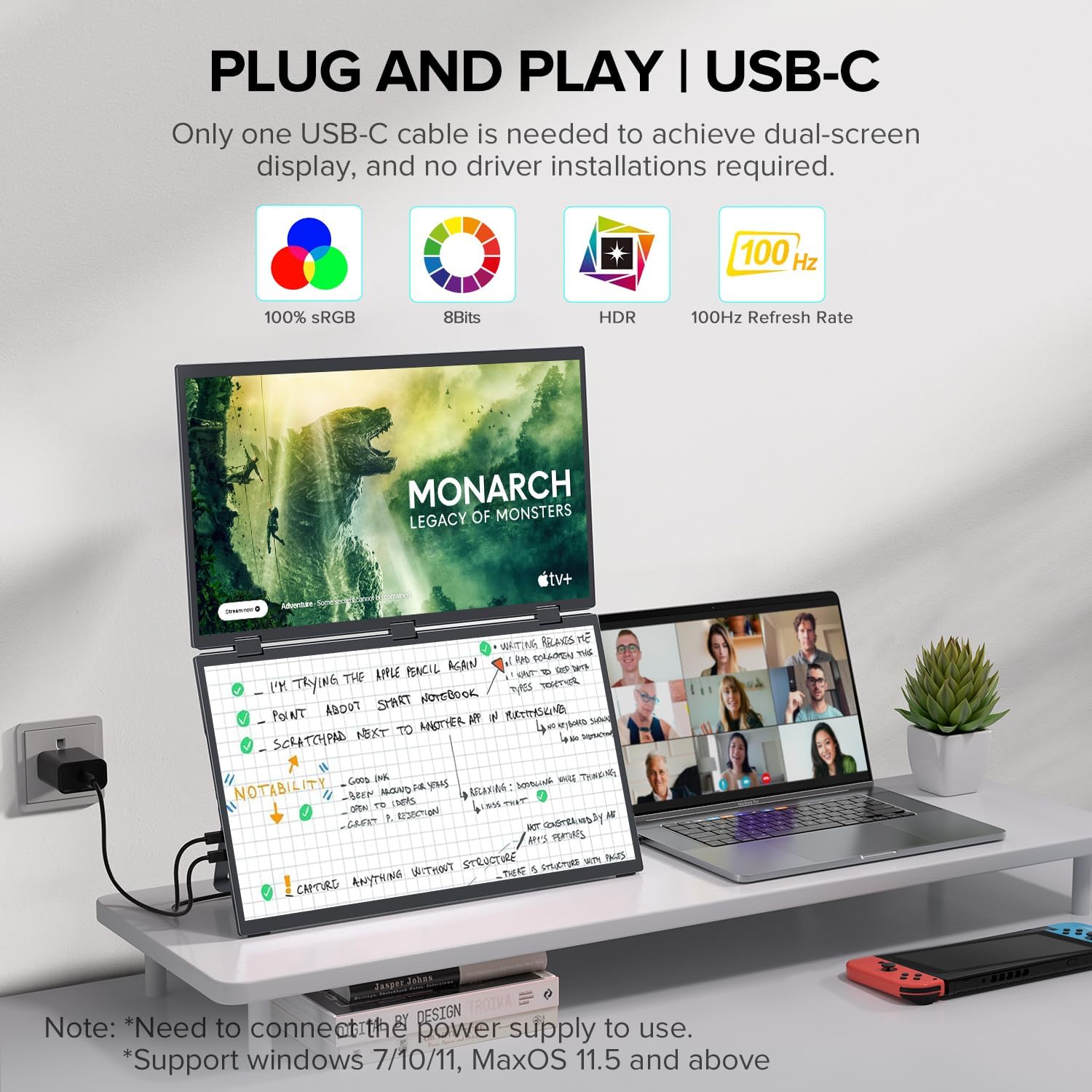
The UPERFECT Delta is a cutting-edge dual portable monitor designed for enhanced productivity and versatility. It features two 18.5-inch IPS matte touchscreen displays with a 100Hz refresh rate, offering vibrant visuals and smooth interaction. The monitor boasts 100% sRGB color gamut and a Delta E value of less than 2, ensuring accurate color reproduction. Its anti-glare, flicker-free, and eye care features contribute to a comfortable viewdoświadczenia podczas długotrwałego użytkowania.
Constructed with a premium aluminum housing, the UPERFECT Delta provides a sturdy and durable feel. It incorporates a versatile folding design that allows for 0-360° rotation and a built-in gravity sensor for 180° automatic rotation, adapting to various work and collaboration scenarios. An integrated adjustable stand and VESA mount compatibility (75x75 mm, M5*4 mm) offer flexible positioning options, whether on a desk, arm, or wall.

Główne cechy:
- Dual 18.5" IPS Matte Touchscreen Displays: Full HD 1080p resolution with wide viewkąty.
- Częstotliwość odświeżania 100 Hz: Ensures smooth visuals, ideal for gaming and fast-paced content.
- Driver-Free Setup: Plug & Play functionality, requiring no tedious driver installations.
- Wszechstronna składana konstrukcja: Supports 0-360° rotation for screen sharing and collaboration, with 180° automatic rotation via gravity sensors.
- Adjustable Stand & VESA Mount: Built-in 180° adjustable stand and VESA (75x75 mm, M5*4 mm) compatibility for ergonomic positioning.
- Wysoka dokładność kolorów: 100% sRGB color gamut and ΔE<2 for precise color reproduction.
- Funkcje pielęgnacji oczu: Anti-glare, flicker-free technology for comfortable extended viewing.
- Solidna konstrukcja: Trwała obudowa aluminiowa.
Porty i elementy sterujące:
The UPERFECT Delta monitor is equipped with multiple ports for flexible connectivity and control buttons for easy navigation of settings.
- 2 porty USB-C: One for power input, the other for audio/video signal transmission.
- 1 x port HDMI: For video input from devices without USB-C display output.
- 1 x gniazdo audio 3.5 mm: Do przesyłania dźwięku do słuchawek lub głośników zewnętrznych.
- Przycisk zasilania: Aby włączyć/wyłączyć monitor.
- Przyciski sterujące: For switching display modes and adjusting settings like brightness, contrast, and color.

5. Konfiguracja
Setting up your UPERFECT Delta monitor is designed to be straightforward and driver-free. Follow these steps to get started:
5.1 Połączenie początkowe
- Podłączenie zasilania: Connect the provided power adapter to a power outlet and then to one of the USB-C ports on the monitor (typically labeled for power input). This is crucial for stable operation, especially with dual displays.
- Device Connection (USB-C): If your device (laptop, phone, game console) has a full-featured USB-C port that supports video output, connect one of the provided USB-C to USB-C cables from your device to the other USB-C port on the monitor (typically labeled for A/V input).
- Device Connection (HDMI): If your device does not have a full-featured USB-C port, use the provided HDMI cable to connect your device to the monitor's HDMI port. In this case, you will still need to connect a USB-C to USB-A cable (not included) from your device to the monitor for touchscreen functionality, or ensure your device has a separate USB-C port for data.
- Wyjście audio: If desired, connect headphones or external speakers to the 3.5mm audio jack on the monitor.
The monitor is compatible with Windows 7/10/11, MacOS 11.5 and above, Samsung Dex Mode, iPhone 15 series (via Type-C), and various game consoles.
5.2 Konfiguracja fizyczna
- Korzystanie z wbudowanej podstawy: The monitor features a built-in 180° adjustable stand. Simply unfold the stand from the back of the monitor and adjust it to your desired viewing angle. The stand is designed to be sturdy and includes rubber stoppers for stability.
- Montaż VESA: For a more permanent setup or to save desk space, the monitor supports VESA mounting (75x75 mm, M5*4 mm). You can attach it to a compatible monitor arm or wall mount (sold separately).
- Składane dla łatwiejszego przenoszenia: When not in use or for transport, the monitor can be folded compactly. Its slim aluminum design makes it easy to carry.
6. Tryby pracy
The UPERFECT Delta offers various display modes to suit your workflow and collaboration needs. Use the control buttons on the side of the monitor to navigate and select your preferred mode.
6.1 Tryby wyświetlania
- Clone Mode (Duplicate): Both screens display the same content, mirroring your primary device's display. This is useful for presentations or sharing content with others.
- Tryb rozszerzania: Expands your desktop across the dual screens, providing a larger visual area for multitasking. You can drag and drop windows between the screens.
- DPMST Mode (Independent Connection): Allows you to connect two different devices simultaneously, with each screen displaying content from a separate source. This enables independent collaboration or simultaneous use of multiple systems.
- Tryb połączenia: Combines the two screens into one overall display, creating an ultra-wide workspace.

6.2 Orientation and Rotation
- Tryb poziomy: The standard horizontal orientation for both screens.
- Tryb portretowy: You can rotate the screens to a vertical orientation, which is beneficial for viewing long documents, code, or social media feeds. The built-in gravity sensors enable 180° automatic rotation when the screen is physically rotated.
- 360° Folding: The monitor's hinges allow for a full 360° rotation, enabling you to share your screen effortlessly in any direction, ideal for collaborative work.

6.3 Funkcjonalność ekranu dotykowego
The 10-point multi-touch screens provide responsive and intuitive interaction. Ensure your device is connected via a full-featured USB-C cable for touch functionality. For HDMI connections, a separate USB-C data cable from your device to the monitor may be required for touch input.
6.4 Oficjalny film o produkcie
Obejrzyj ten film, aby uzyskać kompleksowy przeglądview of the UPERFECT Delta Dual Portable Monitor's features and various usage scenarios.
7. Konserwacja
Proper care and maintenance will ensure the longevity and optimal performance of your UPERFECT Delta monitor.
7.1 Czyszczenie
- Ekran: Gently wipe the screen with a soft, lint-free microfiber cloth. For stubborn smudges, lightly dampen the cloth with water or a screen-specific cleaning solution (avoiding ammonia-based cleaners) and wipe carefully. Do not spray liquids directly onto the screen.
- Ciało: Use a soft, dry cloth to wipe the monitor's aluminum body. Avoid abrasive materials that could scratch the surface.
7.2 Przechowywanie
When not in use, fold the monitor into its compact form to protect the screens and save space. Store it in a dry, cool place away from extreme temperatures and direct sunlight. Consider using a protective sleeve or bag for transport.
8. Rozwiązywanie Problemów
If you encounter any issues with your UPERFECT Delta monitor, please refer to the following common troubleshooting steps:
8.1 No Power / Monitor Not Turning On
- Upewnij się, że zasilacz jest prawidłowo podłączony do monitora i do sprawnego gniazdka elektrycznego.
- Sprawdź, czy gniazdko elektryczne działa prawidłowo, podłączając do niego inne urządzenie.
- Press the power button firmly to ensure it's engaged.
8.2 Brak sygnału / pusty ekran
- Check all video cables (USB-C, HDMI) to ensure they are securely connected to both the monitor and your source device.
- Confirm that your source device is powered on and outputting a video signal.
- If using USB-C, ensure your device's USB-C port supports video output (DisplayPort Alternate Mode).
- Try switching the input source on the monitor using the control buttons.
- Uruchom ponownie urządzenie źródłowe.
8.3 Ekran dotykowy nie reaguje
- Ensure the monitor is connected to your device via a full-featured USB-C cable that supports data and video.
- If using HDMI, ensure a separate USB-C data cable is connected from your device to the monitor for touch input.
- For Windows, check display settings to ensure the touchscreen is recognized and enabled.
- Restart both the monitor and your connected device.
8.4 Display Settings Issues (Brightness, Color)
- Use the control buttons on the side of the monitor to access the On-Screen Display (OSD) menu.
- Navigate through the OSD menu to adjust brightness, contrast, color temperature, and other display settings.
If these steps do not resolve your issue, please contact UPERFECT customer support for further assistance.
9. Specyfikacje
Below are the detailed technical specifications for the UPERFECT Delta 18.5" 100Hz Touchscreen Dual Portable Monitor:
| Funkcja | Specyfikacja |
|---|---|
| Numer modelu | UStation Delta |
| Rozmiar ekranu | Podwójny 18.5 cala |
| Rezolucja | 1920 x 1080 (FHD 1080p) |
| Częstotliwość odświeżania | 100 Hz |
| Typ panelu | IPS Matte Touchscreen |
| Proporcje obrazu | 16:9 |
| Gama kolorów | 100% sRGB |
| Dokładność kolorów | ΔE<2 |
| Łączność | 2 x USB-C, 1 x HDMI, 1 x 3.5mm Audio Jack |
| Wymiary produktu | 0.8 x 16 x 10 cala |
| Waga przedmiotu | 9.09 funta (ok. 4.12 kg) |
| Mocowanie VESA | 75x75 mm (M5*4 mm screws) |
| Producent | DOSKONAŁE |
10. Gwarancja i wsparcie
UPERFECT is committed to providing high-quality products and excellent customer service. Your UPERFECT Delta monitor comes with the following assurances:
- 30-dniowa gwarancja zwrotu pieniędzy: Jeśli nie jesteś zadowolony z zakupu, możesz go zwrócić w ciągu 30 dni i otrzymać pełny zwrot pieniędzy.
- Wymiana w ciągu 90 dni: In case of any product defects or issues within 90 days of purchase, a free replacement will be provided.
- 12-miesięczna gwarancja: The monitor is covered by a 12-month warranty against manufacturing defects.
- Profesjonalne wsparcie techniczne: UPERFECT offers professional technical support to ensure a worry-free experience.
Skontaktuj się z pomocą techniczną:
For any queries, problems, or support requests, please contact us via:
E-mail: support@uperfectmonitor.com
You can also visit the official UPERFECT store on Amazon for more information and product updates: Sklep UPERFECT Amazon