
1. Wprowadzenie
The MiBOXER TRI-PW 500W AC Triac Dimmer is designed for precise control of lighting systems in residential and commercial environments. This device integrates WiFi and 2.4GHz technology, allowing for remote operation via compatible applications and MiBOXER remote controls. It supports triac dimming, ensuring compatibility with a wide range of lighting fixtures, including LED, halogen, and incandescent lights, for smooth and consistent dimming from full brightness to a soft glow.
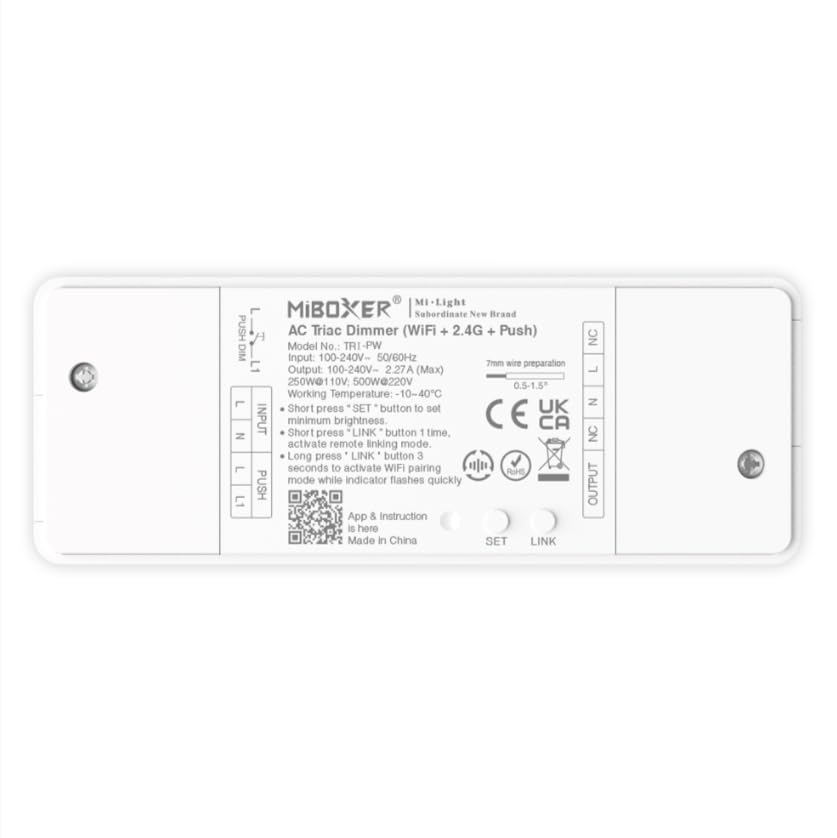
Obraz 1.1: Koniecview of the MiBOXER TRI-PW 500W AC Triac Dimmer unit.
2. Informacje dotyczące bezpieczeństwa
- Instalacja elektryczna: Instalację powinien wykonać wykwalifikowany elektryk, zgodnie z lokalnymi przepisami i regulacjami elektrycznymi.
- Odłączenie zasilania: Przed instalacją lub serwisowaniem ściemniacza należy zawsze odłączyć zasilanie na wyłączniku automatycznym.
- Tomtage Kompatybilność: Upewnij się, że głośność wejściowatage matches the dimmer's specifications (100-240V AC).
- Nośność: Do not exceed the maximum load capacity of 500W. Overloading can cause damage or fire.
- Tylko do użytku wewnątrz pomieszczeń: This device is intended for indoor use in dry locations. Avoid exposure to moisture or extreme temperatures.
- Zgodność: Use only with compatible dimmable lighting fixtures (LED, halogen, incandescent).
3. Zawartość opakowania
Sprawdź, czy w opakowaniu znajdują się wszystkie komponenty:
- MiBOXER TRI-PW 500W AC Triac Dimmer Unit
- User Manual (may be included as a separate document)

Image 3.1: MiBOXER TRI-PW Dimmer unit shown with its packaging and a user manual.
4. Funkcje produktu
- Powerful 500W Capacity: Supports high-power loads, suitable for various lighting fixtures.
- Triac Dimming Technology: Provides flicker-free dimming for LED, halogen, and incandescent lights.
- WiFi & 2.4GHz Control: Integrates with WiFi and MiBOXER 2.4GHz systems for smartphone or remote control.
- Push Control Compatibility: Allows for quick, on-site dimming adjustments via a push button.
- Aplikacja i sterowanie głosowe: Compatible with major smart home platforms for app-based and voice command control.
- Funkcja pamięci: Retains previous lighting settings after power cycles.
5. Specyfikacje
| Funkcja | Szczegół |
|---|---|
| Marka | MiBOXER |
| Nazwa modelu | TRI-PW |
| Funkcja specjalna | Ściemniacz triakowy o mocy 500 W |
| Klasa pasma częstotliwości | Pojedynczy pasmo |
| Standard komunikacji bezprzewodowej | 802.11b |
| Kompatybilne urządzenia | Obsługa ściemniania PUSH |
| Zalecane zastosowania | Home lighting systems |
| Technologia łączności | Wi-Fi |
| Zgodność z inteligentnym domem | Smart Home Compatible (e.g., Amazon Alexa, Google Assistant) |
| Zasięg | LED, halogen, incandescent, high-power loads |
| Częstotliwość | 2.4 GHz |
| Wymiary (w przybliżeniu) | 117 mm (dł.) x 45 mm (szer.) x 24 mm (wys.) |
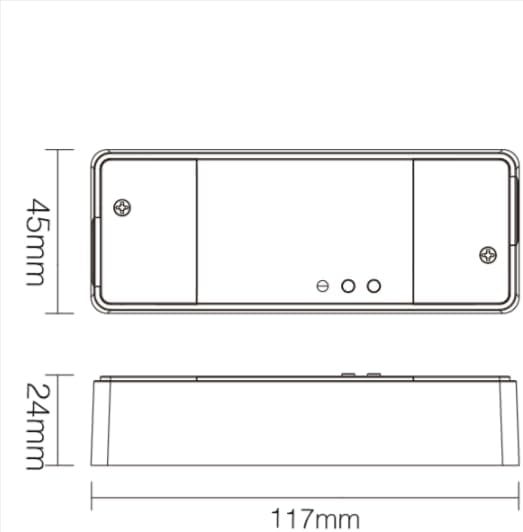
Image 5.1: Technical drawing showing the approximate dimensions of the TRI-PW dimmer.

Image 5.2: Packaging dimensions for the MiBOXER TRI-PW dimmer.
6. Konfiguracja i instalacja
Ważny: Przed rozpoczęciem instalacji należy upewnić się, że zasilanie wyłącznika obwodu jest odłączone.
Schemat okablowania
The MiBOXER TRI-PW dimmer supports two primary wiring methods for integration with a push switch. Both methods are suitable for triac dimming LED lights, traditional filament lamps i halogen lamps.

Image 6.1: Wiring diagrams for connecting the MiBOXER TRI-PW dimmer with a push switch.
Method 1: Single-Wire Push Switch Connection
- Connect the Live (L) and Neutral (N) input wires from your power supply (100-240V~) to the corresponding 'INPUT' terminals on the dimmer.
- Connect the Live (L) and Neutral (N) output wires to your lighting fixture (100-240V~) from the 'OUTPUT' terminals.
- Connect one wire from the push switch to the 'PUSH' terminal on the dimmer.
- Connect the other wire from the push switch to the Live (L) input terminal.
Method 2: Two-Wire Push Switch Connection
- Connect the Live (L) and Neutral (N) input wires from your power supply (100-240V~) to the corresponding 'INPUT' terminals on the dimmer.
- Connect the Live (L) and Neutral (N) output wires to your lighting fixture (100-240V~) from the 'OUTPUT' terminals.
- Connect the two wires from the push switch directly to the 'PUSH' terminals on the dimmer.
After wiring, secure the dimmer in a suitable electrical box or enclosure. Restore power at the circuit breaker.
7. Instrukcja obsługi
7.1. Push Switch Control
- Krótkie naciśnięcie: Turn the lights ON or OFF.
- Długie naciśnięcie: Adjust the brightness level. Release the button to set the desired brightness.
7.2. Sterowanie aplikacją Wi-Fi
The TRI-PW dimmer supports control via a smart app (e.g., Tuya Smart app). No additional 2.4G gateway is required for app control.
- Download the compatible smart home app from your device's app store.
- Zarejestruj się lub zaloguj na swoje konto.
- Put the dimmer into pairing mode (refer to the app's instructions or the dimmer's specific pairing procedure, usually involving a long press of the 'SET' button or power cycling).
- Follow the in-app instructions to add the device to your network.
- Once connected, you can control the dimmer's ON/OFF state and brightness from your smartphone.
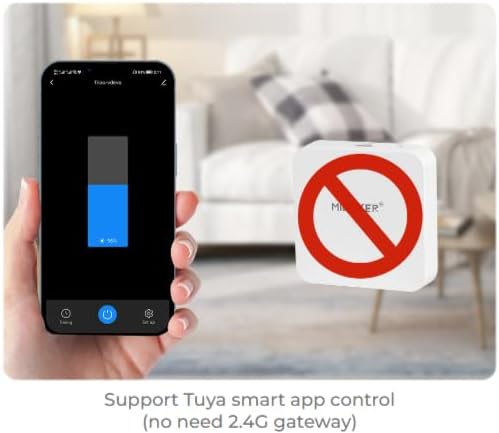
Obraz 7.1: Example of controlling the dimmer using a smartphone application.
7.3. 2.4GHz Remote Control
The dimmer can be paired with MiBOXER 2.4GHz remote controls for direct wireless control.
- Sprawdź, czy ściemniacz jest włączony.
- Refer to your MiBOXER 2.4GHz remote control's manual for specific pairing instructions. Typically, this involves pressing a "Link" or "Pair" button on the remote within a few seconds of powering on the dimmer or pressing the dimmer's 'SET' button.
- A successful pairing is usually indicated by the connected light flashing.
7.4. Sterowanie głosowe (Alexa/Asystent Google)
The TRI-PW dimmer is compatible with smart home voice assistants like Amazon Alexa and Google Assistant when integrated through a compatible smart home app.
- Ensure your dimmer is successfully connected to the smart home app (e.g., Tuya Smart).
- Otwórz aplikację Amazon Alexa lub Google Home.
- Enable the skill or service for the smart home app you are using (e.g., "Tuya Smart" skill).
- Discover devices. Your dimmer should appear in the list.
- Assign a name to your dimmer (e.g., "Living Room Light").
- You can now control your light using voice commands, such as "Alexa, turn on Living Room Light" or "Hey Google, dim Living Room Light to 50%."

Image 7.2: The dimmer is compatible with voice control platforms like Amazon Alexa and Google Assistant.
8. Konserwacja
- Czyszczenie: Disconnect power before cleaning. Wipe the dimmer with a soft, dry cloth. Do not use liquid cleaners or aerosols.
- Kontrola: Okresowo należy sprawdzać, czy połączenia przewodów są dobrze dokręcone oraz czy nie występują ślady zużycia lub uszkodzenia.
- Aktualizacje oprogramowania układowego: If available, check the smart home app for firmware updates to ensure optimal performance and security.
9. Rozwiązywanie Problemów
| Problem | Możliwa przyczyna | Rozwiązanie |
|---|---|---|
| Światła nie włączają się. | No power, incorrect wiring, faulty bulb, dimmer not paired. | Check circuit breaker. Verify wiring according to diagrams. Test bulb. Re-pair dimmer with app/remote. |
| Światła migoczą lub brzęczą. | Incompatible bulb, overloaded circuit, loose wiring. | Ensure bulbs are dimmable and compatible with triac dimmers. Reduce load. Check wiring connections. |
| Dimmer not responding to app/remote. | Dimmer out of range, WiFi issue, not paired. | Ensure dimmer is within WiFi/2.4GHz range. Check WiFi router. Re-pair dimmer with app/remote. |
| Nie można połączyć się z siecią Wi-Fi. | Incorrect WiFi password, 5GHz network, dimmer not in pairing mode. | Verify WiFi password. Ensure you are connecting to a 2.4GHz network. Put dimmer into WiFi pairing mode. |
10. Gwarancja i wsparcie
This MiBOXER TRI-PW dimmer comes with a 2-letnia gwarancja od daty zakupu. Niniejsza gwarancja obejmuje wady materiałowe i wykonawcze przy normalnym użytkowaniu.
The warranty does not cover damage caused by improper installation, misuse, unauthorized modifications, or acts of nature.
For technical support or warranty claims, please contact your retailer or the manufacturer directly. Please have your purchase receipt and product model number (TRI-PW) available when contacting support.
Aby uzyskać więcej informacji, odwiedź stronę Sklep MiBOXER na Amazonie.