
Wstęp
This manual provides instructions for the assembly, operation, and maintenance of your FLEXISPOT MT137 32-inch Height Adjustable Standing Desk Converter. This product is designed to transform your existing desk into an ergonomic sit-to-stand workstation, promoting a healthier work routine.
Informacje dotyczące bezpieczeństwa
- Zawsze należy dokładnie przestrzegać instrukcji montażu.
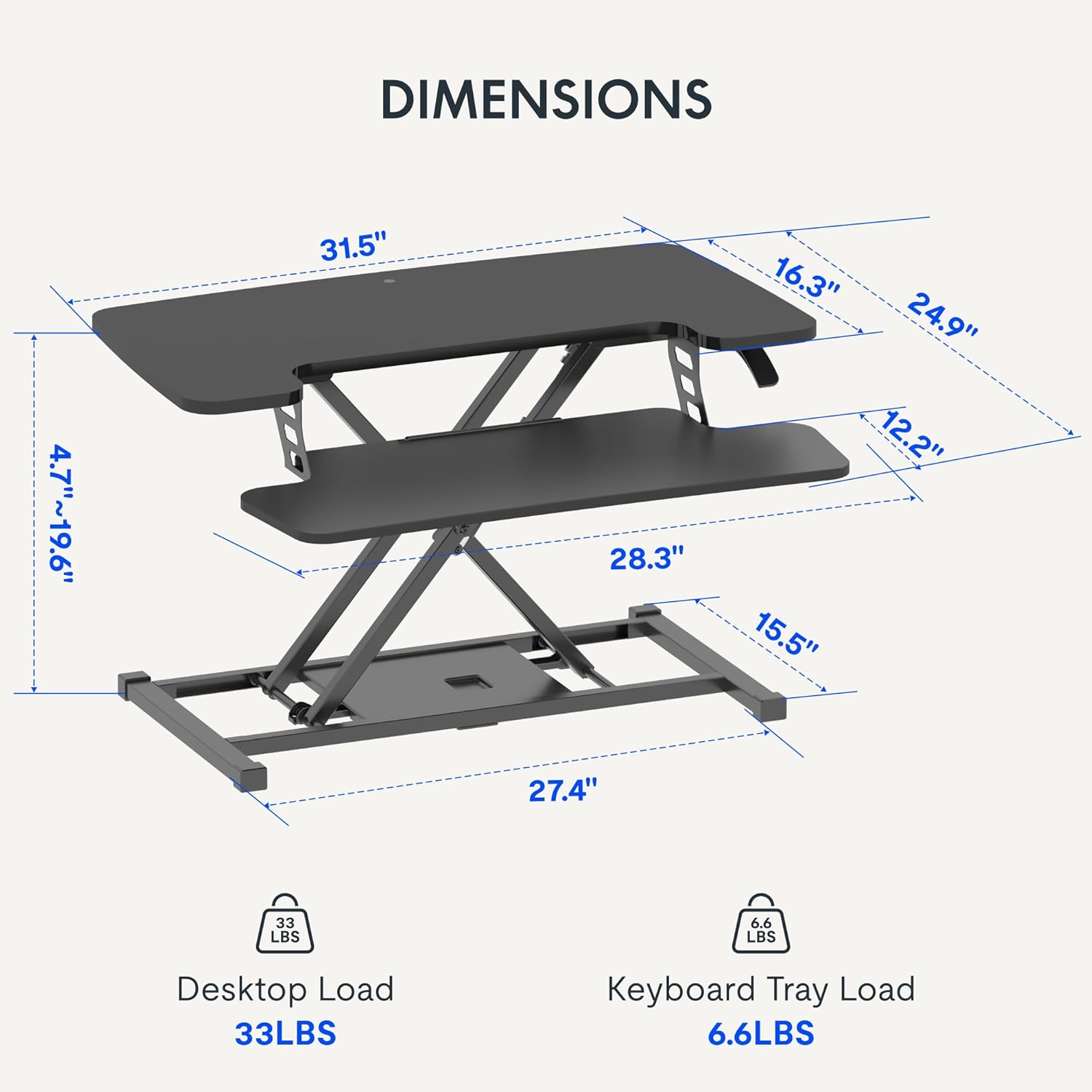
- Do not exceed the weight limit of 33 lbs (15 kg) on the upper desktop.
- Do not exceed the weight limit of 6.6 lbs (3 kg) on the keyboard tray.
- Ensure the desk converter is placed on a stable, flat surface.
- Podczas regulacji wysokości trzymaj dłonie i palce z dala od ruchomych części.
Zawartość opakowania
- Pre-assembled Desk Converter Unit
- Tacka na klawiaturę
- Mounting Screws for Keyboard Tray
- Instrukcja obsługi (ten dokument)
Konfiguracja i montaż
- Rozpakowywanie: Ostrożnie wyjąć wszystkie elementy z opakowania.
- Keyboard Tray Attachment: Position the keyboard tray beneath the main desktop. Align the pre-drilled holes on the keyboard tray with the mounting points on the converter's frame. Secure the keyboard tray using the provided screws.
- Umieszczenie: Place the assembled desk converter on a stable, flat desk surface.

The desk converter is largely pre-assembled, requiring only the attachment of the keyboard tray for immediate use.
Instrukcja obsługi
- Regulacja wysokości: To adjust the height, locate the adjustment lever on the side of the upper desktop.
- Podnoszenie biurka: Squeeze the lever and gently lift the desktop to your desired standing height. Release the lever to lock it in place. The gas spring mechanism assists in smooth elevation.
- Obniżanie biurka: Squeeze the lever and apply gentle downward pressure to lower the desktop to your desired sitting height. Release the lever to lock it in place.
- Nośność: The upper desktop supports up to 33 pounds (15 kg). The keyboard tray supports up to 6.6 pounds (3 kg). Do not exceed these limits.


Cechy
- Ergonomiczna konstrukcja: Seamlessly transition between sitting and standing positions to promote a healthy work posture. The streamlined edges are designed to reduce wrist discomfort.
- Spacious Two-Tier Workstation: The upper desktop provides ample space for monitors or laptops, while the lower keyboard tray accommodates your keyboard and mouse. A U-shaped cutout on the upper deck allows for laptop placement directly on the tray, optimizing space.
- Sturdy X-Frame Construction: Built with a robust X-frame, ensuring stability and smooth, effortless height adjustments.
- Versatile Height Range: Offers a height adjustment range from 4.7 inches (12 cm) to 19.6 inches (50 cm), accommodating various user heights and work preferences.


Konserwacja
- Czyszczenie: Przetrzyj powierzchnie miękką, damp płótno. Unikaj ściernych środków czyszczących.
- Kontrola: Okresowo sprawdzaj wszystkie śruby i połączenia, aby mieć pewność, że są dobrze dokręcone.
Rozwiązywanie problemów
- Trudności w regulacji wysokości: Ensure no objects are obstructing the lifting mechanism. Verify that the weight on the desk does not exceed the specified limits.
- Kołysanie się: Confirm the desk converter is placed on a flat, stable surface. Check all assembly screws for tightness.
Specyfikacje
| Marka | ELASTYCZNI |
| Nazwa modelu | MT137 |
| Wymiary produktu | 61 cm gł. x 81 cm szer. x 50 cm wys. (24" gł. x 32" szer. x 19.7" wys.) |
| Kolor | Czarny |
| Materiał bazowy | Metal |
| Najlepszy rodzaj materiału | Drewno |
| Waga przedmiotu | 24 funtów (10.9 kg) |
| Maximum Upper Desktop Load | 33 funtów (15 kg) |
| Maximum Keyboard Tray Load | 6.6 funtów (3 kg) |
| Zakres regulacji wysokości | od 4.7 cali (12 cm) do 19.6 cali (50 cm) |
| Wymagany montaż | Tak (minimalnie) |
| Narzędzia zalecane do montażu | Śrubokręt |
| UPC | 810072862501 |
Gwarancja i wsparcie
Rodzaj gwarancji: This product comes with a Full Warranty.
For further assistance, warranty claims, or technical support, please contact FLEXISPOT customer service. Refer to the official FLEXISPOT webAktualne dane kontaktowe znajdują się na stronie.