
1. Informacje dotyczące bezpieczeństwa
Please read all instructions carefully before installation and use. Keep this manual for future reference. Ensure proper installation to prevent accidents. Always check your surroundings manually before relying solely on the camera system.
2. Zawartość opakowania
- 1 x 7 Inch IPS Touch Key Monitor with U Bracket
- 1 x RV Backup Camera (Magnetic Solar Wireless)
- 1 x Charge Plug
- 1 x USB to Type C Cable (for Camera)
- 1 x USB to Type C Cable (for Monitor)
- 1 x wtyczka do zapalniczki samochodowej
- 3 x Anteny
3. Koniec produktuview
The AMTIFO A8 system provides enhanced visibility for large vehicles. It features a magnetic, solar-powered wireless camera and a 7-inch portable monitor. Key features include 1080P HD resolution, 170° wide-angle view, advanced night vision, and built-in recording.

Figure 1: Complete AMTIFO A8 Backup Camera System showing the 7-inch monitor and the magnetic solar-powered camera.
4. Konfiguracja
4.1 Ładowanie kamery
The camera is equipped with a solar panel for continuous charging and a built-in 15000mAh battery. For initial use or if the battery is low, charge the camera using the provided USB to Type C cable.

Figure 2: The camera unit showing the solar panel and the Type-C charging port. The solar panel provides 3W power, and the built-in battery is 15000mAh.
4.2 Montaż kamery
The camera features a strong magnetic base for easy, drill-free installation. It can be attached to any ferrous-metal surface on your vehicle. Ensure the surface is clean and flat for optimal adhesion. The camera also includes a 90° up/down adjustment for optimal viewkąt.
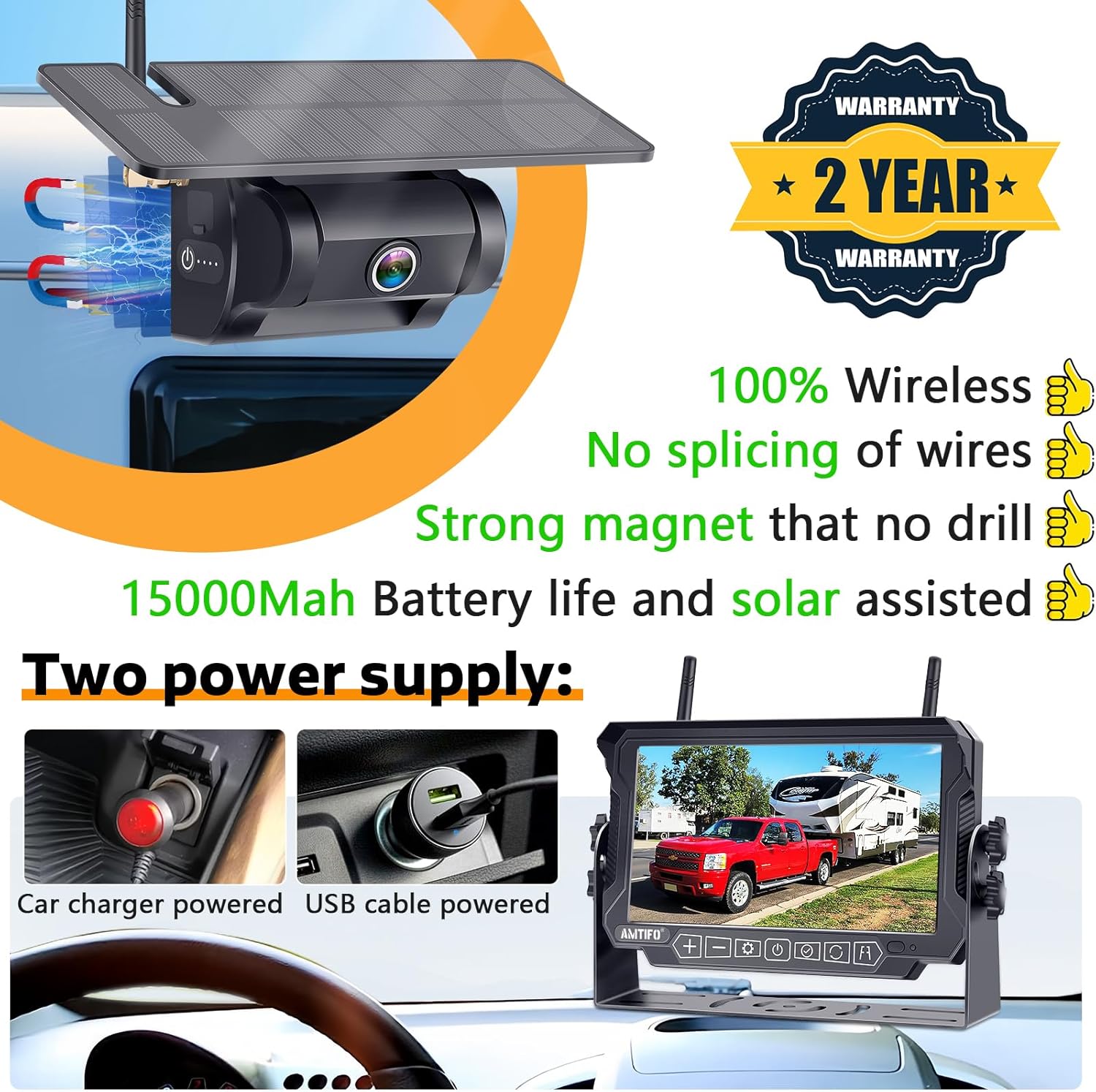
Figure 3: The camera unit highlighting its strong magnetic base for secure attachment to vehicle surfaces.

Figure 4: The camera with its solar panel and dual power supply options, including USB cable and car charger.
Figure 5: The camera's solar power panel and built-in 15000mAh battery, with a 90° up/down adjustment for the camera lens.
4.3 Montaż monitora
Attach the 7-inch IPS monitor to your dashboard or windshield using the provided U bracket or suction cup mount. Position it for clear visibility without obstructing your view drogi.

Figure 6: The 7-inch monitor with dual antennas for signal enhancement, a sunshade for anti-glare, and touch buttons for easy operation.
4.4 Zasilanie monitora
Connect the monitor to your vehicle's power source using the cigarette lighter plug or the USB to Type C cable. The system is designed for quick DIY installation without requiring special tools.
Video 1: Demonstrates the easy installation of the magnetic wireless backup camera and monitor, including power options via USB and car charger. This video is provided by the seller, Yakry-US.
5. Instrukcja obsługi
5.1 Włączanie/wyłączanie
Press and hold the power button on the monitor for 5-10 seconds to turn the system on or off. The camera will automatically activate when the monitor is powered on.
5.2 Display Modes and Settings
The 7-inch IPS monitor features touch buttons for easy navigation. You can switch between different camera channels (if multiple cameras are paired) and view in full screen or split screen mode. Access the menu to adjust brightness, contrast, hue, and other display settings.

Figure 7: The monitor's multi-functional menu, allowing access to pairing, picture settings, mirror/flip options, system settings, recording, and playback.

Figure 8: The monitor displaying options for adjusting DIY guide lines, including width, height, and horizontal position.
5.3 Guide Lines and Image Flip
Dostosuj swój view with adjustable guide lines for precise parking and reversing. The image flip function allows you to change the orientation of the camera feed (Normal, Mirror, Inverted Front, Inverted Mirror) to suit your preference or mounting position.

Figure 9: The monitor illustrating various image flip modes: Normal, Mirror, Inverted Front Image, and Inverted Mirror Image.
5.4 Funkcja nagrywania
The built-in recording function allows you to capture and store video footage. The system supports up to a 128GB SD card and features loop recording, automatically overwriting unprotected video when the card is full.
5.5 Night Vision and Wide-Angle View
The camera provides advanced night vision for clear visibility in low-light conditions. Its 170° wide-angle lens minimizes blind spots, offering full coverage for safer maneuvering of large vehicles.

Figure 10: Comparison of day and night vision capabilities, showcasing the HD 1080P and crystal night vision of the AMTIFO A8 camera.
6. Konserwacja
- Czyszczenie: Regularnie czyść obiektyw aparatu i ekran monitora miękką, miękką szmatką.amp płótno. Unikaj ściernych środków czyszczących.
- Pielęgnacja baterii: Ensure the solar panel is exposed to sunlight when possible to maintain battery charge. If storing for extended periods, fully charge the camera battery.
- Ochrona przed warunkami atmosferycznymi: The camera is IP69K-rated for weather resistance. However, avoid prolonged exposure to extreme conditions when not in use to extend product lifespan.
7. Rozwiązywanie Problemów
| Problem | Możliwe rozwiązanie |
|---|---|
| No signal on monitor | Ensure both camera and monitor are powered on. Check antenna connections. Verify wireless range (up to 100ft). |
| Aparat się nie ładuje | Ensure solar panel is exposed to direct sunlight. Connect via USB-C cable to charge manually. |
| Obraz jest zniekształcony lub niewyraźny | Clean camera lens and monitor screen. Check for obstructions. Adjust brightness/contrast settings. |
| Monitor się nie włącza | Check power connection (cigarette lighter or USB). Ensure vehicle's power outlet is functional. |
8. Specyfikacje
- Wymiary produktu: 4.75 x 1.72 x 7.38 cala
- Waga przedmiotu: 3.81 funta
- Numer modelu przedmiotu: A8
- Baterie: Wymagane 1 baterie litowo-jonowe (w zestawie)
- Technologia wyświetlania: LCD
- Inne funkcje wyświetlacza: Bezprzewodowy
- Rozmiar ekranu: 7 cali
- Zgodne urządzenia: Kampery, przyczepy, campers, trucks, 5th-wheels, boats, tractors
- Typ instalacji: Montaż powierzchniowy (magnetyczny)
- Tomtage: 12 wolty
- Technologia czujnika optycznego: CMOS Infrared
- Typ soczewki: Szeroki kąt
- Kąt rzeczywisty View: 170 stopni
- Typ złącza: Bezprzewodowy
- Ocena odporności na warunki atmosferyczne: IP69K
- Zasięg bezprzewodowy: Do 100 stóp
- Bateria aparatu: 15000mAh (Solar & Battery Powered)
9. Gwarancja i wsparcie
This product comes with a 2-year protection plan option. For technical support, warranty claims, or any inquiries, please refer to the contact information provided with your purchase or visit the official AMTIFO website. Ensure you retain your proof of purchase for warranty services.
Aby uzyskać dodatkową pomoc i informacje o produkcie, odwiedź stronę AMTIFO Store on Amazon.