
Rraycom C366
Rraycom C366 Solar Security Camera System User Manual
Model: C366 | Brand: Rraycom
Wstęp
This manual provides comprehensive instructions for the Rraycom C366 Solar Security Camera System. This wireless outdoor camera system features 2.5K resolution, solar/battery power, PIR motion detection, two-way audio, color night vision, and IP66 waterproofing. It supports both 2.4GHz and 5GHz WiFi bands for stable connectivity and offers flexible local and cloud storage options.
Co jest w pudełku
- 4x Wireless Solar Security Camera Outdoor
- 4x Adjustable 2W Solar Panels (with Screw Pack)
- 4x kabel ładujący USB typu C 3M do panelu słonecznego

Image: Rraycom C366 Solar Security Camera with its solar panel, illustrating the main components. The camera is white with a black front, and the solar panel is black with a white frame.
Video: An unboxing video for the C366 security camera, showing all included components such as the camera, solar panel, power cable, pin, and screw package.
Konfiguracja i instalacja
The Rraycom C366 camera is designed for easy, 100% wire-free installation. No complex wiring or professional technicians are required. Simply drill three holes and mount the camera and solar panel in your desired location.
Montaż kamery i panelu słonecznego
- Wybierz lokalizację: Select an outdoor area with good WiFi coverage and sufficient direct sunlight for the solar panel. Ensure the camera has a clear view obszaru, który chcesz monitorować.
- Wiercenie otworów: Use the provided screw package to mark and drill three holes for mounting the camera bracket and solar panel bracket.
- Bezpieczne mocowanie: Attach the camera and solar panel brackets securely to the wall using the provided screws.
- Podłącz panel słoneczny: Connect the 3M Type-C USB charge cable from the solar panel to the camera's charging port.
- Dostosuj kąt: Adjust the angle of both the camera and the solar panel to optimize sunlight absorption and camera viewkąt.

Image: A man in work attire installing the Rraycom C366 camera on an exterior wall, demonstrating the ease of DIY quick installation.
Initial Setup and App Connection
Download the free "Tuya" app to your smartphone (iOS or Android) to connect and configure your camera. The camera supports both 2.4GHz and 5GHz WiFi bands for flexible and stable connectivity.
- Pobierz aplikację: Szukaj "Tuya" in your device's app store and install it.
- Utwórz konto: Otwórz aplikację i postępuj zgodnie z instrukcjami, aby utworzyć nowe konto lub się zalogować.
- Dodaj urządzenie: Tap the "+" icon to add a new device. Select "Security Camera" or similar option.
- Włącz kamerę: Upewnij się, że kamera jest włączona.
- Połącz się z Wi-Fi: Follow the in-app instructions to connect the camera to your home WiFi network. This typically involves scanning a QR code displayed on your phone with the camera.
- Pełna konfiguracja: Po połączeniu nadaj nazwę swojej kamerze i zakończ proces początkowej konfiguracji w aplikacji.

Image: A smartphone displaying the Tuya app interface, showing a live feed from the Rraycom camera, demonstrating remote access and monitoring capabilities.
Instrukcja obsługi
Na żywo View i nagrywanie
Uzyskaj dostęp do foo na żywotage from your camera anytime, anywhere through the Tuya app. The camera records automatically when motion is detected.
- Na żywo View: Open the Tuya app and select your camera to view kanał na żywo.
- Odtwarzanie nagranego dźwięku: Review recorded events from the app's playback section. Recordings are stored on the inserted TF card (up to 128GB, not included) or in optional cloud storage.
- 2.5K Clarity & 6x Zoom: The camera provides 2.5K FHD resolution. Use the digital zoom feature in the app to magnify distant objects and view bliższe dane.

Image: A side-by-side comparison showing the superior clarity of 2K QHD resolution versus 1080P, highlighting the detailed image quality of the Rraycom C366 camera.
Wykrywanie ruchu i alerty
The camera features advanced AI motion detection to distinguish between people and animals, reducing false alarms. When motion is detected, you receive instant alerts.
- Natychmiastowe powiadomienia: Receive email and push notifications on your smartphone when motion is detected.
- W centrum uwagi i syrena: The powerful spotlight and siren can be activated automatically upon detection to deter intruders.
- Konfigurowalne strefy wykrywania: Zdefiniuj określone obszary w obrębie kamery view to focus motion detection, minimizing alerts from non-critical zones.

Image: An illustration of the camera's smart AI detection capabilities, showing it can differentiate between persons, pets, vehicles, and packages to reduce false alarms.
Dwukierunkowy dźwięk
Komunikuj się bezpośrednio przez kamerę, korzystając z wbudowanego mikrofonu i głośnika.
- Mówić: Use the microphone icon in the app to speak through the camera.
- Słuchać: The camera's speaker allows you to hear audio from the monitored area.
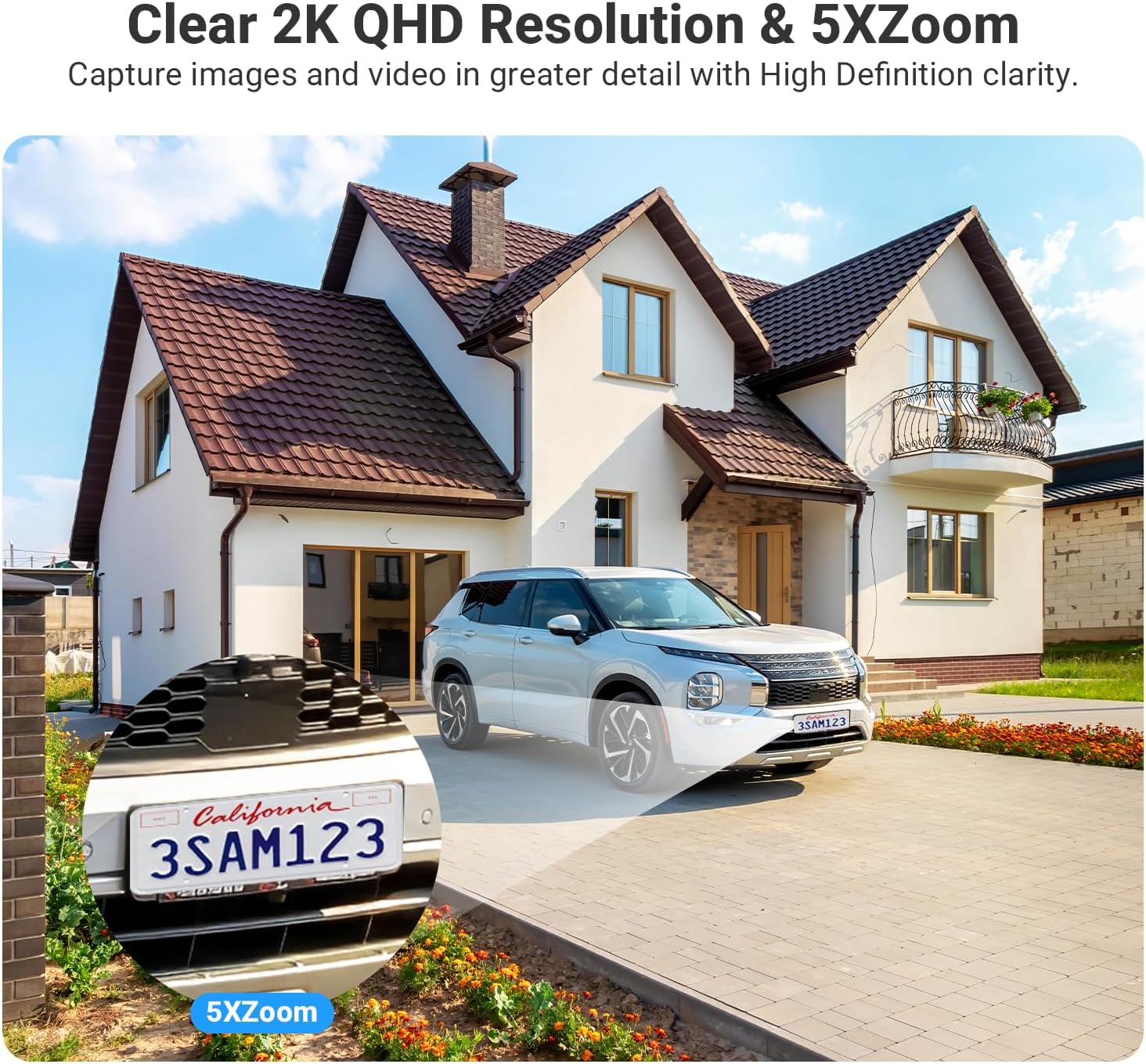
Image: A visual representation of the two-way audio feature, showing a delivery person speaking to a homeowner through the camera, and the homeowner responding via their smartphone app.
Integracja inteligentnego domu (Alexa)
The Rraycom C366 camera is compatible with Amazon Alexa, allowing for voice control.
- Połącz się z Alexą: Follow the instructions in the Tuya app or Alexa app to link your Rraycom account.
- Polecenia głosowe: Use commands like "Alexa, show me the backyard" to view żyćtage on compatible devices such as Echo Show.

Image: An image showing the "Works with Google Assistant" and "Works with Alexa" logos, indicating compatibility. Below, an Echo Show device displays a live camera feed, demonstrating hands-free control.
Konserwacja
Ładowanie słoneczne
The integrated solar panel provides continuous power to the built-in 9600mAh lithium battery. For optimal performance, ensure the solar panel receives adequate direct sunlight daily.
- Umieszczenie paneli: Position the solar panel in an area that receives at least 1.5 hours of direct sunlight per day.
- Czystość: Periodically clean the surface of the solar panel to remove dust, dirt, or debris that may obstruct sunlight absorption.

Image: The Rraycom C366 camera and its solar panel mounted on an outdoor wall, illustrating the 100% wire-free and continuous power supply feature with a 9000mAh battery.
Odporność na warunki atmosferyczne
The camera has an IP66 waterproof rating, designed to withstand various outdoor weather conditions.
- Ochrona: The IP66 rating ensures protection against heavy rain, snow, dust, and splashes.
- Temperatura pracy: The camera is designed to operate in temperatures ranging from -20°C (-4°F) to 50°C (122°F).

Image: The Rraycom C366 camera with its solar panel shown in two different weather conditions: heavy rain with lightning and a snowy winter landscape, demonstrating its IP66 waterproof and all-weather readiness.
Rozwiązywanie problemów
| Problem | Możliwa przyczyna | Rozwiązanie |
|---|---|---|
| Kamera nie włącza się | Low battery; Solar panel not charging; Power cable issue. | Ensure solar panel is in direct sunlight. Check cable connection. Fully charge the camera using the USB cable if needed. |
| Nie można połączyć się z WiFi | Incorrect WiFi password; Camera too far from router; Router band incompatibility. | Verify WiFi password. Move camera closer to router. Ensure your router supports 2.4GHz or 5GHz and select the appropriate band in the app. |
| Częste fałszywe alarmy | Motion detection sensitivity too high; Unoptimized detection zones. | Adjust motion detection sensitivity in the app. Configure custom detection zones to exclude busy areas. |
| Słaba jakość obrazu w nocy | Niewystarczające oświetlenie otoczenia do widzenia kolorów w nocy. | Ensure the camera's spotlight is enabled for color night vision. Clear any obstructions blocking the camera's view. |
| Dwukierunkowe audio nie działa | Mikrofon/głośnik wyciszony w aplikacji; problemy z siecią. | Check audio settings in the Tuya app. Ensure stable network connection. |
Specyfikacje
| Funkcja | Szczegół |
|---|---|
| Nazwa modelu | C366-SP |
| Zastosowanie wewnątrz/na zewnątrz | Na zewnątrz, Wewnątrz |
| Źródło zasilania | Solar Powered, Battery Powered (9600mAh Lithium Ion) |
| Technologia łączności | Bezprzewodowa (Wi-Fi 2.4 GHz i 5 GHz) |
| Rozdzielczość przechwytywania wideo | 2.5K HD (1920p) |
| Wizja nocna | Kolorowa wizja nocna, zasięg 100 stóp |
| Typ powiększenia | Zoom cyfrowy (6x) |
| Wykrywanie ruchu | AI Motion Detection (People, Animals, Vehicles, Packages), Instant Alerts, Spotlight, Siren |
| Audio | Dwukierunkowy dźwięk |
| Składowanie | Micro SD (up to 128GB, not included), Optional Cloud Storage |
| Poziom wodoodporności | Wodoodporność IP66 |
| Temperatura pracy | -20°C (-4°F) do 50°C (122°F) |
| Kompatybilne urządzenia | Smartphone (iOS, Android), Desktop, Tablet, Amazon Alexa, Google Assistant |
| Viewing kąt | 130 stopni |
| Tworzywo | Akrylonitryl-butadien-styren (ABS) |
| Wymiary produktu | 10.35 x 3.35 x 12.4 cala |
| Waga przedmiotu | 1.35 funta |
| Liczba elementów | 4 |
| Zalecane zastosowania | Bezpieczeństwo wewnętrzne, bezpieczeństwo zewnętrzne |
| Cechy specjalne | 2.4/5 Ghz WiFi, 2.5K HD Resolution, Micro SD Local Recording(Optional), Cloud Storage(Optional), 100% Wireless, Solar/Battery Powered, Remote Access, 2 Way Audio, Motion Sensor, Zone Detection, Motion Triggered Recording, IP66 Waterproof, Work with Alexa, Color Night Vision |
Gwarancja i wsparcie
Rraycom is committed to providing high-quality security camera products and excellent customer service. Every camera undergoes rigorous testing and inspection before shipment.
W przypadku pytań dotyczących produktów, pomocy technicznej lub roszczeń gwarancyjnych prosimy o kontakt z naszym zespołem obsługi klienta:
- E-mail: posprzedażna@rraycom.com
- Producent: Rraycom

Image: An illustration depicting a customer service representative at a desk with a computer and phone, symbolizing available customer support for the product.
Ask a question about this manual
Ask about setup, troubleshooting, compatibility, parts, safety, or missing instructions. Manuals+ will review the question and use this page’s manual context to help answer it.