
ScopeAround SASA160
ScopeAround Digital Otoscope User Manual
Model: SASA160
Marka: ScopeAround
Wstęp
The ScopeAround Digital Otoscope with IPS Screen (Model SASA160) is designed for clear, real-time visual inspection of the ear canal. This device allows users to perform ear checks instantly without the need for external connections like phones or apps. It is equipped with a high-resolution camera and integrated lighting to provide detailed views, making it suitable for personal and family ear care, including monitoring ear wax and general ear health.

Image: The ScopeAround Digital Otoscope, showing the main unit with its integrated screen, detachable lens with extension cable, various ear picks, specula, alcohol pads, Q-tips, and USB cable.
Główne cechy
- Built-In IPS Screen: Features a clear IPS display for instant viewing without requiring a phone or app connection. Simply power on and view obrazy w czasie rzeczywistym.
- Kamera o wysokiej rozdzielczości: The 720p HD camera and integrated IPS screen provide sharp, true-to-life images, allowing clear visualization of fine details within the ear canal without glare or distortion.
- Slim 3.9mm Lens with LED Lights: Designed for comfort and safety, the slim lens is gentle for all ages. Six LED lights with three brightness levels ensure optimal illumination for clear viewing.
- Flexible Detachable Lens and Extension Cable: The lens can be detached and connected to an extended cable, offering flexibility for self-inspection or assisting others comfortably.
- Rejestrowanie zdjęć i filmów: Capture clear photos and videos of the ear canal. Files are saved on the included 8GB memory card, useful for tracking progress or sharing with healthcare professionals.
- Przyjazny dla użytkownika projekt: Ergonomic grip and intuitive controls make the device easy to handle for both professionals and home users.

Image: Diagram highlighting the integrated screen for easy and efficient ear examinations, providing a clear and detailed view kanału słuchowego.
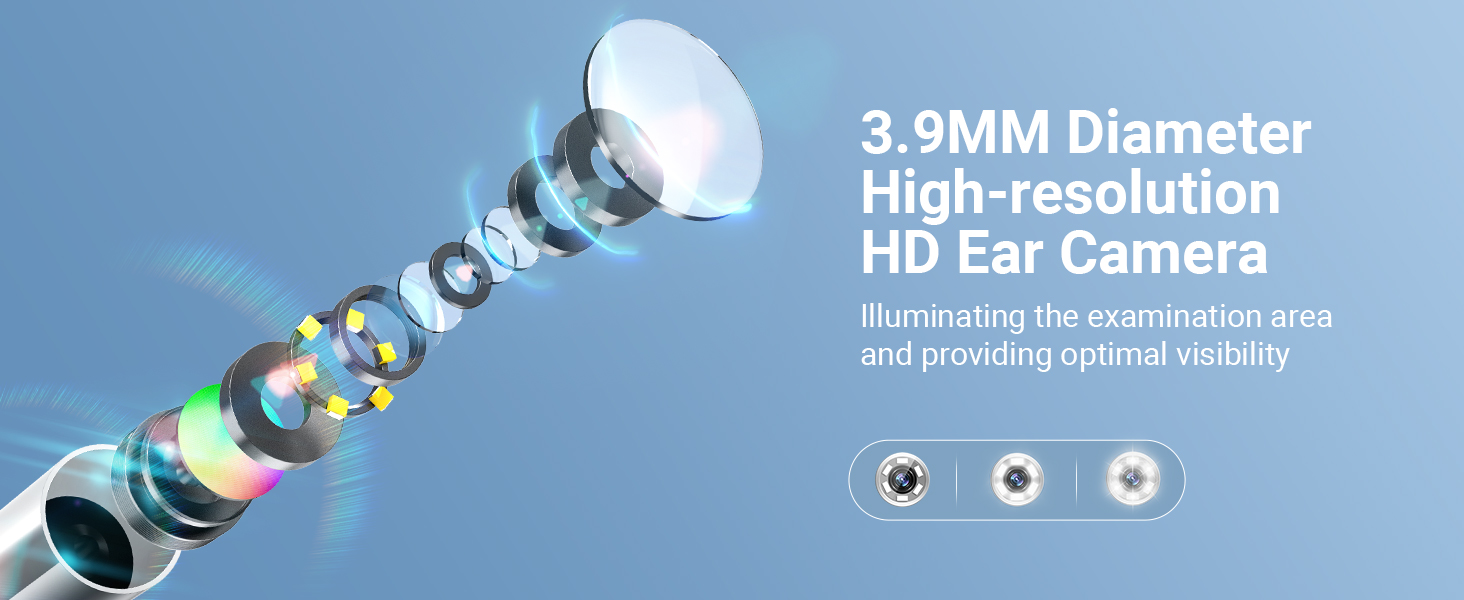
Image: Illustration of the 3.9mm diameter high-resolution HD ear camera, showing how it illuminates the examination area and provides optimal visibility.
Co jest w pudełku
- SA160 Digital Otoscope (Main Unit)
- Ear Picks x 4
- Specula x 5
- Alcohol Pads x 4
- 1 Pack of Q-tips
- Przewód przedłużający
- Kabel ładujący USB
- Karta pamięci 8 GB (wstępnie zainstalowana lub dołączona osobno)

Image: A visual representation of all items included in the product package, such as the otoscope, various ear picks, specula, alcohol pads, Q-tips, extension cable, USB cable, and user manual.
Organizować coś
- Naładuj urządzenie: Before first use, fully charge the otoscope using the provided USB charging cable. The charging port is located on the device.
- Włóż kartę pamięci: Ensure the 8GB memory card is properly inserted into the designated slot on the otoscope. This is necessary for saving photos and videos.
- Attach Lens/Extension Cable:
- For direct use, attach the lens probe directly to the main unit.
- For self-examination or extended reach, connect the lens probe to the extension USB cable, then connect the extension cable to the main unit. Ensure connections are secure.
- Attach Specula/Ear Picks: Select an appropriate speculum or ear pick and attach it to the tip of the lens probe. Ensure it is securely fitted to prevent accidental detachment during use.
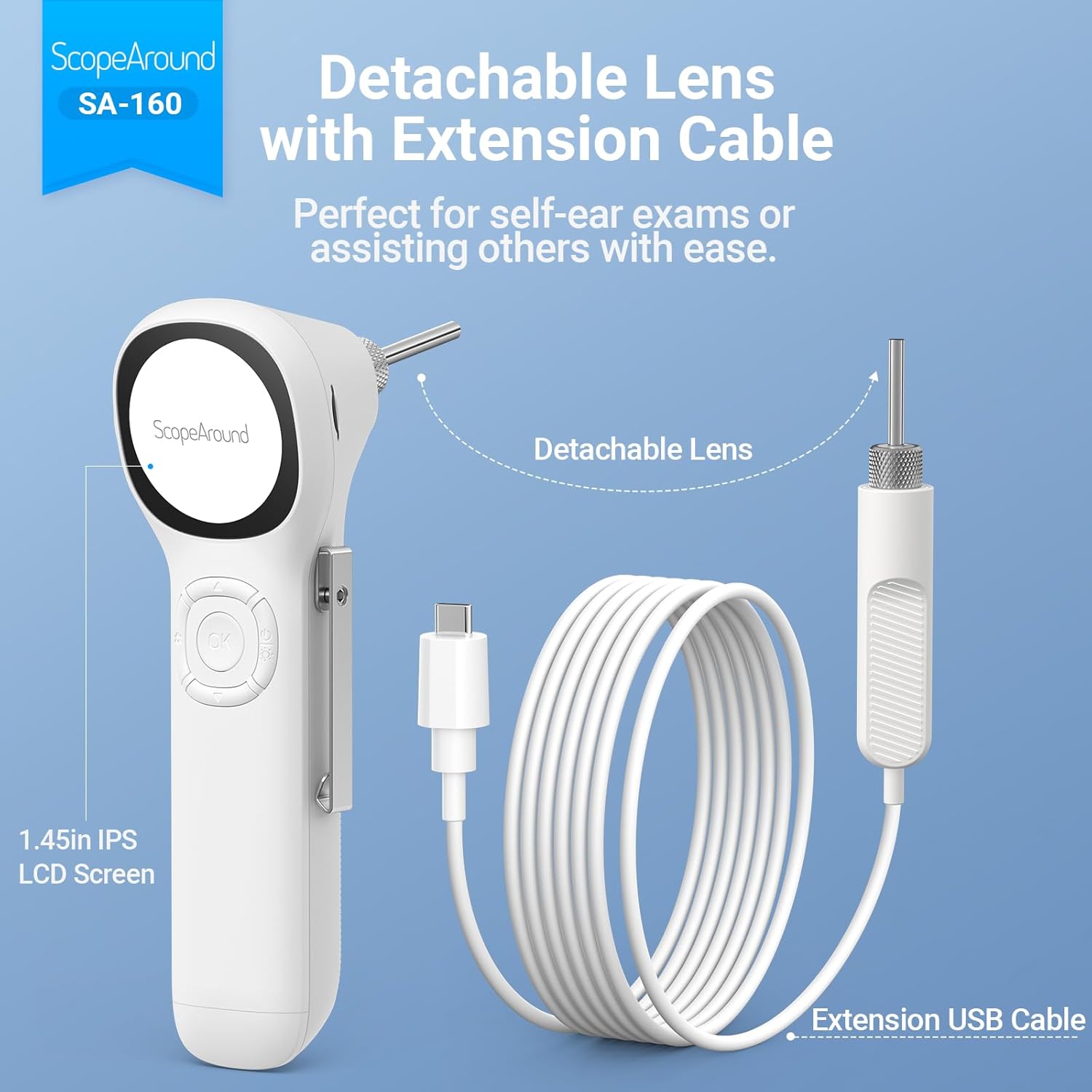
Image: The detachable lens and extension USB cable, illustrating how they connect to the main unit for flexible use, perfect for self-ear exams or assisting others.

Image: A detailed diagram labeling the various components and controls of the ScopeAround Smart Otoscope, including the 1.45-inch screen, settings button, OK button, Up/Down buttons, power button, lens module, capture button, reset, and Type-C port.
Działanie
- Włączanie: Press and hold the Power Button to turn on the device. The IPS screen will activate, displaying the live view z kamery.
- Dostosuj jasność: Use the dedicated button (often integrated with the power button or a separate control) to cycle through the three brightness levels of the LED lights for optimal visibility.
- Perform Examination: Gently insert the speculum-covered lens into the ear canal. Observe the live feed on the IPS screen. Move the otoscope slowly and carefully to get a comprehensive view.
- Rób zdjęcia/nagrywaj filmy:
- Press the Capture Button to take a still photo.
- Press and hold the Capture Button to start recording a video. Press again to stop recording.
- Files are automatically saved to the 8GB memory card.
- Adjust Magnification/Rotation: If available, use the controls to adjust magnification (e.g., 1.0x, 1.3x, 1.5x) for more detailed views or rotate the image 180 degrees for flexible positioning.
- Review Głoska bezdźwięczna: Access saved photos and videos through the device's menu. You can transfer these files to a computer via the Type-C interface for larger screen viewing and health documentation.
- Wyłączone: Press and hold the Power Button to turn off the device after use.

Image: Demonstrates the two primary uses: self-ear checks using the extension cable and assisting others with direct use of the otoscope.

Image: Illustrates the adjustable magnification (1.0x, 1.3x, 1.5x) for detailed views and the 180-degree image rotation feature for flexible positioning during examinations.

Image: Shows a user transferring files from the otoscope to a laptop via the Type-C interface, emphasizing the ease of sharing ear health documentation with professionals.
Konserwacja
- Cleaning the Lens and Specula:
- After each use, especially when used on different individuals, clean the lens and specula thoroughly.
- Use the provided alcohol pads or a soft cloth dampened with isopropyl alcohol to wipe the lens and the exterior of the specula.
- Ensure the lens is free of debris or earwax before storage.
- Czyszczenie jednostki głównej: Przetrzyj jednostkę główną miękką, suchą ściereczką. Unikaj stosowania środków czyszczących o właściwościach ściernych i zanurzania urządzenia w wodzie.
- Składowanie: Store the otoscope and its accessories in a clean, dry place, away from direct sunlight and extreme temperatures. Keep all small parts, especially ear picks and specula, organized in their case to prevent loss.
- Pielęgnacja baterii: To prolong battery life, avoid fully discharging the device frequently. Charge the device regularly, even if not in constant use.

Image: Illustrates safe and dangerous methods of ear cleaning, emphasizing the importance of proper technique to avoid ear canal injury and cross-infection.

Image: Close-up of the removable and soft silicone ear pick, highlighting its design for protection and convenience during ear wax removal.
Rozwiązywanie problemów
| Problem | Możliwa przyczyna | Rozwiązanie |
|---|---|---|
| Urządzenie nie włącza się. | Niski poziom naładowania baterii; awaria urządzenia. | Naładuj urządzenie do pełna. Jeśli problem będzie się powtarzał, skontaktuj się z obsługą klienta. |
| Obraz jest rozmazany lub niewyraźny. | Dirty lens; incorrect focal distance; insufficient lighting. | Clean the lens with an alcohol pad. Adjust the distance from the ear canal. Increase LED brightness. |
| Nie można zapisać zdjęć/filmów. | Memory card full or not inserted correctly; card error. | Sprawdź, czy karta pamięci 8 GB jest prawidłowo włożona. Usuń stare files to free up space or format the card (backup important data first). |
| Urządzenie zawiesza się lub nie reaguje. | Błąd oprogramowania. | Perform a soft reset (refer to user manual for specific reset instructions, usually a small reset button). |
Specyfikacje
- Nazwa modelu: Otoscope SA160
- Numer modelu przedmiotu: SASA160
- Marka: ZakresWokół
- Kolor: Biały
- Tworzywo: Plastikowy
- Wymiary opakowania: 8.19 x 4.41 x 2.4 cala
- Waga przedmiotu: 9.6 uncji
- Typ źródła światła: PROWADZONY
- Kąt rzeczywisty View: 78 stopni
- Maksymalne powiększenie: 1.5 razy
- Tomtage: 3.7 V (prąd stały)
- Baterie: Wymagana 1 bateria litowo-polimerowa (w zestawie)
- Zgodne urządzenia: No device needed (standalone operation)
- Data pierwszej dostępności: 4 listopada 2024 r.

Image: Detailed specifications of the SA-160 camera, including 3.9mm HD ear camera, 6 LED lights, 3 brightness adjustments, 0.39-1.18 inch focal distance, and 78-degree field of view.
Gwarancja i wsparcie
For warranty information, technical support, or service inquiries, please refer to the official ScopeAround webOdwiedź stronę internetową lub skontaktuj się bezpośrednio z działem obsługi klienta. Zachowaj paragon jako dowód zakupu na wypadek ewentualnych roszczeń gwarancyjnych.
ScopeAround is committed to providing high-quality products and customer satisfaction. For further assistance, please visit the ScopeAround Store on Amazon lub skontaktuj się z ich zespołem wsparcia.
Ask a question about this manual
Ask about setup, troubleshooting, compatibility, parts, safety, or missing instructions. Manuals+ will review the question and use this page’s manual context to help answer it.