
Wstęp
Thank you for choosing the Casio G-Shock GA-110 watch. This manual provides essential information regarding the setup, operation, and maintenance of your new timepiece. Designed for durability and precision, the GA-110 offers a range of features including world time, stopwatch, countdown timer, and multiple alarms, all housed in a robust, water-resistant casing.
Please read this manual carefully to ensure proper use and to maximize the lifespan of your watch. Keep this manual for future reference.
Czuwajview

Figure 1: The Casio G-Shock GA-110 watch worn on a wrist. This image provides a real-world perspective of the watch's size and appearance, featuring its black resin construction and white dial.
The Casio G-Shock GA-110 features a combination analog and digital display. It is equipped with four buttons for various operations:
- DOSTOSUJ (lewy górny róg): Służy do wchodzenia i wychodzenia z trybów ustawień oraz do potwierdzania ustawień.
- TRYB (lewy dolny róg): Cycles through different modes (Timekeeping, World Time, Stopwatch, Countdown Timer, Alarm).
- ODWRÓCENIE (prawy górny róg): Used to scroll backward through settings or increase values.
- PRZÓD (prawy dolny róg): Used to scroll forward through settings or decrease values.

Rysunek 2: Szczegółowy widok z przodu view of the Casio G-Shock GA-110 watch. This image displays the watch's overall design, highlighting the black resin band and case, and the distinctive white analog-digital dial with multiple sub-dials and digital displays.

Rysunek 3: Strona view of the Casio G-Shock GA-110 watch. This image illustrates the robust casing and the placement of the ADJUST and MODE buttons on the left side of the watch.
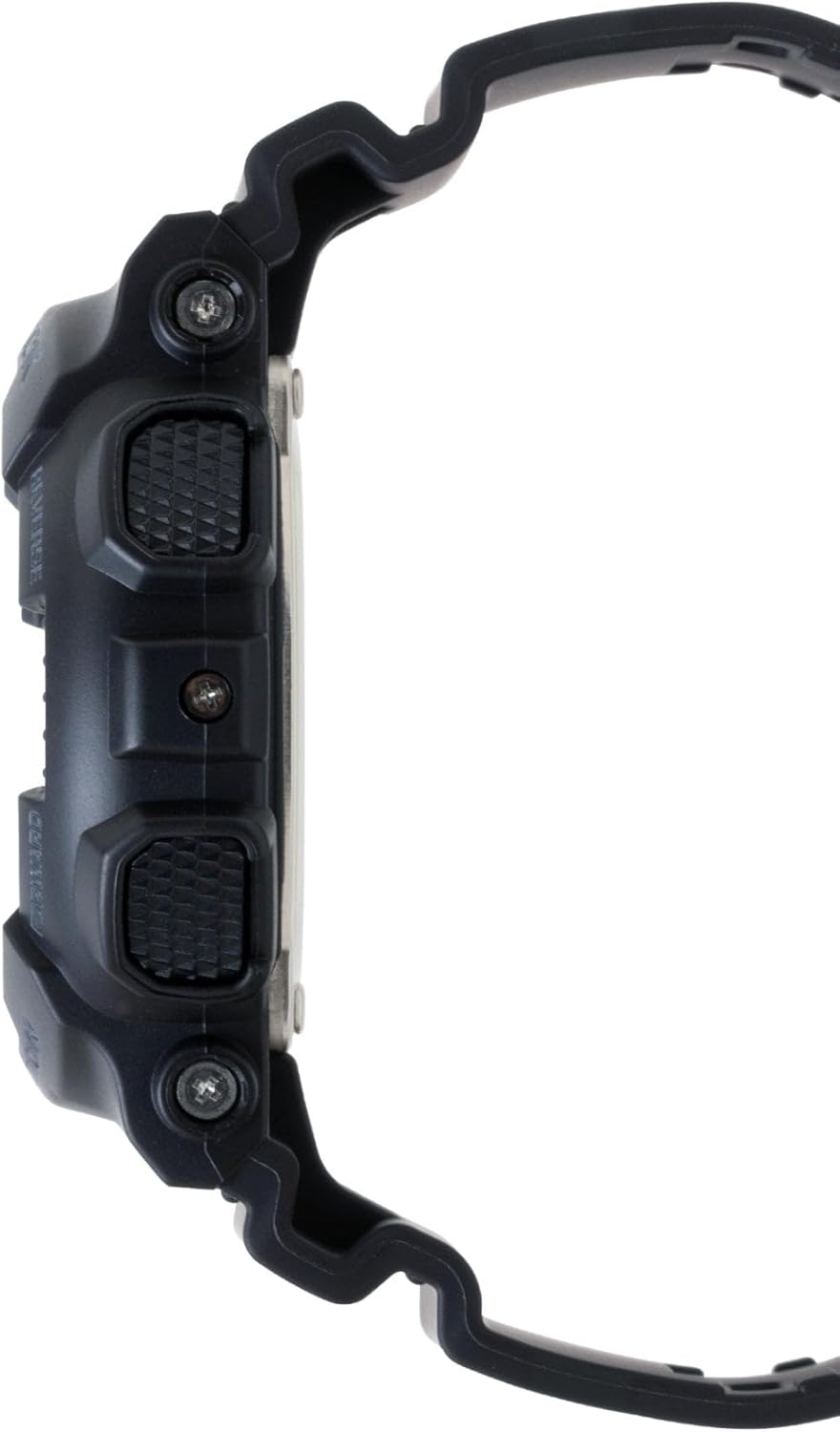
Rysunek 4: Strona przeciwna view of the Casio G-Shock GA-110 watch. This image shows the placement of the REVERSE and FORWARD buttons on the right side of the watch, along with the textured grip.
Organizować coś
1. Ustawienie czasu początkowego
- W trybie pomiaru czasu przytrzymaj klawisz REGULOWAĆ Naciskaj przycisk, aż kod miasta zacznie migać. Oznacza to przejście w tryb ustawień.
- Użyj ODWRACAĆ I DO PRZODU przyciski, aby wybrać żądany kod miasta domowego.
- Naciśnij TRYB button to cycle through the settings: City Code → DST (Daylight Saving Time) → 12/24-hour format → Seconds → Hour → Minute → Year → Month → Day → Illumination Duration.
- Użyj ODWRACAĆ I DO PRZODU przyciski do zmiany migającej wartości.
- After setting all values, press the REGULOWAĆ przycisk, aby wyjść z trybu ustawień.
2. Analog Hand Adjustment
If the analog hands do not match the digital time, you may need to adjust them manually.
- W trybie pomiaru czasu przytrzymaj REGULOWAĆ Naciskaj przycisk, aż kod miasta zacznie migać.
- Naciśnij TRYB button repeatedly until "H.SET" appears on the digital display.
- Użyj ODWRACAĆ I DO PRZODU buttons to move the analog hands to the 12 o'clock position.
- Naciśnij REGULOWAĆ button to confirm and exit. The hands will automatically move to match the digital time.
3. Informacje o baterii
The watch is powered by one LR44 battery, which is included and pre-installed. The battery life varies depending on usage of features like the backlight and alarms. When the display becomes dim or functions become erratic, it may be time for a battery replacement. Refer to the Maintenance section for more details.
Obsługa zegarka
1. Nawigacja trybów
Naciśnij TRYB button to cycle through the different modes in the following order:
Timekeeping Mode → World Time Mode → Stopwatch Mode → Countdown Timer Mode → Alarm Mode
2. Tryb pomiaru czasu
This is the default mode, displaying the current time and date. You can switch between 12-hour and 24-hour formats by pressing the DO PRZODU button in Timekeeping Mode (when not in setting mode).
3. Tryb czasu światowego
W trybie czasu światowego użyj ODWRACAĆ I DO PRZODU przyciski do view the current time in 48 cities (29 time zones) around the world. Press the REGULOWAĆ button to toggle Daylight Saving Time (DST) on or off for the currently displayed city.
4. Tryb stopera
The stopwatch measures elapsed time, split times, and two finishes. The measuring capacity is 1/1000 second for the first hour, then 1/10 second for up to 100 hours.
- Naciskać DO PRZODU aby uruchomić/zatrzymać stoper.
- Naciskać ODWRACAĆ aby wyzerować stoper, gdy jest zatrzymany.
- During measurement, press ODWRACAĆ to record a split time. Press ODWRACAĆ again to release the split and continue measurement.
5. Tryb odliczania
The countdown timer can be set from 1 minute to 24 hours. An alarm sounds when the countdown reaches zero.
- In Countdown Timer Mode, hold down the REGULOWAĆ button until the current countdown start time flashes.
- Użyj TRYB button to move the flashing between hours and minutes.
- Użyj ODWRACAĆ I DO PRZODU przyciski do zmiany migającej wartości.
- Naciskać REGULOWAĆ aby wyjść z trybu ustawień.
- Naciskać DO PRZODU aby rozpocząć lub zatrzymać odliczanie.
- Naciskać ODWRACAĆ to reset the countdown to its start time while it is stopped.
6. Tryb alarmowy
The watch has 5 daily alarms (AL1 to AL4, and SNZ for snooze alarm) and an hourlsygnał czasu y (SIG).
- In Alarm Mode, use the ODWRACAĆ I DO PRZODU buttons to scroll through the alarms (AL1, AL2, AL3, AL4, SNZ, SIG).
- Aby ustawić alarm, przytrzymaj REGULOWAĆ button when the desired alarm (e.g., AL1) is displayed. The hour setting will flash.
- Użyj TRYB button to move the flashing between hours and minutes.
- Użyj ODWRACAĆ I DO PRZODU przyciski do zmiany migającej wartości.
- Naciskać REGULOWAĆ aby wyjść z trybu ustawień.
- Naciskać DO PRZODU to toggle the alarm (and SIG) on or off. An indicator will appear on the display when an alarm or the hourly time signal is active.
7. Illumination (LED Light)
Naciśnij ODWRACAĆ button in any mode (except when setting) to illuminate the display. The illumination duration can be set in Timekeeping Mode settings (refer to Initial Time Setting, step 3).
Konserwacja
1. Cleaning the Watch
- Regularnie przecieraj zegarek miękką, suchą ściereczką, aby usunąć brud i wilgoć.
- For resin bands and cases, a mild soap solution and a soft brush can be used, followed by rinsing with clean water and thorough drying.
- Unikaj stosowania silnych środków chemicznych, rozpuszczalników i ściernych środków czyszczących, ponieważ mogą one uszkodzić materiały, z których wykonany jest zegarek.
2. Wodoodporność
The GA-110 is water-resistant to 200 meters (20 BAR). This means it is suitable for showering, swimming, and diving. However, please observe the following precautions:
- Do not operate the buttons while the watch is wet or submerged.
- Avoid exposing the watch to hot water or steam (e.g., hot showers, saunas), as this can compromise the water resistance seals.
- If the watch is exposed to saltwater, rinse it thoroughly with fresh water and dry it completely.
- Have the water resistance seals checked periodically (e.g., every 2-3 years) by an authorized service center, especially after battery replacement.
3. Wymiana baterii
The watch uses one LR44 battery. When the battery runs low, the display may dim or functions may become unreliable. Battery replacement should ideally be performed by an authorized Casio service center or a qualified watch technician to ensure proper sealing and maintain water resistance. Attempting to replace the battery yourself may void the warranty and compromise the watch's water resistance.
Rozwiązywanie problemów
| Problem | Możliwa przyczyna | Rozwiązanie |
|---|---|---|
| Wskazówki analogowe nie odpowiadają czasowi cyfrowemu. | Dłonie są niewspółosiowe. | Perform analog hand adjustment (refer to Setup section). |
| Wyświetlacz cyfrowy jest słaby lub pusty. | Niski poziom naładowania baterii. | Wymień baterię (patrz rozdział Konserwacja). |
| Przyciski nie reagują. | Watch may be in a frozen state or battery is very low. | Try pressing all four buttons simultaneously for a few seconds to reset. If unresponsive, replace battery. |
| Czas jest nieprawidłowy. | Incorrect city code, DST setting, or manual adjustment error. | Re-set the Home City, DST, and time settings (refer to Setup section). |
| Woda wewnątrz zegarka lub zaparowanie. | Compromised water resistance due to impact, aging seals, or button operation underwater. | Immediately take the watch to an authorized Casio service center for inspection and repair. Do not attempt to dry it yourself. |
Specyfikacje
- Numer modelu: GA-110
- Case/Band Material: Żywica
- Kryształ: Szkło mineralne
- Wyświetlacz: Analog-Digital
- Ruch: Kwarc
- Wodoodporność: 200 metrów (20 barów)
- Bateria: 1 x LR44 (w zestawie)
- Czas pracy baterii: Approximately 2 years (varies with usage of power-intensive functions)
- Dokładność: ±15 seconds per month (without time signal calibration)
- Watch Dimensions (H×W×D): Około 55 × 51.2 × 16.9 mm
- Oglądaj wagę: Około 72 gramów
- Funkcje: World Time (48 cities + UTC), 1/1000-second Stopwatch, Countdown Timer, 5 Daily Alarms (1 Snooze Alarm), Hourly Time Signal, Full Auto-calendar, 12/24-hour format, LED light with Afterglow.
Note: Product package dimensions and weight (e.g., 5 x 4.5 x 3.25 inches; 5.6 ounces) refer to the shipping package, not the watch itself.
Informacje o gwarancji
Your Casio G-Shock GA-110 watch comes with a Ograniczona gwarancja. The terms and duration of the warranty may vary by region and retailer. Please refer to the warranty card included with your purchase or visit the official Casio webstrona zawierająca szczegółowe informacje dotyczące zakresu gwarancji, jej warunków i postanowień.
Zachowaj dowód zakupu (paragon), ponieważ będzie on wymagany w przypadku roszczeń gwarancyjnych.
Obsługa klienta
For further assistance, technical support, or service inquiries, please contact Casio customer support through their official website or the contact information provided in your warranty documentation. You can typically find support resources, FAQs, and service center locations on the official Casio webstrona: