
1. Wprowadzenie
Dziękujemy za zakupasing the Andoer 4K 30fps Tiny Action Camera. This compact and versatile camera is designed to capture your adventures in stunning 4K resolution. With its wide-angle lens, built-in WiFi, and various mounting options, it is ideal for a wide range of outdoor activities, including diving, surfing, and skiing.
This manual provides detailed instructions on how to set up, operate, and maintain your camera to ensure optimal performance and longevity. Please read this manual thoroughly before using the product and keep it for future reference.
2. Informacje dotyczące bezpieczeństwa
Aby zapobiec obrażeniom ciała lub uszkodzeniu urządzenia, należy przestrzegać następujących środków ostrożności:
- Nie wystawiaj aparatu na działanie ekstremalnych temperatur, bezpośredniego światła słonecznego przez dłuższy czas ani wysokiej wilgotności.
- Przechowuj kamerę i jej akcesoria poza zasięgiem dzieci i zwierząt domowych.
- Należy używać wyłącznie wskazanego kabla ładującego i zasilacza.
- Do not attempt to disassemble, repair, or modify the camera yourself. Contact authorized service personnel for assistance.
- Przed zanurzeniem aparatu w wodzie należy upewnić się, że obudowa wodoodporna jest szczelnie zamknięta.
- Unikaj upuszczania aparatu i narażania go na silne uderzenia.

Ostrzeżenie: To avoid suffocation hazard, keep plastic bags away from babies and children.
3. Zawartość opakowania
Sprawdź, czy w przesyłce znajdują się wszystkie elementy wymienione poniżej:
- 1 x Andoer 4K Tiny Action Camera
- 1 x tylny klips
- 1 x Smycz magnetyczna
- 1 x Ramka na kamerę
- 1 x Wodoodporna obudowa
- 2 x podstawy montażowe
- 1 x mocowanie klamry
- 1 x Mocowanie na długą śrubę
- 1 x uchwyt na kierownicę
- 1 x adapter montażowy
- 1 pasek
- 1 x kabel ładujący typu C
- 1 x Instrukcja obsługi (ten dokument)
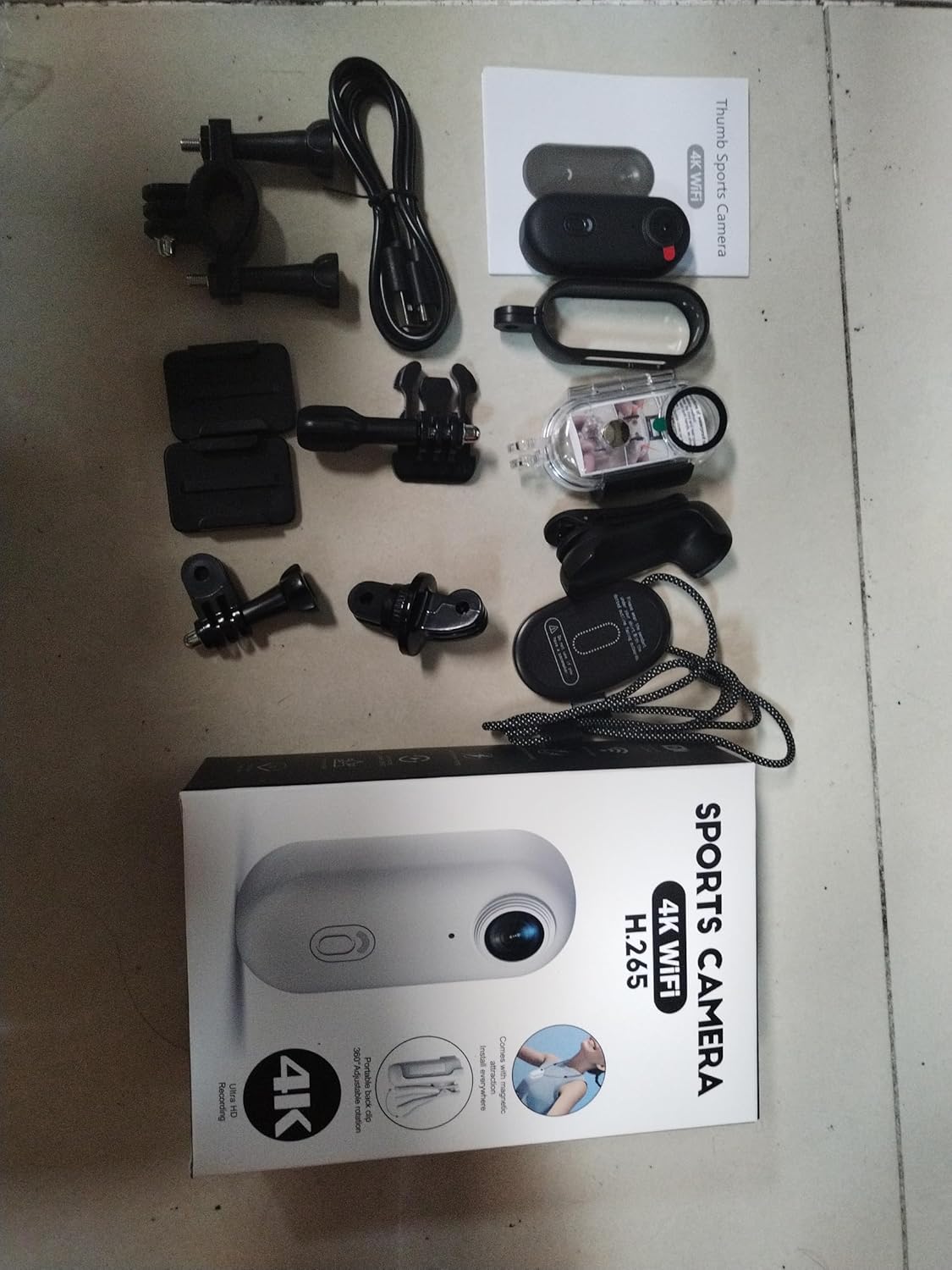
Illustration of the complete package contents.

Szczegółowy view of the camera and its included accessories.
4. Koniec produktuview
The Andoer Tiny Action Camera is designed for portability and ease of use. Familiarize yourself with its main components:

Przód view of the Andoer Tiny Action Camera.
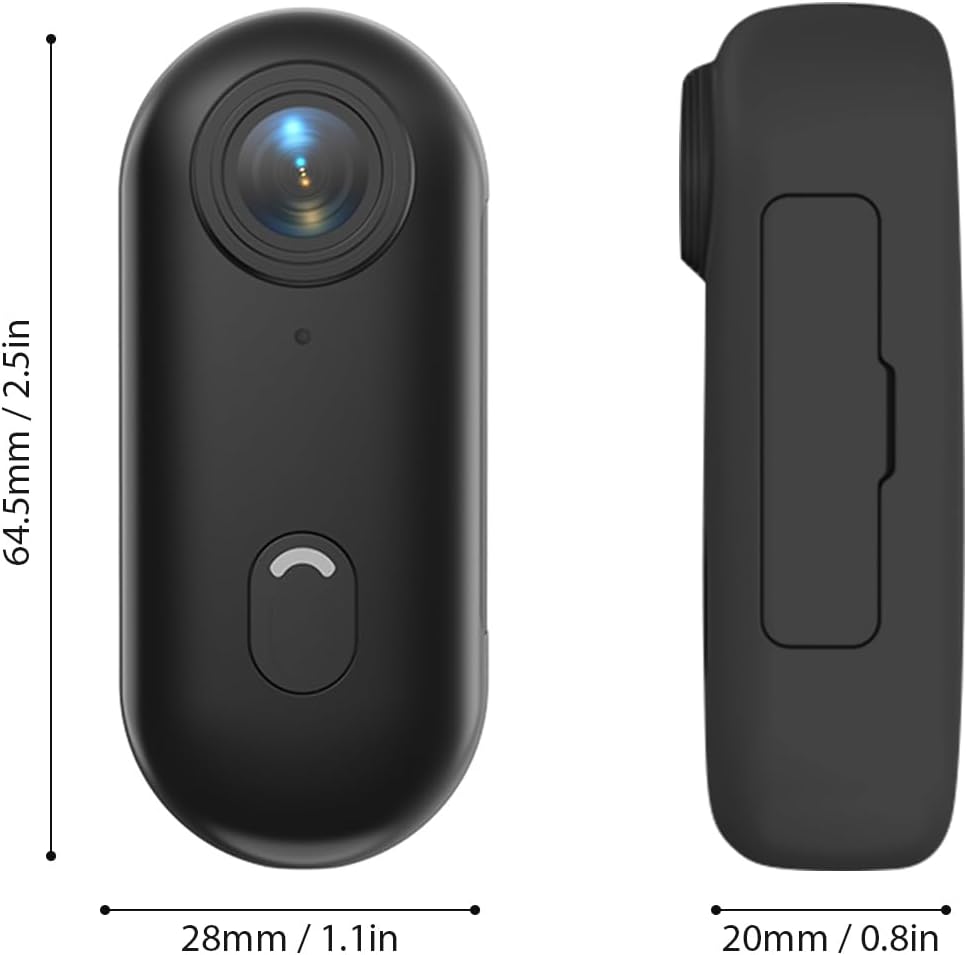
Wymiary fizyczne aparatu.
- Obiektyw: 120° wide-angle lens for expansive shots.
- Przycisk zasilania / trybu: Służy do włączania/wyłączania i przełączania trybów.
- Kontrolka: Displays camera status (recording, charging, WiFi connection).
- Mikrofon: Przechwytuje dźwięk.
- Port USB-C: Do ładowania i przesyłania danych.
- Gniazdo kart microSD: Do wkładania karty pamięci.
5. Konfiguracja
5.1 Ładowanie akumulatora
Aparat jest wyposażony we wbudowaną baterię litową o pojemności 800 mAh. Przed pierwszym użyciem należy całkowicie naładować aparat.
- Connect the included Type-C charging cable to the camera's USB-C port.
- Drugi koniec kabla podłącz do zasilacza USB 5 V/2 A (brak w zestawie) lub do portu USB komputera.
- The indicator light will show charging status (refer to the camera's light indicator guide for specific colors/patterns).
- Pełne ładowanie trwa około 120 minut.
5.2 Wkładanie karty pamięci
A MicroSD (TF) card (not included) is required for recording videos and photos. The camera supports cards up to 256GB.
- Znajdź gniazdo karty MicroSD w aparacie.
- Włóż kartę MicroSD stykami skierowanymi w dół, aż do kliknięcia.
- Aby wyjąć kartę, delikatnie wciśnij ją, aż wysunie się.
Notatka: It is recommended to format the MicroSD card in the camera before first use to ensure compatibility and optimal performance. Refer to the app or camera settings for formatting options.
5.3 Metody montażu
The camera offers multiple versatile mounting options:
- Wbudowane magnesy: The camera has built-in magnets, allowing direct attachment to any iron surface.
- Smycz magnetyczna: Attach the camera to the magnetic lanyard to wear it around your neck for convenient hands-free recording.

Using the magnetic lanyard for hands-free recording.
- Klip z tyłu: Use the included back clip to securely attach the camera to your collar, pocket, or backpack strap.
- Wodoodporna obudowa: For underwater activities or protection from harsh elements, enclose the camera in the waterproof case. This case allows the camera to be submerged up to 30 meters. Ensure the case is properly sealed before use.
- Akcesoria montażowe: Utilize the camera frame, mounting bases, buckle mount, long screw mount, handlebar mount, and mount adapter to attach the camera to helmets, bicycles, and other equipment.

Examples of multiple installation methods for the camera.
6. Instrukcja obsługi
6.1 Włączanie/wyłączanie zasilania
- Włączanie: Press and hold the Power/Mode button for a few seconds until the indicator light illuminates.
- Wyłączone: Press and hold the Power/Mode button again for a few seconds until the indicator light turns off.
6.2 Nagrywanie wideo
The camera records videos in 4K resolution at 30 frames per second (4K 30fps) in MP4 format.
- Sprawdź, czy kamera jest włączona i czy karta MicroSD jest włożona.
- Press the Power/Mode button once to start video recording. The indicator light will change to indicate recording is in progress (e.g., flashing red).
- Press the Power/Mode button again to stop recording. The indicator light will return to standby mode.
6.3 Robienie zdjęć
The camera captures photos at 3840x2160 resolution in JPEG format.
- Sprawdź, czy kamera jest włączona i czy karta MicroSD jest włożona.
- (If in video mode, short press the Power/Mode button to switch to photo mode if applicable, or use the app).
- Press the Power/Mode button briefly to take a photo. The indicator light may flash once to confirm the capture.
6.4 Połączenie Wi-Fi i korzystanie z aplikacji
The camera supports WiFi connection, allowing you to control it and view/share content via a smartphone application.
- Download the dedicated smartphone application (refer to the product packaging or manufacturer's website for the app name and download links).
- Włącz kamerę.
- Activate WiFi on the camera (usually by a long press or specific button combination, refer to camera's light indicator guide). The camera will broadcast a WiFi network.
- On your smartphone, go to WiFi settings and connect to the camera's WiFi network (SSID and password typically found on the camera or in the app instructions).
- Open the app. You should now be able to see a live preview, control recording, adjust settings, and transfer files.
6.5 Nagrywanie w pętli
Kamera obsługuje nagrywanie w pętli, które automatycznie nadpisuje najstarsze nagrania filegdy karta pamięci jest pełna, zapewniając ciągłe nagrywanie.
- This feature is typically enabled by default or can be configured via the smartphone app.
- When the memory card reaches its capacity, the camera will automatically delete the oldest video segments to make space for new recordings.
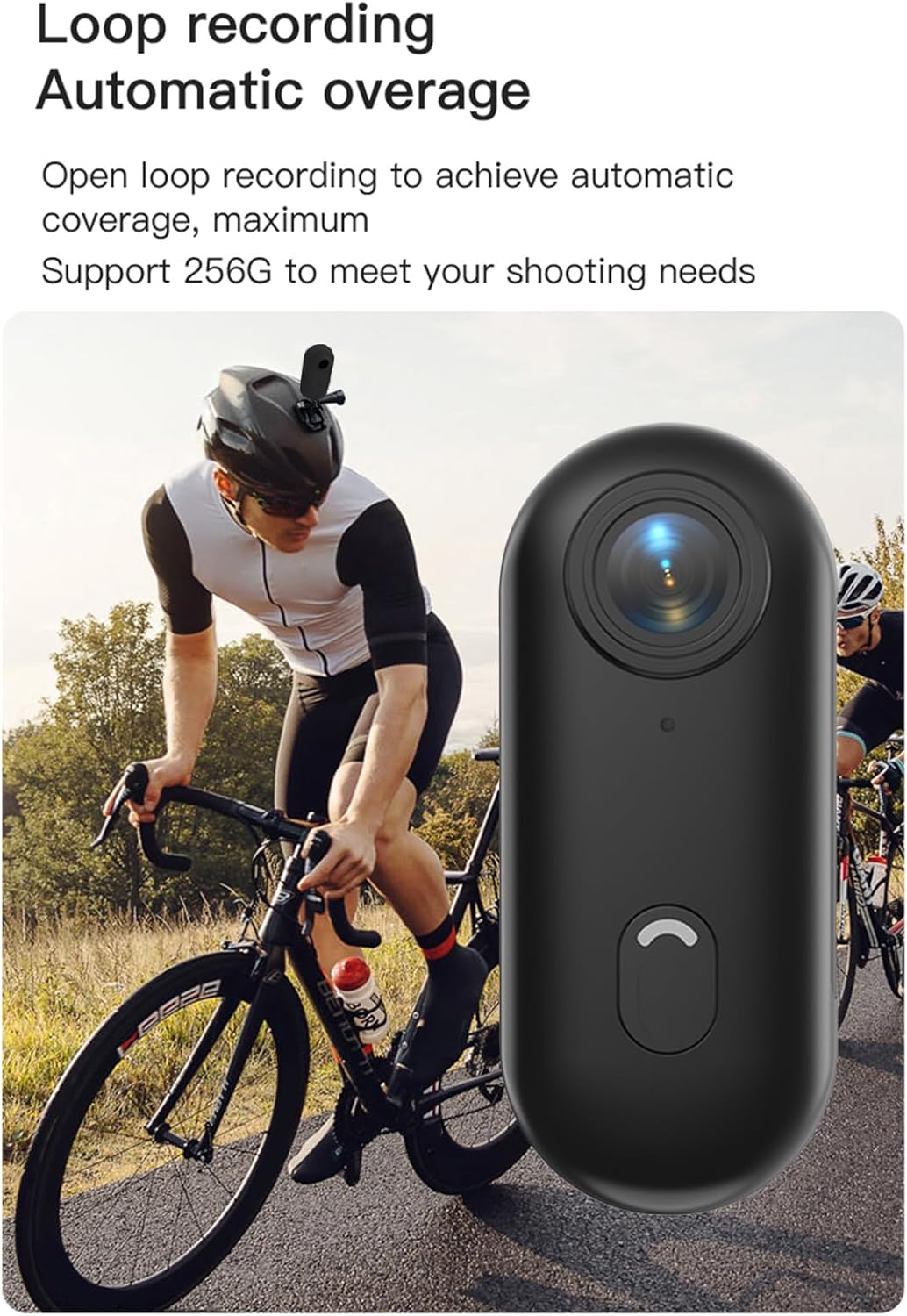
Loop recording functionality ensures continuous capture.
7. Konserwacja
- Czyszczenie: Do czyszczenia korpusu aparatu używaj miękkiej, suchej ściereczki. Do czyszczenia obiektywu użyj specjalnej ściereczki i płynu do czyszczenia obiektywów. Nie używaj silnych środków chemicznych ani materiałów ściernych.
- Składowanie: Gdy nie używasz aparatu, przechowuj go w chłodnym i suchym miejscu, z dala od bezpośredniego światła słonecznego i ekstremalnych temperatur.
- Pielęgnacja baterii: For long-term storage, charge the battery to about 50% every few months to maintain its health.
- Wodoodporna obudowa: After using the waterproof case in saltwater, rinse it thoroughly with fresh water and allow it to air dry. Check the O-ring seal regularly for any debris or damage.
8. Rozwiązywanie Problemów
| Problem | Możliwa przyczyna | Rozwiązanie |
|---|---|---|
| Kamera się nie włącza. | Niski poziom naładowania baterii; uszkodzona bateria; problem z przyciskiem zasilania. | Naładuj kamerę do pełna. Jeśli problem będzie się powtarzał, skontaktuj się z pomocą techniczną. |
| Nie można połączyć się z siecią Wi-Fi. | WiFi not enabled on camera; incorrect password; app issue. | Ensure camera WiFi is active. Re-enter password. Restart camera and phone. Reinstall app. |
| Nagrywanie zostaje nieoczekiwanie przerwane. | Memory card full; slow memory card; battery low. | Check memory card space. Use a high-speed (Class 10 or U3) MicroSD card. Charge battery. |
| Słaba jakość wideo/zdjęć. | Brudny obiektyw, słabe warunki oświetleniowe, nieprawidłowe ustawienia. | Clean the lens. Ensure adequate lighting. Check resolution settings in the app. |
| Wyciek wody w obudowie wodoszczelnej. | Improperly sealed case; damaged O-ring. | Ensure case is securely latched. Check O-ring for debris or damage and replace if necessary. |
9. Specyfikacje
| Funkcja | Szczegół |
|---|---|
| Rozdzielczość wideo | 4K 30 klatek na sekundę |
| Rozdzielczość zdjęcia | 3840x2160 |
| Format wideo | MP4 |
| Format zdjęcia | Plik JPEG |
| Kąt obiektywu | 120° szeroki kąt |
| Łączność | Wi-Fi |
| Pojemność baterii | Bateria litowa 800mAh |
| Czas ładowania | Około 120 minut |
| Objętość ładowaniatage | 5V/2A |
| Obsługa kart pamięci | Karta TF, do 256 GB |
| Typ interfejsu | Typ C |
| Głębokość wodoodporności (z obudową) | Do 30M |
| Wymiary produktu | 64.5 x 28 x 20mm (2.54 x 1.1 x 0.8 cali) |
| Waga przedmiotu | Approx. 11.3 ounces (camera only) |
| Temperatura pracy | -10°C do 60°C (14°F do 140°F) |
| Temperatura przechowywania | -10°C do 60°C (14°F do 140°F) |
10. Gwarancja i wsparcie
Andoer products are manufactured to the highest quality standards. This product is covered by a limited warranty against defects in materials and workmanship from the date of purchase. Please retain your proof of purchase for warranty claims.
For technical support, troubleshooting assistance, or warranty inquiries, please contact Andoer customer service through the retailer where you purchased the product or visit the official Andoer webwitryna do informacji kontaktowych.
Webstrona: Andoer Official Store on Amazon