
1. Koniec produktuview
The DALY Smart Active Balance BMS (Battery Management System) is designed to protect and manage Li-ion, LiFePO4, and LTO battery packs. This model supports 4 to 8 series cells (4S-8S) with a voltage range of 12V-24V and a continuous charge/discharge current of 200A. It features an integrated 1A active balancing function and multiple communication interfaces including Bluetooth, RS485, and CAN.

Image 1.1: DALY Smart Active Balance BMS (Model R24TM-200A) and its components.
Główne cechy:
- Cell Compatibility: Supports 4S-8S Li-ion, LiFePO4, and LTO battery packs.
- Aktualna ocena: Prąd ciągłego ładowania i rozładowywania 200A.
- Aktywne równoważenie: Integrated 1A active balance for cell voltagi wyrównanie.
- Inteligentne monitorowanie: Built-in Bluetooth for real-time monitoring of cell voltagtemperatury, temperatury i inne parametry za pomocą aplikacji mobilnej.
- Interfejsy komunikacyjne: Includes RS485 and CAN for advanced system integration.
- Funkcje ochronne: Overcharge, over-discharge, overcurrent, short circuit, and high-temperature protection.

Image 1.2: Summary of BMS specifications including battery strings, current, balance current, function, battery type, and communication.
2. Konfiguracja i instalacja
Proper installation is critical for the safe and effective operation of the BMS. Ensure all connections are made in the specified order to prevent damage to the BMS or battery pack.
2.1 Lista rzeczy do spakowania
Przed rozpoczęciem instalacji sprawdź, czy wszystkie komponenty są obecne:
- Jednostka Smart Active Balance BMS
- P-&-B- cable (Power and Battery Negative cables)
- Śruby (2 szt.)
- Sampling cable (Balance wires)
- B+ cable (Battery Positive cable)
- NTC (Temperature sensor, one standard, two optional)
- Instrukcja obsługi (ten dokument)
- Pudełko
- RS485/CAN port cable (if applicable to your model)

Image 2.1: Illustrated packing list for the DALY BMS.
2.2 instrukcje okablowania
Follow these steps carefully for correct wiring:
- Połączenie wstępne: Connect the pre-charge circuit if your system requires it. This helps to limit inrush current when connecting the main battery.
- Objętość komórkitage Sensing Wires: Podłącz przewody równoważące (sampling cable) to each cell of the battery pack, starting from the lowest voltage cell (B-) to the highest (B+). Ensure the order is correct.
- Główne przyłącza zasilania: Connect the main B- (battery negative) and P- (load/charge negative) cables to the BMS. Then connect the main B+ (battery positive) cable.
- Parallel Battery Pack Configuration: If using multiple battery packs in parallel, ensure each pack has its own BMS and follow the manufacturer's guidelines for parallel connection.

Image 2.2: Pre-charge connection diagram.

Image 2.3: Cell voltage sensing wire connection.

Image 2.4: Main power connection diagram.

Image 2.5: Parallel battery pack connection example.
A general wiring diagram is provided below for reference. Always consult the specific diagram included with your product for precise connections.
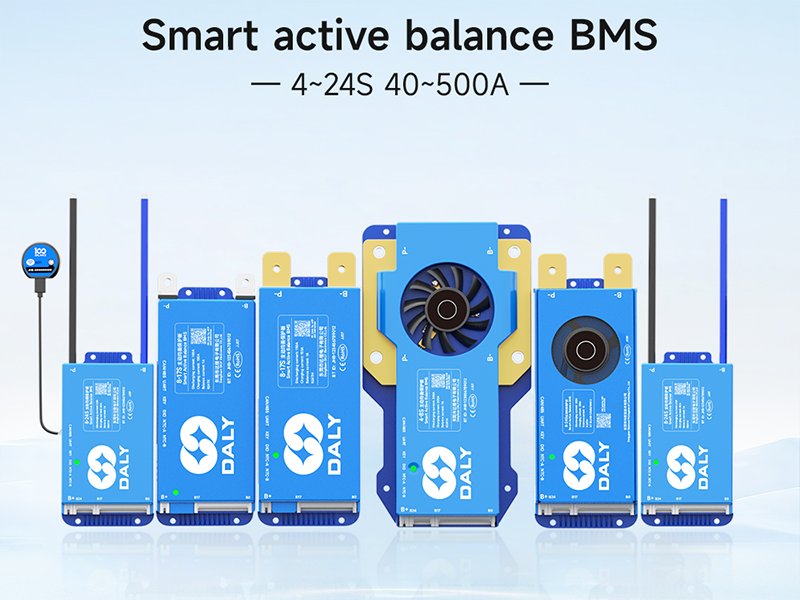
Image 2.6: Comprehensive wiring diagram for the BMS, showing connections for B+, B-, P-, and communication ports.
3. Instrukcja obsługi
The DALY Smart Active Balance BMS offers intelligent monitoring and control capabilities through its communication interfaces.
3.1 Monitorowanie aplikacji mobilnych
The BMS features built-in Bluetooth for wireless monitoring via a dedicated mobile application. Download the 'BalanceBMS' app from your device's app store (available on iOS and Android).
- Połączenie: Once the BMS is powered, open the 'BalanceBMS' app and search for available Bluetooth devices. Select your BMS to connect.
- Monitorowanie: The app displays real-time data including individual cell voltages, całkowita objętość opakowaniatage, charge/discharge current, temperature, and State of Charge (SOC).
- Ustawienia: The app allows for adjustment of various BMS parameters, such as over-voltage, pod objętościątage, and overcurrent thresholds.
3.2 PC Host and Other Communication
For advanced monitoring and configuration, the BMS supports UART, RS485, and CAN communication protocols. These interfaces allow connection to a PC host or other external modules.
- UART: Connect a USB-UART adapter to the BMS UART port for PC communication. Specific software is required for this interface.
- RS485/KAN: These ports enable integration into larger systems, such as industrial controls or vehicle networks. Consult the technical documentation for protocol details.
- Moduły opcjonalne: The BMS can be extended with optional modules like WiFi for cloud monitoring, GPS, key switches, buzzers, and heating modules.
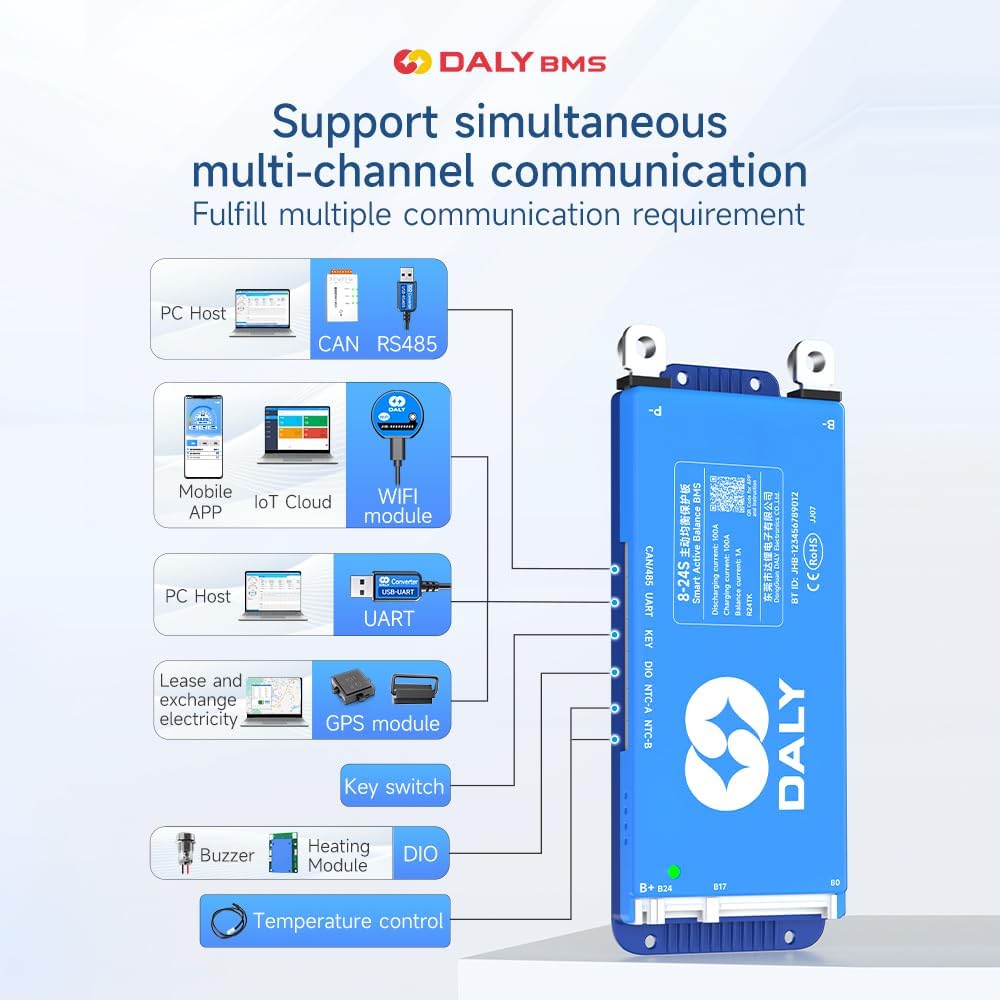
Image 3.1: Multi-channel communication options including PC Host (CAN, RS485, UART), Mobile APP (Bluetooth, WiFi module), GPS module, Key switch, Buzzer, Heating Module, and Temperature control.
4. Konserwacja
The DALY Smart Active Balance BMS is designed for minimal maintenance. Its active balancing feature helps maintain cell health, and its protection functions safeguard the battery.
- Regularne monitorowanie: Periodically check the battery parameters via the mobile app or PC software to ensure all cells are within healthy voltagi zakresach temperatur.
- Aktualizacje oprogramowania układowego: Sprawdź producenta webodwiedź tę witrynę lub aplikację, aby uzyskać dostęp do aktualizacji oprogramowania sprzętowego i uzyskać optymalną wydajność oraz dostęp do nowych funkcji.
- Kontrola fizyczna: Occasionally inspect the BMS and wiring for any signs of damage, loose connections, or corrosion. Ensure the cooling fan (if present) is free from obstructions.
- Czyszczenie: Keep the BMS unit clean and free from dust and debris. Use a dry, soft cloth for cleaning. Do not use liquids or abrasive cleaners.
5. Rozwiązywanie Problemów
W tej sekcji omówiono typowe problemy i ich potencjalne rozwiązania.
5.1 Kwestie ogólne
- BMS nie włącza się:
- Verify all main power connections (B-, P-, B+) are secure and correctly wired.
- Sprawdź pojemność akumulatoratage to ensure it is within the operational range (12V-24V for 4S-8S).
- Brak połączenia Bluetooth:
- Sprawdź, czy system BMS jest włączony.
- Confirm Bluetooth is enabled on your mobile device.
- Restart the 'BalanceBMS' app and try reconnecting.
- Ensure your device is within close proximity to the BMS.
- Nieprawidłowe odczyty w aplikacji:
- Sprawdź dokładnie objętość wszystkich komórektage sensing wires for correct order and secure connections. A multimeter can be used to verify individual cell voltagt.j.
- Ensure the app is configured for the correct number of series cells (S-count).
5.2 Protection Triggers
If the BMS enters a protection state (e.g., no output, no charge), identify the cause:
- Zabezpieczenie przed przeładowaniem/nadmiernym rozładowaniem: The BMS will cut off charging/discharging if cell voltages exceed or fall below set thresholds. Check charger voltage and battery health.
- Zabezpieczenie nadprądowe: Occurs if the load draws too much current. Reduce the load or ensure the BMS current rating matches your application.
- Zabezpieczenie przed zwarciem: The BMS will immediately cut off output in case of a short circuit. Identify and remove the short.
- Ochrona przed wysoką temperaturą: If the BMS or battery temperature exceeds safe limits, the BMS will shut down. Ensure adequate ventilation and cooling.
5.3 Ostrzeżenie dotyczące zgodności
Ostrzeżenie: Using a BMS with an incompatible battery type or cell count can lead to severe damage to both the battery and the BMS, potentially causing fire or explosion. Always ensure your BMS matches your battery pack's specifications (e.g., Li-ion, LiFePO4, LTO, and S-count).

Image 5.1: Guide for selecting the appropriate BMS based on battery cell type, series count, and ampere wymagania.
6. Specyfikacje
| Funkcja | Specyfikacja |
|---|---|
| Numer modelu | R24TM-200A |
| Obsługiwane typy baterii | Li-ion, LiFePO4, LTO |
| Liczba komórek serii | 4S-8S |
| Wejście Voltage Zakres | 12V-24V (dependent on S-count) |
| Ciągły prąd ładowania | 200A |
| Ciągły prąd rozładowania | 200A |
| Aktywne saldo bieżące | 1A |
| Interfejsy komunikacyjne | Bluetooth, RS485, CAN, UART |
| Wymiary produktu (dł. x szer. x wys.) | 6.97 x 2.6 x 0.83 cala (177 x 66 x 21 mm) |
| Waga przedmiotu | 9.7 uncji (275 grama) |
| Producent | Dongguan Daly Electronics Co., Ltd |

Obraz 6.1: Koniecview of DALY BMS specifications for various current ratings, including the 200A model.
7. Gwarancja i wsparcie
7.1 Informacje o gwarancji
This DALY Smart Active Balance BMS comes with an 18-miesięczna gwarancja from the date of purchase. The warranty covers defects in materials and workmanship under normal use. It does not cover damage caused by improper installation, misuse, accidents, unauthorized modifications, or natural disasters.
7.2 Obsługa klienta
For technical assistance, troubleshooting, or warranty claims, please contact DALY customer service. Refer to the product packaging or the official DALY webna tej stronie znajdziesz najbardziej aktualne dane kontaktowe.
The 'BalanceBMS' mobile application also provides a channel for support and information regarding your BMS.