
Argon Forty Argon ONE V5
Argon ONE V5 Case for Raspberry Pi 5 User Manual
Model: Argon ONE V5
Marka: Argon Forty
1. Wprowadzenie
This manual provides detailed instructions for the installation, operation, and maintenance of the Argon ONE V5 Case for Raspberry Pi 5. The Argon ONE V5 is a casted aluminum enclosure designed to enhance the performance, versatility, and style of your Raspberry Pi 5, offering advanced cooling solutions and expanded connectivity options.

Image 1.1: The Argon ONE V5 Case, a sleek black enclosure for the Raspberry Pi 5.

Obraz 1.2: Ponadview of the Argon ONE V5 case, highlighting its design and compatibility with Raspberry Pi 5.
2. Funkcje produktu
The Argon ONE V5 Case offers a range of features designed to optimize your Raspberry Pi 5 experience:
- Casted Aluminum Construction: The case is made from casted aluminum, which also functions as a passive heatsink for efficient heat dissipation.
- Built-in 30mm PWM Fan: Features a 30mm PWM fan for active cooling, ensuring optimal performance during demanding tasks.
- Dwa porty HDMI: Supports dual display output at high resolutions for multi-tasking and media playback.
- Front-Facing USB 2.0 Ports: Two additional USB 2.0 ports located at the front for convenient peripheral access.
- Integrated DAC with Audio Jacks: Includes a Digital-to-Analog Converter (DAC) with 3.5mm microphone input and headphone output jacks for enhanced audio.
- Internal USB Port for ZigBee Modules: Facilitates easy integration of ZigBee modules for Home Assistant and IoT projects.
- Raspberry Pi HAT Compatibility: Designed to maintain compatibility with standard Raspberry Pi HATs.
3. Zawartość opakowania
Sprawdź, czy w przesyłce znajdują się wszystkie elementy:
- Argon ONE V5 Raspberry Pi 5 Case
- Instrukcja obsługi (ten dokument)
- (Additional screws, thermal pads, or small components may be included; refer to the packaging for a complete list.)
4. Konfiguracja i instalacja
Follow these steps to assemble your Raspberry Pi 5 within the Argon ONE V5 Case.
4.1. Preparing the Case and Raspberry Pi 5
- Carefully open the Argon ONE V5 case. It typically consists of a top and bottom section.
- Ensure your Raspberry Pi 5 is powered off and all external cables are disconnected.
- Apply any provided thermal pads to the designated areas on the Raspberry Pi 5's CPU and other heat-generating components, as instructed by the case's specific thermal pad guide.
4.2. Installing the Raspberry Pi 5
- Align the Raspberry Pi 5 with the internal daughterboard connector within the Argon ONE V5 case.
- Gently but firmly press the Raspberry Pi 5 onto the daughterboard until it is fully seated. Ensure all pins are correctly aligned to avoid damage.
- Secure the Raspberry Pi 5 to the case using the provided screws, if applicable.

Image 4.1: Internal layout of the Argon ONE V5 case, showing connectors for ZigBee Module, UART, RTC battery, Camera/Display, PCIE port, and 40-pin GPIO. This illustrates where the Raspberry Pi 5 connects to the internal daughterboard.
4.3. Assembling the Case
- Once the Raspberry Pi 5 is securely installed, carefully place the top section of the Argon ONE V5 case onto the bottom section.
- Ensure that all ports align correctly with the cutouts in the case.
- Fasten the case sections together using the provided screws. Do not overtighten.
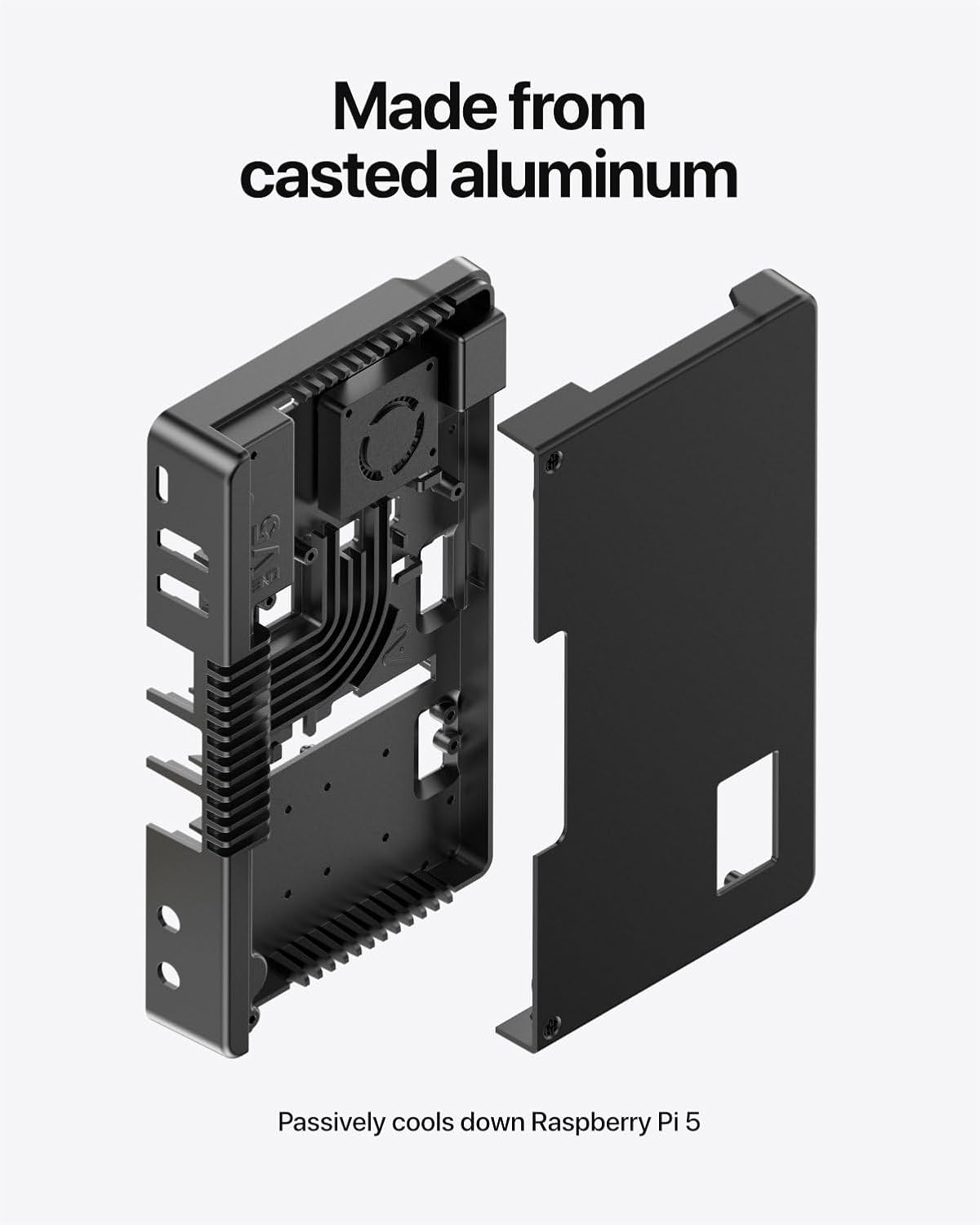
Obraz 4.2: Wybuch view demonstrating the casted aluminum construction of the Argon ONE V5 case, highlighting how the top and bottom sections fit together around the internal components.
4.4. Podłączanie urządzeń peryferyjnych
After assembly, connect your peripherals to the appropriate ports:
- USB-C Power IN: Connect your Raspberry Pi 5 power supply.
- Dual 4K Full Size HDMI Ports: Connect your display(s).
- Gigabit Ethernet: Do przewodowego połączenia sieciowego.
- Porty USB 3.0 (2x): For high-speed peripherals.
- USB 2.0 Ports (2x, front-facing): Do standardowych urządzeń peryferyjnych.
- 3.5mm Mic and Headphone Jack: Do wejścia i wyjścia audio.
- Quick Access SD Card Slot: Włóż tutaj kartę microSD.
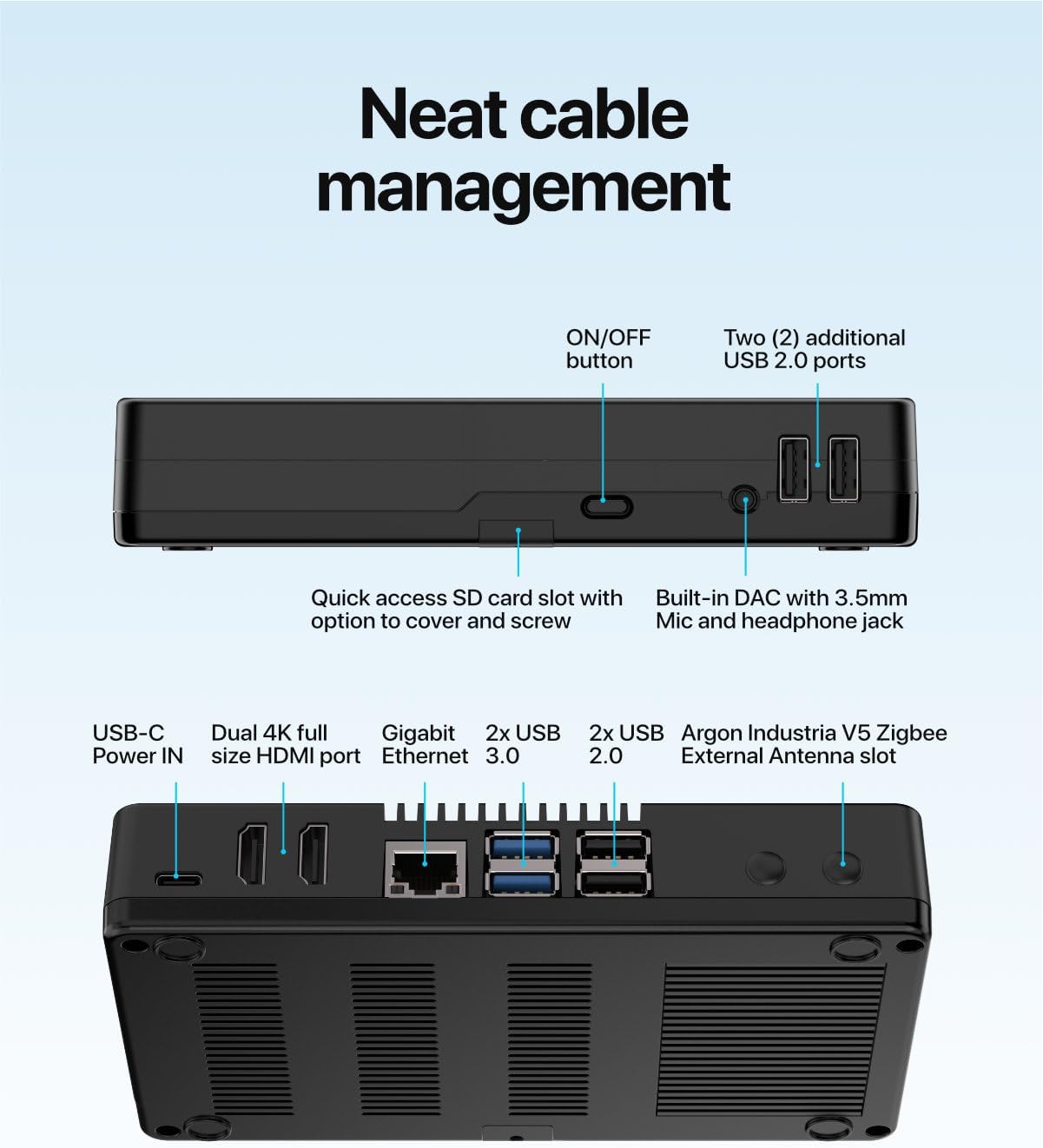
Image 4.3: Labeled diagram of the Argon ONE V5 case's external ports, including USB-C Power IN, Dual HDMI, Gigabit Ethernet, USB 3.0, USB 2.0, 3.5mm audio jacks, and the quick access SD card slot.
5. Instrukcja obsługi
5.1. Włączanie i wyłączanie
The Argon ONE V5 case includes an ON/OFF button for convenient power management. Ensure your Raspberry Pi OS is configured to support safe shutdown via GPIO commands for optimal use of this feature.
- Włączanie: Press the ON/OFF button once to power on the Raspberry Pi 5.
- Wyłączone: A short press of the ON/OFF button can initiate a safe shutdown (requires software configuration). A long press (typically 5-10 seconds) will force a power off.
5.2. Działanie układu chłodzenia
The Argon ONE V5 features both passive and active cooling mechanisms.
- Chłodzenie pasywne: The casted aluminum body of the case acts as a large heatsink, passively dissipating heat from the Raspberry Pi 5's CPU.
- Active Cooling (30mm PWM Fan): The built-in 30mm PWM fan is controlled by the Raspberry Pi 5 and can be configured via software to activate at specific temperature thresholds, providing additional cooling during high-load operations.

Image 5.1: Diagram illustrating the smart cooling system of the Argon ONE V5, showing the 30mm PWM fan and internal fins working together to dissipate heat from the Raspberry Pi 5.
6. Advanced Features and Expansion
6.1. M.2 NVMe Drive Expansion
The Argon ONE V5 case is designed to be expandable with M.2 NVMe expansion boards (sold separately). This allows for high-speed storage integration.
- Acquire a compatible M.2 NVMe expansion board for the Argon ONE V5.
- Install your M.2 NVMe drive onto the expansion board according to the board's instructions.
- Integrate the M.2 NVMe expansion board into the Argon ONE V5 case. The case features a built-in passive cooling heatsink for the M.2 NVMe drive.
- Ensure proper connection to the Raspberry Pi 5's PCIe port via the internal daughterboard.

Image 6.1: Diagram illustrating the installation of an M.2 NVMe heatsink into the Argon ONE V5 case, designed for use with M.2 NVMe Expansion Boards (sold separately).
6.2. Internal Connectivity
The internal daughterboard provides access to various Raspberry Pi 5 connectors:
- Argon Industria V5 ZigBee Module connector: For integrating ZigBee communication modules.
- UART connector: Do komunikacji szeregowej.
- RTC battery connector: To power a Real-Time Clock (RTC) battery.
- 2x 4 Lane Camera / Display connector: For connecting cameras or displays.
- PCIE port: For PCIe expansion, such as M.2 NVMe boards.
- 40 pin GPIO: Standard General Purpose Input/Output pins for various projects.
These internal ports allow for extensive customization and integration with other hardware components.
6.3. Optional OLED Display Module
An optional Argon ONE V5 Industria OLED Display Module (sold separately) can be integrated to provide real-time information, such as temperature readings.

Image 6.2: The Argon ONE V5 case featuring the optional Industria OLED Display Module (sold separately), showing a temperature reading of 45.1°C.
7. Konserwacja
To ensure the longevity and optimal performance of your Argon ONE V5 case and Raspberry Pi 5:
- Czyszczenie: Periodically clean the exterior of the case with a soft, dry cloth. For dust accumulation in vents or around the fan, use compressed air. Ensure the device is powered off before cleaning.
- Kontrola wentylatora: Regularly check the 30mm PWM fan for any obstructions or unusual noises. Keep the fan free from dust to maintain efficient airflow.
- Thermal Pads: If the case is disassembled for any reason, inspect the thermal pads. Replace them if they appear worn or damaged to ensure proper heat transfer.
8. Rozwiązywanie Problemów
This section addresses common issues you might encounter with your Argon ONE V5 case.
| Problem | Możliwa przyczyna | Rozwiązanie |
|---|---|---|
| Raspberry Pi 5 does not power on. |
|
|
| Fan is not spinning or is excessively loud. |
|
|
| Brak wyjścia wyświetlania przez HDMI. |
|
|
| M.2 NVMe drive not detected. |
|
|
9. Specyfikacje
| Funkcja | Szczegół |
|---|---|
| Marka | Argon Forty |
| Model | Argon ONE V5 |
| Zgodność | Raspberry Pi 5 |
| Tworzywo | Casted Aluminum |
| Chłodzenie | Passive (aluminum case), Active (30mm PWM Fan) |
| Wyjście wideo | Dual 4K Full Size HDMI Ports |
| Porty USB | 2x USB 3.0, 2x USB 2.0 (front-facing) |
| Sieć | Gigabitowy Ethernet |
| Audio | Built-in DAC with 3.5mm Mic & Headphone Jacks |
| Rozszerzenie wewnętrzne | Internal USB for ZigBee Modules, UART, RTC battery connector, 2x 4 Lane Camera/Display, PCIE port, 40 pin GPIO |
| Wymiary (pakiet) | 6.46 x 3.9 x 1.42 cala |
| Waga przedmiotu | 11.7 uncji |
| Wsparcie systemu operacyjnego | Linux, Raspberry Pi OS, Ubuntu |
10. Gwarancja i wsparcie
For warranty information and technical support, please refer to the official Argon Forty webOdwiedź stronę internetową lub skontaktuj się bezpośrednio z działem obsługi klienta. Zachowaj dowód zakupu na wypadek roszczeń gwarancyjnych.
Producent: Argon Forty
Webstrona: www.argon40.com (Uwaga: To jest symbol zastępczy URL, please refer to official product documentation for the correct support webstrona.)
Ask a question about this manual
Ask about setup, troubleshooting, compatibility, parts, safety, or missing instructions. Manuals+ will review the question and use this page’s manual context to help answer it.