1. Wprowadzenie
This manual provides comprehensive instructions for the setup, operation, and maintenance of your HY6 4K Smart DLP Android 9 Mini Video Projector. Please read this guide thoroughly before use to ensure optimal performance and longevity of your device. This projector is designed for versatile use, including home cinema, business presentations, and gaming, offering a portable and immersive viewzdobywania doświadczenia.
2. Koniec produktuview
The HY6 Mini Projector is a compact and powerful device featuring 4K resolution support and DLP technology for crisp, vibrant images. It runs on Android 9, providing access to a wide range of streaming applications and media. Key features include 200 lumens brightness, built-in Wi-Fi for wireless screen mirroring, and an integrated speaker for convenient audio playback.

Figure 1: The HY6 Mini Projector, showcasindzięki kompaktowej konstrukcji i zintegrowanemu uchwytowi.
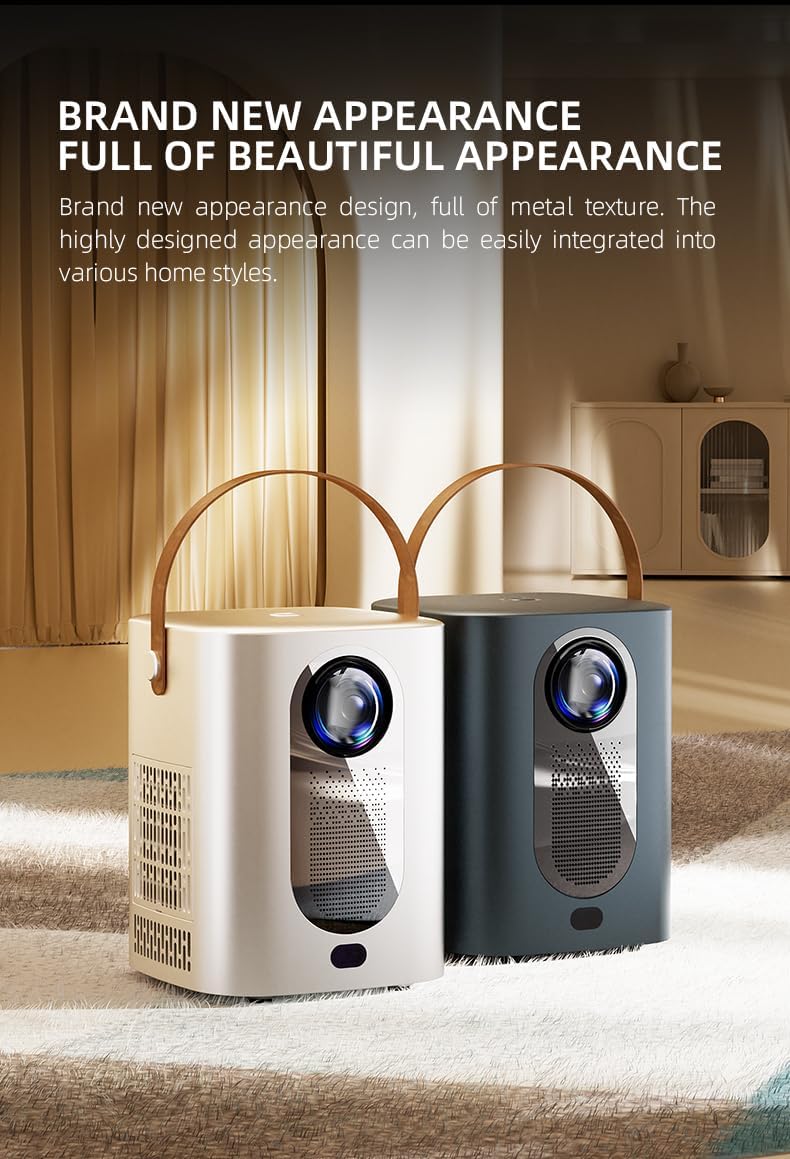
Figure 2: Available color variations of the HY6 Mini Projector, emphasizing its modern aesthetic.

Rysunek 3: Szczegółowy view of the projector's customized lens, designed for improved image quality.

Figure 4: The projector's electric focus feature, allowing for quick and clear image adjustment.
3. Konfiguracja
- Rozpakowywanie: Carefully remove the projector and all accessories from the packaging. Ensure all components are present.
- Umieszczenie: Ustaw projektor na stabilnej, płaskiej powierzchni. Aby uzyskać optymalną viewing, place it directly in front of your projection surface. Ensure adequate ventilation around the device to prevent overheating.
- Podłączenie zasilania: Connect the provided power adapter to the projector's DC input port. Then, plug the power adapter into a suitable electrical outlet.
- Pierwsze włączenie: Naciśnij i przytrzymaj przycisk zasilania na projektorze lub pilocie, aby włączyć urządzenie.
- Regulacja ostrości: Once powered on, the projector will display the Android 9 interface. Adjust the image focus using the manual lens ring or the electric focus function via the remote control until the image appears sharp and clear.
- Połączenie internetowe: Navigate to the 'Settings' menu on the projector's interface. Select 'Wi-Fi' and connect to your preferred wireless network by entering the password. A stable internet connection is required for streaming and app downloads.
4. Instrukcja obsługi
- Navigating the Android 9 OS: Use the directional buttons and 'OK' button on the remote control to navigate through the projector's Android 9 operating system. Access applications, settings, and media content.
- Treść przesyłana strumieniowo: Open pre-installed streaming applications such as Netflix or YouTube, or download new ones from the integrated app store. Ensure a stable internet connection for smooth playback.
- Bezprzewodowe kopiowanie ekranu: To mirror content from your smartphone, tablet, or laptop, select the 'Screen Mirroring' or 'Cast' option from the projector's main menu. Follow the on-screen instructions to connect your device. Ensure both devices are connected to the same Wi-Fi network.
- Wyjście audio: The projector features a built-in speaker for audio playback. Adjust the volume using the volume buttons on the remote control.
- Wyłączone: To turn off the projector, press and hold the power button on the projector or remote control until the power-off prompt appears, then confirm.
5. Konserwacja
- Czyszczenie soczewek: Use a soft, lint-free cloth specifically designed for optical lenses to gently wipe the projector lens. Avoid using abrasive materials, paper towels, or harsh chemical cleaners, as these can scratch or damage the lens coating.
- Wentylacja: Regularly check that the projector's ventilation vents are clear of dust and obstructions. Proper airflow is crucial to prevent overheating and ensure the longevity of the device. Do not block the air inlets or outlets during operation.
- Składowanie: When not in use for extended periods, store the projector in a cool, dry place, away from direct sunlight, excessive humidity, and extreme temperatures. It is recommended to use the original packaging or a protective case to prevent dust accumulation and physical damage.
6. Rozwiązywanie Problemów
- Brak zasilania:
- Ensure the power cable is securely connected to both the projector and a working electrical outlet.
- Sprawdź, czy gniazdko elektryczne działa prawidłowo, podłączając je do innego urządzenia.
- Naciśnij mocno przycisk zasilania na projektorze lub pilocie.
- Brak obrazu / Rozmazany obraz:
- Sprawdź, czy osłona obiektywu została zdjęta.
- Adjust the focus using the manual lens ring or the electric focus function via the remote control.
- Ensure the projector is positioned within the recommended projection distance (up to 3 meters).
- Verify the correct input source is selected if connecting external devices.
- Brak dźwięku:
- Zwiększ głośność projektora i urządzenia źródłowego.
- If using external audio devices, ensure they are properly connected and selected as the audio output.
- Connectivity Issues (Wi-Fi/Screen Mirroring):
- Uruchom ponownie projektor i router Wi-Fi.
- Ensure the projector and the device you are mirroring from are connected to the same Wi-Fi network.
- Re-enter the Wi-Fi password to confirm it is correct.
- Ensure devices are within reasonable range of the Wi-Fi router.
7. Specyfikacje
| Funkcja | Opis |
|---|---|
| Marka | Ogólny |
| Producent | MIRHA |
| Współczynnik kształtu | Przenośny |
| Rozdzielczość ekranu | 1280x720 |
| Resolution (Supported) | 3840 × 2160 (4K) |
| System operacyjny | Android 9 |
| Jasność | 200 lumenów |
| Technologia łączności | Wi-Fi |
| Zalecane zastosowania | Biznes, Edukacja, Gry, Kino domowe |
| Cechy specjalne | 3D-Ready, Auto Focus, Auto Obstacle Avoidance, Auto Screen Alignment, Built-In 3D, Built-In Cooling System, Built-In Media Player, Built-In Speaker, Built-In Wi-Fi, Built-In Handle, Digital Keystone Correction, Dust-Proof, Fold Down Arm, Lightweight, Portable |
8. Gwarancja i wsparcie
Informacje o gwarancji: This product may be covered by an extended warranty. Please refer to your purchase documentation or contact your retailer for specific details regarding 1-Year or 2-Year Extended Warranty options.
Obsługa klienta: For technical assistance, troubleshooting beyond the scope of this guide, or warranty claims, please contact the seller or manufacturer directly. Refer to your purchase receipt or product packaging for contact information.
Uwaga: W niniejszej instrukcji nie ma oficjalnych filmów prezentujących produkty.


