
1. Wprowadzenie
Dziękujemy za zakupasing the CYBORIS Foldable Phone Stand with Speaker, Model T203. This device combines a versatile phone and tablet stand with a wireless Bluetooth speaker, offering enhanced audio and hands-free convenience. This manual provides detailed instructions for setup, operation, and maintenance to ensure optimal performance and longevity of your device.
2. Koniec produktuview
The CYBORIS T203 features a compact, foldable design with an integrated Bluetooth speaker. It includes an adjustable stand for various viewing angles and heights, and control buttons for power, light, playback, and mode selection.
2.1 Zawartość opakowania
- 1 x CYBORIS Foldable Phone Stand with Speaker (Model T203)
- 1 x kabel ładujący USB
- 1 x Instrukcja obsługi
2.2 Komponenty urządzenia
Familiarize yourself with the main parts and controls of your device:

Image: The CYBORIS Foldable Phone Stand with Speaker, illustrating its compact folded form and its ready-to-use unfolded configuration with a phone in place. This image highlights the device's dual functionality and portability.
- Adjustable Phone/Tablet Holder: Securely holds devices from 4 to 13 inches.
- Kratka głośnika: Wyjście audio.
- Przyciski sterujące:
- Przycisk zasilania/światła: Power on/off, cycle LED light modes.
- Poprzedni utwór/Przycisk zmniejszania głośności: Krótkie naciśnięcie powoduje zmniejszenie głośności, długie naciśnięcie powoduje przejście do poprzedniego utworu.
- Przycisk Odtwórz/Pauza/Połącz: Odtwarzaj/pauzuj muzykę, odbieraj/kończ połączenia.
- Następny utwór/Przycisk zwiększania głośności: Krótkie naciśnięcie zwiększa głośność, długie naciśnięcie przełącza na następny utwór.
- Przycisk trybu (M): Przełączaj się między trybami Bluetooth i karty TF.
- Pasek świetlny LED: Zapewnia oświetlenie nastrojowe.
- Gniazdo karty TF: Do odtwarzania muzyki bezpośrednio z karty TF (MicroSD).
- Port ładowania typu C: Do ładowania urządzenia.
- Podkładki antypoślizgowe: Located on the base and device holder for stability and protection.
3. Konfiguracja
3.1 Rozkładanie stojaka
To prepare the stand for use:
- Gently unfold the main arm of the stand from its compact position.
- Adjust the angle of the phone/tablet holder to your desired viewpreferencji.
- Extend the telescopic arm to achieve the desired height.

Image: The phone stand adjusted to different angles, demonstrating its flexibility for various viewing positions. The image shows a phone placed vertically on the stand.
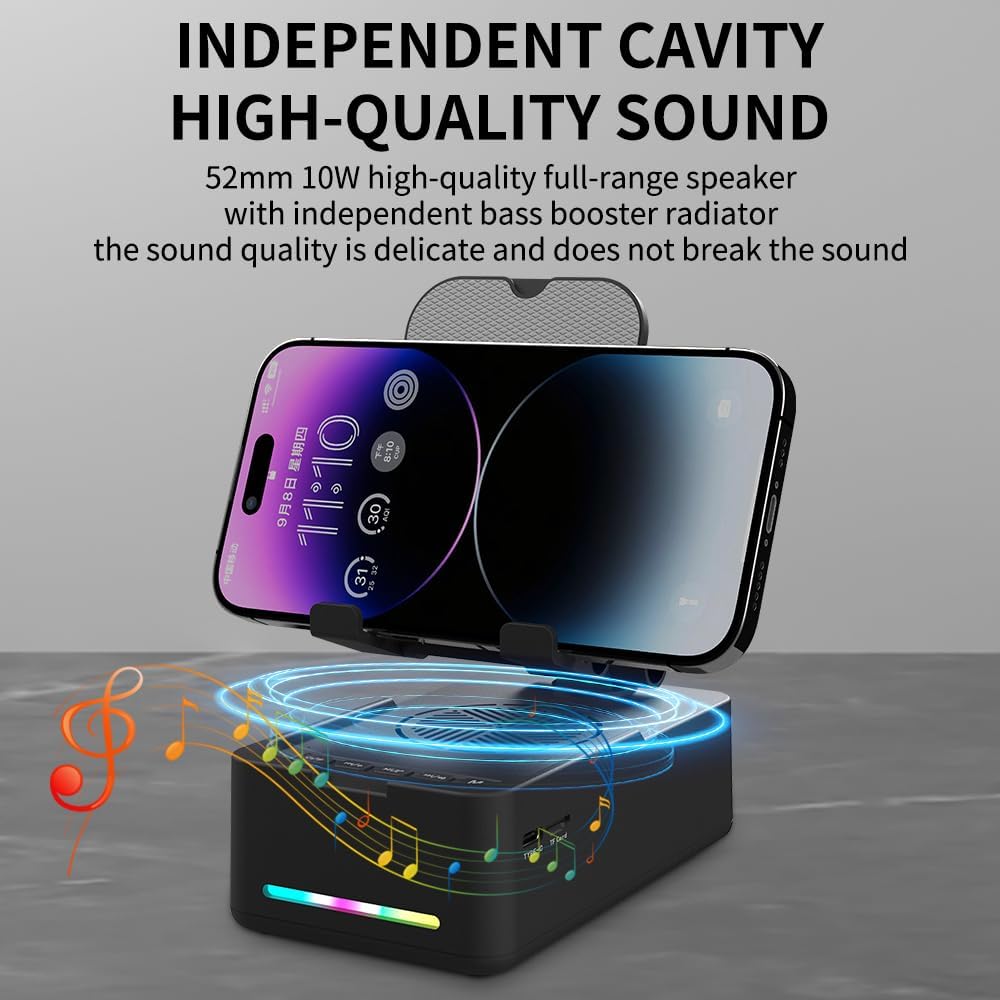
Image: The phone stand with its telescopic arm extended to a higher position, illustrating the adjustable height feature. A phone is shown on the stand at an elevated level.
The sturdy hook and anti-slip pads ensure your device remains secure and protected from scratches.
3.2 Włączanie/wyłączanie
- Włączanie: Press and hold the Power/Light button (⏻ / ✱) for approximately 3 seconds until you hear an audible prompt and the LED light bar illuminates.
- Aby wyłączyć: Press and hold the Power/Light button (⏻ / ✱) for approximately 3 seconds until you hear an audible prompt and the LED light bar turns off.
4. Instrukcja obsługi
4.1 parowanie Bluetooth
Aby połączyć urządzenie przez Bluetooth:
- Ensure the speaker is powered on. The LED light bar will indicate it is in pairing mode (often a flashing blue light).
- Na smartfonie, tablecie lub innym urządzeniu z obsługą technologii Bluetooth przejdź do ustawień Bluetooth.
- Szukaj available devices and select "CYBORIS T203" (or similar name) from the list.
- Once connected, you will hear a confirmation sound, and the LED light bar will typically show a solid blue light.
- The device will automatically attempt to reconnect to the last paired device when powered on.
4.2 Odtwarzanie multimediów
Control your audio playback using the buttons on the speaker:
- Odtwórz/Pauza: Short press the Play/Pause/Call button (▶ / ⏸ / 📞) to play or pause the current track.
- Zwiększenie głośności: Short press the Next Track/Volume Up button (⏭ / 🔊+).
- Ściszanie: Short press the Previous Track/Volume Down button (⏮ / 🔊-).
- Następny utwór: Long press the Next Track/Volume Up button (⏭ / 🔊+).
- Poprzedni utwór: Long press the Previous Track/Volume Down button (⏮ / 🔊-).
Note: Some instructions may incorrectly state the long press functions for track control. Please follow the above corrected instructions for proper operation.
4.3 Funkcje połączeń
Wbudowany mikrofon umożliwia prowadzenie rozmów bez użycia rąk:
- Odbierz połączenie: Short press the Play/Pause/Call button (▶ / ⏸ / 📞) when an incoming call is received.
- Zakończ połączenie: Short press the Play/Pause/Call button (▶ / ⏸ / 📞) during a call to hang up.
- Odrzuć połączenie: Long press the Play/Pause/Call button (▶ / ⏸ / 📞) when an incoming call is received.
4.4 trybów oświetlenia LED
To cycle through the LED light modes:
- Short press the Power/Light button (⏻ / ✱) to change the LED light pattern or turn it off.
4.5 Odtwarzanie z karty TF
Aby odtwarzać muzykę bezpośrednio z karty TF (MicroSD):
- Włóż kartę TF z dźwiękiem MP3 files do gniazda karty TF.
- Naciśnij przycisk Tryb (M) to switch to TF card mode. The speaker will automatically begin playing music from the card.
- Use the media playback buttons (Play/Pause, Next/Previous Track, Volume Up/Down) to control the audio.

Obraz: Zbliżenie view of the side of the speaker base, clearly showing the TF card slot and the Type-C charging port, indicating multiple music playback options.
5. Ładowanie
To charge your CYBORIS T203 speaker:
- Podłącz dołączony kabel ładujący USB do portu ładowania typu C w głośniku.
- Podłącz drugi koniec kabla USB do kompatybilnego źródła zasilania USB (np. zasilacza sieciowego, portu USB komputera).
- Wskaźnik LED pokaże stan ładowania (np. będzie świecił na czerwono podczas ładowania, będzie wyłączony, a na niebiesko po pełnym naładowaniu).
- Pełne naładowanie trwa zazwyczaj około 2–3 godzin.
Note: The device has a battery capacity of 1800mAh and requires a DC 5V/1A input for charging.

Image: The phone stand with a phone displaying battery life estimates: up to 6 hours at maximum volume and 30 hours at 50% volume, highlighting its long-lasting battery.
6. Konserwacja
- Trzymaj urządzenie w suchym miejscu i z dala od wilgoci.
- Nie narażaj urządzenia na działanie ekstremalnych temperatur.
- Czyść urządzenie miękką, suchą ściereczką. Unikaj stosowania silnych środków chemicznych i ściernych środków czyszczących.
- Przechowuj urządzenie w chłodnym, suchym miejscu, gdy nie jest używane.
7. Rozwiązywanie Problemów
| Problem | Możliwa przyczyna | Rozwiązanie |
|---|---|---|
| Urządzenie nie włącza się. | Niski poziom naładowania baterii. | Naładuj urządzenie za pomocą dostarczonego kabla USB. |
| Nie można sparować przez Bluetooth. | Bluetooth not enabled on source device; device too far; speaker not in pairing mode. | Ensure Bluetooth is on and the speaker is in pairing mode. Move devices closer. Restart both devices. |
| Brak dźwięku lub niski poziom głośności. | Zbyt niski poziom głośności głośnika lub urządzenia źródłowego; urządzenie nie jest podłączone. | Zwiększ głośność zarówno głośnika, jak i podłączonego urządzenia. Sprawdź połączenie Bluetooth. |
| Track control buttons (Next/Previous) not working as expected. | Nieprawidłowy czas naciśnięcia przycisku. | For Next/Previous track, długie naciśnięcie the respective buttons. Short press is for volume control. |
| TF card music not playing. | Incorrect mode selected; TF card not inserted correctly or corrupted. | Press the 'M' button to switch to TF card mode. Reinsert the TF card. Ensure files są w formacie MP3. |
8. Specyfikacje
- Nazwa modelu: T203
- Marka: CYBORIS
- Zgodne urządzenia: Smartphones, Tablets (4 to 13 inches)
- Współczynnik kształtu: Nawias
- Typ montażu: Blat stołu
- Bateria: 1800mAh
- Wejście: Prąd stały 5 V/1 A
- Wymiary przedmiotu: 5.51 x 3.15 x 2.44 cala
- Waga przedmiotu: 0.44 kilograma
- Materiał obudowy: Plastik, Guma
- Wbudowane media: Speaker, USB cable, Manual book
9. Gwarancja i wsparcie
The CYBORIS Foldable Phone Stand with Speaker (Model T203) comes with a 1-letnia gwarancja od daty zakupu. Niniejsza gwarancja obejmuje wady produkcyjne i usterki powstałe podczas normalnego użytkowania.
For warranty claims, technical support, or any questions regarding your product, please contact CYBORIS customer service through the retailer where you purchased the product or visit the official CYBORIS webwitryna do informacji kontaktowych.
Zachowaj dowód zakupu w celu potwierdzenia gwarancji.