
1. Wprowadzenie
Thank you for choosing the RIGDOO HT20 Trail Camera. This advanced game camera is designed for wildlife monitoring, security surveillance, and outdoor exploration, offering high-resolution imaging, rapid trigger speed, and robust weather resistance. This manual provides detailed instructions for setup, operation, maintenance, and troubleshooting to ensure optimal performance of your camera.
2. Zawartość opakowania
Sprawdź przesyłkę, aby upewnić się, że znajdują się w niej wszystkie elementy:
- RIGDOO HT20 Trail Camera
- Pasek montażowy
- Kabel USB
- Karta SD 32 GB
- AA Batteries (4 included, 8 recommended for extended use)
- Instrukcja obsługi

Image: RIGDOO HT20 Trail Camera, showing the camera unit, a 32GB SD card, and four AA batteries.
3. Koniec produktuview
Zapoznaj się z elementami aparatu:

Obraz: Zbliżenie view of the camera's internal components, highlighting the 2.4-inch LCD color screen, mechanical buttons for navigation, the auto mode switch, and the protruding SD card slot.
- Obiektyw: Główny obiektyw aparatu.
- Czujniki PIR: Pasywne czujniki podczerwieni do wykrywania ruchu.
- Diody podczerwieni: 50pcs no-glow LEDs for night vision illumination.
- Ekran LCD: 2.4-inch color display for menu navigation and playback.
- Przyciski sterujące: MENU, REPLAY, SHOT, OK, and directional buttons for settings adjustment.
- Gniazdo karty SD: For inserting the memory card (supports up to 256GB).
- Port USB-C: Do podłączenia do komputera.
- Przełącznik trybu automatycznego: Internal switch to automatically turn on motion capture when the unit is closed.
- Komora baterii: Mieści 4 lub 8 baterii AA.
4. Konfiguracja
4.1. Instalacja baterii
- Otwórz aparat casinzatrzaski g.
- Zlokalizuj komorę baterii.
- Insert 4 or 8 new AA batteries, ensuring correct polarity (+/-). For optimal performance and longer standby time (up to 180 days), 8 AA batteries are recommended.
- Dokładnie zamknij pokrywę komory baterii.
4.2. Instalacja karty SD
- Wyłącz kamerę i znajdź gniazdo karty SD.
- Insert the provided 32GB SD card (or another compatible SD card up to 256GB) into the slot with the metal contacts facing down, until it clicks into place.
- To remove, push the card in until it clicks, then release, and it will spring out.
4.3. Montaż kamery
- Select a suitable location, such as a tree or pole, ensuring a clear view obszaru, który chcesz monitorować.
- Przeciągnij dołączony pasek montażowy przez otwory z tyłu kamery.
- Securely fasten the camera to the desired object using the strap. Ensure the camera is stable and pointed correctly.
- Adjust the camera angle as needed. The 120° wide-angle detection allows for a broad field of view.

Image: The RIGDOO HT20 Trail Camera mounted on a tree, illustrating its 120° wide-angle PIR detection range over a natural landscape.
5. Instrukcja obsługi
5.1. Włączanie/wyłączanie zasilania
- To power on, open the camera casing and slide the auto mode switch to the ON position. The camera will enter test mode.
- Aby wyłączyć urządzenie, przesuń przełącznik do pozycji OFF.
- Kiedy casing is closed, the camera will automatically switch to active monitoring mode if the auto mode switch is in the ON position.
5.2. Nawigacja po menu
Use the 2.4-inch LCD screen and mechanical buttons to navigate the menu and adjust settings:
- Naciśnij MENU aby wejść do menu ustawień.
- Użyj GÓRA/DÓŁ directional buttons to scroll through options.
- Użyj LEWO/PRAWO directional buttons to change values or select sub-menus.
- Naciśnij OK przycisk, aby potwierdzić wybór.
5.3. Tryby zdjęć i wideo
Aparat obsługuje różne tryby przechwytywania:
- Tryb zdjęć: Rejestruje nieruchome obrazy.
- Tryb wideo: Nagrywa klipy wideo.
- Tryb zdjęć i wideo: Rejestruje nieruchomy obraz, a następnie klip wideo.
5.4. Ustawienia klawiszy
- Rozdzielczość zdjęcia: Set to 48MP for ultra-clear images.
- Rozdzielczość wideo: Select 4K (2160P) for high-definition video recording.
- Prędkość wyzwalania: The camera features an ultra-fast 0.1s trigger speed. This can be adjusted to capture 1, 2, 3, or 10 consecutive shots per trigger event.
- Czułość PIR: Adjust the sensitivity of the motion sensors (Low, Medium, High) based on the environment to avoid false triggers.
- Widzenie nocne: The 50pcs no-glow infrared LEDs provide clear night vision up to 65 feet without disturbing wildlife.
- Upływ czasu: Ustaw interwały wykonywania zdjęć w dłuższych okresach.
- Data/Godzina Śwamp: Enable to imprint date, time, temperature, and moon phase on photos/videos.
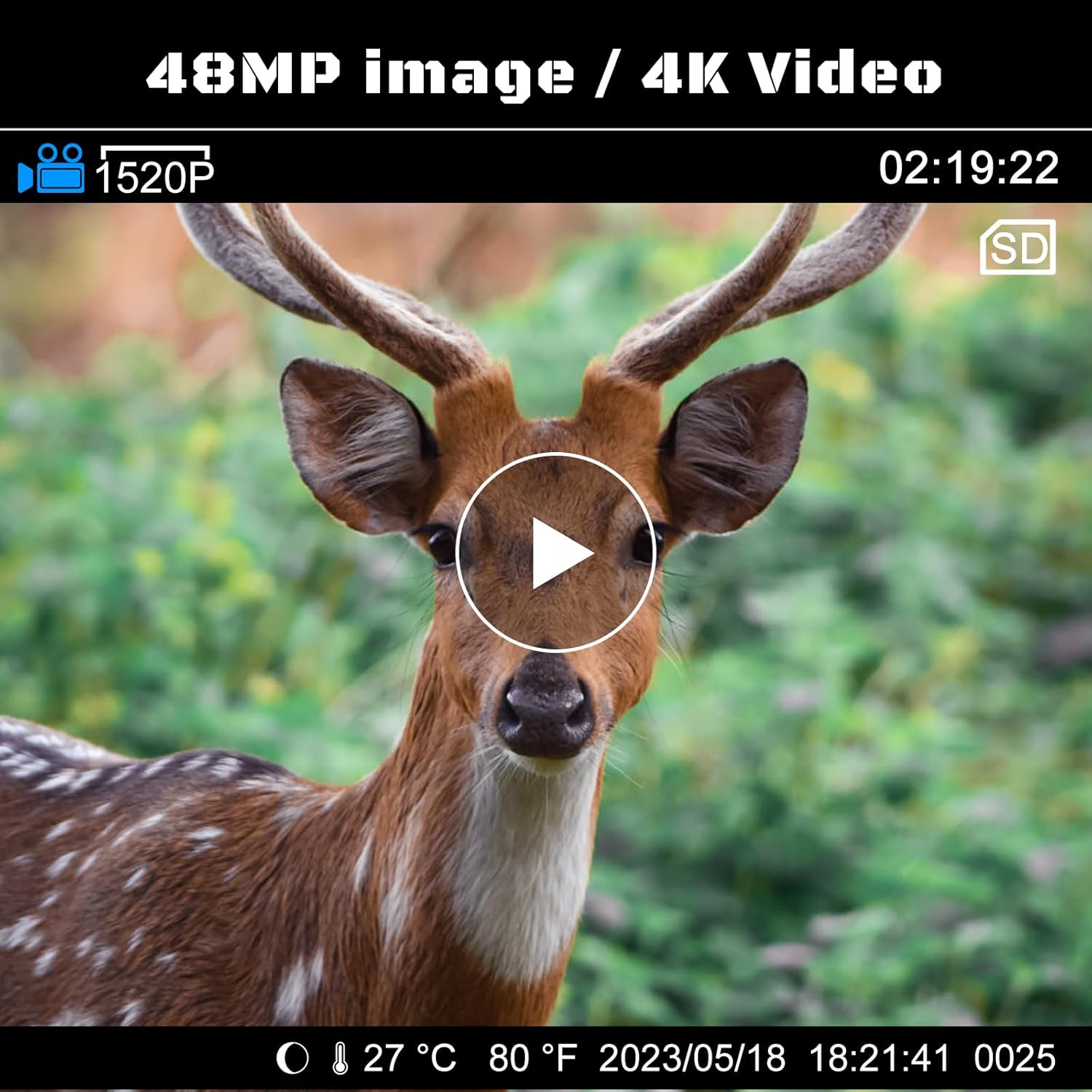
Image: A still frame from a 4K video, demonstrating the 48MP image quality, featuring a deer in its natural habitat.

Image: A split image comparing the clear night vision capabilities of the RIGDOO camera (left) with 48pcs 940nm IR LEDs against other cameras (right) with fewer normal IR LEDs, showing a leopard at night.

Image: A visual comparison demonstrating the 0.1s trigger speed of the RIGDOO camera (top) capturing a sharp image of an eagle in flight, versus a slower 0.5s trigger speed (bottom) resulting in a blurred image.
5.5. Viewwchodzenie Files
- Przed kamerą: In test mode, press the POWTÓRNA ROZGRYWKA przycisk do view captured photos and videos on the LCD screen. Use directional buttons to navigate.
- Na komputerze: Connect the camera to a computer using the USB cable, or remove the SD card and insert it into a card reader. The camera/SD card will appear as a removable disk, allowing you to access and transfer files.
6. Konserwacja
- Czyszczenie: Do czyszczenia obiektywu aparatu i kamery użyj miękkiej, suchej ściereczki.asing. Unikaj środków czyszczących o właściwościach ściernych i rozpuszczalników.
- Pielęgnacja baterii: Replace all batteries at the same time. Do not mix old and new batteries or different types of batteries. Remove batteries if the camera will not be used for an extended period.
- Karta SD: Aby zachować optymalną wydajność i zapobiec uszkodzeniu danych, należy okresowo formatować kartę SD.
- Składowanie: Kiedy aparat nie jest używany, przechowuj go w chłodnym i suchym miejscu.
7. Rozwiązywanie Problemów
| Problem | Możliwa przyczyna | Rozwiązanie |
|---|---|---|
| Kamera nie włącza się | Low or dead batteries; incorrect battery polarity; switch in OFF position. | Replace all batteries with new ones, ensuring correct polarity. Check that the power switch is in the ON position. |
| Słaba jakość obrazu/wideo | Brudny obiektyw, słabe warunki oświetleniowe, nieprawidłowe ustawienia rozdzielczości. | Clean the lens. Ensure sufficient lighting or rely on night vision. Check resolution settings in the menu (set to 48MP/4K). |
| Kamera nie wykrywa ruchu | PIR sensitivity too low; obstruction in front of PIR sensors; camera placed too high/low. | Increase PIR sensitivity. Ensure clear line of sight for sensors. Adjust camera height and angle. |
| Krótki czas pracy baterii | Częste wyzwalacze, ekstremalne temperatury, baterie niskiej jakości. | Reduce trigger frequency if possible. Use high-quality alkaline or rechargeable AA batteries. Consider using 8 AA batteries for longer runtime. |
| Buttons freeze up / unresponsive | Moisture ingress; extreme cold. | Ensure camera is properly sealed. If exposed to moisture/cold, bring indoors and allow to dry/warm up before attempting to use. |
8. Specyfikacje
| Funkcja | Specyfikacja |
|---|---|
| Model | HT20 |
| Efektywna rozdzielczość obrazu nieruchomego | 48 MP |
| Rozdzielczość przechwytywania wideo | 4K (2160P) |
| Szybkość wyzwalania | 0.1 sekund |
| Viewing kąt | 120 stopni |
| Zakres noktowizora | 65 stóp |
| Liczba diod LED podczerwieni | 50 (No Glow) |
| Poziom wodoodporności | Wodoodporność IP66 |
| Źródło zasilania | Battery Powered (4 or 8 AA batteries) |
| Maksymalny obsługiwany rozmiar pamięci Flash | 256 GB |
| Wyświetlacz | 2.4-calowy kolorowy ekran LCD |
| Technologia łączności | USB (typ C) |
| Wymiary (dł. x szer. x wys.) | 3.39 x 5.19 x 8.19 cala |
| Waga przedmiotu | 1.48 funta |
| Tworzywo | Akrylonitryl-butadien-styren (ABS) |
9. Gwarancja i wsparcie
RIGDOO provides comprehensive customer support for your trail camera:
- Gwarancja: Skorzystaj z rocznej gwarancji od daty zakupu.
- Zwroty i wymiany: A 30-day free return and exchange policy is available.
- Obsługa klienta: If you encounter any problems when using the hunting trail camera, please feel free to contact RIGDOO's professional customer service team. They are committed to helping you within 24 hours.
For support, please refer to the contact information provided on the product packaging or the official RIGDOO webstrona.