
1. Koniec produktuview
The AUTOOL GOGO8-US Digital Manometer is a precision instrument designed for measuring gas pressure and differential pressure. It features a dual-port design for synchronous detection, a backlit LCD display, and supports 12 different pressure units. This device is suitable for applications such as HVAC duct pressure monitoring, filter blockage diagnosis, cleanroom micro-pressure control, and gas appliance maintenance.

Figure 1: AUTOOL GOGO8-US Digital Manometer with accessories.
Główne cechy:
- Zakres pomiarowy: ±20.68 kPa / ±2.999 psi.
- Dokładność: ±0.3% FSO (Full Scale Output).
- Czas reakcji: 0.5 sekund.
- Unit Support: 12 selectable units including PSI, inHg, inH₂O, ftH₂O, kPa, mbar, Bar, kgcm², ozin², mmHg, cmH₂O, Pa.
- Dual-Port Detection: Real-time display of pressure difference (P1-P2).
- Funkcje danych: Data storage (100 groups), Data Hold, Max/Min value recording.
- Wyświetlacz: Large backlit LCD for clear readings in various lighting conditions.
- Zarządzanie energią: Automatic shutdown after 15 minutes of inactivity, low battery warning.
- Kalibrowanie: One-button zero calibration.
2. Co znajduje się w pudełku
Po rozpakowaniu sprawdź, czy wszystkie wymienione poniżej przedmioty znajdują się na miejscu i są w dobrym stanie:
- AUTOOL GOGO8-US Digital Manometer
- Flexible Tubes (2 pieces)
- Adapter metalowy
- Instrukcja obsługi

Figure 2: Package contents of the Digital Manometer.
3. Konfiguracja
3.1 Instalacja baterii
- Locate the battery compartment on the back of the manometer.
- Otwórz pokrywę baterii.
- Włóż jedną baterię 9V, zwracając uwagę na prawidłową biegunowość.
- Dokładnie zamknij pokrywę baterii.
3.2 Connecting Tubes and Adapters
- Identify the two tube connectors on the top of the manometer: Tube Connector (-) and Tube Connector (+).
- Connect the flexible tubes to the desired ports based on your measurement requirements (e.g., for differential pressure, connect one tube to each port).
- If needed, attach the metal adapter to one of the flexible tubes for specific connection points.

Figure 3: Manometer components and dimensions.
4. Instrukcja obsługi
4.1 Włączanie/wyłączanie zasilania
- Naciśnij WŁ./WYŁ. button (red power icon) to turn the device on.
- Naciśnij i przytrzymaj WŁ./WYŁ. przycisk, aby wyłączyć urządzenie.
4.2 Kalibracja zera
Before each measurement, especially for differential pressure, it is recommended to perform a zero calibration to ensure accuracy.
- Ensure both pressure ports are open to atmospheric pressure or disconnected from any pressure source.
- Naciśnij i przytrzymaj TRZYMAĆ button to clear any zero drift and calibrate the device to zero.
4.3 Wybór jednostki
The manometer supports 12 different pressure units.
- Naciśnij JEDNOSTKI button to cycle through the available pressure units (PSI, inHg, inH₂O, ftH₂O, kPa, mbar, Bar, kgcm², ozin², mmHg, cmH₂O, Pa).
4.4 Differential Pressure Measurement (P1-P2)
The device automatically displays the pressure difference between the two ports (P1-P2).
- Connect the higher pressure source to the (+) port and the lower pressure source to the (-) port for positive readings, or vice-versa.
- The display will show the real-time pressure difference.

Figure 4: Dual-port for positive and negative pressure measurement.
4.5 Zatrzymanie danych
- Naciśnij TRZYMAĆ button briefly to freeze the current reading on the display.
- Naciśnij TRZYMAĆ Naciśnij przycisk ponownie, aby zwolnić funkcję zatrzymania danych.
4.6 Max/Min Value Recording
To capture the maximum and minimum pressure values during a measurement period:
- Naciśnij i przytrzymaj MAKS button to activate Max/Min recording mode. The display will show 'MAX' or 'MIN'.
- Naciśnij krótko MAKS button to toggle between MAX and MIN values.
- Naciśnij i przytrzymaj MAKS button again to exit Max/Min recording mode.
4.7 Podświetlenie wyświetlacza
- Naciśnij ° C / ° F button briefly to turn the backlight on or off.

Figure 5: LCD Backlight Display for enhanced visibility.
4.8 Przechowywanie danych
The device can store up to 100 groups of readings.
- Naciśnij krótko ° C / ° F key to save the current reading.
- Użyj RóŻNICA I MAKS keys to scroll through stored data.
5. Konserwacja
5.1 Czyszczenie
- Przetrzyj urządzenie miękką, suchą ściereczką. Nie używaj środków czyszczących o właściwościach ściernych ani rozpuszczalników.
- Ensure the pressure ports are free from dust and debris.
5.2 Wymiana baterii
When the low battery indicator appears on the display, replace the 9V battery promptly to ensure accurate operation.
- Wykonaj kroki instalacji baterii podane w rozdziale 3.1.

Figure 6: Low Battery Reminder and Auto Shutdown feature.
5.3 Przechowywanie
- Store the manometer in a cool, dry place, away from direct sunlight and extreme temperatures.
- Aby zapobiec wyciekowi baterii, wyjmij ją, jeśli urządzenie nie będzie używane przez dłuższy czas.
6. Rozwiązywanie Problemów
| Problem | Możliwa przyczyna | Rozwiązanie |
|---|---|---|
| Urządzenie nie włącza się | Wyczerpana lub nieprawidłowo zainstalowana bateria | Sprawdź biegunowość baterii lub wymień ją na nową baterię 9 V. |
| Inaccurate readings / Zero drift | Environmental factors or sensor drift | Perform one-button zero calibration by long pressing the HOLD button. Ensure ports are open to atmosphere during calibration. |
| Display shows "Err0" | Exceeds positive pressure range | The measured pressure is above the maximum positive range. Reduce pressure or use a device with a higher range. |
| Display shows "Err1" | Exceeds negative pressure range | The measured pressure is below the minimum negative range. Reduce vacuum or use a device with a wider negative range. |
| Podświetlenie nie działa | Backlight off or low battery | Press the °C/°F button to toggle backlight. Check battery level and replace if low. |
| Auto-shutdown occurs too quickly | Normal operation (15 minutes inactivity) | This is a power-saving feature. The device will shut down after 15 minutes of no operation. |
7. Specyfikacje
| Parametr | Wartość |
|---|---|
| Zakres pomiarowy | ±20.68 kPa / ±2.999 PSI |
| Jednostki miary | 12 (PSI, inHg, inH₂O, ftH₂O, kPa, mbar, Bar, kgcm², ozin², mmHg, cmH₂O, Pa) |
| Dokładność | ±0.3% FSO (25°C) |
| Powtarzalność | ±0.2% (maks. ±0.5%FSO) |
| Linearity / Hysteresis | ±0.29% FSO (25°C) |
| Szybkość pomiaru | 0.5 sekund |
| Przechowywanie danych | 100 grup |
| Maksymalne ciśnienie | 20 KPa |
| Temperatura pracy | 0°C do 50°C (32°F do 122°F) |
| Temperatura przechowywania | -10°C do 60°C (14°F do 140°F) |
| Zasilacz | Bateria 9V |
| Automatic Shut-down Time | 15 minut |
| Wymiary | 164 × 70 × 32 mm (6.5 × 2.8 × 1.3 cala) |
| Waga | 200 g (0.44 funta) |
| Tworzywo | Akrylonitryl-butadien-styren (ABS) |
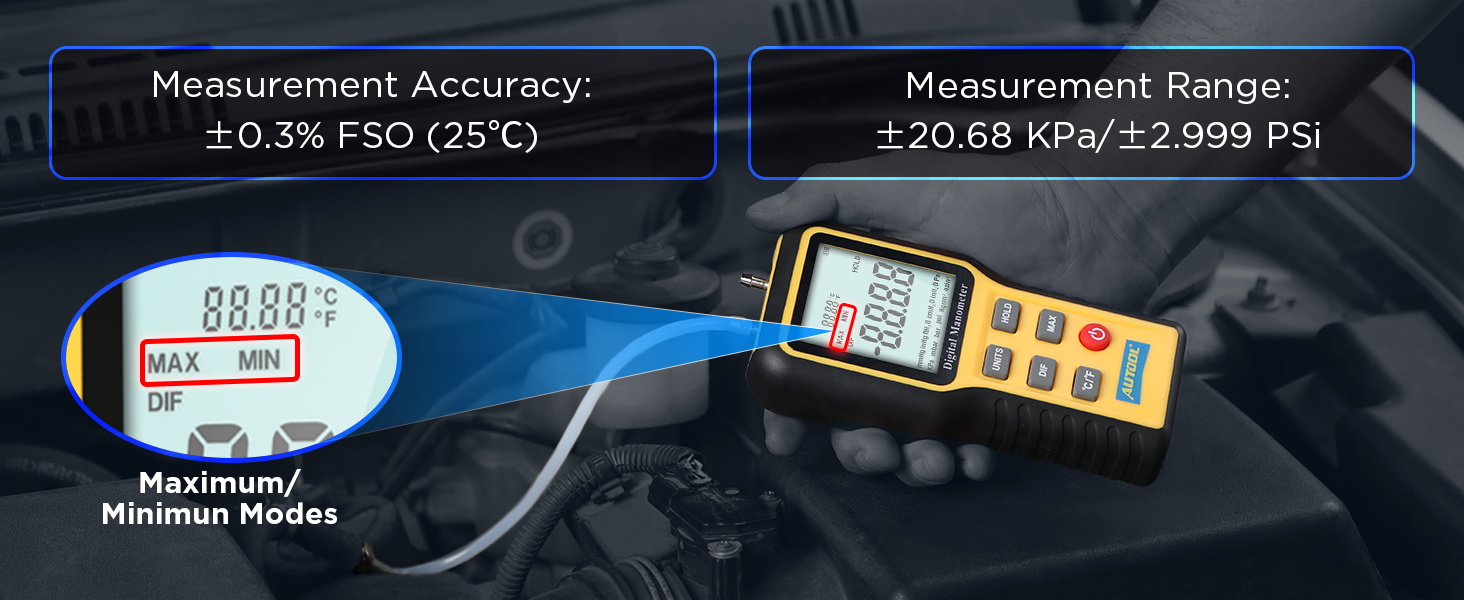
Rysunek 7: Szczegółowe specyfikacje produktu.
8. Gwarancja i wsparcie
8.1 Informacje o gwarancji
The AUTOOL GOGO8-US Digital Manometer comes with a Trzyletnia gwarancja against manufacturing defects. If the manometer exhibits any defects within this period, AUTOOL will provide a replacement or a suitable solution to ensure customer satisfaction without delay.
8.2 Wsparcie techniczne
AUTOOL provides dożywotnie wsparcie techniczne for this product. For any technical assistance, operational queries, or warranty claims, please contact AUTOOL customer service. We are committed to responding to your inquiries within 24 hours.