
1. Wprowadzenie
The Groov-e Lisbon Portable DAB & FM Digital Radio offers a versatile listening experience with its dual-band radio capabilities and Bluetooth connectivity. Designed for portability, it features an intuitive LCD display, a built-in alarm clock, and a headphone jack for private listening. This manual provides detailed instructions for setup, operation, and maintenance of your Lisbon radio.

Obraz: Ponadview of the Groov-e Lisbon radio highlighting its key features like DAB/FM, Bluetooth, LCD display, alarm clock, and headphone socket.
2. Funkcje produktu
- DAB/FM Digital Stations & Bluetooth Streaming: This portable digital radio comes with DAB & FM technology, so tune into preset stations with auto-scan and manual tuning. Plus use Bluetooth to turn your radio into a speaker and stream your music on the go.
- Blue LCD Display: The LCD screen features a blue background light that notifies you of the radio station that you're tuned into and can be dimmed or turned off, while the easy front-on buttons are simple to use for easy tuning and navigation.
- Built-In Alarm Clock: The handy built-in alarm clock allows you to set your alarm clock as to when you want it to go off so you can stay organised and also features a snooze and timer function.
- Wejście słuchawkowe 3.5 mm: Thanks to the 3.5mm jack input you can easily plug in your own earphones so you can listen quietly and in peace while the expanding telescopic antenna allows for crystal clear signal.
- Designed to Travel: Portable, sleek, and sized to fit on a shelf or table, this radio can be powered using a USB cable or batteries (not included); a convenient travel companion that can be easily carried or tucked into your backpack or luggage.
3. Zawartość opakowania
Sprawdź, czy wszystkie elementy są obecne:
- Groov-e Lisbon Portable DAB & FM Digital Radio
- Kabel zasilający USB
- Instrukcja obsługi (ten dokument)
4. Sterowanie i wyświetlacz
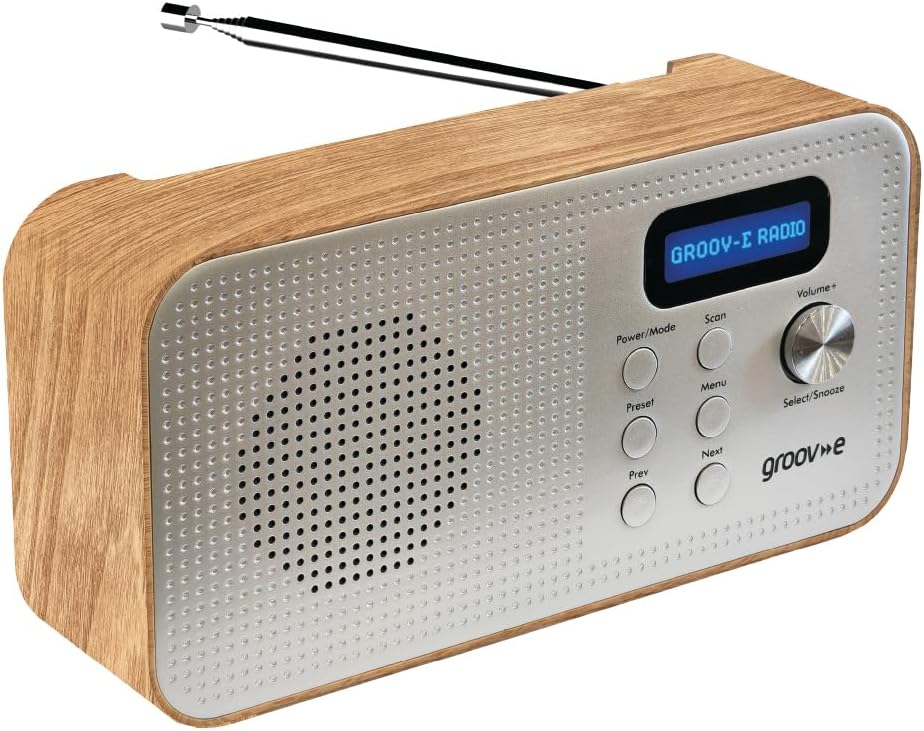
Image: Front panel of the Groov-e Lisbon radio, detailing the layout of buttons, the volume knob, and the LCD screen.
Elementy sterujące na panelu przednim:
- Przycisk zasilania / trybu: Press to turn the radio on or off. Press repeatedly to cycle through DAB, FM, and Bluetooth modes.
- Przycisk skanowania: Initiates an auto-scan for available radio stations in DAB or FM mode.
- Przycisk menu: Accesses the menu options for the current mode.
- Przycisk ustawień wstępnych: Used to save and recall your favorite radio stations.
- Prev Button: Navigates to the previous station, menu option, or track.
- Następny przycisk: Navigates to the next station, menu option, or track.
- Volume+ / Select/Snooze Knob: Rotate to adjust volume. Press to select a menu option or to activate the snooze function when an alarm sounds.
Wyświetlacz LCD:
The blue backlit LCD display shows current station information, time, alarm status, and menu options. It can be dimmed or turned off to conserve power or for nighttime use.

Image: A graphic icon symbolizing an LCD display, indicating the presence of a digital screen on the radio.
5. Konfiguracja
Powering Your Radio:
The Groov-e Lisbon radio can be powered in two ways:
- Zasilanie USB: Connect the supplied USB cable to the radio's USB port and plug the other end into a compatible USB power adapter (not included) or a powered USB port.
- Moc baterii: For portable use, insert 4 x AA batteries (not included) into the battery compartment located on the back of the unit. Ensure correct polarity.
Antena:
Extend the telescopic antenna fully for optimal DAB and FM radio reception.

Image: A woman enjoying the Groov-e Lisbon radio outdoors, illustrating its portable design and ease of use for travel.
6. Instrukcja obsługi
6.1 Włączanie/wyłączanie i wybór trybu
- Aby włączyć radio naciśnij Moc/Tryb przycisk.
- Aby wyłączyć radio, naciśnij i przytrzymaj Moc/Tryb przycisk.
- To switch between DAB, FM, and Bluetooth modes, press the Moc/Tryb Naciśnij przycisk kilkakrotnie.
6.2 Obsługa radia DAB
- Automatyczne skanowanie: W trybie DAB naciśnij przycisk Skandować button to automatically search for and store all available DAB stations.
- Strojenie ręczne: Użyj Poprzedni or Następny przyciski umożliwiające przeglądanie dostępnych stacji.
- Zapisywanie ustawień wstępnych: Dostrój się do wybranej stacji. Naciśnij i przytrzymaj Ustawienie wstępne button until "Preset Store" appears. Use Poprzedni/Następny aby wybrać numer ustawienia wstępnego (1-20), a następnie naciśnij Select/Snooze pokrętło, aby potwierdzić.
- Przywoływanie ustawień wstępnych: Naciśnij krótko Ustawienie wstępne przycisk. Posługiwać się Poprzedni/Następny aby wybrać żądany numer ustawienia wstępnego, a następnie naciśnij Select/Snooze pokrętło, aby potwierdzić.
6.3 Obsługa radia FM
- Automatyczne skanowanie: W trybie FM naciśnij Skandować przycisk umożliwiający automatyczne wyszukiwanie i zapisywanie dostępnych stacji FM.
- Strojenie ręczne: Użyj Poprzedni or Następny przyciski do precyzyjnego dostrojenia częstotliwości.
- Zapisywanie ustawień wstępnych: Dostrój się do wybranej stacji. Naciśnij i przytrzymaj Ustawienie wstępne button until "Preset Store" appears. Use Poprzedni/Następny aby wybrać numer ustawienia wstępnego (1-20), a następnie naciśnij Select/Snooze pokrętło, aby potwierdzić.
- Przywoływanie ustawień wstępnych: Naciśnij krótko Ustawienie wstępne przycisk. Posługiwać się Poprzedni/Następny aby wybrać żądany numer ustawienia wstępnego, a następnie naciśnij Select/Snooze pokrętło, aby potwierdzić.

Image: The Groov-e Lisbon radio displayed with text emphasizing its DAB/FM digital station capabilities and Bluetooth streaming functionality.
6.4 Łączność Bluetooth
- Przełącz radio na Bluetooth tryb za pomocą Moc/Tryb Na wyświetlaczu pojawi się komunikat „Parowanie Bluetooth”.
- On your Bluetooth-enabled device (smartphone, tablet, etc.), search for "Groov-e Lisbon" in the Bluetooth settings.
- Select "Groov-e Lisbon" to pair. Once connected, the radio will indicate successful pairing.
- You can now stream audio from your device to the radio. Use the Poprzedni/Następny buttons on the radio to skip tracks, and the Głośność+ pokrętło do regulacji głośności.
6.5 Funkcja budzika
- Ustawianie alarmu: Naciśnij Menu przycisk, a następnie użyj Poprzedni/Następny to navigate to "Alarm Setup". Press Select/Snooze to enter. Follow the on-screen prompts to set the alarm time, source (DAB/FM/Buzzer), and volume.
- Drzemka: Gdy zabrzmi alarm, naciśnij Select/Snooze knob to activate snooze. The alarm will temporarily stop and sound again after a set interval.
- Zatrzymywanie alarmu: Press any other button (except Snooze) to turn off the alarm for the day.
- Wyłącznik czasowy: Naciśnij Menu button, then navigate to "Sleep Timer". Use Poprzedni/Następny to set the desired sleep duration (e.g., 15, 30, 60 minutes). The radio will automatically turn off after the set time.

Image: A graphic icon symbolizing an alarm clock, indicating the radio's built-in alarm functionality.
6.6 Korzystanie ze słuchawek
- Plug any standard 3.5mm headphones into the headphone jack located on the side or back of the radio.
- The radio's internal speaker will automatically mute when headphones are connected.
- Dostosuj głośność za pomocą Głośność+ pokrętło.

Image: A graphic icon symbolizing headphones, indicating the radio's headphone jack for private listening.
7. Konserwacja
- Czyszczenie: Do czyszczenia powierzchni radia używaj miękkiej, suchej ściereczki. Nie używaj środków czyszczących ani rozpuszczalników o działaniu ściernym.
- Pielęgnacja baterii: If using batteries, remove them if the radio will not be used for an extended period to prevent leakage.
- Składowanie: Przechowuj radio w chłodnym i suchym miejscu, z dala od bezpośredniego światła słonecznego i ekstremalnych temperatur.
- Antena: Obchodź się ostrożnie z anteną teleskopową, aby jej nie wygiąć ani nie złamać.
8. Rozwiązywanie Problemów
| Problem | Możliwa przyczyna | Rozwiązanie |
|---|---|---|
| Radio się nie włącza. | No power, flat batteries, or USB cable not connected properly. | Ensure USB cable is securely connected or replace batteries. |
| Słaby odbiór radia (DAB/FM). | Antena nie jest wysunięta, sygnał jest słaby lub występują zakłócenia. | Fully extend the telescopic antenna. Try repositioning the radio. Avoid placing near other electronic devices. |
| Brak dźwięku. | Volume too low, headphones connected, or incorrect mode. | Increase volume. Disconnect headphones if not needed. Ensure correct mode (DAB/FM/Bluetooth). |
| Parowanie Bluetooth nie powiodło się. | Radio nie jest w trybie parowania, urządzenie jest za daleko lub jest już sparowane. | Ensure radio is in Bluetooth mode and "Pairing" is displayed. Move device closer. Unpair from other devices if necessary. |
| Alarm nie włącza się. | Alarm not set, alarm volume too low, or alarm turned off. | Verify alarm settings (time, source, volume) in the menu. Ensure alarm is enabled. |
9. Specyfikacje
- Model: Lisbon (5060108299435)
- Wymiary produktu: 18.1Dł. x 7Sz. x 10Wys. centymetrów
- Waga: 360 gramów
- Technologia łączności: Bluetooth
- Technologia tunera: DAB, FM
- Źródło zasilania: Battery Powered (4 x AA, not included), AC Adapter (via USB cable)
- Obsługiwane pasma radiowe: DAB, FM
- Cechy szczególne: Portable, Headphone Socket, Alarm Clock, Bluetooth Connectivity, LCD Display
- Kolor: Brązowy
- Producent: Rashmian Ltd.
10. Gwarancja i wsparcie
For warranty information and technical support, please refer to the documentation provided at the time of purchase or visit the official Groov-e webwitryny. Możesz również skontaktować się ze sprzedawcą, aby uzyskać pomoc.
Groov-e Official Webstrona: www.groov-e.co.uk