
1. Wprowadzenie
This manual provides comprehensive instructions for the safe and efficient operation of your HTVRONT Auto Heat Press 2. Please read this manual thoroughly before using the device to ensure proper function and to prevent damage or injury. Keep this manual for future reference.
2. Informacje dotyczące bezpieczeństwa
OSTRZEŻENIE: Nieprzestrzeganie tych instrukcji bezpieczeństwa może spowodować pożar, porażenie prądem lub inne obrażenia bądź szkody.
- Zawsze należy obsługiwać prasę termiczną na stabilnej, odpornej na ciepło powierzchni.
- Keep hands and fingers clear of the heating plate during operation to avoid burns.
- Nie zanurzaj urządzenia w wodzie lub innych płynach.
- Sprawdź, czy przewód zasilający nie jest uszkodzony i jest prawidłowo podłączony do uziemionego gniazdka.
- Odłącz urządzenie od prądu, gdy nie jest używane lub przed czyszczeniem.
- Nie pozostawiaj maszyny bez nadzoru podczas pracy.
- The machine features an automatic shut-off function after 15 minutes of inactivity to prevent overheating.
- Przechowywać w miejscu niedostępnym dla dzieci.
3. Koniec produktuview
The HTVRONT Auto Heat Press 2 is designed for efficient and precise heat transfer applications. Familiarize yourself with its main components:
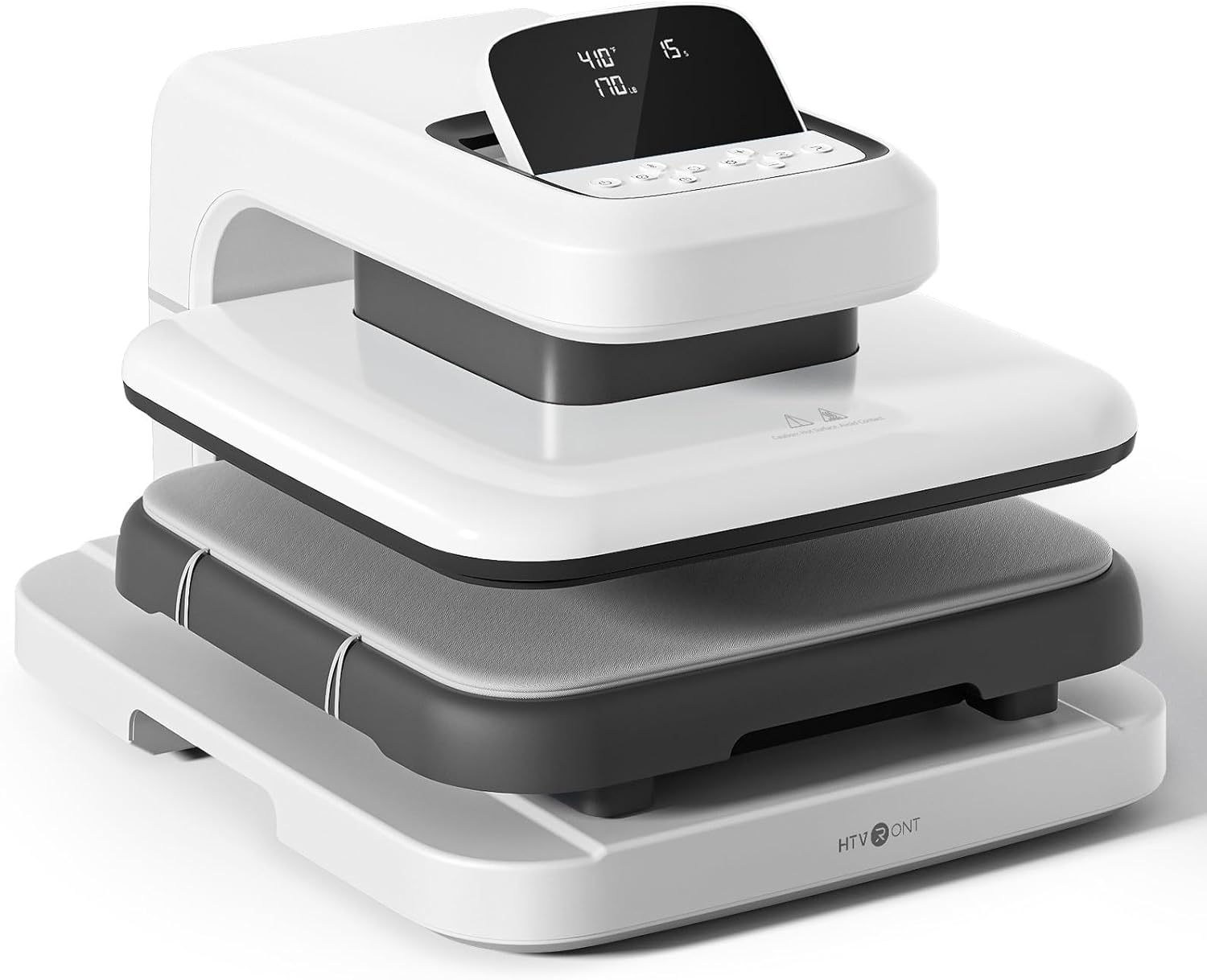

- Płyta grzewcza: The upper heating element that applies heat and pressure.
- Ironing Board (Lower Platen): The surface where materials are placed for pressing. Features a fully pull-out drawer design.
- Opierać: Provides stability for the machine.
- Ekran LED: Displays temperature, time, and pressure settings.
- Przyciski sterujące: Used to adjust settings and initiate operations.
4. Konfiguracja
Follow these steps to set up your HTVRONT Auto Heat Press 2 for first use:
- Rozpakuj maszynę: Carefully remove the heat press from its packaging. Retain all packaging materials for potential future transport or storage.
- Umieszczenie: Place the machine on a flat, stable, and heat-resistant surface. Ensure there is adequate clearance around the machine for ventilation and safe operation.
- Podłączenie zasilania: Connect the power cord to the machine and then plug it into a standard 110V (DC) grounded electrical outlet.
- Pierwsze włączenie: Press the power button to turn on the machine. The LED screen will illuminate.

5. Instrukcja obsługi
5.1. Włączanie/wyłączanie zasilania
- Aby włączyć, naciśnij przycisk zasilania.
- Aby wyłączyć urządzenie, naciśnij i przytrzymaj przycisk zasilania, aż ekran się wyłączy.
5.2. Setting Parameters (Temperature, Time, Pressure)
The HTVRONT Auto Heat Press 2 allows for precise control over temperature, time, and pressure to suit various materials and transfer types.
- Zakres temperatur: 210°F - 410°F (100°C - 210°C)
- Zakres czasu: 1 - 999 sekundy
- Zakres ciśnienia: 50 - 170 LB (adjustable)

Use the control buttons on the LED screen to adjust these settings. The machine heats up quickly, reaching 410°F within 5 minutes and 30 seconds.

5.3. Automatic Pressing Cycle
Once parameters are set and the material is in place, the automatic pressing function simplifies operation:
- Place your substrate and transfer material on the ironing board.
- Press the "R" button to initiate the automatic pressing cycle. The heat plate will descend and apply pressure.
- The machine will buzz when the set time is complete and automatically release the heat plate.

5.4. Using the Fully Pull-out Drawer
The ironing board features a fully pull-out drawer, allowing for safe and easy placement of materials without contact with the hot heat plate.
- Pull the drawer completely out before placing or adjusting your items.
- Push the drawer back in before starting the pressing cycle.
5.5. Adjusting Screen Angle
The LED screen can be adjusted to 7 levels within a 0-75° range for improved visibility and ergonomic comfort during operation.

5.6. Material Compatibility and Higher Heating Height
The HTVRONT Auto Heat Press 2 is compatible with various heat transfer materials and features an increased heating height for thicker items.
- Kompatybilne materiały: HTV (Heat Transfer Vinyl), Sublimation Paper, DTF (Direct to Film), Heat Transfer Paper, Puff Heat Transfer Vinyl, Glitter Heat Transfer Vinyl.
- Increased Heating Height: Up to 4.5 cm (1.77 inches), allowing for pressing on thicker items such as hoodies, canvas bags, and pillows, in addition to t-shirts.


6. Konserwacja
Proper maintenance ensures the longevity and optimal performance of your heat press.
- Cleaning the Heat Plate: Allow the machine to cool completely. Use a soft, damp cloth to wipe the heat plate. For stubborn residue, a specialized heat press cleaner can be used, following the cleaner's instructions. Avoid abrasive materials.
- Cleaning the Ironing Board: Wipe the ironing board with a damp płótno. Przed następnym użyciem upewnij się, że jest suchy.
- Ogólne sprzątanie: Wytrzyj zewnętrzną część urządzenia miękką, suchą ściereczką.
- Składowanie: Przechowuj prasę termiczną w suchym i wolnym od kurzu miejscu, gdy nie jest używana.
7. Rozwiązywanie Problemów
If you encounter issues with your HTVRONT Auto Heat Press 2, refer to the following common troubleshooting steps:
| Problem | Możliwa przyczyna | Rozwiązanie |
|---|---|---|
| Maszyna nie włącza się. | Przewód zasilający nie jest prawidłowo podłączony; problem z gniazdkiem elektrycznym. | Ensure the power cord is securely plugged into both the machine and a working grounded outlet. Test the outlet with another device. |
| Maszyna się nie nagrzewa. | Temperature not set; machine in standby mode. | Verify temperature settings on the LED screen. Allow sufficient time for preheating. If the machine has been idle for 15 minutes, it may have entered auto shut-off mode; power cycle the machine. |
| Uneven heat transfer results. | Incorrect pressure; uneven material placement; faulty transfer material. | Adjust pressure settings as needed (50-170 LB). Ensure material is laid flat and evenly. Test with new transfer material. |
| Automatic press not engaging/releasing. | "R" button not pressed; obstruction. | Ensure the "R" button is pressed firmly. Check for any obstructions preventing the heat plate from moving freely. |
Jeśli po wypróbowaniu tych rozwiązań problem nadal występuje, zapoznaj się z sekcją pomocy technicznej, aby uzyskać dalszą pomoc.
8. Specyfikacje
| Funkcja | Szczegół |
|---|---|
| Numer modelu | SG-RYJ-0521-US |
| Rozmiar płyty grzewczej | 15 x 15 cala (38.1 x 38.1 cm) |
| Zakres temperatur | 210°F - 410°F (100°C - 210°C) |
| Zakres czasu | 1 - 999 sekundy |
| Zakres ciśnienia | 50 - 170 LB |
| Increased Heating Height | Do 4.5 cm (1.77 cali) |
| Moc | 1500 W |
| Wejście Voltage | 110 V (prąd stały) |
| Waga przedmiotu | 47.4 funtów (21.54 kg) |
| Wymiary produktu | Około 20.9 cm długości x 17.1 cm szerokości x 13 cm wysokości |
| Automatyczne wyłączanie | Po 15 minutach bezczynności |
| Regulacja kąta ekranu | 0-75 stopni |
9. Gwarancja i wsparcie
For warranty information, please refer to the documentation included with your purchase or visit the official HTVRONT website. For technical support, product inquiries, or assistance with troubleshooting beyond this manual, please contact HTVRONT customer service through their official channels. Details can typically be found on the manufacturer's webwitrynę lub platformę zakupową.
Note: The manufacturer is committed to providing support; however, specific contact methods may vary. Always check the latest information on the official HTVRONT webstrona.